Weather Live - Radar & Alerts
- 446.00
- 4.4
- Installs
- 5.00M
- Price
- Free
Screenshots
Analysis by Reviewed
When I’m deciding whether to carry a rain jacket, change my route, or shift an outdoor plan, I want a forecast I can check quickly and understand at a glance. Weather Live - Radar & Alerts is a free weather app from HealthTracker Apps, and its mix of forecasts, radar, maps, and widgets makes it a practical option for everyday planning. I’d treat it as a convenient guide rather than a guarantee: weather can change, and a radar view is most useful when I check it alongside the forecast.
Where it fits in a busy day
The simplest reason to try this app is that it brings several common weather checks together. Instead of looking at one screen for the day’s outlook and opening another tool to inspect a map, I can use the forecast for the broad plan and radar when timing matters. That combination is handy for everyday decisions, not just for people who follow storms closely.
A realistic example is a morning commute with uncertain skies. I’d glance at the forecast before leaving, then open the radar if rain looks possible around the time I expect to travel. If the map suggests a shower is approaching, that may be enough to choose a jacket or leave a little earlier. I would not treat a screen as a guarantee that a specific street will stay dry, but the two-step check can be more useful than reacting to a single chance-of-rain symbol.
The app is currently at version 1.3.0, with an average rating of 4.4 from around 21,000 ratings and more than 5 million installs. Those figures suggest it has found a sizable audience, though popularity alone can’t tell me whether its layout or information suits my routine. It is rated for everyone, and it can be installed on devices running Android 6.0 or later. The app is free to download, with optional in-app purchases ranging from $1.99 to $9.99 per item.
How it fits into an everyday weather routine
Checking conditions without overcomplicating the day
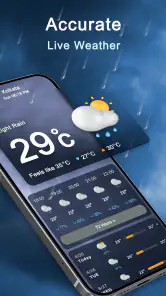
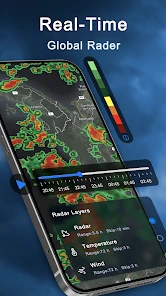
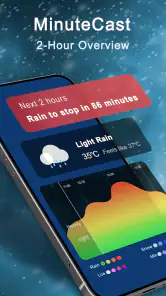
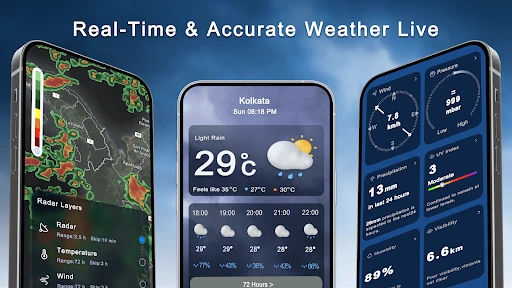
First off, Weather Live - Radar & Alerts offers a beautifully designed interface. It’s sleek, modern, and intuitive. As soon as you open the app, you’re greeted with a comprehensive dashboard that provides a snapshot of the current weather conditions in your area. The use of real-time radar is a standout feature, allowing you to track weather patterns with impressive accuracy. Whether you’re planning a weekend hike or just deciding on your daily commute, this feature ensures you’re never caught off guard by unexpected weather changes.
Making radar, maps, and widgets work for you
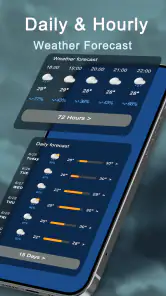
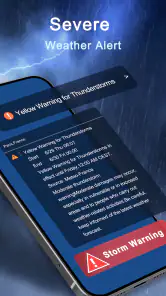
One of the things I love about this app is its customizable alerts. You can set notifications for severe weather conditions, ensuring you’re always prepared, whether it’s a thunderstorm or a sudden drop in temperature. The app also provides detailed weather forecasts, not just for the day but for the entire week, helping you plan ahead with ease.
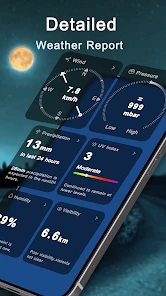
If you’re a weather enthusiast or simply someone who loves detailed data, you’ll appreciate the app’s in-depth weather statistics. From humidity levels to wind speed and UV index, it’s all there. The app makes it easy to switch between different data points, so you can focus on what matters most to you.
More From Our News Desk

Clash of Clans Is Won Between the Battles

Android Auto Makes the Case for Quieter Car Software

MobiOffice: Transforming Mobile Productivity with Seamless Integration

EA SPORTS FC™ Mobile Soccer: Redefining Mobile Sports Gaming

How Microsoft OneDrive Became a Mobile Productivity Giant

How Google Translate Breaks Language Barriers Effortlessly
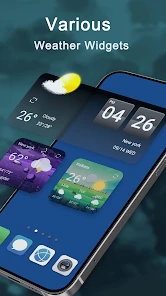
For a useful routine, I’d check the forecast before making plans, then use the radar when rain seems possible, rather than keeping the map open all day. A widget can make a quick glance easier, while the full app is better when I want to inspect a map or compare conditions. That distinction matters: a widget is convenient, but it doesn’t replace taking a closer look before a long drive, hike, or outdoor event.
A practical widget habit, not another screen to babysit
I’d place a weather widget where I naturally see it during the day, then use it as a prompt to decide whether a fuller check is worthwhile. That’s more useful than repeatedly opening the app out of habit. If the morning looks settled, a glance may be enough; if the day’s plans depend on a narrow window of dry weather, I’d open the radar and forecast before committing.
There is a trade-off here. Widgets save taps, but they can encourage overconfidence if I mistake a brief snapshot for a complete picture. I’d use one to notice changing conditions, not to make a high-stakes call without opening the app. For a hike or an outdoor event, I’d check again close to departure and keep an eye on local guidance if severe weather is possible.
The maps also serve different purposes from the forecast. A forecast helps me think in broad time blocks; radar is more useful for judging the movement and timing of precipitation. Neither answers every question on its own. For a trip that crosses several areas, I’d check the route and destination rather than assuming my current location tells the whole story.
What the community adds—and where judgment still matters
Another aspect worth mentioning is the community-driven weather reports. Users can share weather conditions in real-time, adding a layer of social interaction and accuracy to the app’s data. This feature is particularly useful during severe weather events, where real-time updates can make a significant difference.
I’d use community reports as a helpful local signal, not as the only basis for a safety decision. Reports can be especially relevant when conditions vary across nearby streets or neighborhoods, but they depend on people sharing timely observations. When severe weather is involved, I’d still check official local alerts and follow local guidance rather than relying on an app’s map or user posts alone.
Who gets the most from this mix of tools
I think the app is best suited to someone who checks weather for several practical reasons: deciding what to wear, choosing when to walk or cycle, planning a weekend outside, or keeping tabs on changing conditions without switching between multiple apps. The combination of forecast, maps, and widgets can make those routines feel joined up, especially if the user is comfortable treating each tool as one clue rather than a final answer.
It is less compelling for someone who only wants the temperature and a simple daily summary. A phone’s built-in weather app may be quicker for that, particularly if it already presents the information in a format the person likes. Likewise, users who need highly specialized meteorological detail may prefer a service built around that kind of analysis. I’d choose this app for accessible everyday checks, not because its tools eliminate the need for judgment.
Families may find the alert options useful when planning school runs or outdoor activities, while someone who works outside could benefit from comparing the forecast with radar before choosing a start time. Those are convenience use cases, though; no app should replace workplace safety procedures or official warnings. The right role for Weather Live is to help me notice conditions and plan around them, not to make a safety decision on my behalf.
Notifications and the balance between useful and noisy
Alerts can be helpful precisely because they do not require me to keep watching a map. I’d start with the notifications that would genuinely change my plans and leave less relevant ones off. If every possible change produces a buzz, I’m likely to tune the app out, which defeats the point of having alerts in the first place.
It is also worth asking what kind of decision an alert should support. A notice can prompt me to check the forecast or look outside, but it should not become an assumption that conditions are identical everywhere in my area. If an alert matters to a journey or an outdoor commitment, I’d open the app, review the relevant map or forecast, and compare that with trusted local information.
Usability, trade-offs, and who should choose it
Usability-wise, the app is quite user-friendly. Navigation is a breeze, and even if you’re not tech-savvy, you’ll find it easy to access all the features. The app also runs smoothly without any noticeable lag, which is a huge plus for those who rely on instant updates.
In practice, it suits people who want a single place to check a forecast, look at radar, and keep weather information close through a widget. It may be less appealing if you only want a bare-bones temperature reading, or if your routine already depends on another weather service whose local alerts you trust. Compared with a phone’s built-in weather app, this one puts more emphasis on maps and weather tools; compared with specialist forecasting services, its appeal is convenience rather than a promise of expert-level analysis. I’d take a moment to choose only the alerts I genuinely need, so notifications remain useful instead of becoming easy to ignore.
Another decision is whether to pay for anything inside the app. It is free to download, and optional purchases are available, but I would not assume a paid option is necessary for the core routine of checking a forecast and opening radar. Before spending, I’d look at what the particular purchase adds and ask whether I would use it often enough to justify the cost. Someone who only checks the weather before leaving home may have no reason to buy anything.
For people already using a trusted weather service, I would not switch just because this app has several tools in one place. I’d compare the practical details that affect my own area: whether the forecast feels useful for my plans, whether the alerts are timely enough to act on, and whether I actually prefer checking its maps. If those parts work better for me, it can earn a place in the routine; if not, keeping the existing service is a perfectly sensible choice.
What to expect as the app develops
HealthTracker Apps has released version 1.3.0, which gives users a clear current version to identify when checking the app on their device. A version number is useful for knowing what edition is installed, but it does not, by itself, tell me which features changed or how the experience has evolved. I would separate that concrete detail from any expectation about what a future release might bring.
For existing users, the main question is whether the current set of forecast, map, widget, and alert tools continues to fit their local routine. I’d pay attention to whether the information remains easy to interpret and whether notifications help me make decisions rather than adding noise. Those are more meaningful signs of progress in everyday use than a version number alone.
For someone trying the app for the first time, a sensible approach is to test it on ordinary days before relying on it for a major outdoor plan. Check whether the radar view is understandable, decide which alerts deserve a notification, and see whether the widget actually saves time. That small trial makes it easier to judge fit without treating a download as a commitment.
My verdict after weighing the practical details
All in all, Weather Live - Radar & Alerts is a solid choice for anyone looking to stay informed about the weather. Its combination of real-time radar, customizable alerts, and detailed forecasts make it a must-have app for both casual users and weather enthusiasts alike. If you haven’t tried it yet, I’d say it’s definitely worth a download. After all, who doesn’t want to be one step ahead of Mother Nature?
My recommendation is more measured than “must-have”: it’s a sensible free starting point if radar, widgets, and flexible alerts are what you’ll actually use. The optional purchases are worth considering only if an included paid option solves a need you have; I wouldn’t pay simply because it is available. HealthTracker Apps has released version 1.3.0, but that version number by itself doesn’t establish how the app has changed over time. For existing users, the practical test is whether the current mix of forecast, maps, and notifications works reliably in their own area. I’d keep an eye on whether future versions make those everyday checks clearer and more dependable, while choosing a different service if local coverage or specialist detail is the deciding factor.
Weather Live - Radar & Alerts Frequently Asked Questions
Can I use Weather Live - Radar & Alerts without paying?
Yes. Weather Live - Radar & Alerts is free to download, so you can try its weather tools without paying upfront. In-app purchases are available, ranging from $1.99 to $9.99 per item. Take a look at the purchase options before paying, especially if you are downloading the app for a child or prefer to avoid optional spending.
Who makes Weather Live - Radar & Alerts, and is it popular?
HealthTracker Apps develops Weather Live - Radar & Alerts. The app has an average rating of 4.4 from around 21 thousand ratings, alongside more than 400 written reviews, and has been downloaded over 5 million times. Those figures give a sense of its reach and reception, though your own experience will depend on what you expect from a weather app.
What is Weather Live - Radar & Alerts used for?
Weather Live - Radar & Alerts is a weather app for checking forecasts, rain radar, weather maps, and widgets. It is intended to keep daily weather information accessible, whether you want to check conditions in the app or use a widget for a quick look. Consider whether these forecast and display tools match the way you normally check the weather.
What devices can run Weather Live - Radar & Alerts?
Weather Live - Radar & Alerts is available for Android devices running Android 6.0 or later. It is a weather app designed to provide forecasts, radar information, widgets, and maps, so it may be useful if you want weather details close at hand. Check your device’s operating system version before downloading to make sure it meets the minimum requirement.
Who develops Weather Live - Radar & Alerts, and what do users think of it?
Weather Live - Radar & Alerts is developed by HealthTracker Apps. It has an average rating of 4.4 from around 21 thousand ratings, with more than 400 written reviews, and has been downloaded over 5 million times. These figures offer a snapshot of its reach and reception, though your own experience may depend on the features and forecasts you expect from a weather app.
Pros
- Accurate weather forecasts
- Real-time radar updates
- Severe weather alerts
- Customizable widgets
- User-friendly interface
Cons
- Occasional ads
- Premium features locked
- May drain battery
- Requires internet connection
- Limited free version
- Category
- Weather
- Version
- 1.3.0