Weather Forecast & Radar
- 151.00
- 4.7
- Installs
- 5.00M
- Price
- Free
Screenshots
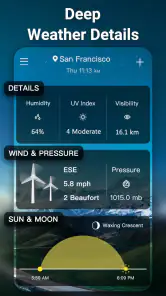
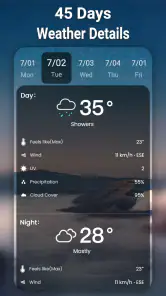
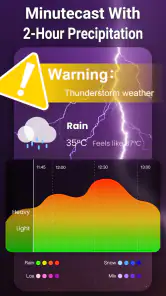
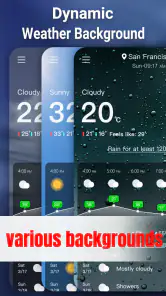
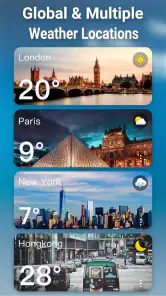
Analysis by Reviewed
I judge a weather app less by how much information it puts on screen than by whether I can get a useful answer quickly, in the situation I am actually in. Weather Forecast & Radar is aimed at everyday decisions: checking whether to take a coat, seeing how the next few hours may unfold, or deciding whether rain on the map could affect a trip. Its mix of local forecasts, radar and widgets gives it more to offer than a bare temperature readout, though it still needs to fit your habits and your preferred way of reading a forecast.
Checking the forecast at a glance
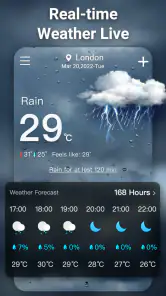
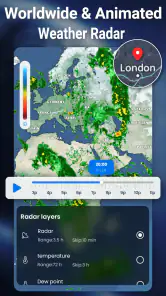
In my day-to-day use, the most useful way to approach a weather app is to check the next few hours before looking further ahead. A daily outlook helps with broad plans, but an hourly forecast is the better tool for deciding whether to walk now, wait for a shower to pass, or pack an extra layer. The radar can add context when rain is nearby, though I treat it as a guide rather than a guarantee: weather can change, and a map is not a promise about exactly what will happen on my street.
That distinction matters if you are choosing between this app and a basic weather panel already built into a phone. The built-in option may be enough for a quick temperature check. This app is more appealing when you want the combination of radar, hourly detail, and widgets that can keep information visible without reopening the full forecast. If you mainly need long-range planning or specialist meteorological tools, a more dedicated service may suit you better.
The User-Friendly Design
From the moment you open the Weather Forecast & Radar app, you’re greeted with a clean, modern interface that’s as easy on the eyes as it is to navigate. The app’s layout is straightforward – no need to dig through layers of menus to find what you’re looking for. Everything you need is right there on the main screen, from the current temperature to the seven-day forecast.
Features that Shine
One of the standout features of this app is its real-time radar. It offers a detailed view of weather patterns in your area, allowing you to track storms and precipitation with incredible accuracy. Whether you’re planning a picnic or just need to know when to bring an umbrella, this radar feature has got you covered.
Aside from the radar, the app provides hourly and daily forecasts, so you’re never caught off guard by sudden weather changes. I also love the severe weather alerts. They pop up just when you need them, giving you a heads-up about any incoming storms or other weather emergencies.
Using the display in different situations
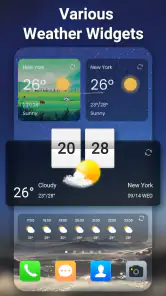
Weather information is only helpful if it is easy to consult in the moment. I find a widget useful when I am getting ready at home: it can make a quick glance more convenient than opening an app and navigating through it. On a busy morning, I would check the hourly view before leaving, then use the radar only if rain looks likely. That two-step habit keeps the map from becoming a distraction when a simple forecast is enough.
You May Like

Clash of Clans Is Won Between the Battles

Android Auto Makes the Case for Quieter Car Software

MobiOffice: Transforming Mobile Productivity with Seamless Integration

EA SPORTS FC™ Mobile Soccer: Redefining Mobile Sports Gaming

How Microsoft OneDrive Became a Mobile Productivity Giant

How Google Translate Breaks Language Barriers Effortlessly
There is a practical trade-off for people with different visual or motor needs. A glanceable widget can reduce taps, while a radar map may require more attention to interpret than a clear temperature and forecast summary. If small text, motion, or detailed map imagery is tiring, I would rely on the simplest forecast view available and avoid making the radar the only basis for a decision. Someone who needs highly configurable text or specialist accessibility controls should test the interface on their own device before depending on it.
Planning around a changing day
One useful way to make the app less demanding is to give each screen a specific job. I would use the widget for a quick temperature check, the hourly forecast to choose a departure time, and the radar only when nearby precipitation could change that choice. This avoids repeatedly scanning every panel for information that may not matter. It also makes the forecast easier to share in conversation: “rain may arrive later” is a more practical takeaway than trying to interpret every detail on a map while someone is waiting by the door.
For example, imagine a morning walk followed by errands across town. I would check the hourly outlook before getting dressed, then look at the radar if rain appears likely during the return trip. If the map suggests weather is close, I could bring a light rain layer rather than cancel the outing immediately. That is a modest but useful planning advantage; the app helps me prepare, not predict the exact conditions at every point along the route.
Personal Experience
I’ve been using the Weather Forecast & Radar app for a few weeks now, and I must say, it’s been a game-changer. I no longer have to guess whether I need a jacket or sunglasses before heading out the door. The app’s predictions have been incredibly accurate, which is more than I can say for some of the other weather apps I’ve tried.
Another thing I appreciate is the customization options. You can tailor the app to show weather updates based on your location, and even set up notifications for specific weather conditions. It’s like having a personal meteorologist who knows exactly what you need.
A realistic use is planning a commute when the morning looks unsettled: I would check the hourly forecast before leaving, use the radar to see whether a shower is moving toward the route, and choose a widget for later quick checks. That is more useful than repeatedly opening several apps, but I would still verify urgent or safety-critical weather through trusted local alerts. Notifications are most helpful when they match conditions I genuinely care about; too many prompts can become easy to ignore.
Making alerts and widgets work for you
Widgets are most valuable when their placement suits a real routine. I would put one where I naturally glance while preparing to leave, rather than filling a screen with weather panels that compete for attention. If the information shown there is enough to decide whether to carry an umbrella, I can save opening the full app for days when timing matters. The trade-off is that a compact view cannot replace a closer look at the hourly outlook or radar when conditions are unsettled.
Notifications deserve the same restraint. I would choose only the weather changes that affect my plans, if the available controls allow that, and review the choices if alerts start to feel noisy. A message that interrupts constantly can lose its value just when a genuinely important warning arrives. For severe weather, I treat an app notification as a useful prompt to pay attention, not as a substitute for official local guidance or a complete emergency plan.
Who benefits most from this combination
I think this app is best for people who make frequent, ordinary decisions around the weather: commuters, parents planning school runs, walkers, and anyone who wants a fast local check without opening several tools. The widget can suit someone who prefers brief glances, while hourly detail and radar give more context when the day is changeable. It is also a reasonable choice for someone moving between home and nearby locations who wants to check conditions before setting out.
I would skip it if your needs are unusually specialized. A person planning mountain travel, aviation, marine activity, or weather-sensitive work may need a service built for those decisions, with the kind of specialist information and interpretation such activities require. Likewise, if you only want the temperature now and already like your phone’s built-in panel, installing another app may add little. The best reason to try this one is wanting its particular combination of radar, widgets and time-based forecasts.
What to weigh before relying on it
Weather Forecast & Radar is a free weather app from Lite Tools Games. It is rated for Everyone, has a 4.7 average from around 24 thousand ratings, and has passed 5 million installs. It launched in February 2024, and version 1.2.1 requires Android 6.0 or later. Optional in-app purchases range from $4.99 to $9.99 per item, so I would check what an offered purchase includes before paying rather than assuming every feature is part of the free experience.
The app is a sensible fit for someone who wants local conditions, a radar view, widgets, and forecasts together in one place. It is less compelling if you only check the temperature occasionally, prefer the familiar layout of your phone’s built-in weather screen, or need a specialist forecast for outdoor work. A useful habit is to compare the hourly forecast with the radar instead of treating either as a standalone answer: one gives a time-based outlook, while the other helps you inspect nearby weather activity. Local conditions and forecast accuracy can vary, so I would not plan a safety-critical decision around a single screen.
Readability, movement and sensory comfort
Different weather views ask different things of the person using them. A concise forecast is easier to scan than a radar map, which involves interpreting geographic shapes and movement. If visual detail is tiring, I would start with the forecast summary and use the map only to answer a focused question, such as whether rain is approaching. That approach keeps the app useful without assuming that every person will find every screen equally comfortable.
Motor effort matters too. A widget can reduce the number of steps for a routine check, but it is only helpful if its location and layout are convenient on that person’s device. Someone who finds repeated taps difficult may prefer a quick glance and fewer trips into the app. On the other hand, a person who needs larger text, strong contrast, screen-reader-friendly controls, or a particular motion setting should check the experience directly on their own phone before making it part of an essential routine. I would not assume those needs are met simply because the general layout feels straightforward to me.
When another weather source is the better choice
Compared with the standard weather panel on a phone, this app’s appeal is the additional context of radar and widgets rather than a fundamentally different kind of daily decision. The built-in option can be faster if it already shows what you need, and using it avoids maintaining another place to check. A dedicated weather service can be a better match when you need specialist layers, detailed interpretation, or information tailored to a specific outdoor activity. I see this app in the middle: more visual and planning-oriented than a minimal glance, but not something I would treat as a professional forecasting workstation.
It is also worth separating convenience from certainty. Radar can help me decide whether to take a route or carry rain gear, but it cannot guarantee what will happen at a particular address. For a casual walk, that distinction is manageable; for a severe-weather decision, I would consult trusted local warnings as well. If an alert arrives while I am travelling, I would stop somewhere safe before studying a detailed map rather than trying to interpret it while moving.
Remaining barriers and practical checks
The most likely friction is not that the app lacks a reason to use it, but that its richer views may be more than some people want. A map can take longer to interpret than a simple icon, and alerts can become distracting if they do not match the user’s priorities. People sharing a device or relying on a fixed routine may also need to decide which location the app should focus on and whether its widget presents the information they actually use. A short trial during ordinary days is a sensible way to find out whether the extra detail helps or merely adds another screen.
Before relying on it, I would answer a few practical questions through use rather than guess. Does the local forecast make sense for the places I travel? Can I read the widget comfortably at a glance? Do alerts arrive in a useful way, or do I prefer checking manually? And does the radar help me make a decision faster than the phone’s existing forecast? These checks matter more than installing an app simply because it offers several features. If the answers are disappointing, the built-in weather view or another service may be a better fit.
Final Thoughts
In a world where weather can be unpredictable, having a reliable source of weather information is crucial. The Weather Forecast & Radar app not only provides accurate and timely forecasts but does so in a user-friendly way that anyone can appreciate. Whether you’re a weather enthusiast or just someone who wants to stay dry, this app is a must-have. Trust me, once you try it, you’ll wonder how you ever lived without it.
My recommendation is more measured: it is worth trying if the mix of radar, hourly planning, and at-a-glance widgets matches how you check the weather. I would not call it essential for everyone, and people who need a highly specialized forecast or a display they can confirm works with their access needs may prefer another option. For everyday errands and commute decisions, though, it offers a convenient way to bring several useful weather checks into one routine.
For me, the inclusive question is whether the app can fit different ways of checking weather, not whether one layout will suit everybody. A widget and an uncomplicated glance may help someone who wants fewer steps; the map and detailed outlook may be more useful to someone comfortable with visual information. I would test those parts separately and keep an alternative source available for moments when the display, alert, or forecast does not meet the need. That makes it easier to decide on personal usefulness without expecting a single app to serve every context.
Weather Forecast & Radar Frequently Asked Questions
Is Weather Forecast & Radar free to download, and are there optional purchases?
Weather Forecast & Radar is free to download, so you can try its weather tools without paying upfront. It also offers in-app purchases priced from around five to ten dollars per item. Review the purchase details shown in the app before confirming anything, especially if you are downloading it for a child or want to keep spending limited.
Who develops Weather Forecast & Radar, and is it available for iPhone?
Weather Forecast & Radar is developed by Lite Tools Games and is a weather app. The compatibility requirement listed for the app is Android 6.0 or later, so check that your device meets it before downloading. If you are considering an iPhone, look at the app’s availability in your device’s app store before proceeding, rather than assuming the Android version is offered there.
What devices can run Weather Forecast & Radar?
Weather Forecast & Radar is an Android weather app that requires Android 6.0 or later. Before downloading, check your device’s operating system version to make sure it meets that requirement. The app is listed for all ages, so its content rating is Everyone. If your device is compatible, you can use its local forecasts, radar maps, and weather widgets to keep an eye on conditions.
Who makes Weather Forecast & Radar, and is it popular?
Weather Forecast & Radar is developed by Lite Tools Games. It has been available since February 21, 2024, and its current version is 1.2.1. The app has over five million installs and around 24,000 ratings, with a 4.7 average. Those figures suggest that it has reached a broad audience, though individual experiences with forecasts and features can still vary.
What features does the Weather Forecast & Radar app offer?
The Weather Forecast & Radar app provides users with detailed weather forecasts, real-time radar maps, severe weather alerts, and hourly updates. It offers features like precipitation probability, temperature trends, and wind speed forecasts. The app is designed to help users plan their day effectively by providing accurate and timely weather information. Its store summary also highlights live local weather updates and various widgets, making it useful for checking conditions from the app or a home-screen view.
Pros
- Accurate weather predictions
- Interactive radar maps
- Customizable alerts
- User-friendly interface
- Global coverage
Cons
- Frequent ads
- Subscription required for premium features
- Occasional loading delays
- Battery consumption
- Limited offline functionality
- Category
- Weather
- Version
- 1.2.1