Weather data & microclimate :
- 156.93K
- 4.8
- Installs
- 10.00M
- Price
- Free

Screenshots
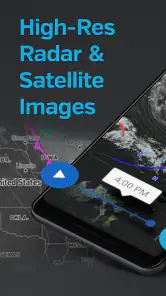
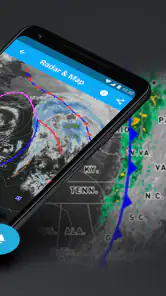
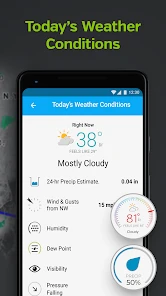
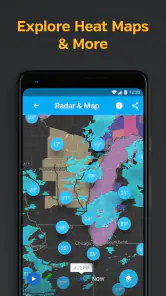
Analysis by Reviewed
I judge a weather app by whether it helps me make a better decision, not by how many numbers it can fit on a screen. Weather Data & Microclimate is at its best when I want to look beyond a broad city forecast and explore how conditions may vary nearby. That extra perspective is useful for planning around local weather, though it doesn’t make every forecast certain or replace a quick, simple glance when I only need to know whether to take a coat.
Where local detail earns its place
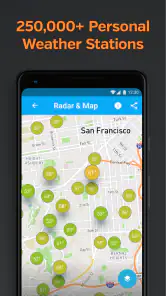
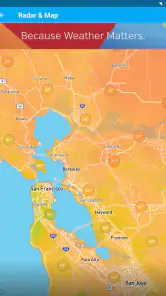
The main reason I would choose this app over a bare-bones forecast is its focus on nearby conditions, maps, and personal weather-station information. Weather can feel different across a short journey, especially when I’m moving between open, sheltered, or built-up places. A hyperlocal view gives me more to investigate than a single city-wide summary, while the maps help turn weather information into something I can inspect spatially.
That detail is most valuable when it changes a plan. Before walking to an appointment, cycling, or deciding where to spend time outdoors, I can check the map as well as the forecast instead of treating one headline condition as the whole story. I would still use judgment: a detailed display can clarify what is happening, but it cannot guarantee that conditions at one exact street or moment will match a prediction.
Super Detailed Weather Insights
One of the standout features of Weather Data & Microclimate is its ability to provide super detailed weather insights. Forget the generic weather forecasts; this app offers hyper-local weather data that’s precise to your exact location. Whether you're planning a picnic or just curious about the climate in your area, the app's microclimate tracking ensures you're always in the know.
A practical way to read the maps
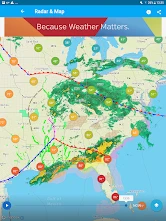
I find maps most useful when I treat them as a comparison tool rather than a colorful forecast to browse without a purpose. If rain is approaching, for instance, looking at the precipitation view can help me judge whether to leave now or wait a little; wind information can add context for a route or an exposed outdoor spot. Checking the same view again before setting off is a sensible habit, because weather changes and a map is only one part of the decision.
There is a trade-off here: more layers invite closer inspection, but that can take longer than opening a simpler weather app. If I just need a quick answer, the extra detail may feel like work. I’d keep this app for moments when local variation matters, rather than expecting every screen to be the fastest possible route to a yes-or-no answer.
User-Friendly Interface
Now, I know what you might be thinking – all these features must make the app complicated to use, right? Wrong! The user interface is incredibly intuitive. Navigating through the app feels like a breeze, even if you're not a tech wizard. Everything is laid out in a clean, easy-to-understand format, so you can get the weather updates you need without any hassle.
More From Our News Desk

Weather by Xiaomi Review: Clear at a Glance, Less Clear Up Close

X Under Pressure: Can It Recover When Posting Goes Wrong?

Clash of Clans Is Won Between the Battles

Android Auto Makes the Case for Quieter Car Software

MobiOffice: Transforming Mobile Productivity with Seamless Integration

EA SPORTS FC™ Mobile Soccer: Redefining Mobile Sports Gaming
Useful for routines, not just forecasts
A realistic use for me would be checking conditions before a morning commute, then looking again before an evening walk if the weather seems unsettled. The first check helps me choose what to wear; the second can tell me whether it is worth taking a longer outdoor route or keeping plans flexible. People who spend time outdoors, follow changing local conditions, or enjoy understanding weather patterns are likely to get more from that routine than someone who only checks the daily high and low.
The app is also a better fit for curious users than for anyone who wants a forecast to make every choice automatically. I would not rely on a single map view as a safety decision in severe or rapidly changing conditions. For urgent alerts or a very streamlined forecast experience, the relevant local weather service or a simpler app may be a more direct choice.
Notifications and what to expect
Imagine getting a notification not just when it’s about to rain, but also when the temperature drops to your preferred level. With customizable notifications, Weather Data & Microclimate lets you set alerts that matter to you. Whether it's a heads-up for high pollen levels or a reminder to grab your sunscreen, this app has got you covered.
For day-to-day use, I’d make alerts selective rather than turning on every option. A notification is helpful when it prompts an action I actually care about; too many can become background noise. The app is free to download, with in-app purchases ranging from $1.99 to $19.99 per item, so I’d start with the free experience and only consider spending if I find a specific paid option useful. It is rated for Everyone, and its minimum operating system is 8.0.
Community reports and station context
One of the coolest aspects of this app is its community-powered reports. Users can share real-time weather conditions and updates, making it a collaborative platform. This means you get an extra layer of accuracy from people on the ground. It’s like having a network of weather scouts at your fingertips!
Those reports are best treated as helpful local context, not as a substitute for a forecast: a person’s observation describes a particular place and moment, while conditions can differ nearby. If you follow a personal weather station, that can make the experience more relevant to a location you care about. I’d compare what I see there with the broader map rather than assuming one report tells the whole story.
Weather Underground develops this weather app, which has been available since December 19, 2011. Its current version is 6.19.1, and it has a 4.8 average from around 606,000 ratings, with more than 10 million installs. That kind of reach makes it a familiar option in the category, but popularity alone would not decide it for me; the local maps and the way I use them are the stronger reasons to keep it.
Advanced Weather Maps
It's not just about numbers and data; the app also features advanced weather maps. These maps are interactive and packed with information. From wind patterns to precipitation forecasts, the visual representation makes it easier to understand complex weather phenomena. Plus, it’s just fun to play around with!
Choosing it over a simpler forecast
The usual weather app is often designed to answer a small set of questions quickly: what is the temperature, will it rain, and what should I wear? I still value that kind of glanceable forecast, and I would not replace it with a map-heavy routine every morning. The difference here is that I can investigate local variation and station context when a general forecast seems too broad for the decision I’m making.
That distinction matters most in places where conditions shift across neighborhoods or along a route. If I am choosing between an exposed path and one with more shelter, a map can give me another way to think through the choice. It is not a promise that one route will be dry or comfortable, but it can help me ask a better question than simply whether the city forecast says rain.
For people who mainly want a clean daily summary, a simpler alternative may be less distracting and faster to check. For weather enthusiasts, outdoor workers, or anyone who routinely plans around conditions, the extra layers can justify the added attention. I see this as a companion for investigating weather rather than a universal replacement for every forecast app.
Making personal stations useful
If a personal weather station is relevant to a place I care about, I would use it as a local reference point rather than assuming it represents a whole neighborhood. A station can make conditions feel less abstract, especially when I’m checking a home area or a location I visit often. The useful habit is to compare that observation with the wider map and forecast, then decide whether the local detail actually changes my plans.
This approach also keeps station information in perspective. A reading from one spot can be informative without describing a nearby hill, street, or park equally well. I would not chase every small variation; I’d look for patterns that matter to a real choice, such as whether conditions near my destination seem different from those where I am now.
Getting value without overchecking
A weather map can encourage repeated checking, particularly when the conditions are unsettled. I find it more useful to set a simple routine: look once while planning, check again closer to departure if the weather could affect the decision, and stop when another look is unlikely to change anything. That keeps the app’s detail practical instead of turning a forecast into a running distraction.
It also helps to decide what information matters before opening the map. For a walk, I might care about rain and wind; for a day spent outside, I may want a broader picture of changing conditions. Focusing on one or two relevant layers makes the display easier to interpret and reduces the temptation to treat every available detail as equally important.
Who will get the most from it
I would recommend trying it if local conditions affect your day often: perhaps you cycle, walk a dog, work outdoors, plan activities in open spaces, or simply enjoy comparing weather around you. Its combination of maps and station information gives curious users more to explore than a standard temperature-and-rain summary. The free download also makes it reasonable to test whether that style of checking suits you before considering any purchase.
I would steer someone toward a simpler weather app if they want only an at-a-glance forecast, dislike exploring map layers, or need a dedicated source for urgent local warnings. The app can inform a decision, but I would not make it the sole basis for safety-critical plans in dangerous or fast-changing weather. In those situations, checking official local guidance is the more responsible choice.
What to expect before installing
The app is a weather tool for Everyone, and its current version is 6.19.1. It is available at no upfront cost, though in-app purchases are offered at different price points. I’d begin by using the free experience for the things I actually need—checking local conditions, exploring maps, and seeing whether station context helps—rather than paying in advance for an option I may not use.
It has been around since December 19, 2011, and Weather Underground is the developer. Its 4.8 average across around 606,000 ratings and more than 10 million installs suggest that it has found a substantial audience, but those figures are not a substitute for seeing whether its detailed approach fits my habits. The practical question is whether I want to inspect conditions or simply receive a quick forecast.
In conclusion, Weather Data & Microclimate is more than just a weather app; it's a comprehensive tool for anyone interested in understanding the weather in detail. Whether you're a weather geek or just someone who likes to be prepared, this app offers everything you need. So why not give it a try and see the weather in a whole new light?
Weather data & microclimate : Frequently Asked Questions
Can Weather Data & Microclimate help me follow conditions in a particular neighborhood?
Hyperlocal tracking is central to the app’s appeal: it focuses on weather data for specific places rather than only broad regional conditions. Its store summary highlights a hyperlocal tracker, weather maps, and the ability to follow a weather station. This can be useful when nearby areas experience different conditions, though forecasts are best treated as practical guidance rather than a guarantee.
Can I follow a personal weather station in the app?
Yes. Weather Data & Microclimate’s store summary specifically highlights the ability to follow your weather station, alongside radar and weather maps. That makes the app relevant to users who want to keep an eye on local observations as well as general weather information. If you mainly need a straightforward forecast, you can also use it as a weather app without making station tracking your focus.
Is Weather Data & Microclimate free, or will I need to pay to use it?
The app is free to download, and optional in-app purchases are available. The available purchase prices range from $1.99 to $19.99 per item, so it is worth checking the purchase options before confirming anything. You can consider the free app first and decide whether any paid offering suits your needs; downloading it does not mean you have to make an in-app purchase.
What devices can run Weather Data & Microclimate?
Weather Data & Microclimate is a weather app from Weather Underground, and it requires Android 8.0 or later. Before downloading, check your device’s operating system so you know it meets that requirement. The app is free to install, while in-app purchases are available for users who want to explore optional paid offerings.
What features does the Weather Data & Microclimate app offer?
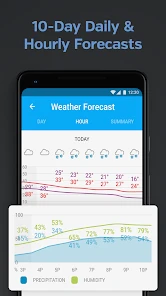
The Weather Data & Microclimate app provides real-time weather updates, detailed forecasts, and customizable alerts for severe weather conditions. It also includes microclimate insights, which offer hyper-local weather data, making it ideal for users interested in precise weather information for specific locations. Additional features include radar and satellite imagery, a weather widget, and integration with smart home devices. Its store description also highlights weather maps and the ability to follow a personal weather station.
Pros
- Highly accurate weather forecasts.
- Detailed microclimate information.
- User-friendly interface design.
- Real-time weather updates.
- Customizable weather alerts.
Cons
- Limited free features.
- Ads in the free version.
- Requires internet for updates.
- Battery consumption could be high.
- Occasional in-app purchase prompts.
- Category
- Weather
- Version
- 6.19.1











