Volume Bass Booster, Equalizer
- 1.87K
- 4.7
- Installs
- 5.00M
- Price
- Free
Screenshots


Analysis by Reviewed
If you've ever found yourself cranking up the volume on your phone, only to feel like you're still missing out on that rich, deep sound you crave, then the Volume Bass Booster, Equalizer app might just be your new best friend. This app promises to pump up the bass and enhance your listening experience, whether you're jamming out to your favorite tunes or catching up on the latest podcast.
I’d judge a sound booster by a simple test: can I make a familiar track easier to enjoy without turning the controls into a project? This is where an equalizer can help, but it’s worth keeping expectations grounded. Phone speakers and headphones still have their own limits, and extra bass cannot create detail that the original audio or hardware does not provide.
Unleashing the Sound
Right off the bat, you'll notice how user-friendly the Volume Bass Booster, Equalizer is. The interface is sleek and intuitive, which means you won't have to spend ages trying to figure out how to get started. With just a few taps, you can customize your sound settings to suit your preferences. Whether you're a bass head or someone who loves crisp trebles, this app has you covered.
Features That Stand Out
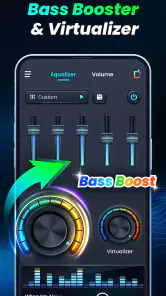
The app comes loaded with a variety of features that make it a standout in the sea of sound-enhancing apps. First up, the bass booster. It’s pretty impressive how this feature can add a whole new dimension to your music. Songs that you thought you knew inside out suddenly have a new life to them. And it's not just about the bass; the equalizer settings let you tweak everything to match your mood or the genre of music you're listening to.
For a useful everyday routine, I’d start with a familiar song at a comfortable volume, make one small adjustment, and listen for a moment before changing anything else. That makes it easier to tell whether the bass is genuinely helping or simply making the sound louder. A restrained setting is often more pleasant for podcasts and spoken audio, where too much low end can make voices feel heavy.
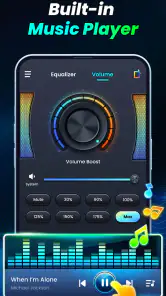
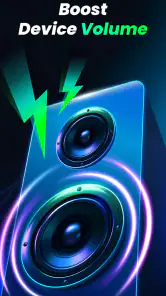
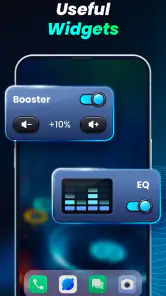
Another cool feature is the volume booster. Ever been in a noisy environment where even max volume isn't cutting it? This app can push your phone's volume to new heights without distorting the sound. It's like having a personal sound engineer in your pocket! Plus, the app supports a variety of file formats, so you’re not limited by your music library.
That extra level can be handy when listening quietly at home or trying to hear a familiar recording in a less-than-ideal setting, but it is not a replacement for a better speaker or a quieter room. I’d avoid treating maximum boost as the default: distortion can depend on the phone, the connected audio device, and the recording itself. If a track starts sounding harsh or muddy, backing off the boost is the sensible fix.
More From Our News Desk

Weather by Xiaomi Review: Clear at a Glance, Less Clear Up Close

X Under Pressure: Can It Recover When Posting Goes Wrong?

Clash of Clans Is Won Between the Battles

Android Auto Makes the Case for Quieter Car Software

MobiOffice: Transforming Mobile Productivity with Seamless Integration

EA SPORTS FC™ Mobile Soccer: Redefining Mobile Sports Gaming
Performance and Usability
In terms of performance, the app runs smoothly with minimal battery drain, which is a big plus if you’re always on the go. It’s compatible with both Android and iOS, so it doesn’t matter what side of the tech fence you’re on. The developers have done a great job ensuring the app doesn’t crash or lag, even when you’re multitasking.
Usability-wise, it’s a breeze to navigate. The settings are straightforward, and you can easily switch between different modes and presets. If you're someone who loves experimenting with sound, you'll appreciate the level of control this app provides.
Speed Expectations in Everyday Listening
For a tool like this, I care less about flashy animation and more about whether a change is easy to hear without interrupting what I’m doing. The practical way to judge it is to start audio first, adjust one control, and listen for the difference on the same passage. Familiar material is especially useful because it gives you a steady reference; switching songs while adjusting makes it harder to separate the app’s effect from the differences in the recordings.
I wouldn’t expect an equalizer to make every track sound better immediately. A bass-heavy mix played through headphones that already emphasize low frequencies may need less bass, not more. A thin-sounding recording may benefit from a small change, while a well-balanced one might be best left alone. The point is not to chase a dramatic transformation but to make a deliberate adjustment that remains comfortable over a whole listening session.
There’s also a useful distinction between perceived loudness and improved clarity. Raising the level can make quiet details easier to notice, but if the sound becomes strained, the extra volume has stopped helping. I’d compare the adjusted sound with the original at roughly the same listening level whenever possible. Otherwise, the louder version can seem better simply because it is louder, even if its tone is less natural.
In a busy day, I’d use it differently for different listening situations: a little bass for music through a small speaker, then a lighter touch for a voice-heavy podcast. Before switching between headphones and a speaker, I’d listen again at a modest level rather than assuming the same adjustment will suit both. A setting that sounds full on one device may become overpowering on another.
Heavy Use, Device Changes, and Reliability
The most demanding everyday moment is not necessarily a long playlist; it is changing how and where I listen while expecting the same setting to work everywhere. A phone speaker, headphones, and an external speaker each reproduce sound differently. I’d treat a change of output as a fresh listening situation: lower the volume first, play a familiar section, and make a small correction only if it needs one. That simple reset is more reliable than carrying a strong boost from one device to the next.
If I’m moving from music to a spoken podcast, I’d also reset my expectations before reaching for more volume. Voices can become tiring when pushed too hard, and extra bass can make speech feel thick rather than clear. For a quiet recording, a modest volume adjustment may be enough; if the source itself is muffled, an equalizer cannot restore words that were never captured clearly. This is a useful limit to remember before spending time making increasingly large changes.
For a longer listening session, I’d make one adjustment, leave it in place for a few minutes, and then decide whether it remains pleasant. Constantly changing several controls can turn casual listening into troubleshooting, while a short check after a device change can prevent an unpleasant jump in loudness. Keep the output at a comfortable level, particularly with headphones, and take breaks if you are listening for a long time. These habits matter more than trying to squeeze the maximum possible level out of the phone.
Compared with relying only on a phone’s built-in sound controls, a dedicated booster can make audio adjustment feel more direct. On the other hand, listeners who already like their device’s equalizer may prefer to keep everything in one place instead of adding another layer of control. If you use more than one sound-enhancement tool at once, make changes one at a time; overlapping boosts can make it harder to identify what is changing the sound.
That overlap is the main source of avoidable confusion. If the phone already has an audio effect enabled, changing that and this app together makes it difficult to know which setting helped—or caused harshness. I’d begin with other sound processing unchanged, test a small adjustment here, and only then decide whether there’s a reason to use another control. This is not a claim that one setup is universally better; it is simply a cleaner way to hear what each change is doing.
On stability, I’d judge the experience by whether it stays out of the way during ordinary playback rather than expecting the app to repair every unusual audio problem. If the sound changes unexpectedly, I’d first return the boost toward a neutral level and check the active output before making more edits. A quick, controlled test with one familiar track can tell you whether the issue follows the setting or the device. It’s a more useful recovery routine than pushing several controls at once and hoping the sound settles.
Who It Suits and What to Expect
I can see this being most useful for someone who listens regularly on a phone and wants quick control over bass, tone, or perceived loudness without learning complicated audio software. It also makes sense for casual listening when a recording sounds a little thin. If you want precise studio-style editing, a more specialized audio tool is a better fit; if your main problem is weak hardware, upgrading the speaker or headphones is likely to help more than pushing software controls.
It is a particularly reasonable fit if you move between music and spoken audio and want to make small adjustments for each, or if you sometimes find a familiar recording too quiet at a comfortable volume. It is less compelling if you already have a sound profile you like and rarely change it. In that case, another layer of processing may add fiddling without solving a real problem. I would also skip it as a substitute for properly functioning headphones or a speaker: software can alter the signal, but it cannot fix a damaged driver or make a tiny phone speaker reproduce deep bass like larger hardware.
Compared with a music player’s own equalizer, a separate booster’s appeal is convenience when you want to adjust sound beyond a single music app. The trade-off is that audio tools can differ in how they interact with the phone and its output, so I would not assume one setting behaves identically across every listening route. If your priority is detailed control for recording or mixing, choose a dedicated production tool instead. If all you need is a quick tonal nudge while listening, this app’s simpler focus is more appropriate than a complex editor.
For a realistic test, try it during a commute or while making dinner: choose a track you know well, make a modest adjustment, and check whether the result remains comfortable after several minutes. If you use headphones, keep the volume at a level that feels safe and take breaks during long listening sessions. The goal is a more enjoyable sound, not simply a louder one.
That same test answers a practical question many people have: will it help with a podcast or a video as well as music? The app is designed around sound adjustment, so the sensible approach is to try the audio you actually listen to, rather than assuming one result will suit every source. A music track with a weak low end and a speech recording with unclear voices are different problems. If a small change does not make the real listening situation better, I wouldn’t keep increasing it just to make the control feel useful.
The Verdict
At the end of the day, Volume Bass Booster, Equalizer delivers on its promise to enhance your listening experience. It’s perfect for anyone who’s serious about sound quality. Whether you’re listening through headphones or external speakers, the difference is noticeable. The app might not turn your phone into a concert hall, but it’s pretty close!
So, if you’re ready to take your audio experience to the next level, give this app a shot. It’s a small download for a big boost in sound quality. Happy listening!
There are a few practical details that help put it in context. This is a free music and audio app from ZANKHANA PTE LTD, rated for everyone, and it has a 4.7 average from around 36,000 ratings, with over 5 million installs. It was released on April 26, 2024, and version 1.0.8 requires Android 6.0 or later. Those details make it approachable for many Android users, though the experience will still depend on the device and audio setup.
My performance verdict is positive for quick, lightweight sound adjustments, with the usual caveat that “louder” is not the same as “better.” If the controls seem to have little effect, check that audio is actually playing through the output you want to adjust, then make a small change and listen again. If the sound becomes rough, reduce the boost rather than pushing it further. I’d choose this app for convenient tuning, but skip it if you want guaranteed improvements on every device or detailed production tools.
Volume Bass Booster, Equalizer Frequently Asked Questions
Does Volume Bass Booster, Equalizer work with the phone’s built-in speaker?
The app is described as a bass booster, equalizer, and volume booster for Android phones and speakers, so it is intended for use with a phone’s built-in speaker as well as other audio setups. The result can vary depending on the device and what you are playing. Start with modest adjustments, then listen at a comfortable volume to find a setting that suits your speaker.
Who makes Volume Bass Booster, Equalizer, and what kind of app is it?
Volume Bass Booster, Equalizer is a Music & Audio app developed by ZANKHANA PTE LTD. Its purpose is to adjust sound on Android phones and speakers, with bass boosting, equalizer controls, and volume enhancement at the center of its appeal. If you are looking for a dedicated audio utility rather than a music player, its stated focus may make it worth considering.
Is Volume Bass Booster, Equalizer available for iPhone and Android?
Volume Bass Booster, Equalizer is an Android app in the Music & Audio category, developed by ZANKHANA PTE LTD. It is listed as free and has an Everyone content rating. If you use an iPhone, check your device’s app store before looking for it, as the app is described as a bass booster and equalizer for Android phones and speakers.
What features does the Volume Bass Booster, Equalizer app offer?
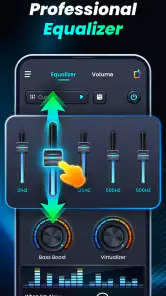
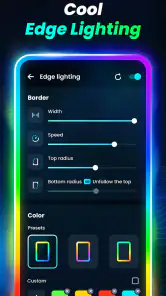
The Volume Bass Booster, Equalizer app offers a range of features designed to enhance your audio experience. It includes a bass booster to amplify low frequencies, a 5-band equalizer to fine-tune audio output, and a virtualizer for a 3D surround sound effect. Additionally, it provides preset sound modes for different music genres, customizable themes, and a simple user interface for easy navigation. All these features aim to deliver a superior and tailored audio experience on your Android or iOS device.
Is the Volume Bass Booster, Equalizer app compatible with all audio formats?
The Volume Bass Booster, Equalizer app is designed to work with most popular audio formats, ensuring broad compatibility with your music library. While it supports formats like MP3, WAV, and AAC, it's always best to check the app's specifications for any limitations. The app enhances audio from both local files and streaming services, providing a versatile solution for improving sound quality across different media sources.
Pros
- Enhances audio quality significantly.
- User-friendly interface.
- Customizable sound profiles.
- Compatible with various audio formats.
- Boosts bass effectively.
Cons
- May drain battery quickly.
- Ads can be intrusive.
- Limited features in free version.
- May not work on all devices.
- Possible sound distortion at high volumes.
- Category
- Music & Audio
- Version
- 1.0.8













