Weather Forecast - Local Radar
- 120.00
- 4.7
- Installs
- 1.00M
- Price
- Free
Screenshots
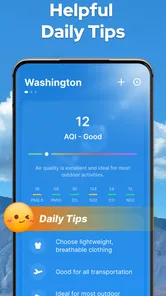
Analysis by Reviewed
I would approach Weather Forecast - Local Radar as a handy second opinion for everyday plans, not as a tool that makes decisions for me. Its value is in moving from a quick forecast to a visual look at nearby conditions, which can help when “maybe rain later” is not enough to decide whether to walk, cycle, or take a coat.
A sensible first check after installing
On the first launch, I would focus on one place and one question: what is the weather likely to do there today? If the app offers location-based results, I would choose automatic access only if that convenience matters to me; otherwise, a manually selected location, where available, can keep the check focused on home, work, or a destination. Either way, I would avoid spending the first session exploring every detail before I know which ones help with my routine.
My first useful action would be to read the local forecast, then open the radar when rain is relevant. The forecast gives me the broader picture; the radar can add context about weather patterns nearby. That simple sequence is less overwhelming than starting with a map full of movement and trying to infer the whole day from it. If I am checking for somebody else’s town, I would make sure I am looking at that place rather than assuming the displayed conditions follow me automatically.
Make the forecast answer a real question
A weather app is easiest to use well when I begin with a decision instead of a screen. If I am choosing clothes, temperature and wind matter more than a long-range outlook. If I am deciding whether to bring rain protection, I would compare the forecast with the radar rather than relying on either one alone. For outdoor plans, UV information can be useful context, while a windy route may call for a different plan even if rain is unlikely.
For example, before walking to work, I might check the forecast while getting ready and glance at radar before leaving if showers look plausible. If the map suggests changing conditions near my route, I can take an umbrella or choose a covered option. I would still treat that as a practical judgement, not a guarantee: local weather can shift, and a radar image is a snapshot rather than a promise about what will happen at my exact doorstep.
Use notifications selectively
Alerts can be helpful when I cannot keep checking the phone, but more notifications are not automatically better. I would turn on only the warnings that could change a decision, such as whether to postpone an outdoor errand, and keep the rest of my weather checking manual. This matters especially if I already receive alerts from another weather service: overlapping messages can make it harder to notice the one that actually needs attention.
If a notification does not arrive, I would not use that as proof that conditions are safe. I would open the app for a fresh check before a plan where weather matters, and consult an authoritative local source when a warning has serious consequences. In my view, the strongest role for this app is helping with ordinary preparation; it should not be the only source for emergency decisions or safety-critical travel.
More From Our News Desk

Weather by Xiaomi Review: Clear at a Glance, Less Clear Up Close

X Under Pressure: Can It Recover When Posting Goes Wrong?

Clash of Clans Is Won Between the Battles

Android Auto Makes the Case for Quieter Car Software

MobiOffice: Transforming Mobile Productivity with Seamless Integration

EA SPORTS FC™ Mobile Soccer: Redefining Mobile Sports Gaming
What the extra detail is good for
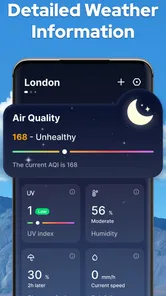
The reported range of information goes beyond a simple temperature display, including humidity, wind speed, and UV index alongside the forecast. Those details are most useful when tied to a specific activity. Wind can affect a bike ride or an exposed walk; UV can influence how I prepare for time outdoors; humidity can help explain why a day feels uncomfortable even when the temperature alone seems manageable. I would check the relevant detail rather than treating every number as equally important.
The outlook reaching several days ahead can help me compare possible dates for a flexible plan, but I would use it as an early guide, not a settled answer. A useful habit is to make a provisional choice first, then revisit the forecast nearer the day. That avoids cancelling too early because of a distant possibility and gives me a chance to adjust if the weather picture changes.
Features That Shine
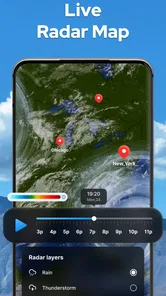
The Weather Forecast - Local Radar app is packed with features that make it a standout in the crowded field of weather apps. First off, the local radar feature is a game-changer. It provides real-time updates on weather patterns, giving you a bird's-eye view of what's happening in your area. You can see storms approaching or watch as they pass by, all from the convenience of your phone.
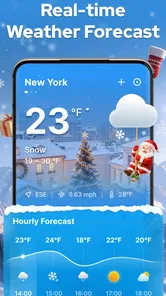
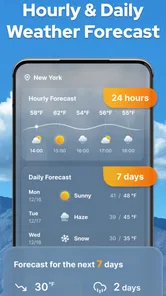
Another cool feature is the detailed weather forecasts. The app doesn't just tell you the temperature; it gives you a comprehensive breakdown of humidity levels, wind speed, and even UV index. It's like having your own personal weather station at your fingertips. Plus, the app provides forecasts up to 10 days in advance, so you can plan your activities well ahead of time.
Ease of Use
One of the things I love about this app is how user-friendly it is. The interface is clean and intuitive, so you don't have to be a tech guru to navigate it. Whether you're checking the weather for today or planning a trip next week, the information is easy to find and understand. Just a few taps and you have all the data you need.
Getting started without overthinking it
For a first visit, I would keep the task simple: check the forecast for the place you care about today, then open the radar to see whether the pattern nearby changes your plan. That is a more useful first success than browsing every detail at once. If location access is offered during setup, consider whether automatic local results are worth it for you; choosing or entering a place manually, if available, is a sensible alternative when you prefer not to share your location. I would not assume that one view alone settles a tricky weather decision.
A practical routine is to look at the broader forecast before leaving, then use radar as a second check when rain seems possible. For a commute, the timing and direction of a weather system can matter more than a single temperature figure. For a hike, wind and UV details add context, but I would still use local trail guidance and common sense rather than treating a phone forecast as a safety guarantee. Radar is most helpful as a visual aid, not a promise that conditions will unfold exactly as shown.
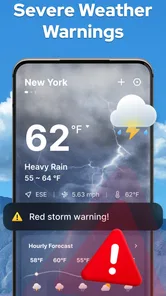
And let's not forget the customizable alerts. You can set the app to notify you of severe weather conditions, ensuring that you and your loved ones stay safe and informed. It's a small feature, but it makes a big difference, especially if you live in an area prone to sudden weather changes.
Making alerts and forecasts work for you
I would keep alerts focused on the warnings that could change what I do, rather than turning every notification into background noise. That makes an alert more likely to catch my attention when I am busy. If you mainly want a glanceable temperature and a simple chance-of-rain summary, your phone's built-in weather panel may already be enough. This app makes more sense when you value its local radar view and want to inspect conditions rather than just read a one-line summary.
Forecasts extending several days are handy for choosing between possible plans, but I would revisit them as the day approaches instead of treating an early outlook as fixed. A forecast for a weekend outing is a planning aid; the closer check is the one to use before packing or setting off. That small habit helps avoid both overreacting to a distant rain prediction and being caught out by a change nearer the time.
Where it fits—and where it doesn't
Compared with a basic weather widget, the appeal here is the combination of a local view, radar, and details such as wind and UV. Compared with specialist services used for aviation, marine trips, or serious storm tracking, I would be more cautious: the app is presented as a general-purpose weather companion, not a replacement for dedicated professional information. If the forecast seems uncertain or the consequences of getting it wrong are high, check an authoritative local source as well.
There is also a trade-off in having more detail available: it can take longer to decide what matters. I find it useful to choose the question first—“Do I need rain protection?” or “Is the wind relevant to this plan?”—and then consult the matching information. That keeps the radar and extra conditions practical instead of turning a quick check into an unnecessary deep dive.
Who will get the most from it
I think this app is a good fit for someone who checks the weather in short bursts throughout the day and sometimes needs more than a basic widget. A commuter can use the local view to reconsider a walking route; a parent planning a playground visit can compare the day’s outlook with the possibility of nearby showers; and someone arranging a casual outdoor meal can use the longer forecast to choose a tentative date, then check again before committing.
It is less compelling if all I want is a temperature at a glance and I never open a radar map. In that case, the built-in weather display on a phone may be quicker and less distracting. Likewise, anyone making decisions for a flight, boat trip, remote hike, or severe-weather response should use a purpose-built, authoritative source as the main reference. The useful distinction is not whether this app has details, but whether its everyday level of information matches the consequences of the decision.
Small habits that improve the experience
One practical habit is to check the location label before interpreting a forecast. This is especially useful when switching between home and a destination: a correct-looking screen can still answer the wrong question if it is showing another place. I would also separate planning checks from departure checks. The first helps me choose a day; the second helps me decide what to carry or whether to adjust my route.
Another helpful trade-off is deciding in advance what counts as a meaningful alert. If I only want to know about conditions that would make me change plans, I can keep notifications useful rather than letting them become a stream of interruptions. And when the app’s radar and forecast seem to tell different stories, I would treat that as a cue to check again closer to the time, not as a reason to assume one view must be wrong.
Cost, compatibility, and expectations
The app is free to install, with optional in-app purchases priced at $1.99 per item. I would begin without buying anything and see whether the radar and forecast fit my daily routine first. Its age rating is Everyone, and the minimum Android requirement is version 6.0, which makes the compatibility threshold clear for Android users considering an install. The app is developed by ZANKHANA PTE LTD, and its current version is 1.3.0.
Its 4.7 average from around 9,000 ratings and more than a million installs suggest that many people have tried it, but popularity is not a substitute for checking whether the layout and level of detail work for me. It was released on January 17, 2024, and has a modest review count compared with its rating count; I would read user feedback for recurring practical issues rather than expecting a rating alone to answer every question.
Final Thoughts
In a world where the weather can be unpredictable, having the Weather Forecast - Local Radar app on your phone is a smart move. It's reliable, easy to use, and packed with features that give you a detailed look at what's happening in the skies above. Whether you're a weather enthusiast or just someone who likes to be prepared, this app is definitely worth checking out. So, next time you're planning an outing or deciding what to wear, let this app be your guide. Trust me, once you start using it, you'll wonder how you ever lived without it.
My recommendation is strongest for someone who checks the weather before a commute, errands, or a flexible outdoor plan and wants more than a temperature tile. A first-time user can get value quickly by checking one local forecast, using radar to judge whether the nearby weather affects the route, and setting only the alerts they genuinely need. If you prefer a very minimal display, need specialist-grade certainty, or dislike notifications, a simpler built-in option or a dedicated service may suit you better. For everyday decisions, though, this is an approachable place to start.
Weather Forecast - Local Radar Frequently Asked Questions
Is Weather Forecast - Local Radar suitable for all ages?
Weather Forecast - Local Radar is a weather app with an Everyone content rating, making it suitable for a broad audience. Its focus is on checking conditions and planning around the weather, so it can be useful for everyday routines as well as trips and outdoor activities. The app is developed by ZANKHANA PTE LTD.
What features does the Weather Forecast - Local Radar app offer?
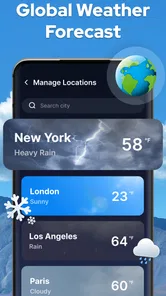
The Weather Forecast - Local Radar app provides users with real-time weather updates, accurate local radar maps, and future weather predictions. It includes features such as severe weather alerts, hourly and weekly forecasts, and detailed weather conditions like temperature, humidity, wind speed, and UV index. The app is designed to help users plan their day with confidence regardless of weather changes.
Is the Weather Forecast - Local Radar app free to use?
Yes, the Weather Forecast - Local Radar app is free to download and use. However, it may offer in-app purchases or a premium version that provides additional features such as ad-free experience, advanced radar maps, and customizable weather alerts. Users can choose to upgrade for a more comprehensive weather tracking experience.
How accurate is the weather information provided by the app?
The Weather Forecast - Local Radar app uses data from reliable meteorological sources to provide accurate weather information. It utilizes advanced algorithms and real-time updates to ensure users receive the most current and precise weather forecasts. However, like any weather service, there can be occasional discrepancies due to sudden atmospheric changes.
Can I customize the alerts and notifications in the app?
Yes, the Weather Forecast - Local Radar app allows users to customize alerts and notifications to suit their preferences. Users can set specific weather conditions for which they want to receive alerts, such as rain, snow, or extreme temperatures. Notifications can be scheduled for daily forecasts or severe weather alerts, ensuring users are always prepared for any weather condition.
Pros
- Accurate local weather updates
- Real-time radar for tracking storms
- User-friendly interface design
- Customizable weather alerts
- Detailed hourly weather forecasts
Cons
- Ads can be intrusive
- Some features require premium
- Occasional slow data updates
- Limited international coverage
- Battery consumption is high













