AI Photo Studio: Editor Pro
- 721.00
- 4.6
- Installs
- 10.00M
- Price
- Free

Screenshots


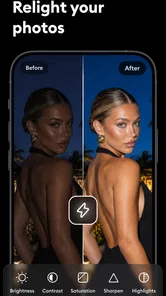
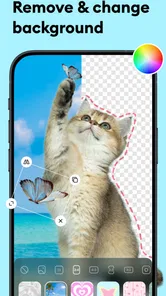
Analysis by Reviewed
I judge a photo editor less by how many buttons it advertises and more by whether it helps me finish a real picture without turning a small edit into a chore. AI Photo Studio: Editor Pro is aimed at that quick, flexible kind of work: improving a photo, trying a generated image, changing its background, or removing an unwanted object. It is a photography app from ZANKHANA PTE LTD, and its broad toolkit makes it worth considering if you prefer one place to experiment rather than switching between several specialized editors.
My main reservation is the same one I have with many AI-focused editors: a wide set of tools can be convenient, but it does not automatically mean every result will suit every image. The best reason to try it is to handle varied, modest editing jobs in one app. If your priority is precise manual control or a consistent professional workflow, a dedicated editor may still be a better fit.
What the free starting point tells you
I find the free starting point most useful as a way to test a real editing task, not as proof that every tool is available without charge. I’d choose a photo I’m comfortable experimenting on and notice whether the app’s workflow feels worthwhile before considering an in-app purchase. That practical test leads to the larger question: whether having several kinds of editing together saves enough time to earn a place on my phone.
Free to try, with purchases inside
The app is free to download, while in-app purchases are listed from $0.99 to $29.99 per item. That gives you a practical way to start without paying upfront, but it does not tell you which individual tools require a purchase or how often a particular feature can be used. I would treat the free entry point as a chance to test the specific edits I care about, rather than assume every part of the toolkit is included at no cost.
That distinction matters with AI photo apps. A tool can look useful in a preview, yet the real value depends on whether it handles your own images well and whether the workflow you want is available on terms you are comfortable with. Before building it into a regular routine, I would try one ordinary photo and one more difficult image, then check the purchase prompt only if it appears during a task I genuinely want to complete.
AI Photo Studio: Editor Pro has an average rating of 4.6 from around 141,000 ratings, and it has been installed over 10 million times. Those figures suggest that it has found a large audience, but they cannot tell me whether a particular background removal or enhancement will work on my picture. I see them as useful context, not a substitute for testing the app against the kind of photos I actually edit.
Version and device fit
The current version is 1.3.3, and the stated minimum operating system is 8.0. The age rating is Everyone, so the app is positioned for a broad audience. I would still consider the device I plan to use and the size of the images I want to edit: a phone-based editor is naturally most convenient for quick sharing, while a larger screen can make careful edge work and fine visual comparisons easier.
More From Our News Desk

Weather by Xiaomi Review: Clear at a Glance, Less Clear Up Close

X Under Pressure: Can It Recover When Posting Goes Wrong?

Clash of Clans Is Won Between the Battles

Android Auto Makes the Case for Quieter Car Software

MobiOffice: Transforming Mobile Productivity with Seamless Integration

EA SPORTS FC™ Mobile Soccer: Redefining Mobile Sports Gaming
The app was released on Dec 12, 2024. For a reader deciding whether to install it, the practical point is that this is a relatively focused mobile editing option, not a replacement for every step in a desktop photography setup. If you mainly take pictures on your phone and want to make them share-ready there, that limitation may be a benefit rather than a problem.
Where the toolkit earns its place
The toolkit’s value depends on how often your editing needs change from one picture to the next. I’d get more from a single place to try cleanup, enhancement, and creative treatments than someone who always applies the same preset. The important distinction is convenience rather than guaranteed perfection, so it helps to look at which everyday jobs benefit from that flexibility.
One app for several kinds of edit
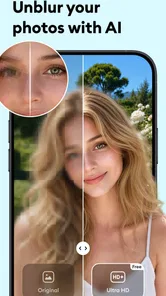
The appeal is the range of jobs grouped under one roof: photo enhancement, image generation, background removal, object removal, and filters. In everyday terms, that lets me move from improving an existing shot to changing its presentation without immediately reaching for a second app. It is especially useful when I am still deciding what a picture should become, rather than following a fixed editing recipe.
A sensible workflow is to begin with the least dramatic change. I would first see whether enhancement improves the main subject, then decide if a filter adds something rather than masking a weak image. Only after that would I try a background or object edit. This order helps me avoid stacking effects that make a picture look artificial, and it makes it easier to see which step actually helped.
There is also a useful distinction between fixing and reinventing. Removing a distracting object or changing a background is a repair to the image’s presentation; generating an image is a more creative departure. Keeping those goals separate makes the app easier to judge. If I want a faithful record of a place or event, I would keep changes restrained. If I am making a playful post or visual concept, I would be more willing to experiment.
Everyday situations where it can save time
Imagine taking a quick picture of a second-hand item to post for sale. The room behind it is untidy, and a small object on the surface pulls attention away from what you are selling. In one editing session, I could try removing the distraction, make a modest enhancement, and compare a filter-free version with a more styled one. The useful outcome is not simply a polished photo; it is being able to prepare a clearer listing without learning a full desktop editor.
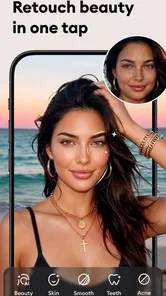
For a portrait, I would use the same cautious approach. A slight improvement or background adjustment can help the person stand out, but aggressive edits can make edges around hair and clothing look conspicuous. I would zoom in on the boundary between the subject and the background before deciding the result is ready. That quick inspection is one of the most important habits for any automatic cutout tool, including this one.
For social posts, the combination of filters and generation can be handy when I want to explore a mood before settling on a final image. I would save or compare a restrained version against the more stylized result, rather than assuming the boldest treatment is best. This is a small workflow choice, but it prevents a common mistake: editing until the picture is eye-catching on a phone and then discovering that the original subject has lost its character.
How it compares with familiar alternatives
Compared with a traditional editor built around sliders, layers, and detailed selections, this app’s appeal is breadth and approachability. A specialist editor is usually the better choice when I need exact control over color, retouching, or a complex composite. Here, the attraction is being able to try several AI-assisted directions without starting with a technically demanding workflow.
Compared with a basic filter app, AI Photo Studio: Editor Pro offers a wider range of intended tasks than applying a look to the whole picture. That does not make it automatically superior: a simple filter tool can be quicker when all I want is a consistent tone across a few casual shots. The broader app makes more sense when I expect to switch between cleanup, background changes, enhancement, and creative exploration.
One non-obvious tradeoff of an all-in-one approach is decision fatigue. When an app can alter several parts of an image, it is tempting to keep testing options long after the photo is already good enough. I get better results by deciding the goal first—cleaner product photo, clearer portrait, or imaginative visual—and using only the tools that serve that goal. The app’s flexibility is most valuable when it does not become an invitation to over-edit.
Tradeoffs worth considering before relying on it
I would be cautious about making an automatic edit the final version without checking the details. A quick comparison with the original can reveal whether a cleanup or enhancement has improved the photo or simply made the edit more noticeable. That habit matters especially when a picture needs to remain faithful, and it clarifies when a more controlled editor is the better tool.
AI edits need a human check
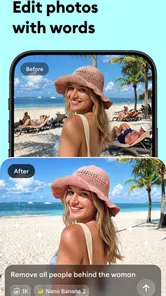
Background and object removal are most convincing when the area being changed is visually simple. A clean wall behind a subject gives an automatic edit less to contend with than a busy scene with overlapping edges. When the background contains fine details or the object sits against a complicated texture, I would inspect the result closely and be ready to keep the original if the repair draws more attention than the distraction did.
Enhancement also involves taste, not just correction. A photo that looks dull on one screen may already have the right mood, and a stronger treatment can flatten subtle lighting or make skin and colors feel less natural. I recommend comparing the edit with the source before exporting or sharing. The point is not to avoid AI; it is to use it as a starting suggestion instead of treating its first result as the final answer.
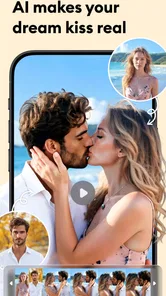
Generated imagery calls for a different kind of judgement. It can be useful for experimentation or a visual idea, but it is not the right substitute when the image needs to document something accurately. If I were editing a memory, a product detail, or a scene where authenticity matters, I would keep generative changes clearly separate from ordinary cleanup and choose the faithful version.
When another editor is the better choice
I would skip this app if my routine depends on exact, repeatable adjustments across many images, or if I need a highly controlled layer-based process. A specialist editor is a stronger choice for that kind of work because precision and consistency matter more than having several AI tools nearby. Likewise, if I only want a quick color preset, a simpler filter app may involve fewer decisions.
I would also pause before paying for anything if I had not yet tested the task that matters most to me. The listed purchase range gives a sense of the possible in-app spending, but it does not establish which specific capability is included at each price. Trying the free app first is the sensible way to discover whether its actual workflow suits your needs; a purchase is easier to justify only after a result proves useful in your own photos.
Who gets the most value
I think the strongest match is someone who edits varied phone photos now and then and prefers trying a few approaches over mastering a specialist workflow. If you need repeatable, precise adjustments, or only want a fast filter, a narrower alternative may be less distracting. The next question is whether this app’s mix of flexibility and review work fits the way you actually handle pictures.
A good fit for flexible phone editing
I can see this being useful for casual photographers, people preparing pictures for social posts, and anyone who often needs a quick cleanup rather than a full retouching session. It is also a reasonable option for someone curious about AI editing who wants to test several kinds of image changes from one mobile app. The strongest fit is a user who values convenience and is comfortable checking the result instead of expecting every automatic edit to be flawless.
It is less compelling for photographers who already have a trusted manual workflow, for users who need identical edits across a large batch, or for anyone who dislikes trying options and reviewing their effects. Those readers may get more from a focused editor with controls tailored to their particular job. The value here comes from variety, not from a promise that one app will be best at every kind of image work.
My practical recommendation is to start with a low-stakes photo: an everyday portrait, a product snapshot, or a picture with one obvious distraction. Try one edit at a time, inspect the edges and details, and compare against the unedited image. If the app makes that small task easier, its broader set of tools may be worth exploring. If the result needs repeated correction or the available purchase step does not suit your budget, there is no reason to force it into your routine.
My buy-or-skip verdict
AI Photo Studio: Editor Pro is worth trying for free if you want several AI-assisted photo tasks in one place, but I would pay only after confirming that the particular tool I need works well on my own images. Its broad range is a genuine convenience, especially for quick mobile edits, while the need to inspect results and the uncertainty around which purchase unlocks which workflow are reasons to proceed thoughtfully.
Overall, I would recommend it to someone who enjoys experimenting and wants a practical shortcut for occasional photo cleanup or creative changes. I would steer a precision-focused photographer toward a more specialized editor, and a filter-only user toward a simpler option. For everyone in between, the best test is not a dramatic sample image but one ordinary photo you actually plan to use.
AI Photo Studio: Editor Pro Frequently Asked Questions
What is AI Photo Studio: Editor Pro used for?
AI Photo Studio: Editor Pro is designed to help users edit and enhance photos with artificial-intelligence tools alongside more familiar image-editing controls. Depending on the version and features available in your region, it may offer options such as image enhancement, filters, background changes, or creative effects. Check the app’s current feature list before downloading, since tools and capabilities can change between updates.
Is AI Photo Studio: Editor Pro free to download and use?
The app may be available to download without an upfront charge, but that does not necessarily mean every feature is free. Some editing tools, exports, or usage allowances may require a subscription, in-app purchase, or credits. Review the store listing and the purchase terms before starting a trial or confirming payment, and check whether a subscription renews automatically and how to cancel it.
Does AI Photo Studio: Editor Pro upload my photos or use them to train AI?
Photo-editing apps may process images on your device, on remote servers, or through a combination of both. The exact handling depends on the app’s current privacy policy and settings, so avoid assuming that images remain private or are never retained. Before importing sensitive photos, review the privacy disclosures, permissions, retention rules, and any information about sharing or AI training.
Do I need an internet connection to edit photos in AI Photo Studio: Editor Pro?
Some basic editing functions may work offline, while AI-powered effects can require an internet connection if image processing takes place online. Availability can also depend on whether tools or assets have already been downloaded. If you expect to edit while travelling or have limited data, check the app’s requirements and test the specific features you plan to use before relying on offline access.
What should I check before downloading AI Photo Studio: Editor Pro?
Confirm that the app supports your Android or iOS version and that your device has enough storage for the app, imported images, and exported edits. Also check recent reviews, the latest update date, listed permissions, subscription details, and export options such as image quality or watermarks. These details can affect whether the app suits your workflow and expectations.
Pros
- AI tools can quickly turn ordinary photos into more polished images.
- A range of editing options suits both quick touch-ups and creative experiments.
- Useful for preparing portraits and social images without advanced editing skills.
- Results can be reviewed and adjusted before saving or sharing.
- The all-in-one format keeps common photo-editing tasks in one app.
Cons
- AI results may look artificial or differ from the original photo.
- Some tools or export options may require a paid subscription.
- Processing can take longer with large images or a slow internet connection.
- The app may request access to photos and other device permissions.
- Output quality and available features can vary by device and app version.











