Translate - Translator
- 820.00
- 4.5
- Installs
- 5.00M
- Price
- Free

Screenshots


Analysis by Reviewed
When I need to understand a short message in another language, I want an answer quickly, without having to choose between typing, speaking, and pointing my camera at the text. Translate - Translator brings those everyday routes together in one productivity app. I find that combination more useful than a translator built around just one input method, especially when I’m away from my desk and dealing with unfamiliar words in the moment.
What the free access means
The app is free to download, with optional in-app purchases listed from $6.99 to $64.99 per item. That gives you a way to try its core translation approach before deciding whether any paid option makes sense for you. I’d treat the free access as a practical starting point rather than assume every feature or use pattern has no limits; check the purchase details in the app before paying, and decide based on how often you actually need it.
What I would check before paying
The purchase range is broad enough that I would not judge value from the highest or lowest price alone. Before spending anything, I’d identify the specific task that is making me consider an upgrade, then check what the in-app purchase offers and whether it addresses that need. If I only want occasional help with a menu or a short message, the free starting point may be all I need. If I expect to rely on translation often, I’d first test the app with the kinds of text and situations I actually encounter.
That approach also helps separate convenience from necessity. A paid option is only worthwhile to me if it changes a real part of my workflow, not simply because the app has more features somewhere behind a purchase. I’d be especially cautious about paying before checking how the feature behaves with my preferred languages and whether it suits my usual connection conditions. The app is available without an upfront price, but the practical value of an optional purchase depends on the details shown inside the app and on how regularly I use it.
Breaking the Language Barrier
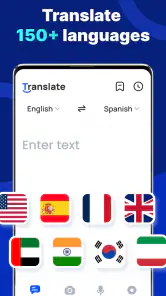
First off, let's talk about what this app does best: translating languages. With support for over 100 languages, this app has got you covered no matter where you are in the world. Whether you're trying to order a croissant in Paris or haggling for souvenirs in Bangkok, this app makes it as easy as pie.
Features that Stand Out
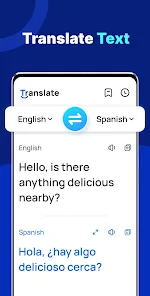
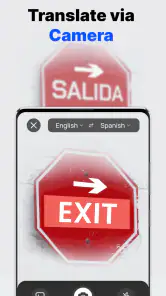
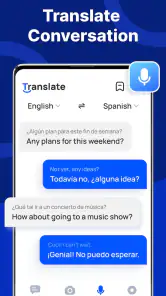
One of the coolest features is the voice translation. Just speak into your phone, and the app translates your words into the chosen language. It's almost like having a personal interpreter in your pocket. Plus, there's a text translation feature that's as simple as typing out what you need to say. And if you're dealing with a tricky script, the camera feature allows you to snap a picture of text and get an instant translation.
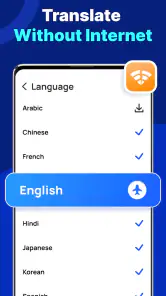
Another handy feature is the offline mode, which lets you download languages for use without an internet connection. This is super useful when you're traveling and can't always rely on Wi-Fi. No more exorbitant data charges!
You May Like

Clash of Clans Is Won Between the Battles

Android Auto Makes the Case for Quieter Car Software

MobiOffice: Transforming Mobile Productivity with Seamless Integration

EA SPORTS FC™ Mobile Soccer: Redefining Mobile Sports Gaming

How Microsoft OneDrive Became a Mobile Productivity Giant

How Google Translate Breaks Language Barriers Effortlessly
Getting better results from each input method
I would treat voice as the quickest option for a simple, clearly spoken question, not as the best choice for every conversation. If a place is noisy or the other person speaks rapidly, I’d keep the exchange short and confirm the important part with a second question. For something I need to say exactly, typing gives me a chance to review the wording first. When using the camera, I’d frame only the relevant printed passage and check the surrounding context, since a line taken out of a notice can be misleading even if the words are translated correctly.
One useful habit is to prepare a few essential phrases while I still have a connection, then use offline access as a backup rather than assuming it will solve every travel problem. For example, I’d check that the language I expect to need is available for offline use before leaving Wi-Fi, and I’d keep a short typed version of a question ready if speaking is awkward. This is a practical trade-off: offline translation is valuable when access is uncertain, but it takes a little planning and cannot guarantee that every phrase will be clear in context.
Practical value beyond a quick lookup
I’d use the three input options differently rather than treating them as interchangeable. Text is best when I can pause and check spelling; voice is useful for a brief, straightforward question; and a photo is a convenient first pass on a sign or printed notice. For an important instruction, I’d still compare the translation with context or ask a person to confirm it. A translated phrase can sound plausible while missing a local nuance, particularly when the original uses slang, humor, or an indirect request.
A realistic travel routine is to check a menu while connected, then prepare offline language access before heading somewhere with unreliable service. I would not wait until I’m standing at a station without signal to find out whether the language I need is ready. Offline use can help avoid depending on a connection, but it is not a substitute for checking that the relevant language is available for offline translation in advance.
User Experience and Interface
The app's interface is slick and intuitive, which means you won't waste time trying to figure out how to use it. Everything is laid out clearly, with quick access to the main features. I particularly appreciate how the app emphasizes practicality without sacrificing aesthetics.
But, like any app, it's not all sunshine and rainbows. While the translations are generally accurate, there are times when they can be a bit off, especially with idiomatic expressions. However, this is a common issue with most translation apps, so it's something I was prepared for.
Where it fits among translator apps
Compared with a basic text-only translator, this app is more flexible when the words are on a sign or you’d rather speak than type. That convenience is its clearest advantage; it doesn’t make the result automatically more reliable. If I need to polish a long document, preserve a specific writing style, or make a high-stakes decision based on exact wording, I’d use a human translator or a specialist service instead of relying on a quick app result. For casual travel phrases and everyday comprehension, the mix of text, voice, photo, and offline options is a better fit.
It is developed by ZANKHANA PTE LTD, and its 150-plus language coverage gives it room to help with more than a single holiday destination. The app has a 4.5 average from around 28,000 ratings and over 5 million installs, which suggests it has found a broad audience, though popularity alone cannot tell me whether a particular translation is right. It is rated for Everyone, released on January 16, 2024, and version 1.2.0 requires Android 6.0 or later. Those details make it easy to judge whether it suits an older Android device as well as a newer one.
Small workflow choices that matter
For a longer message, I’d split the text into sensible sections instead of feeding in a large block and trusting the result as a finished translation. That makes it easier to notice where a name, date, or instruction might have been misunderstood. I’d also preserve the original wording alongside the translation when the message affects a booking or appointment. This does not take away the speed advantage; it simply gives me a way to check what the app is interpreting before I act on it.
For language learning, I’d use a translation as a prompt for a question rather than as the end of the exercise. I might compare a short phrase with what I already know, then look for a native example or ask a speaker how the wording sounds in conversation. The app can help me get unstuck, but a direct translation does not necessarily explain register, grammar, or why one expression feels more natural than another. Someone looking for lessons, pronunciation coaching, or a structured study plan should choose a dedicated learning tool instead.
Who gets the most from it
I’d recommend it to travelers who want several ways to translate without juggling separate tools, and to anyone who occasionally needs to understand a message or printed text in another language. It can also be handy for language learners checking a word in context, though I wouldn’t use its output as a replacement for studying grammar or practicing conversation. Someone who only translates a phrase once in a while may be perfectly happy with a built-in phone translator; the reason to choose this app is having its particular set of input options together.
For a daily example, imagine arriving at a hotel and finding a printed notice you can’t read. A photo translation can give you a quick sense of the message; if you need to ask a follow-up, voice translation offers another route, while typing lets you make the question more precise. I’d keep sensitive details out of any translation tool unless I’m comfortable entering them, and I’d verify instructions that affect safety, money, or travel plans rather than acting on a rough translation alone.
It is a weaker fit for someone who needs consistent, publication-ready language or has to interpret legal, medical, or financial wording precisely. In those situations, speed is not the only thing that matters, and a fluent-sounding result can still be wrong in a consequential way. I’d also skip it if my only requirement is occasional typed translation and a tool already built into my phone handles that comfortably. The reason to install this one is the combination of different ways to work with language, not a promise that every translation will be definitive.
Final Words
All in all, this translator is a useful tool for anyone who loves to travel or needs to communicate in multiple languages regularly. Its practical features, combined with an easy-to-use interface, make it a convenient choice in the crowded field of translation apps. So, if you're planning a trip or just want to break down language barriers, give this app a shot. It's like having a little piece of the world right in your hand.
My verdict is to try the free app if you expect to use its different translation methods, and to hold off on an in-app purchase until you know what you need from it. It’s a useful pocket aid, not a dependable interpreter for every situation: keep it for quick everyday help, but choose a human or specialist option when precision matters more than speed.
In practical terms, I’d install it before a trip, test the languages I expect to use, and make sure offline access is ready before I’m somewhere with an unreliable connection. At home, I’d reach for it when a short message or printed notice needs a quick first pass. For work that needs careful tone, exact terminology, or accountability for the final wording, I’d spend the effort on a more suitable service. That distinction is what makes the free starting point appealing without assuming every optional purchase will be worth it for every user.
Translate - Translator Frequently Asked Questions
Can I use Translate - Translator while traveling without an internet connection?
The app describes itself as an offline and fast translator, which can make it useful to consider for travel when connectivity is limited. It supports translating text, voice, and photos, but offline availability may depend on the feature and situation. If you expect to rely on it away from a connection, check the relevant language and translation options before setting out.
Is Translate - Translator suitable for students or work-related translation?
Translate - Translator is a productivity app that handles text, voice, and photo translation across a broad range of languages. That mix can help with everyday tasks such as understanding a passage, checking a message, or interpreting printed material. It can be a convenient aid for study or work, though it is sensible to review important translations in context before using them.
Who develops Translate - Translator, and what age group can use it?
Translate - Translator is developed by ZANKHANA PTE LTD and is rated for Everyone, making it suitable for a broad range of users. It is a general-purpose translation app rather than a tool aimed at a particular age group. Parents and other users can still consider whether its translation features and any optional purchases are appropriate for their needs.
Does Translate - Translator have a good reputation among users?
The app has an average rating of 4.5 from around 28,000 ratings, alongside about 820 written reviews. Its overall reception is positive, although ratings reflect different devices and individual expectations. Before downloading, consider whether you need text, voice, or photo translation and whether the app’s optional purchases suit how you plan to use it.
Can Translate - Translator translate text from a photo?
Yes. Translate - Translator can translate text from photos, alongside text and voice, making it useful when you encounter signs, menus, or other printed material in another language. You can use it as a practical starting point for understanding what you see, then check the translated wording in context before relying on it for anything important.
Pros
- Supports multiple languages.
- Offers voice translation.
- Easy to use interface.
- Offline translation available.
- Accurate text translations.
Cons
- Limited free version features.
- Occasional translation errors.
- Requires internet for updates.
- Ads in free version.
- Voice recognition can be faulty.

- Category
- Productivity
- Version
- 1.2.0













