VOKA 3D Anatomy and Physiology
- 27.00
- 4.0
- Installs
- 500.00K
- Price
- Free
Screenshots
Analysis by Reviewed
I find a 3D anatomy reference most useful when I can pause over a structure that a flat diagram makes hard to picture. VOKA 3D Anatomy and Physiology takes that visual approach on a phone, letting me inspect the body from different angles rather than relying on a single textbook illustration. It is a medical learning app, not a substitute for a course or clinical reference, but it can make exploratory study feel more hands-on.
When a connection becomes part of the experience
Using an app with detailed visual material can make network conditions noticeable: a model or other content may take longer to become available when connectivity is weak. I would open the sections I plan to study before a commute or a busy class break, while I have a reliable connection, instead of assuming every part will be ready instantly wherever I am. That small habit can keep a short review session from turning into a wait.
VOKA is free to download, with in-app purchases ranging from $0.49 to $99.99 per item. That makes it easy to try, but I would check what a desired feature or piece of content costs before building a study routine around it. The app is rated for Everyone, though its detailed anatomy is most relevant to learners who are comfortable studying the human body.
Getting to Know VOKA 3D Anatomy and Physiology
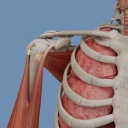
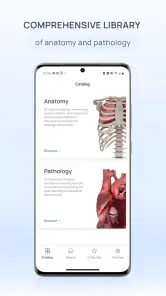
From the moment you fire up VOKA 3D Anatomy and Physiology, you’re greeted with a sleek and user-friendly interface that makes navigation a breeze. The app boasts a comprehensive library of 3D anatomical models that you can explore from every angle. Whether you’re a med student, an aspiring physiotherapist, or just a curious soul, this app has something to offer.
A Deep Dive into Features
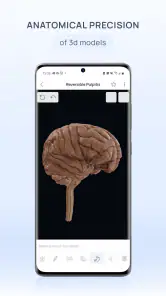
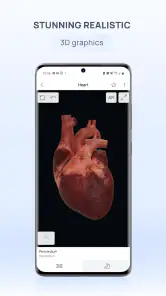
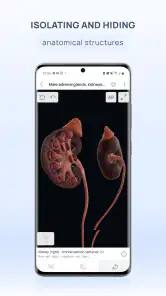
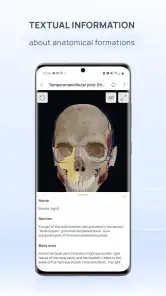
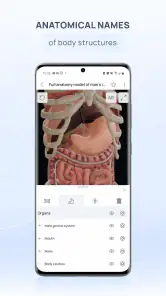
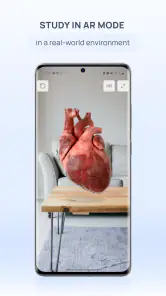
Let’s talk features, shall we? One of the standout aspects of VOKA is its interactive 3D models. You can zoom in, rotate, and even dissect these models to get a closer look at every muscle, bone, and organ. It’s like having a mini medical museum in your pocket! Plus, the models are incredibly detailed, which makes understanding complex structures so much easier.
Another nifty feature is the app's integrated quizzes. These aren’t your run-of-the-mill quizzes; they’re designed to test your knowledge in a fun and engaging way. It’s like playing a game while learning – talk about killing two birds with one stone!
What Makes It Stand Out?
Now, you might be wondering, “What makes VOKA different from other anatomy apps out there?” Well, besides its stunning visual appeal, VOKA offers a unique blend of education and entertainment. The app’s developers have clearly put a lot of thought into making the learning process as interactive and enjoyable as possible. It’s not just about memorizing facts; it’s about understanding how everything fits together.
More From Our News Desk

Weather by Xiaomi Review: Clear at a Glance, Less Clear Up Close

X Under Pressure: Can It Recover When Posting Goes Wrong?

Clash of Clans Is Won Between the Battles

Android Auto Makes the Case for Quieter Car Software

MobiOffice: Transforming Mobile Productivity with Seamless Integration

EA SPORTS FC™ Mobile Soccer: Redefining Mobile Sports Gaming
One useful study habit is to treat a model as a prompt for recall, not just something to admire. Before rotating it, try naming the structures you expect to see; then use the view to check yourself. I also find it helpful to focus on one region at a time and ask how neighboring parts relate, rather than jumping between unrelated systems. That turns a quick visual browse into a more deliberate revision session.
The app’s 3D approach is especially handy for learners who struggle to translate textbook diagrams into a mental picture. A paper atlas remains better for quick labeled overviews, and a lecture or trusted course material is better for building a complete, sequenced explanation. I’d use VOKA alongside those tools, not as a replacement. If you mainly need concise written definitions, or a formal source for clinical decisions, a dedicated text or course reference is the more suitable choice.
For example, before a practical class, I might use a short break to rotate a model and quiz myself on the landmarks I expect to identify. If the screen is small or the surroundings are distracting, though, subtle details can be harder to inspect, so I would save close examination for a larger display or a quieter moment. The phone format is convenient for revisiting a concept, but it does not make every study task equally comfortable.
Using it on the move without losing your place
On a mobile device, touch controls make it natural to turn and enlarge a model, but they also reward a little patience: a small movement can change the viewing angle more than intended. I would zoom in gradually and recenter the structure before deciding that a detail is missing. For a focused session, a stable connection and a few uninterrupted minutes are more useful than trying to browse while walking or switching rapidly between apps.
If content is slow to load or the app does not respond as expected, I would first check the connection and give the current screen a moment before repeatedly tapping. Then I would close and reopen the app if needed, and return to the same topic once it is responsive. These are ordinary troubleshooting steps rather than a guarantee about how every network interruption behaves; the practical point is to avoid making a rushed study session depend on instant access.
VOKA is developed by Factory of innovations and solutions LLC. It first appeared on February 19, 2021, and version 6.8.0 is the current version. It has an average rating of 4.0 from around 2.1 thousand ratings, alongside 27 written reviews, and has been installed over 500 thousand times. Those figures suggest that it has found an audience, but I would still judge it by whether its models and learning style suit the way I study.
What Makes It Stand Out?
Now, you might be wondering, “What makes VOKA different from other anatomy apps out there?” Well, besides its stunning visual appeal, VOKA offers a unique blend of education and entertainment. The app’s developers have clearly put a lot of thought into making the learning process as interactive and enjoyable as possible. It’s not just about memorizing facts; it’s about understanding how everything fits together.
Moreover, the app is regularly updated with the latest anatomical data, ensuring that you’re always learning from the most up-to-date resources. This is crucial in a field that’s constantly evolving.
Choosing it with realistic expectations
Since VOKA is a visual study aid, I would not treat a detailed-looking model as proof that it covers every question a class, exam, or patient-care situation might raise. Use it to build spatial understanding, then confirm terminology and course-specific material with the resources your instructor recommends. The same distinction matters for health questions: an anatomy model can support learning, but it is not a diagnosis or personal medical advice.
If you are deciding whether to install it, the minimum operating system requirement is Android 8.0. I would also think about how often I actually want to study by rotating models, because that interaction is the main reason to choose this kind of app over a conventional image atlas. Learners who prefer a guided lesson path, extensive written explanations, or a resource that works reliably in a particular network situation may be better served by a course platform or reference book.
Who will get the most from a 3D study session?
I think this app is strongest for someone who already has a question in mind: where a muscle sits relative to a bone, how a structure changes appearance from another angle, or whether a label in a flat diagram makes sense in three dimensions. That focused starting point helps keep browsing purposeful. If you open it without a topic, the visual detail can be engaging, but it may be harder to turn that exploration into organized learning.
A realistic routine might be to review a lecture’s topic during a quiet break, choose one body region, and use the model to test what you remember before checking your notes. I would finish by writing down any structure whose name or position I still confuse. That last step matters because visual recognition can feel like mastery even when you cannot recall the terminology without the model in front of you.
VOKA may also suit curious non-specialists who want a more concrete way to explore anatomy than a short article or a static illustration provides. I would still approach medical-looking detail as educational material, not as a way to interpret symptoms. For someone preparing for a practical assessment, it can help with spatial orientation; for someone who needs a clear explanation of a condition or treatment, a clinician or reliable medical text is a better place to turn.
Making the phone format work for you
One trade-off with a detailed model on a phone is that the screen can become crowded once you are zoomed in. I would use a larger screen when the task is careful comparison, and keep the phone for short checks or revisiting a familiar region. In a noisy or moving setting, I would avoid trying to learn several new labels at once; a quick look can refresh a concept, but it is not always a good substitute for a calm study block.
Another useful approach is to separate exploration from verification. First, rotate the model and describe what you think you are seeing in your own words. Then check the labels and compare them with your class notes or atlas. This helps prevent the polished appearance of a 3D representation from becoming the only source you trust, and it makes differences in terminology easier to catch.
For data-conscious use, I would treat network access as a practical consideration rather than assume that every model is ready without it. If you are using mobile data, choose a time and connection that suit a visual session, and avoid repeatedly reloading a section just because it takes a moment to respond. I would also check the in-app purchase details before relying on a particular resource, since trying the free app and budgeting for optional purchases are separate decisions.
Where alternatives have the advantage
Compared with a conventional anatomy atlas, VOKA’s main appeal is being able to inspect a model from changing viewpoints instead of interpreting a fixed image. The atlas still wins when I want a quick page of labels, a predictable layout, or an easy side-by-side comparison. A course or textbook is more useful when I need a structured sequence that explains concepts from first principles, while a 3D model is better for questions about shape and spatial relationships.
I would skip this app if my main need were a fully guided curriculum, long-form explanations, or a reference I could confidently use in a weak-signal situation without checking how it behaves. It is also not my first choice for clinical decisions. Those are not flaws in 3D anatomy as a learning format; they are limits of what I would ask a mobile visual aid to do.
Wrapping It Up
In conclusion, if you’re serious about mastering anatomy and physiology, VOKA 3D Anatomy and Physiology is a must-have tool in your educational arsenal. It’s perfect for visual learners who crave a more dynamic approach to studying. Plus, it’s a fantastic way to supplement your traditional learning methods. Whether you’re prepping for exams or just satisfying your curiosity, VOKA has got you covered.
So, what are you waiting for? Dive into the fascinating world of human anatomy with VOKA and see for yourself why it’s becoming a favorite among students and professionals alike. Happy exploring!
My connectivity verdict
For me, VOKA makes the most sense as a visual companion when I can give it a stable connection and focused attention. I would use it for targeted review, spatial practice, and curiosity-driven exploration, while keeping a textbook or trusted teaching resource nearby for structured explanations. If you want a phone-based way to turn anatomy into something you can inspect rather than only read about, it is worth trying; if dependable access in weak-signal settings is essential, I would choose a resource whose behavior in those conditions is clear to me.
VOKA 3D Anatomy and Physiology Frequently Asked Questions
Is VOKA 3D Anatomy and Physiology free to download?
VOKA 3D Anatomy and Physiology is free to download, so you can try the app without paying upfront. It also offers in-app purchases, with individual items ranging from $0.49 to $99.99. Check the purchase details in the app before unlocking paid content, and consider whether its educational tools suit your needs before spending.
Who develops VOKA 3D Anatomy and Physiology, and is it intended for general audiences?
The app is developed by Factory of innovations and solutions LLC and is categorized as a medical learning app. Its content rating is Everyone, making it suitable for a broad audience. Its focus on anatomy and physiology may appeal to students, medical professionals, and anyone curious about how the human body is organized.
What is VOKA 3D Anatomy and Physiology?
VOKA 3D Anatomy and Physiology is an advanced educational app designed to help students, medical professionals, and enthusiasts explore the human body in an interactive 3D environment. The app offers detailed anatomical models that can be rotated, zoomed, and explored to understand the intricate structures and systems of the human body.
How user-friendly is VOKA 3D Anatomy and Physiology for beginners?
VOKA 3D Anatomy and Physiology is designed with an intuitive interface that makes it accessible for beginners. Users can easily navigate through various anatomical models and systems. The app provides guided tutorials and tooltips to help new users get acquainted with its features, ensuring a smooth learning curve for all skill levels.
What devices are compatible with VOKA 3D Anatomy and Physiology?
The VOKA 3D Anatomy and Physiology app is compatible with most modern Android and iOS devices. It requires a stable internet connection to download the detailed 3D models and updates. Users should ensure their device has adequate storage space and meets the necessary system requirements to operate the app smoothly. On Android, it requires version 8.0 or later.
Pros
- Detailed 3D anatomy models.
- Interactive learning features.
- User-friendly interface.
- Regular updates with new content.
- Suitable for medical students.
Cons
- Requires a stable internet connection.
- High device storage usage.
- Subscription needed for full access.
- Complex navigation for beginners.
- Some features are device-dependent.
- Category
- Medical
- Version
- 6.8.0











