Voice Tools
- 414.00
- 4.5
- Installs
- 500.00K
- Price
- Free

Screenshots
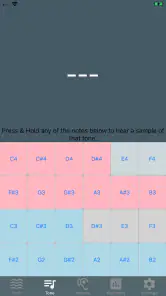
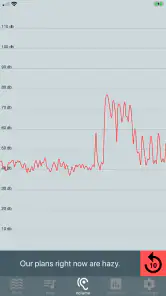
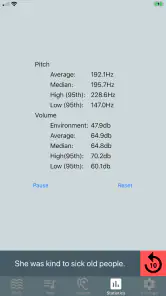
Analysis by Reviewed
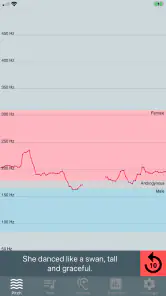
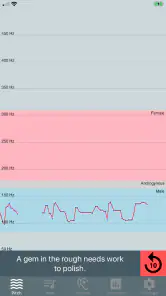
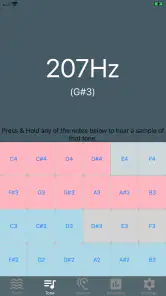
I’d approach Voice Tools with a practical goal rather than expecting a pocket sound studio: it is a free medical app from DevExtras, built around live voice analysis for therapy. Its focus makes it a different proposition from a general recorder or a novelty effects app. The useful question is whether seeing changes in pitch, tone, and volume can help you practise more deliberately—and whether that feedback fits the way you work with your voice.
Start with a clear practice goal
For a first session, I’d pick one small target, such as noticing whether my voice stays steady while reading a short paragraph. A real-time display can make a fleeting sound easier to pay attention to, but it is not a diagnosis or a substitute for guidance from a speech-language professional. If you are following a clinician’s exercises, I’d use the app to support that plan rather than inventing a treatment routine from what the display seems to show.
A useful everyday scenario is a few minutes of practice before a call or presentation. I could read the same sentence at a comfortable volume, pause, and repeat it while paying attention to how the display responds. Keeping the phrase and setting similar makes the comparison more meaningful than switching between unrelated sounds. I would also practise somewhere reasonably quiet: background noise and changes in microphone distance can affect what a live analyser picks up, so a busy room is a poor place to judge subtle differences.
Turn feedback into a repeatable routine
The best workflow is simple: decide what you are listening for, speak naturally, observe the response, and repeat without chasing every movement on screen. A visual readout can focus attention, but it can also tempt you to overcorrect or speak unnaturally. I’d make comfort and clarity the priority, take breaks if my voice feels strained, and note what felt easier rather than treating the display as a score to beat.
That distinction matters for people who want help with voice practice, including someone working on vocal habits with professional support. It is less suitable if you need a full recording studio, automatic coaching, or a clinical assessment. A standard voice recorder is better when the main goal is to capture and replay a performance; a live analyser is more relevant when you want immediate visual feedback while speaking. Neither replaces the other, and choosing between them depends on whether you need a saved recording or an in-the-moment cue.
Make the session useful beyond the screen
I’d treat each short exercise as an observation, not a test. Before opening the app, choose a phrase you can repeat comfortably and decide what you want to notice: perhaps whether the sound feels even, or whether you can keep a familiar speaking style while reading. Afterward, write down a plain-language impression such as “easier to stay relaxed” or “lost my place halfway through.” That kind of note gives you something concrete to discuss with a clinician without pretending that a moving visual display is a medical result.
For a person practising independently, the same approach helps prevent aimless sessions. Repeating one small task is more informative than switching among different voices, rooms, and speaking styles in a single sitting. If you want to compare days, keep the sentence and phone position roughly consistent, and compare only what you can reasonably control. The goal is not to make every session look identical; it is to avoid drawing a big conclusion from a change that may simply come from a different room or distance.
More From Our News Desk

Weather by Xiaomi Review: Clear at a Glance, Less Clear Up Close

X Under Pressure: Can It Recover When Posting Goes Wrong?

Clash of Clans Is Won Between the Battles

Android Auto Makes the Case for Quieter Car Software

MobiOffice: Transforming Mobile Productivity with Seamless Integration

EA SPORTS FC™ Mobile Soccer: Redefining Mobile Sports Gaming
Know what should happen after practice
The most useful handoff is often from the app to a conversation with a speech-language professional. If you already have an exercise plan, you can explain what you noticed while practising and ask whether the visual feedback is relevant to that goal. If you do not have professional guidance, the app can still help you pay closer attention to your voice, but it should not be used to decide that a therapy need exists or that a problem has been resolved.
It can also help to decide in advance what you will do if the display distracts you. I’d close it and practise by listening to my own speech, or return to a clinician’s instructions, rather than forcing myself to follow a visual cue that makes speaking feel tense. A good practice aid should help you focus; if it becomes the thing you are performing for, it is no longer serving the original purpose.
Unleashing the Power of Your Voice
So, what exactly can you do with Voice Tools? Let's dive in. Imagine you're at a party and want to impress your friends with some cool voice effects. With this app, you can easily change your voice to sound like a robot, a chipmunk, or even add some spooky echo effects. It's like having a full-blown sound studio right in your pocket!
Beyond the fun and games, Voice Tools is also incredibly practical. For those of us who dabble in podcasting or audio content creation, the app offers features like noise reduction and voice enhancement. This means you can record your next big hit or podcast episode without worrying about pesky background noises. It's a game-changer for anyone serious about audio quality.
Intuitive and User-Friendly Interface
One of the standout features of Voice Tools is its intuitive interface. You don't need to be a tech wizard to navigate through the app. The layout is clean, and everything is just a tap away. Want to record something? Just hit the record button. Need to add some effects? Swipe through the options and select the one you fancy. It's as simple as that.
Moreover, the app provides a neat tutorial for first-time users, ensuring that you're not left in the dark. Whether you're a newbie or a seasoned audio editor, you'll find the app accommodating and straightforward to use.
Customization at Your Fingertips
Customization is key, and Voice Tools doesn’t disappoint. You can adjust the pitch, speed, and tone of your recordings to suit your needs. Plus, with regular updates, the app keeps introducing new features and effects, making sure you never run out of things to try. It's like having an evolving toolkit that grows with your creativity.
Another cool feature is the ability to save and share your creations. Whether you want to send your modified voice clip to a friend or use it in a professional project, sharing is seamless and supported across various platforms.
Choosing the right tool for the job
For day-to-day voice practice, the key advantage of a live analyser is immediacy: you speak and can notice a response in the moment. A recorder works differently. It lets you listen back, which can be useful for judging how a whole sentence sounds, but it asks you to remember what you were doing while you listen. I see these as complementary tools rather than rivals. If you want to work on a specific speaking habit with professional guidance, live feedback may be a useful prompt; if your concern is pacing, wording, or the overall sound of a talk, replaying a recording may tell you more.
There is a similar distinction with specialist audio software. A desktop editor is a better choice when you need detailed control over a finished recording, while a phone app is easier to bring into a brief practice moment. I would not choose Voice Tools as my main production setup for a podcast simply because editing a finished episode and observing a voice while speaking are different jobs. The app makes most sense when the task is small, immediate, and centred on your own speaking practice.
Where the Workflow Can Break Down
The distinction between live practice and edited audio is worth keeping in mind. If the aim is therapy, playful effects and post-processing can distract from the natural voice you are trying to observe. I would keep any effect-based experiments separate from a practice session, and avoid treating altered playback as evidence that a vocal goal has been met. For a polished podcast, a dedicated audio editor and a quiet recording setup are usually a better handoff than relying on a phone tool alone.
There is also a practical question of consistency: hold the phone at roughly the same distance and use a similar speaking volume from one attempt to the next. Otherwise, an apparent change may reflect how you held the device rather than a change in your voice. If the feedback feels confusing, or practice causes discomfort, stop and ask a qualified professional how to use it appropriately. That is a more useful next step than trying to interpret every on-screen fluctuation by yourself.
Who is likely to get the most from it?
I’d recommend trying it if you want a visual companion for short speaking exercises, especially when you already know what you are practising and can keep the setting fairly quiet. It may suit someone preparing for a presentation, following a voice-related exercise plan, or simply trying to pay closer attention to vocal habits. A realistic routine might be to practise a short passage before work, put the phone in a steady position, repeat the same passage once, and then stop to consider whether the exercise felt comfortable and useful.
I would skip it if you are looking for a diagnosis, a complete therapy plan, or a tool that makes decisions for you. It is also not the best fit if you mainly want polished audio, extensive editing, or a saved record of every session. In those cases, a qualified clinician, a dedicated recorder, or audio-editing software is a more appropriate next step. The app is most valuable when you understand its narrow role and do not ask its display to answer questions it cannot answer on its own.
A small practical trade-off is attention. Watching a display while speaking may make one feature easier to notice, but it can pull focus away from how the speech feels and sounds. I’d glance at the feedback, then look away and repeat the exercise naturally. If the visual element makes you self-conscious, there is no need to force it: use the app only when it helps, and rely on your clinician’s guidance or ordinary listening when that is more comfortable.
What to expect when you install it
Voice Tools is a medical app developed by DevExtras, and its age rating is Everyone. It first arrived on November 19, 2018, and the current version is 2.0.169, with Android 5.0 or later required. The app is free to install, though in-app purchases are listed at $19.99 per item. I’d check the purchase screen carefully before buying anything and consider whether the free experience already supports the way you intend to practise.
It has a 4.5 average from around 3,000 ratings, with more than 500,000 installs and around 414 written reviews. Those figures suggest that plenty of people have tried it, but they cannot tell you whether its feedback matches your particular voice goal. I would use them as background rather than as a promise of results: usefulness depends on having a sensible practice target and, where appropriate, professional guidance.
In a world where audio content is becoming increasingly popular, having an app like Voice Tools in your arsenal is invaluable. It not only enhances your creative projects but also adds a layer of fun to your everyday life. So, if you haven't tried it yet, give it a whirl and unlock the full potential of your voice!
Voice Tools Frequently Asked Questions
Does Voice Tools work on my Android device?
Voice Tools is an app in the Medical category, and it requires Android 5.0 or later. Check your device’s operating-system version before downloading so you can tell whether it meets that requirement. The app is developed by DevExtras and is described as a real-time pitch, tone, and volume analyser for voice therapy.
Is Voice Tools intended for voice therapy or general voice editing?
Voice Tools is described as a real-time pitch, tone, and volume analyser for voice therapy, so its focus is on monitoring aspects of the voice rather than offering a general-purpose collection of recording effects. It may be useful to people exploring voice practice, but an app should not be treated as a substitute for advice or care from a qualified medical professional.
What is Voice Tools and what can I use it for?
Voice Tools is a versatile app designed to modify and enhance your voice using various effects and settings. It can be used for fun, such as changing your voice in a recording, or for more practical purposes like improving vocal clarity for presentations or voiceovers. With a user-friendly interface, it's suitable for both beginners and experienced users looking to explore voice manipulation.
Is Voice Tools free to use, or are there in-app purchases?
Voice Tools is available for free download, offering a range of basic features at no cost. However, to access advanced features and effects, users may need to make in-app purchases. These purchases can unlock premium content, removing ads, or providing additional voice effects, enhancing the overall user experience.
How user-friendly is the Voice Tools app for beginners?
Voice Tools is designed with simplicity in mind, making it accessible for users of all skill levels. The app features an intuitive interface with easy-to-navigate menus and clear instructions. Beginners will find it easy to start modifying their voice with just a few taps, while tutorials and help sections are available for those who need extra guidance.
Pros
- Intuitive user interface
- Wide range of voice modulation options
- High-quality voice recording
- Supports multiple audio formats
- Efficient noise reduction feature
Cons
- Requires internet for some features
- Premium features are paid
- Occasional app crashes
- Limited free version capabilities
- Some features require permissions
- Category
- Medical
- Version
- 2.0.169