Vivint
- 49.12K
- 4.3
- Installs
- 1.00M
- Price
- Free

Screenshots
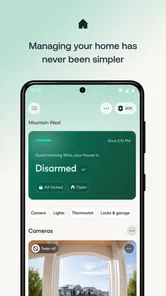
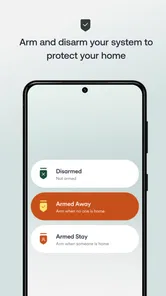
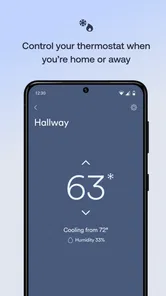
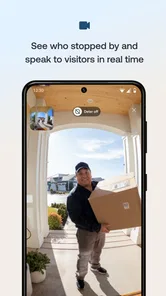
Analysis by Reviewed
When I judge a home-control app, I look beyond how many things it can put on a screen. I want to know whether the controls make sense when I’m in a hurry, what I can check before acting, and whether the app fits the equipment I already rely on. Vivint is a free House & Home app from Vivint Home, aimed at people who manage a Vivint smart home rather than anyone looking for a general-purpose controller. Its 4.3 average from around 142,000 ratings and more than a million installs suggest a substantial user base, but those figures don’t tell me whether it matches your setup. The key question is whether you want one place for your home routines and security-related checks.
Where trust starts: a system you already use
For me, trust here begins with the relationship between the app and the home system it controls. This isn’t an abstract dashboard that can promise to work with every brand; its usefulness depends on having a Vivint setup and compatible equipment. If you are choosing a home-security or automation system from scratch, compare the full service and equipment options, not just the phone app. If you already use Vivint, a single place to check and manage parts of that setup can be more practical than switching among separate device apps.
Controls are most useful when they fit a routine
The real value of remote control shows up in small moments: checking a door after leaving, adjusting a setting when plans change, or looking in on home while away. I’d treat those as convenient checks, not a reason to stop using ordinary habits such as confirming a door before bed. Before relying on any control, learn where it sits in the app and verify the result on screen; that simple routine helps avoid mistaking a tap for a completed action.
For a household, the useful question is also who will use the app and how comfortable they are with phone-based controls. A clear shared routine can reduce confusion, while several people changing settings without coordination can create it. I’d agree on who handles time-sensitive actions and show other household members how to check the current state rather than assuming everyone will interpret an alert or control the same way.
Privacy deserves a deliberate check
Home apps can touch sensitive parts of daily life, especially when they involve cameras, entry points, or notifications about activity. I wouldn’t assume a particular permission, data practice, or privacy choice without checking the current app and account screens. Before enabling access, review the permission prompts shown on your device, consider whether each requested access makes sense for the task you want to do, and inspect the account controls available to you. If a feature is optional for your household, leaving it unused is a reasonable choice.
I also recommend thinking through the phone itself: use a screen lock, keep access to the account limited to people you trust, and be careful about what appears in notification previews. Those are practical safeguards, not claims about the app’s security design. They matter because a home-control screen can reveal more than an ordinary shopping or entertainment app, and a shared phone may expose alerts to someone who doesn’t need them.
Your Home, Just a Tap Away
Imagine this: You’re on vacation, miles away from home, and suddenly you remember you forgot to lock the back door. No worries! With the Vivint app, you can lock it remotely in just a few taps. The app’s interface is incredibly user-friendly, designed to be intuitive even for those who aren’t tech-savvy. It’s like having your home in your pocket, ready to respond to your needs.
More From Our News Desk

 Block Blast!
 Makes Every Clear Feel Like One More Turn
A clean little block puzzle becomes a study in space, risk, and self-control. Its best moments come from one satisfying clear; its toughest test is knowing when to stop.

 Super Stylist Fashion Makeover
Super Stylist Turns Dress-Up into a Runway Career
Its makeover-to-client loop turns quick outfit decisions into shareable style theater. The question is whether the closet keeps giving players a reason to return.

 Block Craft 3D:Building Game
Block Craft 3D Under Pressure: How Well Does It Recover When Building Goes Wrong?
A failure-focused look at Block Craft 3D’s forgiving building loop, its uncertain recovery edges, and the moments that demand more than a cheerful village.

 Woodturning
 Trades Creative Freedom for a Satisfying Carving Loop
If your usual creative game is about building, decorating, or styling, Woodturning trades open-ended projects for a tactile, tightly guided carving loop. Here is what that switch really costs.

 PUBG MOBILE
 Shows What Battle Royale Must Get Right
PUBG MOBILE shows how battle royale has matured: bigger systems matter less than meaningful choices, readable fights, and a reason to return after every loss.

 Braindom: Brain Games Test
Braindom’s Social Life Happens Between Puzzles
Braindom turns quick logic traps into a personal ritual, but its community value is more about comparing answers than building together.
Latest News



Features That Stand Out
The app is packed with features that make managing your home a breeze. One of my favorites is the ability to control smart lighting. You can set schedules or adjust the lights remotely, making it look like someone’s home even when you’re not. Another gem is the integration with smart thermostats, allowing you to optimize energy usage and save on bills. It’s not just about convenience; it’s about efficiency too.
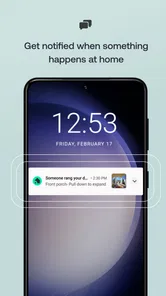
Security is another major highlight. The app provides live video feeds from your home security cameras, so you can keep an eye on things no matter where you are. Plus, you receive real-time alerts if something unusual is detected. It’s peace of mind, delivered right to your smartphone.
Personal Experience
I’ve been using the app for a few months now, and it has genuinely transformed the way I manage my home. The setup process was straightforward, and the app’s performance has been consistently reliable. One time, I was able to avoid a potential burglary by getting an alert and contacting the authorities instantly. It’s moments like these that make you appreciate having such technology at your disposal.
Also worth mentioning is the app’s integration with other smart home devices. Whether it’s Alexa, Google Assistant, or other IoT devices, it plays well with others, creating a cohesive smart home ecosystem. It’s like having a personal assistant that’s always on duty.
Daily use, version, and who should choose it
A practical routine is to check the home’s status before leaving, use lighting schedules for predictable absences, and reserve remote checks for exceptions rather than repeatedly watching a feed. For example, if an evening runs late, a quick look at a camera can answer a specific concern; it need not become a habit of monitoring every room. That distinction keeps the app useful without turning home management into another stream of phone notifications.
The current version is 25.11.401, and it requires Android 12 or later. The app is rated for Everyone and has been available since March 3, 2014. These details help with basic fit, but the more important decision is whether you are invested in the Vivint system. If you only want to control a few unrelated bulbs or thermostats from different brands, their manufacturers’ apps or a broader smart-home platform may be a simpler match. It makes more sense when your household already depends on its connected home setup.
Making remote controls work for real life
One useful way to approach a new home-control app is to decide what you want it to solve before filling your day with checks. If your main concern is remembering whether you secured the house, make that the first routine you learn. If you mainly want to manage lighting or climate, start with one predictable change and see whether the remote action fits your habits. This keeps the app from becoming a collection of controls you rarely use and makes it easier to spot when a setting or workflow is confusing.
For a realistic weekday, imagine leaving in a rush while another person is still getting ready at home. Instead of making repeated changes from outside, agree on who checks the home’s status and who handles any alert that needs attention. When plans shift later, use a remote control only after checking what the app shows, then confirm the resulting state. That sequence is a small but valuable safeguard: it prevents household members from acting on assumptions or duplicating each other’s actions.
Schedules also work best when they reflect a stable routine rather than a one-off plan. Lighting set for a regular evening absence may be useful, but an irregular trip calls for a quick review of the settings rather than blind confidence that an old schedule still fits. I’d treat automation as a starting point and remote controls as a way to handle exceptions. That balance is more dependable than expecting the app to make every decision for you.
Choosing it over separate device apps
Compared with managing each connected product through its own manufacturer’s app, a Vivint-centered setup can make sense when you want your home controls and security checks gathered around one system. The trade-off is that this convenience is tied to compatible equipment and the Vivint ecosystem. A brand-neutral smart-home platform may suit someone who wants to mix devices freely, while separate apps can be perfectly adequate if a household only has one or two simple connected products.
I’d also distinguish between a home app and a complete security plan. A live view or alert can help you understand what may be happening, but it cannot decide what response is appropriate, and not every situation will be clear from a phone screen. Before relying on remote monitoring, decide who can act, how they will verify an event, and what they should do if the picture is inconclusive. The app is most useful as part of that plan, not a substitute for one.
Potential users should also think about shared access. A household with several people may benefit from having a clear approach to account access and responsibilities, but each person should understand which actions they are expected to take. If you prefer not to manage home controls on a phone, or if other people in the household are uncomfortable with app-based access, the convenience may not outweigh the extra coordination. In that case, a simpler arrangement or a different system may be a better fit.
Where convenience has limits
Remote access is only reassuring when you can interpret what you see and know what action to take next. Alerts can prompt a check, but they do not replace judgment; a camera view may not explain every situation, and a notification should not automatically be treated as proof of an emergency. I’d decide in advance who in the household responds to important alerts and how they will verify what is happening. That plan is especially useful when someone else is home or when several people receive the same notification.
There is also a real trade-off between having many controls in one place and depending on a specific home ecosystem. If your equipment changes, or you prefer choosing devices independently, check compatibility and account options before building routines around the app. The same applies before travel: confirm that the controls you intend to use are familiar and that the right household members can access the account. A little preparation is more useful than discovering the workflow while you are away.
A cautious verdict for a connected household
Overall, if you’re looking for a smart-home app with security and household controls, this is a solid option for people already using compatible Vivint equipment. It brings routine tasks and remote checks together in a way that can be convenient, but the value depends on the wider setup rather than the download alone. If you’re ready to manage a connected home through your phone, it may suit you; if flexibility across unrelated brands matters more, another approach could be more comfortable.
I’d recommend it most to someone who already uses Vivint equipment and wants routine controls, camera checks, and alerts within one app. I’d hesitate if you are mainly shopping for a brand-neutral dashboard, are uncomfortable managing home access from a phone, or don’t want to review account and device permissions yourself. The app is free, but the useful experience depends on the wider home setup, so decide based on the system you intend to use rather than the download alone. For me, that is the fairest way to judge its convenience and trustworthiness.
Vivint Frequently Asked Questions
Does Vivint work on both Android and iPhone?
Vivint is a mobile app for controlling a Vivint Smart Home, so check the app store on your device for its current compatibility and installation requirements before downloading. The listed minimum operating system is version 12. The app is developed by Vivint Home, and its Everyone content rating makes it suitable for a broad audience.
Do I need Vivint smart home equipment to use the app?
Vivint is intended for controlling a Vivint Smart Home, so its main purpose is to manage a home setup associated with Vivint rather than serve as a general-purpose smart home controller. If you are considering downloading it, think about whether Vivint equipment and services are part of your household’s plans. The app’s value depends on having a Vivint home system to control.
Can I use the Vivint app when I’m away from home?
Vivint is designed to let users control their Vivint Smart Home from a phone, which can be useful when they are away from the house as well as when they are at home. What you can control will depend on the Vivint setup in your home. The app is a companion to that system, rather than a substitute for the equipment itself.
Is Vivint free to download, and what devices can run it?
Vivint is free to download and is intended for controlling a Vivint Smart Home. It is rated for Everyone, and the current version is 25.11.401. Before installing, check that your device runs iOS 12 or later, since that is the minimum operating system requirement. The app is developed by Vivint Home.
What is Vivint and what does it offer?
Vivint is a smart home automation app that allows users to control various aspects of their home environment remotely. It connects to Vivint's suite of smart devices, including security cameras, smart locks, thermostats, and lighting systems, giving users the ability to manage their home’s security and energy usage efficiently from anywhere via their smartphone. Its store summary describes it as a way to control your Vivint Smart Home with the next-generation Vivint App.
Pros
- User-friendly interface
- 24/7 customer support
- Customizable alerts
- Smart home integration
- Energy-efficient solutions
Cons
- Expensive subscription fees
- Complex initial setup
- Limited third-party integrations
- Occasional app crashes
- Inconsistent update schedule