Vidix-AI Photo Video Generator
- 550.00
- 4.2
- Installs
- 10.00M
- Price
- Free

Screenshots

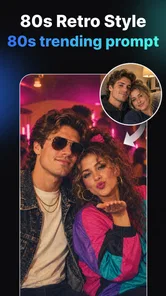

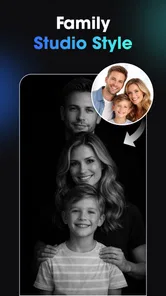
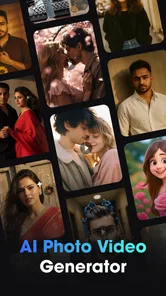

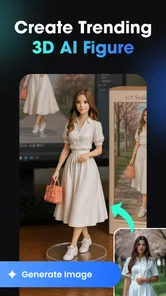
Analysis by Reviewed
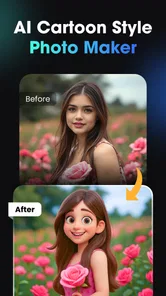
My first test with an AI photo app would not be a family portrait or anything I would be upset to lose control of. I would start with a harmless image, learn what the app asks me to do, and see whether the result earns a place in my camera roll. That cautious approach suits Vidix, an Art & Design app from Supercool Labs built around AI-generated visual transformations. I find it most compelling as a quick place to explore looks, rather than as a dependable archive, precision editor, or complete production studio.
Start with a low-stakes creative test
A useful first session is to choose a photo where a little unpredictability is acceptable: a landscape, a still life, or a casual portrait you have permission to use. Keep the original untouched, try one visual direction, and inspect small details before deciding whether to save or share the result. This simple habit makes it easier to spot when an effect has changed something important, such as facial features, lettering, or the shape of an object.
For example, if I have ten minutes before posting a weekend photo, I might use Vidix to explore a more imaginative treatment, then compare it with the unedited image on my phone. If the transformed version feels too artificial, I can leave it behind instead of trying to rescue it. If I like the mood but need the caption or layout to be exact, I can take the image into a separate design tool. The strongest workflow is often to use AI for a visual starting point, not to make it responsible for every finishing detail.
Creative play works best when you stay in control
I use this section to focus on the choices that make AI image-making feel manageable: starting with a low-stakes picture, keeping the original, and judging each result before sharing it. That approach is useful for creative experiments, but it does not answer every trust question on its own. Before choosing an image, I also consider what the app visibly asks me to allow and whether those choices suit the picture I have in mind.
What Vidix is good for
The appeal is immediacy. Rather than starting with a blank canvas and adjusting every detail, I can use an AI-driven style as a starting point and see how a familiar image changes. Filters and effects suit quick experiments, while the app’s focus on AI video and 3D art styles gives it a broader feel than a basic filter camera. It is designed for making visual variations, not for replacing the careful craft of drawing, compositing, or color grading.
That distinction matters. A generative result can be striking while still changing details I wanted to preserve. I would treat the output as an interpretation of the source, not as a faithful retouch. For a playful portrait, an imaginative profile image, or a visual to share with friends, that looseness can be the point. For a product photo, a portfolio piece that must match a brief, or an image where exact likeness is essential, it is a real limitation.
The app is free to install, and its Everyone age rating makes it broadly approachable. Its current version is 1.3.0, and it requires Android 7.0 or later. In-app purchases range from $0.99 to $79.99 per item, so I would check the purchase screen carefully before committing to any paid option. That range is wide enough that a casual user should decide in advance whether the free experience meets their needs rather than tapping through a prompt on impulse.
More From Our News Desk

Weather by Xiaomi Review: Clear at a Glance, Less Clear Up Close

X Under Pressure: Can It Recover When Posting Goes Wrong?

Clash of Clans Is Won Between the Battles

Android Auto Makes the Case for Quieter Car Software

MobiOffice: Transforming Mobile Productivity with Seamless Integration

EA SPORTS FC™ Mobile Soccer: Redefining Mobile Sports Gaming
Trust begins with what is visible
AI editing is a personal activity when the source image includes your face, family, home, or location. I would not assume that a creative effect tells me how an image is handled behind the scenes. The practical approach is to read the permission prompts and any privacy or account information shown in the app and make a choice based on what is actually presented there. A request should make sense for the action I am taking; if I am not comfortable with it, I can stop instead of granting access automatically.
This is not a claim that Vidix has a particular data policy or a particular permission setup. Those details should be judged from the current screens and terms available to the user, not guessed from the fact that the app uses AI. Before trying a personal photo, I would look for the available choices around selecting or sharing images, account use, and any consent prompts. My rule is simple: use an image you are comfortable submitting to the workflow you can see.
That caution is especially useful for people who handle client work or photos of children. A public-facing creative tool may be convenient, but convenience does not settle whether a particular image is appropriate to upload or process. For sensitive material, I would choose a workflow whose privacy terms and controls I have already reviewed, or use a local editor if that better fits the situation.
A practical workflow for everyday experiments
For a low-stakes test, I would begin with a copy of a photo rather than my only original. Pick an image with a clear subject and a simple background, try one style, and compare the result with the source before moving on. This makes it easier to judge whether the transformation improved the image or merely made it busier. Keeping the original separate also gives me an easy way back if the generated version distorts a face, text, or an important detail.
A realistic example: I take a casual portrait before meeting friends and want a more eye-catching image for a group chat. I would test a stylized look, inspect the face and background, and share only the version I actually like. If the effect changes the person’s features too much, I would switch to a lighter treatment or use a conventional editor for a small adjustment. That sequence is more reliable than assuming the first AI result will be the best one.
A second useful approach is to treat the app as an idea generator. I might create a few different visual directions for a social post, then use the strongest one as a reference while finishing the design elsewhere. This avoids asking a generative tool to solve every part of the job. It also helps when the output is visually exciting but needs accurate text, consistent branding, or precise layout that a dedicated design app handles better.
Where it fits among other creative apps
Compared with a standard photo editor, Vidix appears more focused on transformation than on detailed manual correction. Traditional editors are usually the better choice when I need dependable cropping, exact exposure adjustments, layers, or fine control over a particular region. Vidix’s attraction is the possibility of a more dramatic, style-led result without first mastering a long sequence of editing tools.
Compared with other AI image apps, the useful question is not which one promises the most effects, but which one gives me the right balance of control, output quality, and understandable choices. Vidix’s combination of photo and video generation gives it a broader creative pitch than a single-purpose portrait filter. Still, breadth does not guarantee that every style will suit every source image. I would try the kind of image I actually plan to use before relying on it for a regular project.
For video work, I would also keep expectations realistic. A tool that offers AI video creation can be attractive for short, expressive experiments, but anyone needing a precise edit, a carefully timed sequence, or a production-ready export should compare it with a dedicated video editor. Those apps are built around timeline control and repeatable adjustments; a generative approach is more about producing a visual concept or effect. The right choice depends on whether I value surprise or precision more for that task.
Popularity is context, not a privacy guarantee
Vidix has an average rating of 4.0 from around 111,000 ratings, with roughly 416 written reviews and more than 10 million installs. That level of adoption suggests many people have tried it, but it does not tell me whether a particular feature will suit my images or whether its data practices match my expectations. I use popularity as a reason to investigate an app, not as a substitute for reading its visible terms and making my own decision.
Its release date is November 27, 2025, so the version and available choices may evolve. I would review the current app screens rather than rely on an old description or assume a setting remains unchanged. This is especially sensible before using personal images or making an in-app purchase. A quick check of the wording on the screen is more useful than treating an earlier impression as permanent.
Who should try it, and who should pass
I would recommend giving Vidix a try if you enjoy experimenting with visual styles, want a quick way to make an ordinary picture feel more expressive, or need inspiration for a social graphic. It is also a reasonable fit for someone curious about AI-generated video and willing to judge each result rather than accept it automatically. Supercool Labs has positioned it for accessible creative play, and the free entry point makes a cautious first test possible.
I would skip it, or at least avoid using sensitive images, if I need complete control over how a source photo is changed, if I cannot accept unexpected alterations, or if I have not reviewed the choices presented around permissions, accounts, and data. It is also not my first pick for exact retouching, precise brand assets, or a video project that depends on detailed timeline editing. In those cases, a conventional photo or video editor is the more predictable tool.
Questions worth settling before you begin
Will the first try cost anything? The app is free to install, but paid options are available, so I would pause at any purchase prompt and decide whether the value is clear before proceeding. You do not need to treat a suggested upgrade as a requirement for evaluating whether the creative approach suits you.
Is it suitable for a child to explore? Its Everyone age rating means it is broadly rated for all ages, but I would still guide a child through image choices, sharing, and purchase prompts. An age rating does not replace a family decision about which pictures are appropriate to use or what spending controls are sensible.
Can it replace a regular editor? Not for every job. I would reach for a conventional editor when I need precise cropping, controlled corrections, or repeatable brand work. Vidix is a better fit when I want a stylized variation quickly and can accept that the output may reinterpret the source.
Should I use a personal photo? I would first review the permission, account, and consent choices visible in the app and consider whether the image is appropriate for that workflow. If I cannot make a comfortable decision, I would test with a non-sensitive image or choose a tool whose handling and controls I have already checked.
My cautious verdict
Vidix is most appealing when I treat it as a creative sketchbook: test a look, keep the original, and use the result only if it genuinely works. Its blend of AI imagery, effects, and video ideas offers an approachable route into visual experimentation, but the generative nature of the work means results can be less predictable than ordinary editing. I would start with a non-sensitive photo, inspect the permission and consent choices as they appear, and decide whether any paid option is worthwhile only after trying the workflow.
That makes Vidix a useful option for curious creators, not an automatic recommendation for every image or project. If you value playful transformations and are comfortable checking the choices in front of you, it is worth exploring. If privacy certainty, faithful likeness, or precise editing comes first, choose a tool whose controls and workflow you have verified for that need.
Vidix-AI Photo Video Generator Frequently Asked Questions
What is Vidix-AI Photo Video Generator?
Vidix-AI Photo Video Generator is an app designed to use artificial intelligence to turn photos into stylized images or short video creations. Depending on the tools available in your version, you may be able to choose an effect or template, add a photo, and let the app generate the result. Check the current app listing for the exact features, supported formats, and any regional limitations.
How do I create a video or image with Vidix?
The usual workflow is to select a creation tool or effect, choose a compatible photo from your device, and follow the on-screen prompts while the app processes it. Some effects may require a clear, well-lit image or a particular subject arrangement. Generation time and results can vary with the selected effect, your connection, and the app’s processing method, so review the preview before saving or sharing.
Is Vidix-AI Photo Video Generator free to use?
The app may offer some features at no cost while reserving other effects, higher usage limits, or exports for a paid plan or in-app purchase. Pricing and free-trial terms can change, so check the app store listing and the purchase screen before starting a subscription. Also review renewal and cancellation details carefully, since deleting the app alone generally does not cancel an active store subscription.
Do I need an internet connection, and what happens to my photos?
Some AI generation features may require an internet connection because processing can take place online; other functions may work locally, depending on the version and tool. Before uploading personal or sensitive images, read Vidix’s privacy policy and the permissions requested by the app. These explain how images and related data may be processed, stored, or shared, and whether you can request deletion.
Can I use and share creations made with Vidix?
You can typically save generated results and share them through compatible apps, but available export options may depend on the feature, account, or subscription. Before using a creation commercially or posting it publicly, check Vidix’s current terms and the rights associated with the original photo, music, templates, and generated content. Avoid uploading images of other people without their permission, especially when creating realistic or sensitive edits.
Pros
- Turns written prompts into short videos with minimal editing.
- AI-generated visuals make it easy to explore creative ideas.
- Useful for creating social posts and other shareable content.
- Combines photo and video generation in one app.
- Beginner-friendly workflow requires no video-editing experience.
Cons
- AI results may not match the prompt precisely.
- Generation times can vary depending on server demand.
- Free use may be limited by credits or daily quotas.
- Some outputs may contain visual artifacts or inconsistent details.
- Review subscription terms before paying for more generations.












