VA Video Connect
- 1.81K
- 4.4
- Installs
- 500.00K
- Price
- Free

Screenshots
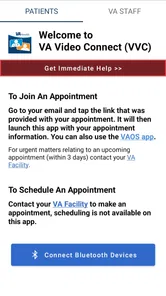
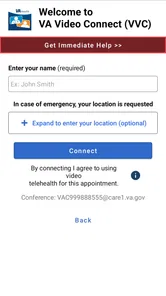
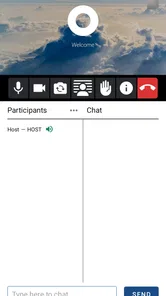
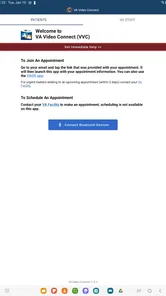
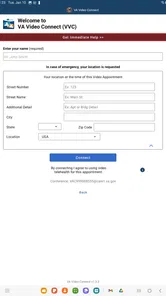
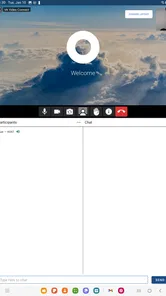
Analysis by Reviewed
What I value most about a VA video visit is the chance to speak with my care team without making the trip to a clinic. That can matter when travel is difficult, a concern feels manageable at home, or I simply want to use appointment time for the conversation rather than the journey. VA Video Connect is a medical app from the US Department of Veterans Affairs, built around that practical use: meeting with VA care providers by video.
Where a video visit fits
I see this as a useful option for appointments where talking through symptoms, questions, or next steps is the main point. It is not a substitute for every kind of care; if a clinician needs to examine something in person or arrange hands-on treatment, a video call cannot do that. The value is having another way to connect, not making clinic visits unnecessary.
For instance, if I had a scheduled conversation about how I have been feeling or wanted to clarify instructions after a previous visit, being able to join from home could save a tiring journey. I would still keep a short note of my questions nearby, just as I would for an office appointment. That small bit of preparation helps me use the call well and avoid remembering the important question only after it ends.
Making the appointment useful
A video appointment works best when the practical details are settled beforehand. I would choose a quiet, private spot, make sure my device is charged, and give myself a moment to get ready before the appointment time. If another person needs to help me with the device, arranging that in advance can keep the conversation focused on care rather than troubleshooting.
It is also worth thinking about what the clinician may need to see or discuss. I would keep relevant notes or medication details close at hand, rather than assuming I can retrieve everything during the call. A stable, comfortable setup matters more than a polished background: the point is to hear each other clearly and discuss the concern. If video is not working well or the issue needs an in-person assessment, contacting the care team about another arrangement is more sensible than forcing a poor visit.
Who benefits, and who may prefer another route
This approach is especially appealing to veterans who live far from a VA facility, have difficulty getting around, or want to avoid spending travel time on a conversation that can happen remotely. Compared with an ordinary phone call, video gives both sides a visual connection; compared with an in-person visit, it removes the trip but also removes the clinician’s ability to examine someone in the room. I would choose based on the purpose of the appointment, not assume one format is always better.
It may be less convenient for someone without a suitable device, a reliable connection, or a private place to talk. In those cases, a regular appointment or another option arranged with the care team may feel more dependable. I would also avoid treating a video visit as the right route for an urgent problem that needs immediate hands-on attention.
More From Our News Desk

 Block Blast!
 Makes Every Clear Feel Like One More Turn
A clean little block puzzle becomes a study in space, risk, and self-control. Its best moments come from one satisfying clear; its toughest test is knowing when to stop.

 Super Stylist Fashion Makeover
Super Stylist Turns Dress-Up into a Runway Career
Its makeover-to-client loop turns quick outfit decisions into shareable style theater. The question is whether the closet keeps giving players a reason to return.

 Block Craft 3D:Building Game
Block Craft 3D Under Pressure: How Well Does It Recover When Building Goes Wrong?
A failure-focused look at Block Craft 3D’s forgiving building loop, its uncertain recovery edges, and the moments that demand more than a cheerful village.

 Woodturning
 Trades Creative Freedom for a Satisfying Carving Loop
If your usual creative game is about building, decorating, or styling, Woodturning trades open-ended projects for a tactile, tightly guided carving loop. Here is what that switch really costs.

 PUBG MOBILE
 Shows What Battle Royale Must Get Right
PUBG MOBILE shows how battle royale has matured: bigger systems matter less than meaningful choices, readable fights, and a reason to return after every loss.

 Braindom: Brain Games Test
Braindom’s Social Life Happens Between Puzzles
Braindom turns quick logic traps into a personal ritual, but its community value is more about comparing answers than building together.
Latest News



Effortless Appointment Scheduling
First off, let’s talk about how VA Video Connect makes scheduling a breeze. Forget about those long waiting times on the phone trying to book an appointment. With just a few taps, you can set up a time to chat with your healthcare provider. It’s straightforward and user-friendly, which is a huge plus for those of us who aren’t tech-savvy. Plus, the app sends you reminders, so there's no chance you’ll miss out on your appointments.
Quality Virtual Consultations
Now, I know what you’re thinking – how good can a virtual consultation be? Pretty darn good, if you ask me! The video quality is top-notch, and it feels like you’re right there in the doctor’s office. You can discuss your health concerns just like you would in a face-to-face meeting. The doctors are attentive, and they make sure all your questions are answered. It’s like having a personalized healthcare experience without stepping out of your home.
Secure and Confidential
One of the biggest concerns with online health services is privacy. But, worry not, because VA Video Connect has got that covered. The app uses secure technology to ensure that all your information stays confidential. You can have peace of mind knowing that your health data is protected and only shared with your consent.
Moreover, the app is integrated with the VA’s electronic health record system, which means your medical history is right there for your doctor to review. This makes consultations more efficient and personalized. No need to repeat your medical history every time you have an appointment!
Accessibility and Convenience
What’s really impressive is how the app makes healthcare accessible to veterans living in remote areas. No more long drives to the nearest VA facility – all you need is a smartphone or tablet, and you’re good to go. It’s especially beneficial for those with mobility issues or who live far away from VA centers. You can literally have a check-up while sipping coffee in your kitchen!
Practical trade-offs before installing
The app is free, rated for Everyone, and has a 4.5 average from around 7,000 ratings; it has passed 500,000 installs. Those figures suggest that many people find a reason to use it, but they cannot tell me whether it fits a particular appointment. It was released in 2021, and version 1.11.4 supports devices running Android 10 or later. I would check that my phone meets the requirement before planning a visit around it.
One practical question is whether I can use it for any appointment with any clinician. I would treat it as a way to attend eligible video visits with my VA care team, not as a general-purpose telehealth service or an appointment-booking replacement for every kind of care. If I am unsure whether a planned visit can be held by video, I would confirm with the care team rather than assume the app changes the appointment format.
Another useful distinction is between joining a call and getting care. The app can make the connection more convenient, but it does not remove the need to explain symptoms clearly or follow up on advice. I would keep a written list of symptoms, questions, and any changes since the last visit, then note the clinician’s recommendations afterward. That creates a simple record for myself without expecting a video app to do the work of remembering for me.
The US Department of Veterans Affairs is the developer, and the app’s focus is deliberately narrower than broad video-call services: it is for connecting with VA care providers. That focus is a real advantage if I already receive care through the VA, because I am not trying to adapt a casual calling app to a medical appointment. If I need a face-to-face examination, immediate help, or a video conversation outside my VA care, a different route is the better fit.
A realistic visit from home
Imagine I have a routine follow-up on a day when getting across town would take more effort than the conversation itself. I can set aside a quiet room, charge my phone, and put my questions and medication details within reach before joining. That preparation is more useful than trying to make the room look like an office: it gives me a chance to focus on what has changed and what I need to ask. If another person is helping me with the device, I would have them nearby before the appointment begins rather than interrupting the consultation to find them.
After the call, I would take a minute to write down the advice and any next steps while they are fresh. This is a small but important habit for remote care, where I do not have the same physical cues as a clinic visit to signal that the appointment has ended. The app can help me reach the care team, but my notes help me carry the conversation into the rest of the day.
Choosing the right kind of contact
For a discussion that depends on seeing one another, video can be more helpful than a standard phone call. A phone conversation may be a better fallback if a connection struggles or a camera setup is uncomfortable, while an in-person appointment is the sensible choice when touch, a close examination, or hands-on care matters. General video-call apps may be familiar, but they are not a substitute for the VA-focused route when the purpose is a visit with a VA provider.
That distinction also answers a common concern: installing the app does not mean every health question can be handled through it. I would first check with my care team about whether the specific appointment is appropriate for video. If I cannot get a private space or dependable connection at the time, I would ask about another format rather than risk missing important parts of the conversation.
Small preparations that make a difference
One useful tip is to keep a brief appointment note in plain language: when the issue started, what has changed, and the main question I want answered. That is easier to scan during a call than a long list of details, and I can add other points if there is time. For medication questions, having the relevant information close at hand avoids relying on memory, especially if the visit is about a recent change.
I would also decide beforehand what I will do if the video connection becomes unusable. The practical answer is to contact the care team and arrange an alternative, not to keep trying indefinitely while the appointment passes. That backup mindset is particularly worthwhile for someone who depends on remote care because travel is difficult. The convenience is real, but it works best when I treat the video visit as one part of a care arrangement rather than the whole arrangement.
Who gets the most from it
The strongest fit is a veteran who already receives care through the VA and has an appointment suited to conversation, follow-up, or reviewing questions. Someone who lives far from a facility or finds travel physically demanding may gain more than someone who lives nearby and prefers the structure of an office visit. I would also consider whether the person is comfortable managing a video call; support from a family member or caregiver can help with setup, but the patient still needs a way to communicate privately if that is important to the visit.
On the other hand, I would not recommend relying on this as the only way to reach care if the person has no workable device, limited connectivity, or no suitable place to speak. It is also a poor match for a concern that may need urgent attention or a physical examination. In those situations, a call to the care team or an in-person route is more appropriate than trying to make video solve a problem it cannot address.
For Android users, the app is in the medical category and is free to install; it is intended for Everyone. The current version is 1.11.4 and requires Android 10 or later, so I would check the operating system before relying on it for an upcoming appointment. Its 4.5 average comes from around 7,000 ratings, alongside roughly 1,400 written reviews. Those figures offer a little context about use, but the more important question remains whether VA video appointments suit my care and setup.
In conclusion, VA Video Connect is a fantastic tool for veterans seeking convenient and accessible healthcare. It’s a blend of modern technology and healthcare, making life a tad bit easier for those who’ve served our country. So, if you’re a veteran, I’d say give it a shot – it might just be the healthcare solution you’ve been waiting for.
VA Video Connect Frequently Asked Questions
Who is VA Video Connect intended for?
VA Video Connect is intended for veterans who want to meet with their VA care team through a video visit. It is a medical app from the US Department of Veterans Affairs, and its focus is remote appointments rather than general-purpose video calls. If you are considering downloading it, think of it as a way to connect with your VA care team from a distance.
What is VA Video Connect and how does it work?
VA Video Connect is a telehealth application developed by the Department of Veterans Affairs (VA) that allows veterans to connect with their healthcare providers through secure video conferencing. It is designed to facilitate convenient and efficient healthcare services remotely. Users can download the app on their mobile devices or access it via a web browser, enabling them to have virtual appointments with VA healthcare professionals.
Is VA Video Connect secure and private?
Yes, VA Video Connect is designed with security and privacy in mind. The app uses secure video conferencing technology that complies with federal security standards to ensure that all communications between veterans and healthcare providers are protected. Users need to log in with their VA credentials, and all sessions are encrypted to maintain confidentiality and privacy.
What devices are compatible with VA Video Connect?
VA Video Connect is compatible with a wide range of devices. It can be accessed through a web browser on desktops and laptops, as well as on mobile devices such as smartphones and tablets. The app is available for download on both Android and iOS platforms, making it versatile and accessible for most veterans seeking telehealth services. On Android, the app requires version 10 or later, so check your device’s operating system before installing.
Do I need to pay to use VA Video Connect?
No, VA Video Connect is a free service provided by the Department of Veterans Affairs. The app is designed to offer veterans convenient access to healthcare without incurring additional costs. However, users should be aware that data charges may apply depending on their mobile plan if they are not connected to Wi-Fi during their video sessions.
Pros
- Easy setup and user-friendly interface.
- Secure and encrypted communication.
- High-quality video and audio.
- Supports multiple participants.
- Available on both Android and iOS.
Cons
- Requires stable internet connection.
- Limited features for free version.
- Occasional connectivity issues.
- No desktop version available.
- Battery consumption can be high.