UMR | Health
- 209.00
- 4.4
- Installs
- 100.00K
- Price
- Free

Screenshots

Analysis by Reviewed
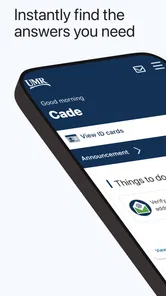
When I look at UMR | Health, I see a practical benefits companion rather than a general wellness app. It is designed for the moments when health coverage information is useful but rarely easy to remember: checking what your plan may cover, finding details while arranging care, or keeping benefit information close when you are away from home. My overall view is positive, with one important qualification: its value depends heavily on whether your healthcare benefits are connected to UMR. If they are, this free medical app can make routine administration less frustrating. If they are not, it is not the right tool.
That focused purpose is also its clearest strength. UMR | Health is developed by UNITED HEALTHCARE SERVICES, INC., and its store summary presents the app as a way to keep health benefits available while moving through daily life. I would not treat it as a replacement for a doctor, an urgent-care service, or a symptom-checking product. I see it as a digital doorway into the practical side of healthcare: the information that helps you understand and use coverage before, during, and after an appointment.
What using UMR | Health feels like in everyday healthcare
The first thing I would recommend is setting up the app before you actually need it. Healthcare administration becomes stressful when it is handled from a waiting room, a pharmacy counter, or a phone call with a provider’s office. Having the app ready gives you a better chance of checking benefit information calmly, rather than trying to reconstruct your plan from memory. That preparation is a small habit, but it is where this kind of app earns its place.
A realistic example is a routine appointment that turns into a question about coverage. You may know which clinic you want to visit but not remember the relevant benefit details. Instead of searching through old messages or opening a paper document, you can use UMR | Health as the first place to look. I would still confirm important financial or clinical questions with the appropriate healthcare provider or plan contact, but the app can reduce the initial uncertainty and help you ask a more precise question.
That distinction matters. Benefits information and medical advice are not the same thing, and the app’s medical category should not lead anyone to expect diagnosis or treatment guidance. I found the most sensible way to think about it is as an administrative health tool. It supports decisions around using coverage, not decisions about whether a symptom is dangerous or which treatment is medically correct.
The app is also better suited to planned care than emergencies. If someone is experiencing a serious or rapidly worsening symptom, opening a benefits app should not delay emergency help. In that situation, immediate medical attention comes first. UMR | Health becomes useful afterward, when you need to organize coverage details or understand the practical next step in a non-urgent situation.
The strongest reason to keep it installed
Convenience is not just about speed. In healthcare, it is also about having the right information at the right point in a process. A benefits app can be more useful than a general search engine because a web search may produce broad explanations that do not apply to your particular plan. UMR | Health is aimed at your benefits relationship, so its role is more personal than simply searching for an explanation of insurance terminology.
More From Our News Desk

Weather by Xiaomi Review: Clear at a Glance, Less Clear Up Close

X Under Pressure: Can It Recover When Posting Goes Wrong?

Clash of Clans Is Won Between the Battles

Android Auto Makes the Case for Quieter Car Software

MobiOffice: Transforming Mobile Productivity with Seamless Integration

EA SPORTS FC™ Mobile Soccer: Redefining Mobile Sports Gaming
I especially like the idea of using it as a preparation tool. Before arranging care, I would open it to refresh my understanding of the relevant benefit information. Before speaking with a provider’s billing office, I would use it to make sure I was asking about the correct part of my coverage. After an appointment, I would keep it available for follow-up administrative questions. This three-stage workflow—prepare, confirm, follow up—is more useful than treating the app as something to open only when a problem appears.
Another non-obvious benefit is that it can help separate two questions that people often mix together: “Is this service medically appropriate?” and “How might my benefits apply to this service?” The first belongs with a clinician. The second belongs with plan information and the relevant administrative channels. Keeping those questions separate makes conversations clearer and reduces the temptation to treat an app as an authority on medical decisions.
There is also a memory advantage. Health benefits are full of terms that are easy to confuse, particularly when you are handling several appointments or family responsibilities at once. I would rather check the current information in an app than rely on a note I wrote months ago. That does not eliminate the need to read carefully, but it gives the process a more dependable starting point.
Where it fits better than usual alternatives
The usual alternatives are paper benefit documents, a browser-based member portal, customer service by phone, or asking a provider’s office to explain what may apply. Each option has a place. Paper is useful when you need a record that does not depend on a device. A browser portal can be better when you are already working on a larger screen or need to handle several account tasks. Phone support remains important when your situation is unusual or the written information is unclear.
UMR | Health makes the most sense between those options. It is more portable than paper, more immediate than waiting on a phone call, and potentially more relevant than a general internet search. I would not say it replaces the member portal or support line. Instead, it can reduce how often you need them for straightforward questions and help you arrive at a support call better prepared.
That trade-off is important for people who prefer a complete desktop experience. If you regularly compare documents side by side, save detailed records, or manage complicated family coverage, a larger screen may be more comfortable. A mobile app is strongest when you need a quick reference while away from a desk. It is less convincing as the only place you manage every aspect of healthcare administration.
The app’s public reception supports the impression that it is useful to many members. It holds a 4.5 average from around 2.4 thousand ratings, with over 100 thousand installs. Those figures suggest a meaningful audience and a generally favorable response, but I would not read them as a guarantee that every plan or every user will have the same experience. Benefits tools are personal by nature: the usefulness of the information depends on the member relationship behind the login.
The friction I would want users to understand
The biggest limitation is not a flashy missing feature; it is the app’s narrow eligibility. UMR | Health is valuable when it connects to your UMR benefits. Someone looking for broad health education, medication reminders, exercise tracking, appointment booking across unrelated providers, or urgent symptom guidance should choose a different kind of app. Installing it simply because it appears in the medical category would create the wrong expectation.
There is also a potential trust issue whenever an app presents benefit information. People may assume that a screen showing coverage settles every billing question. In practice, healthcare charges can depend on details such as the service, provider, timing, and the way a claim is processed. I would use the app to orient myself, then verify anything that could affect a significant payment or an important care decision. That is not a criticism unique to UMR | Health; it is a sensible boundary for digital benefits information.
Another point of friction is the difference between having information available and understanding it. A benefits app can put plan language within reach, but insurance language is still insurance language. If a term is unfamiliar, I would not guess based on a short phrase. I would note the exact wording, compare it with the related plan material, and contact the appropriate support channel when the answer matters. The app can make the question easier to ask, but it cannot make every healthcare rule simple.
Mobile convenience can introduce its own trade-offs. A phone is excellent for checking something while travelling or standing at a reception desk, but it is not always ideal for reading long explanations. I would use the app for quick orientation and keep more detailed review for a quiet moment. If you are responsible for another person’s benefits, you should also be especially careful about selecting the correct member information before relying on what you see.
Version 2.31.0 is the current version, and the app requires an operating system version of 9 or later. That makes compatibility a practical consideration for anyone using an older phone. I would check the device requirement before planning to depend on it during a trip or appointment. A benefits app is most helpful when it is installed, accessible, and already working—not when you discover a compatibility problem at the worst possible time.
Small workflows that make it more useful
My first tip is to use UMR | Health before a healthcare task, not only during one. A few minutes of preparation can help you identify what you need to clarify. Write down the exact question you still have, such as whether a particular type of visit falls under the benefit you are reviewing. This turns the app from a passive information shelf into a preparation aid.
My second tip is to treat it as a conversation tool. If a provider’s office gives you a confusing answer, refer back to the benefit wording you reviewed and ask them to explain which part of the charge they are addressing. You may still need to contact UMR, but precise questions are usually more productive than saying only that you are unsure about coverage.
My third tip is to avoid using it as a substitute for keeping important healthcare records. The app may help you access benefit information, but I would still retain relevant appointment details, provider communications, receipts, and claim paperwork in an organized place. That creates a useful division of labor: the app helps you check current benefits, while your own records preserve the history of what happened.
A fourth useful habit is to review the app when your healthcare routine changes. Starting with a new provider, planning a procedure, or taking on responsibility for a family member can expose gaps in your understanding of coverage. I would use those transitions as prompts to revisit the relevant information rather than waiting for a bill to reveal that I misunderstood something.
Who should choose it—and who should skip it
I would recommend UMR | Health to people whose benefits are administered through UMR and who want a mobile way to stay oriented. It is especially suitable for users who dislike carrying paper documents, frequently move between home and appointments, or want a quick reference before calling support. It can also help people who are comfortable doing a little preparation themselves instead of asking a provider’s office every basic benefits question.
It is a reasonable choice for someone who wants a free, focused tool rather than a crowded health platform. The Everyone age rating also makes it broadly approachable from an age-classification perspective, although the actual usefulness still depends on the member’s plan and the person managing the account. I would see it as most valuable for adults handling their own benefits or helping coordinate routine healthcare administration for a household.
I would skip it if you are looking for clinical guidance, fitness coaching, medication tracking, telehealth, or a universal insurance wallet. I would also choose a browser portal or direct customer support first if you need to examine many documents at once, resolve a disputed claim, or discuss a complicated coverage exception. In those cases, the app may be a helpful reference, but it should not be your only channel.
Price is another easy point in its favor: the app is free. That removes the usual subscription decision, but it does not remove the need to decide whether it serves your particular benefits relationship. A free app that does not apply to your coverage is still unnecessary clutter. For the intended user, though, the lack of a purchase barrier makes it sensible to try and evaluate during a calm moment, before a healthcare issue makes the need urgent.
My final assessment
UMR | Health is best understood as a focused benefits companion, not a complete healthcare manager. In my experience-based assessment, its strongest contribution is reducing the distance between having health coverage and actually knowing where to begin when using it. The app can support preparation, clearer questions, and faster access to plan-related information while you are away from a computer.
Its limitations are equally clear. It cannot replace medical professionals, emergency services, detailed support conversations, or careful review of significant billing questions. Users who expect a broad collection of wellness and clinical tools will likely find it too narrow. Users who are connected to UMR and mainly need benefits information in a portable format are the people most likely to appreciate its design.
With a 4.5 average and a growing audience, it has earned a credible place among dedicated health-benefits apps. I would install it if UMR manages my coverage, prepare it before an appointment, and use it as a first reference rather than a final authority. That is a modest role, but an important one: when healthcare administration becomes confusing, a focused tool that helps me start with the right information is genuinely useful.
UMR | Health Frequently Asked Questions
Is UMR | Health free, and which devices can run it?
UMR | Health is a free medical app from UNITED HEALTHCARE SERVICES, INC. It is intended for Android and iOS devices, with the Android version requiring Android 9 or later. Before downloading, check that your device’s operating system meets the requirement and that you are installing the official app. Having a compatible device does not replace the need for eligible UMR plan access to use member features.
Who develops UMR | Health, and how well is it rated by users?
UMR | Health is developed by UNITED HEALTHCARE SERVICES, INC. It has an average rating of 4.5 from around 2.4 thousand ratings, with about 208 written reviews. User ratings can give you a general sense of other members’ experiences, but the app’s usefulness will depend on whether its available tools match your plan and whether you can sign in successfully.
What is UMR | Health used for?
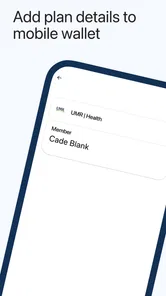
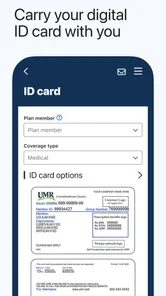
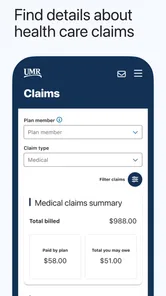
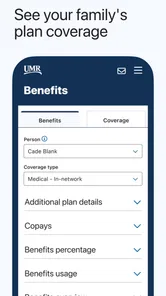
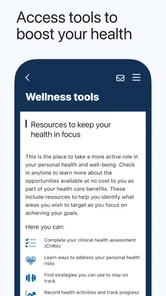
UMR | Health is a member-focused healthcare app designed to help eligible UMR health plan participants manage important insurance information from a mobile device. Depending on your plan, you may be able to view coverage details, access digital identification cards, review claims, search for care providers, check benefits, and find contact information for member support. Available tools can vary by employer and plan.
Can I use UMR | Health if I am not a UMR member?
The app is primarily intended for people enrolled in a participating UMR health plan, along with eligible dependents who have access to their member credentials. You will generally need your UMR login information or registration details to use personalized features. If your employer recently changed plans or your account is not recognized, contact UMR or your benefits administrator before assuming the app is unavailable.
What information and features can I access in the app?
After signing in, the available sections may include your member ID card, plan and deductible information, claims history, explanation of benefits details, provider search, benefit summaries, and customer service contacts. The exact experience depends on the plan configured by your employer. Some features may redirect you to a secure website or require additional verification for privacy and security.
Pros
- Quick access to personal health records and medical information.
- Convenient tools for tracking health data in one place.
- May help users prepare for appointments with organized information.
- Useful health resources can support better daily decisions.
- Simple digital access reduces reliance on paper documents.
Cons
- Some features may depend on regional healthcare system support.
- Requires careful handling of sensitive personal health information.
- Data accuracy depends on what users and providers enter.
- Not a substitute for professional medical advice or emergency care.
- Account or identity verification may be required before full access.













