NYC Employees PPO Plan
- 11.00
- 4.7
- Installs
- 10.00K
- Price
- Free

Screenshots
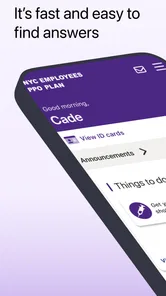
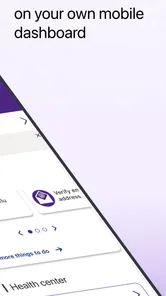
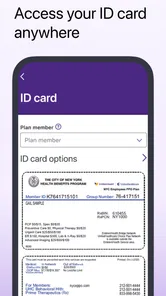
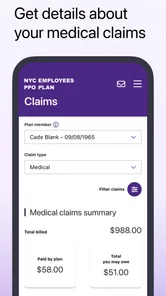
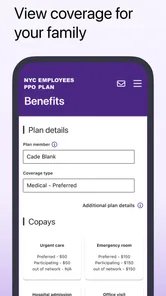
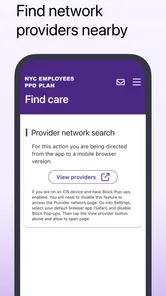
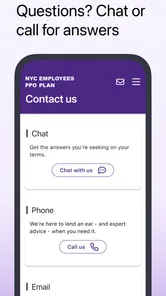
Analysis by Reviewed
Choosing a health-plan app is different from choosing a general wellness tracker. I look first at whether it is tied to the coverage I actually use, whether it reduces the need to carry paper information, and whether it helps during an ordinary appointment rather than simply looking polished. The NYC Employees PPO Plan app is built for a specific audience: members of the NYC Employees PPO Plan who have already received their member ID card. That narrow focus is both its main strength and its biggest boundary.
In my experience, this is best understood as a digital access point for an existing medical plan, not as a replacement for a doctor, a pharmacy app, a symptom checker, or a broad personal-health dashboard. It belongs in the medical category, is free to download, and is published by UNITED HEALTHCARE SERVICES, INC. The app is aimed at Everyone, so the interface is intended for general use rather than a specialist clinical audience.
The key decision is simple: if your healthcare coverage is the NYC Employees PPO Plan, this app deserves a place on your phone after your member ID card arrives. If you are looking for general health advice, fitness tracking, or access to an unrelated insurance plan, installing it will not solve that problem.
What I would check before relying on the app
The first practical step is confirming that your member ID card is available. The app’s purpose is connected to membership, so downloading it before you have the card may not give you a useful starting point. I would keep the physical or digital card nearby during setup, because the information on it is likely to be the reference point for accessing the plan area.
This requirement also tells me how to judge the app fairly. A general-purpose health app can be opened by almost anyone and explored immediately. This one is more like a secure doorway into a particular benefit arrangement. Its value depends less on how many unrelated tools it contains and more on whether it gets a covered member to the right plan information with less friction.
For a new member, I would install it at home rather than waiting until standing at a clinic reception desk. That gives me time to sign in, check that the account is recognized, and understand where the member information is located. A few minutes of preparation can matter when an appointment is already running late.
I would also treat the app as one part of my healthcare routine rather than my only source of information. Medical coverage can involve the member card, provider conversations, billing documents, and plan communications. A mobile app can make access more convenient, but it does not remove the need to read what a provider or plan administrator tells you about a particular service.
More From Our News Desk

Weather by Xiaomi Review: Clear at a Glance, Less Clear Up Close

X Under Pressure: Can It Recover When Posting Goes Wrong?

Clash of Clans Is Won Between the Battles

Android Auto Makes the Case for Quieter Car Software

MobiOffice: Transforming Mobile Productivity with Seamless Integration

EA SPORTS FC™ Mobile Soccer: Redefining Mobile Sports Gaming
A realistic appointment-day workflow
Imagine that I am heading to a medical appointment and realize that I left my wallet at home. With a plan-specific app already set up, I can open the digital access point and look for the member information I need instead of turning around immediately. Whether the office accepts the on-screen information is ultimately up to that office, but having the plan available on my phone gives me a practical backup.
There is another useful scenario: I am speaking with a provider’s office by phone and need to refer to my coverage details. Rather than searching through an email thread or a drawer for paperwork, I can open the app while I am on the call. That does not guarantee that every question will be answered inside the app, but it can make the conversation more organized.
I would keep the app easy to reach, but I would not assume that a phone screen is always enough. Phones can lose battery, reception can be poor, and some offices may still ask for information in a particular format. My practical advice is to keep the member ID card accessible as a backup, especially for an important appointment or a first visit with a provider.
Why the plan-specific approach can be useful
The strongest advantage here is focus. A broad insurance marketplace or a general health organizer may contain many plans, accounts, and unrelated tools. That variety can be helpful when someone manages several kinds of coverage, but it can also make a simple task harder to find. A dedicated NYC Employees PPO Plan app has a clearer reason for existing: give eligible members a direct way to access their plan after receiving their card.
This focus may also make the app easier to explain to another household member. Instead of saying, “Open this general health app and look through the insurance section,” I can point to the app associated with the specific employee PPO plan. That is a small distinction, but it matters when someone is helping a parent, partner, or dependent prepare for an appointment.
The app’s public reception is encouraging without being a reason to install it blindly. It holds a 4.7 average from roughly 174 ratings, while its reach is still relatively modest at over 10 thousand installs. I read that combination as a sign that people who find the app relevant tend to respond positively, but I would not treat it as proof that every member will have the same experience on every device.
What I would not expect it to replace
I would not install this expecting a symptom diagnosis tool, medication reminder, exercise coach, or personal medical record in the broad sense. Nothing about its identity suggests that it is designed to compete with those categories. If my main goal is tracking blood pressure, logging meals, or discussing symptoms, a dedicated health app or direct medical advice would be more appropriate.
I also would not assume that having the app means every insurance question is resolved instantly. Plan access and medical decision-making are different things. A digital member card or account view can help identify coverage, but a provider may still need to confirm eligibility, authorization, or billing details through the normal process.
That distinction is important because it prevents disappointment. The app can be valuable even if it is not a complete healthcare command center. I judge it by the job it appears designed to perform: helping members reach their NYC Employees PPO Plan information from a mobile device.
How it compares with the usual alternatives
The most obvious alternative is using the physical member ID card alone. That remains the simplest option for people who rarely need to access their plan information and are comfortable carrying the card. It has no battery requirement and does not depend on a login session. For those users, the app may feel unnecessary.
The app becomes more appealing for people who often leave their wallet behind, manage appointments from a phone, or want a second way to reach their plan information. The trade-off is that a phone-based option introduces its own small points of friction: installation, account access, device availability, and the need to keep the phone charged.
Another alternative is a general insurer or healthcare portal. That type of service may be a better fit for someone who wants several insurance relationships, broader account management, or a wider collection of health tools in one place. The downside can be a busier experience, especially when the user only needs information connected to this particular PPO plan.
There is also the provider’s own patient portal. I would use that for appointment messages, clinical documents, and communication with a doctor’s office when those functions are offered there. I would not confuse it with a plan-access app. The provider portal and the insurance plan serve different purposes, and keeping those roles separate can make healthcare tasks easier to organize.
For people who prefer calling customer service, the phone remains a reasonable alternative. A conversation may be better when the question is complicated or involves a disputed bill. The app is more attractive for quick access and self-service moments, while a phone call may be better when I need an explanation rather than a piece of information.
Where this app wins the comparison
It wins when the user is already part of the intended plan and wants a plan-specific mobile option. The narrow audience avoids the confusion that can come with downloading an app designed for an entirely different insurance product. It also gives the member a way to keep plan access close at hand without relying exclusively on a paper card.
It is especially sensible for people who make appointments across different locations or who help coordinate healthcare for someone else. In those situations, reducing the number of physical documents to search through can be worthwhile. I would still verify what a particular office accepts, but the app can serve as a convenient reference during the process.
The current release is version 1.8.0, and it supports operating system version 9 or later. That makes checking the phone’s software compatibility an important step before assuming installation will be smooth. Someone using an older device may be better served by the physical card or an official browser-based route if one is available to them.
Where another option may fit better
I would choose a broader healthcare portal if I needed to manage multiple types of information in one account and the plan-specific app did not cover those tasks. I would choose a provider portal when my immediate need involved messages from a clinic or records held by that clinic. I would choose direct customer service when the issue involved a complicated eligibility or billing question.
I would also skip this app if I am not enrolled in the NYC Employees PPO Plan. Its name and purpose are too specific for it to be useful as a general medical resource. Downloading a free app is not automatically worthwhile when the underlying membership does not match.
People who dislike managing accounts on a phone may reasonably stay with the member card. The app is not automatically better simply because it is digital. Its advantage appears when mobile access solves a real inconvenience; otherwise, it can become another application to maintain without adding much value.
The real cost of switching from paper access
Switching from a physical card to an app is inexpensive in money because the download is free, but the time cost is not zero. I would need to install it, complete the access process, confirm that I can reach the plan area, and learn where the useful member information appears. That setup is a one-time investment, but it is still worth considering for someone who only visits a doctor occasionally.
There is also a habit cost. I would need to remember to keep my phone charged and know how to open the app when I am under pressure. A paper card is familiar and immediate. The best approach, in my view, is not to discard the card at once. I would use the app as a convenient digital companion until I know it works reliably for my routine.
Switching between apps can create a different kind of friction. If I already use a general insurer portal, adding a plan-specific app may mean remembering another login or deciding which application contains which information. The benefit is strongest when this app gives me a faster path to the exact plan details I need, rather than duplicating a function I already use comfortably elsewhere.
Small habits that make it more useful
I would set up access before the first appointment after receiving the member ID card. That is more useful than waiting for a receptionist to ask for information. I would then open the app once at home and make sure I understand the basic route to my member information, rather than assuming I will remember it months later.
I would also keep a secure backup of essential membership information according to my own privacy preferences. I would not place sensitive details in an unprotected note or send screenshots casually. The convenience of mobile access should not encourage careless sharing, particularly when a phone is used by multiple people.
For family healthcare, I would clarify whose plan information is actually available through the account before relying on it for another person’s appointment. A plan-specific application may be excellent for the enrolled member while being less convenient for coordinating several people. In that case, keeping each person’s documentation organized may still be necessary.
Finally, I would update the app through the normal official app-store process and pay attention to whether the phone meets the minimum operating-system requirement. Since the app is relatively new and has a focused audience, I would give myself a fallback plan for an appointment rather than making it the only way I can present coverage information.
My recommendation for NYC Employees PPO Plan members
I recommend the app to eligible members who have received their member ID card and want a convenient mobile route to their plan. The combination of a free download, a focused purpose, and a strong average user rating makes it a sensible addition for people who regularly manage appointments from their phones. The fact that the developer is UNITED HEALTHCARE SERVICES, INC. also makes the app’s connection to the plan clear rather than ambiguous.
My recommendation is more cautious for people who rarely use healthcare services, prefer paper documentation, or already have a reliable official portal that covers everything they need. In those cases, installing another app may not improve the experience enough to justify the extra setup. I would also recommend skipping it for anyone outside the intended plan, because its value is tied to membership rather than general medical use.
For me, the best way to use NYC Employees PPO Plan is as a prepared backup and a convenient everyday access point, not as a complete substitute for the member card, a provider portal, or customer support. Install it after receiving the card, test it before an appointment, keep your device compatible with the required operating system, and retain another way to show your coverage.
That makes the decision fairly straightforward. If the plan matches your coverage and mobile access would remove an actual hassle, I would install it. If you want broad health tracking or clinical tools, I would look elsewhere. As a focused medical app for NYC Employees PPO Plan members, it seems most valuable when used for exactly what it is: a direct, practical companion to an existing employee health plan.
NYC Employees PPO Plan Frequently Asked Questions
Do I need a member ID card before using the NYC Employees PPO Plan app?
Yes. Access to the NYCE PPO app is available after you receive your member ID card, so keep it nearby when you are ready to get started. The card is also useful for identifying your plan and finding the member details needed for access. If you have not received your card yet, contact the plan through its usual member support channels.
Is the NYC Employees PPO Plan app free, and what devices can run it?
The app is free to download and is listed for devices running iOS 9 or later. Before installing, check that your device’s operating system meets that requirement and that you have enough storage available. The app is intended for members who have received their member ID card; downloading it does not by itself establish plan membership or guarantee access to member features.
What is the NYC Employees PPO Plan app used for?
The NYC Employees PPO Plan app is designed to help eligible New York City employees and covered dependents manage health plan information in one place. Depending on the available features, users may be able to review benefits, find participating providers, access identification details, check claims or coverage information, and contact member support. It is primarily a convenience tool and does not replace official plan documents or customer service assistance.
Who can use the NYC Employees PPO Plan app?
Access is generally intended for members enrolled in the NYC Employees PPO Plan, including eligible City employees, retirees, and covered dependents where applicable. Registration may require information from your health plan identification card, such as a member ID or group number. Eligibility is determined by the plan administrator, so downloading the app alone does not guarantee access to every feature or confirm enrollment.
Can I use the app to find doctors and check whether services are covered?
The app may provide tools for locating in-network physicians, hospitals, pharmacies, or other healthcare facilities, depending on the version and services supported by the plan. It can also help members review general benefit information. However, provider participation and coverage can change, and search results may not explain every authorization or limitation. Confirm important treatment details directly with the plan before receiving care.
Pros
- Offers broad provider access across New York City and nationwide.
- No referral is generally required to visit many specialists.
- Includes coverage for preventive care and routine checkups.
- Useful for employees who value flexibility in choosing doctors.
- May provide out-of-network benefits for added treatment options.
Cons
- Out-of-network care can lead to higher deductibles and unexpected bills.
- Premiums and copays may vary depending on the selected plan option.
- Finding in-network providers may require checking the current directory.
- Some treatments and services require prior authorization.
- Plan eligibility is limited to qualifying NYC employees and dependents.













