Twinkly
- 2.27K
- 4.5
- Installs
- 500.00K
- Price
- Free

Screenshots
Analysis by Reviewed
I like decorative lighting that can be adjusted to suit a room rather than left on one fixed setting, and that is the main reason Twinkly caught my attention. It is a free home app from Twinkly for shaping the look of compatible smart lights, with an emphasis on mapping them so custom effects fit the decoration. That approach makes it more interesting than a basic color remote, though it also means the experience depends on having the right lights and spending some time setting them up.
What the app is built to do
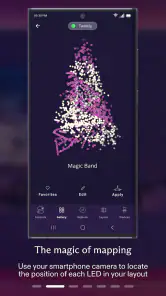
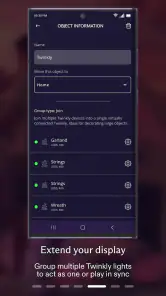
Twinkly sits in the House & Home category, and its central idea is to make decorative lights feel like part of the room rather than a string with a color slider. Mapping helps the app understand how the lights are arranged, so an effect can follow their physical layout. I find that especially useful on a tree, a wall display, or another arrangement where a pattern looks better when it follows the shape instead of appearing as an arbitrary wash of color.
The app is rated for Everyone and has an average rating of 4.5 from around 34,000 ratings, with more than 500,000 installs. Those figures suggest a well-established audience, but they do not remove the practical question a new user should ask: do you already own compatible Twinkly lights, or are you choosing a lighting system from scratch? If you only need a simple lamp control, this level of customization may be more than you want.
Getting Started with Twinkly
So, first things first, let's talk about setting up. Now, I won't sugarcoat it; getting everything synced can be a bit of a process. But trust me, once you get past the initial setup, it's smooth sailing. You'll need to download the app and connect it to your Wi-Fi, which is pretty standard for smart devices these days. The app itself is available for both Android and iOS, so no one's left out in the cold.
Mapping, effects, and a useful first setup
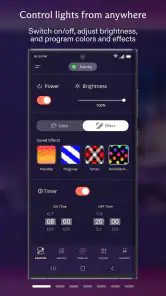
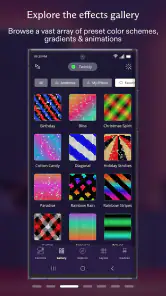
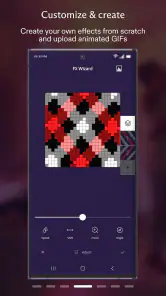
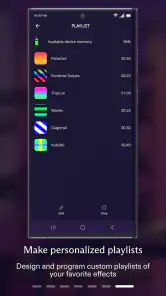
Once you're in, the real fun begins. The app offers a treasure trove of features that let you customize your lighting to your heart's content. You can choose from a variety of pre-set effects, or if you're feeling particularly creative, you can design your own. The app allows for an impressive range of colors and patterns, making it possible to craft the perfect ambiance for any occasion.
My practical advice is to treat the first mapping session as part of installing the decoration, not as a job to squeeze in while guests are arriving. Take care over how the lights are arranged before mapping, then try a simple effect and check whether it follows the layout as expected. If you move the decoration later, the old map may no longer describe where the lights are, so it is worth checking the result again rather than assuming every pattern will still land neatly.
That workflow is where this app differs from the usual smart-light alternative. A basic controller is quicker when all you want is a steady color or a quick brightness change; Twinkly is more compelling when the physical arrangement matters and you want effects designed around it. The trade-off is clear: a little planning can make the display feel far more intentional, but casual users may prefer a simpler control app.
More From Our News Desk

Clash of Clans Is Won Between the Battles

Android Auto Makes the Case for Quieter Car Software

MobiOffice: Transforming Mobile Productivity with Seamless Integration

EA SPORTS FC™ Mobile Soccer: Redefining Mobile Sports Gaming

How Microsoft OneDrive Became a Mobile Productivity Giant

How Google Translate Breaks Language Barriers Effortlessly
Everyday use and the learning curve
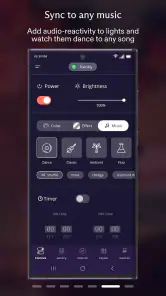
One of the features I find particularly nifty is the music sync. You can have your lights dance along to your favorite tunes, which is a real hit during parties. Just imagine the lights pulsing in time with the bass drop—it's like having your very own light show right in your living room.
For an ordinary evening, I would keep a calmer effect ready for the room and save music sync for a gathering, rather than making every use a setup project. That distinction matters: a decorative display can be part of daily home atmosphere, while a reactive show is best when people are actually watching. If you are buying lights mainly for quiet, reliable illumination, a conventional smart bulb may be a better fit than a system focused on visual effects.
Now, let's talk about the user experience. The app is pretty intuitive, though it can feel a bit overwhelming at first glance due to the sheer number of options. But don't worry, you don't need to be a tech wizard to use it. The interface is user-friendly, and once you spend a little time playing around with it, you'll get the hang of it.
Connecting new devices is generally straightforward. However, I did hit a minor snag with the app occasionally losing connection. It was nothing a quick restart couldn't fix, but it's something to keep in mind, especially if you plan on using it during an event.
Version, continuity, and remaining friction
The app has been available since October 27, 2016, and its current version is 3.27.3. That long-running history gives existing owners a reason to see it as an ongoing companion to their lighting rather than a one-off seasonal download. At the same time, a version number alone does not tell me which changes matter most in day-to-day use, so I would judge an update by whether it improves the setup or effect workflow I actually rely on.
If you already have a mapped decoration that looks right, I would avoid changing several things at once when exploring new effects. Save or keep track of the look you like, then experiment with one adjustment at a time. That makes it easier to return to a dependable setup if a new pattern is too busy or a connection hiccup interrupts the session. It is a small habit, but it is useful when the app offers more creative choices than you want to manage during a busy evening.
The main limitation is not that the app lacks things to try; it is that customization asks for attention. A person who wants lights to work as a set-and-forget accent may find mapping and occasional reconnection more effort than the payoff warrants. I would also test the setup well before a party or holiday display, since a last-minute connection issue is more frustrating when the lights are meant to be the centerpiece.
Making a display work in a real home
A useful way to decide whether mapping is worth the effort is to start with one display that has a clear shape. A tree is a good example: a flowing effect can make its outline feel deliberate, while a flat, single-color setting may look much like it would on any ordinary string. For a small accent tucked behind furniture, the difference may be harder to notice. I would spend setup time where the lights are visible from across the room, not automatically on every decorative strand.
There is also a practical difference between arranging lights for appearance and arranging them for a map. When you can, settle the cable and decoration before mapping, then avoid casually shifting individual sections afterward. If a display must be moved, check the effect again in its new position. This is a simple way to prevent a pattern that looked coherent in one arrangement from seeming scattered in another.
For a typical evening at home, I would choose a restrained effect before settling in, then leave the app alone unless I wanted a change. Before hosting, I would test the chosen look and connection while there is still time to adjust. Music-reactive lighting can add a playful focal point during a gathering, but it need not be the default for dinner or winding down. Thinking about when the display will actually be watched helps keep the setup useful rather than turning every evening into a lighting experiment.
Choosing it over simpler lighting
Compared with the usual smart bulb app, Twinkly is aimed at a different job. A bulb controller is often the sensible choice for everyday room illumination: set a color, adjust the brightness, and move on. This app makes more sense when the lights themselves are the decoration and you care about patterns fitting their physical layout. It is not automatically a better choice; it is a more specialized one.
That distinction matters when shopping for a whole home. If you want one straightforward control method for ordinary lamps, a system built around general lighting may be less fiddly. If you already own compatible lights, or have a prominent seasonal display that would benefit from tailored effects, the free app is a reasonable place to explore the controls. I would check compatibility before buying lights specifically for this experience, rather than assuming every smart string or bulb will work with it.
People who enjoy making a display feel personal are likely to get more from the app than people who want the lights to disappear into the background. It rewards a little patience and visual curiosity. On the other hand, if you dislike configuring connected devices, rarely change the look of a room, or need lighting primarily for practical visibility, the extra creative layer may not justify the setup.
Who will enjoy it, and what to watch
I would recommend Twinkly to people who enjoy arranging seasonal displays, decorating a room for events, or tweaking color and pattern until a setup feels personal. It makes the most sense when you care about how an effect travels across a physical decoration, not just which color is selected. If your priority is dependable basic lighting, or you do not want to spend time configuring a display, a simpler smart-light option is likely the more comfortable choice.
Before committing to a particular setup, check that the lights you plan to control are compatible with the app and give yourself time to map them in their final arrangement. For a household with several decorative displays, it is also worth deciding which ones genuinely benefit from custom effects; not every corner needs a mapped light show. The free app is an easy way to explore the control experience if you already have the matching lights, but the app itself is only one part of the overall lighting setup.
For existing owners, the long-running app history is reassuring as context, but I would still approach each new version in a practical way: keep the current setup that works in mind and see whether the changes help with the displays you actually use. The current release is version 3.27.3; that establishes where the app stands now, not what future changes will bring. Rather than rebuilding a carefully arranged display just to explore, I would make one change at a time and check the result before relying on it for a special occasion.
One question worth answering before setup is whether the lights will stay in one place or be moved often. A fixed tree or wall arrangement is a natural fit for mapping because its layout remains stable. Portable decorations can still be enjoyable, but moving them may mean checking whether the effect still matches their arrangement. If you regularly pack away and rebuild a display, factor that extra attention into your decision.
What I would keep an eye on
For a new user, the most useful things to watch are the initial connection, how accurately an effect follows the mapped layout, and whether the controls feel comfortable after the first session. For an existing owner, I would pay attention to whether updates make those everyday tasks more predictable. Those are more meaningful signs of progress than a version number by itself, because they directly affect whether the lights are pleasant to use when you are short on time.
I would also be realistic about the role of the app: it can shape the presentation of compatible lights, but the quality of the result depends on the physical display and where it sits in the room. A strong effect on a carefully arranged feature can be impressive; the same effort may be wasted on lights hidden behind a cabinet. Choosing the right display to map is therefore as important as choosing a pattern.
Final Thoughts
In conclusion, Twinkly has revolutionized the way we think about decorative lighting. It's not just about turning lights on and off anymore; it's about creating an experience. Whether you're decking the halls for the holidays or just want to add some flair to your everyday decor, this app offers a plethora of options to play with.
Sure, it has its quirks, but the ability to personalize your lighting setup makes it all worth it. If you're someone who loves to tinker with tech and has an eye for design, this is definitely an app worth exploring.
So, go ahead and give it a try. Who knows, you might just find yourself getting lost in the glow of your own personal light show.
Twinkly Frequently Asked Questions
Can I use Twinkly without creating an account?
If you are deciding whether to download Twinkly, it helps to know that the setup flow described for the app includes creating an account before connecting your lights. The app is designed as a control and customization companion for compatible Twinkly smart lights, so its main features are tied to managing a physical light display rather than using the phone on its own.
What should I check before downloading Twinkly?
Check that your phone runs Android 9 or later and that you have compatible Twinkly smart lights to manage. The app is free and intended for home decoration, with a focus on mapping lights so effects can be customized across a display. If those basics fit your setup, you can install the app and use its guided process to connect and personalize your lights.
Can I use Twinkly to control lights when I am away from home?
Twinkly is built around controlling compatible lights from its app, but the experience described here centers on connecting and managing the lights through the setup process. Before relying on it for remote control, consider whether your intended use is simply changing effects at home or managing decorations when you are elsewhere. The app’s central purpose is creating and adjusting looks for your physical light display.
Is the Twinkly app free, and which devices can install it?
Twinkly is a free House & Home app for controlling compatible Twinkly smart lights. It is rated for everyone, and the current version is 3.27.3. The app supports devices running Android 9 or later, making it worth checking your device’s operating system before downloading. Its main appeal is turning compatible lights into mappable decorations that can be personalized from a phone.
What is Twinkly and how does it enhance my holiday decorations?
Twinkly is a smart LED light application that allows users to create stunning and customized lighting displays for holidays and events. It connects with Twinkly's range of LED lights, enabling you to control colors, patterns, and animations directly from your smartphone. With its user-friendly interface, you can easily transform your home into a festive wonderland, making your decorations stand out with vibrant and dynamic effects.
Pros
- User-friendly interface
- Wide range of customizable lighting options
- Syncs with music for dynamic effects
- Compatible with voice assistants
- Frequent software updates
Cons
- Requires stable internet connection
- Can be pricey for larger setups
- Limited offline functionality
- App can be slow with older devices
- Setup can be complex for beginners
- Category
- House & Home
- Version
- 3.27.3









