TV Cast: Anycast in smart view
- 1.97K
- 4.4
- Installs
- 10.00M
- Price
- Free

Screenshots


Analysis by Reviewed
I like the simple idea behind TV Cast: Anycast: moving something from a phone to a television can make it easier to share, especially when several people are watching. It is a House & Home app from TV Master - Smart TV Remote Control, aimed at casting and sharing content on a larger screen. The name suggests a broad casting tool, but I’d treat it as a practical option to try rather than assume it will work identically with every TV and phone.
What the free option means
The app is free to install, which makes trying it a low-commitment first step. There are in-app purchases priced from $3.99 to $19.99 per item, so some paid options may be offered. I wouldn’t count on a particular feature being included or decide the app is worth paying for until I’ve checked what the current purchase screen says and whether the free access meets my needs.
That distinction matters: “free” is useful when I only need occasional casting, but it doesn’t tell me which parts of the experience require payment. If I were installing it for a one-off visit or to share a few photos, I’d start without buying anything. For frequent use, I’d first test the exact TV-and-phone combination I plan to rely on, then judge any purchase against that routine.
How it fits into everyday TV sharing
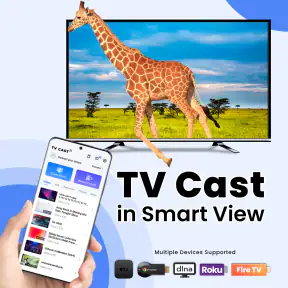
Ever found yourself in that situation where you have a bunch of friends over, and everyone’s huddled around your tiny phone screen trying to watch the latest viral video? Well, that’s where TV Cast: Anycast swoops in like a superhero. This handy app lets you stream your phone content straight to your TV, making those gather-around-the-screen moments a thing of the past.
Setting Up and Getting Started
Getting started with TV Cast: Anycast is as breezy as a summer afternoon. All you need is a smart TV and your trusty smartphone. Simply download the app, and follow the easy-peasy setup guide. It's designed to connect seamlessly with a variety of smart TVs, making it super versatile. I mean, I’m no tech wizard, but even I found the process straightforward.
In practice, I’d approach setup as a compatibility check, not a guarantee. The useful test is to try the TV you actually use, then cast a short clip or photo before planning a whole evening around it. If the TV doesn’t appear or the connection is unreliable, checking that the phone and television are on the same home network is a sensible first troubleshooting step for casting apps. I would also keep the TV’s own casting options in mind: a built-in feature may be simpler if it already handles the content I want.
Features You’ll Love
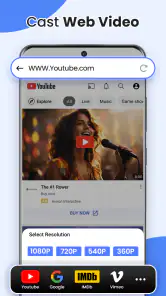
Let’s dive into the features because this app is packed with them! First off, it supports a vast range of video formats, which means whether it's a movie night or a binge-watch session of your favorite series, you’re covered. Plus, the streaming quality? Crisp as a fresh apple. The app makes sure you’re not missing out on any details, delivering high-definition quality right to your TV screen.
More From Our News Desk

Clash of Clans Is Won Between the Battles

Android Auto Makes the Case for Quieter Car Software

MobiOffice: Transforming Mobile Productivity with Seamless Integration

EA SPORTS FC™ Mobile Soccer: Redefining Mobile Sports Gaming

How Microsoft OneDrive Became a Mobile Productivity Giant

How Google Translate Breaks Language Barriers Effortlessly
For a more reliable movie night, I’d test the exact file and length of video I intend to watch before guests arrive. A quick clip is not the same as a full film: longer playback gives me a chance to notice buffering or interruptions, while a file test reveals whether that particular format behaves as expected. I’d also keep the phone charged and nearby, since it is the source of the content and the playback controls. These small checks are more useful than assuming that a broad format claim guarantees every file will play perfectly.
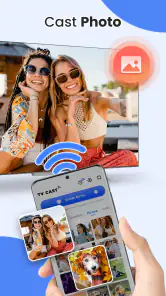
The everyday value is not limited to films. For example, after a family trip, I could bring up a handful of photos on the TV so everyone can look together and comment without passing a phone around. For a recipe, enlarging a page or video can make it easier to follow from across the kitchen, though I’d test whether that content casts cleanly before relying on it. These are modest jobs, but they explain why casting can be more convenient than emailing files or crowding around one display.
Another cool feature is the app’s compatibility with multiple devices. Got an Android phone today and planning to switch to iOS tomorrow? No worries! The app has you covered on both fronts, so you won't have to hunt for a new app when you change devices.
It is listed for Android with a minimum operating system requirement of Android 5.0, and the app is rated for Everyone. The developer is TV Master - Smart TV Remote Control. The current version is 5.7.1, and the app has been available since September 17, 2020. Those details make it easier to judge whether it fits an older Android phone, while the actual TV connection still deserves a quick test.
User Experience
The user interface is another win for TV Cast: Anycast. It’s intuitive, clean, and very easy to navigate. Whether you’re a tech-savvy individual or someone who just dabbles with technology, you’ll find it friendly and straightforward.
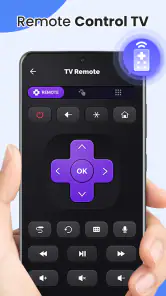
One of the things I personally love is the ability to control playback directly from your phone. It's like having a remote control in your pocket, and let's be honest, we all know the struggle of losing the actual TV remote. Now, you can pause, play, or skip without the frantic search under the couch cushions.
That phone-based control has a practical trade-off: the handset remains part of the viewing setup, so I wouldn’t lend it out or put it away if I still need to manage playback. In a shared home, it helps to decide who is operating the stream before everyone settles in. When the TV’s own remote offers direct access to the service you want, that remote may be less fiddly for a long session; this app is most appealing when the content starts on the phone.
Who is likely to get value
I’d consider this app if I often need to show phone-stored media to a small group, want a quick way to put a clip on a bigger screen, or would rather try an app before paying for a separate casting device. It has an average rating of 4.4 from around 152,000 ratings, with roughly 2,000 written reviews and over 10 million installs. That scale suggests it has attracted a large audience, but it cannot promise that a particular television will connect smoothly in my home.
I’d skip it if my television lacks compatible casting support, if I need a guaranteed connection for an important presentation, or if the content I watch is already easier to open directly through the TV’s own apps. Compared with a manufacturer’s remote or built-in casting feature, a third-party app can be handy for phone-first sharing, but it adds another step and may be less dependable on a device combination I have not tested. Someone who needs a stable, repeatable setup may prefer the TV maker’s own tools or a dedicated casting device.
A useful test before relying on it
One practical way to decide whether the app fits your home is to test more than one kind of content during the first session. I’d try a photo, a short video, and the particular source I expect to use most. That separates a basic connection problem from a content-specific one: if a photo appears but a video does not, I know the TV is at least being found, while the video workflow still needs attention. This small comparison can save time later, especially if I’m setting it up for family rather than troubleshooting alone.
I’d also try the same task using the television’s built-in casting or app controls. The point isn’t to run a complicated benchmark; it’s to see which route takes fewer steps and behaves more predictably with the content I care about. If the TV’s own option already opens the service directly, reaching for a phone app may add little. If my goal is to show a file or photo that lives on the phone, the casting app has a clearer role.
For a casual get-together, I’d prepare the content in advance rather than browse for it while everyone waits. A short album or a chosen clip is easier to manage than searching through a crowded camera roll on the spot. I’d keep the phone within reach and let one person handle playback, too; otherwise, someone can accidentally interrupt the stream while trying to use the handset for something else. These aren’t special features, but they make phone-to-TV sharing feel much smoother.
Where the alternatives make more sense
The main alternative is often already in the room: the television’s own casting function or the app built into its smart-TV interface. That route is usually the first one I’d try for regular viewing from a streaming service, because it avoids making the phone the center of a long session. It can also be more convenient when several people want to browse or control playback without handing one person’s phone around.
A dedicated casting device may make more sense for someone who casts frequently and wants a consistent setup across viewing sessions. It brings an extra purchase and another device to manage, so I wouldn’t recommend it automatically for someone who only shares a few photos now and then. The app’s appeal is that I can test a phone-based approach before deciding whether a separate device would genuinely improve my routine.
There is also a difference between sharing media and mirroring everything on a phone. If I only need to show a handful of pictures, a focused casting workflow is preferable to putting every notification or phone activity on the living-room screen. Before sharing around guests, I’d select what I want to show and avoid switching into private apps mid-session. That’s a simple privacy-minded habit, not a claim that the app provides special privacy controls.
Final Thoughts
In a world where we’re increasingly consuming media on-the-go, TV Cast: Anycast bridges the gap between small screens and big screens effortlessly. Whether you’re streaming a blockbuster movie or your latest vacation photos, this app ensures that your media is displayed in full glory. It’s a must-have for anyone looking to enhance their media sharing experience. So next time you have friends over, don’t keep them squinting at your phone; cast it to the big screen with ease.
To sum it up, if you’re in the market for an app that makes screen mirroring a breeze, look no further. Give TV Cast: Anycast a try, and you might just wonder how you ever lived without it.
My own verdict is more measured: the free install makes it reasonable to test, while the optional purchases mean I’d check the value of any paid tier before committing. I’d keep it if it proves dependable with my television and saves me effort in ordinary sharing. If it struggles with my setup, the built-in TV option is the better choice. The app is most worthwhile as a convenient bridge from phone to screen, not as a substitute for checking compatibility first.
For me, the decision comes down to frequency and friction. Someone who occasionally wants to show a clip to visiting relatives can get a useful trial without paying upfront. A household that relies on casting every night should judge it against the built-in TV route over several ordinary sessions, not just one successful test. If the phone remains tied up, connection hiccups become a pattern, or a paid option is needed for the intended routine, I’d compare that cost and effort with alternatives before making it part of daily viewing.
The strongest reason to keep it is convenience in those phone-first moments: a camera-roll photo, a clip someone sent, or content that is easier to find on the handset than on the television. The strongest reason to skip it is equally practical: if the TV already handles the same content directly, another app may not improve anything. I’d start free, verify the exact workflow at home, and only spend if the app consistently solves a problem I actually have.
TV Cast: Anycast in smart view Frequently Asked Questions
Can TV Cast: Anycast mirror my phone screen, or does it only cast media files?
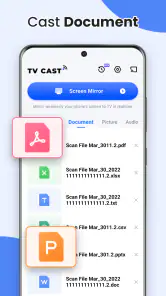
TV Cast: Anycast is presented as a way to share files and multimedia from a mobile device to a larger TV screen. The store summary emphasizes casting and smart view, so it may suit people who want to show media on a TV. The exact casting options can depend on the phone and receiving device, so check what your TV supports before relying on a particular use.
Will I need to create an account or sign in before using TV Cast: Anycast?
TV Cast: Anycast is designed around connecting a mobile device with a smart TV or compatible streaming device for casting. If you are deciding whether to install it, keep in mind that the main practical requirement is having a compatible receiver and a wireless connection. Check the app’s setup flow when you first open it for any prompts related to permissions or account access.
Can I cast videos, photos, and other files with TV Cast: Anycast?
The app’s purpose is to share multimedia and files from a phone or tablet to a larger TV screen. Its store summary specifically describes sharing files to a TV, while the app description highlights casting videos and photos. The formats and playback behavior may vary with your TV or streaming device, so confirm that the receiver supports the content you plan to display.
Does TV Cast: Anycast work without Wi-Fi or an internet connection?
TV Cast: Anycast connects a mobile device to a smart TV or compatible streaming device wirelessly, and the devices generally need to be on the same Wi-Fi network for casting. That means a suitable local wireless connection is important for using its main features. Whether particular online content plays also depends on the source and your network, so consider your setup before downloading.
What devices and operating systems can I use with TV Cast: Anycast?
TV Cast: Anycast is an app for casting media from a mobile device to a smart TV or compatible streaming device. It is available for Android and iOS, and the Android version requires Android 5.0 or later. Before downloading, check that your phone or tablet meets the relevant system requirements and that your TV or streaming device supports wireless casting.
Pros
- Supports multiple streaming protocols.
- Easy setup with intuitive interface.
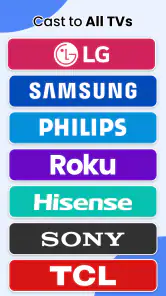
- Works with various smart TV brands.
- Stable connection with minimal buffering.
- No additional hardware required.
Cons
- Limited free features in basic version.
- Occasional connectivity issues.
- Ads in free version can be intrusive.
- Not all file formats are supported.
- Requires compatible TV for full functionality.
- Category
- House & Home
- Version
- 5.7.1











