TV remote control for Roku
- 4.21K
- 4.6
- Installs
- 10.00M
- Price
- Free
Screenshots
Analysis by Reviewed
Ever found yourself in that classic situation where the remote is missing, and the show is about to start? Well, if you’re a Roku user, the TV remote control for Roku app might just be the lifesaver you need. Let me walk you through my experience with this nifty little tool, which has been a real game-changer for my TV habits.
Why Go Digital?
We’ve all been there—frantically searching under couch cushions or beneath piles of laundry for the remote. Enter the TV remote control for Roku app, which transforms your smartphone into a remote control. Honestly, it's like having a magic wand in your pocket, ready to zap away those missing remote blues. Plus, it’s super convenient when you’re hosting friends and want to impress them with your tech-savvy skills.
Setting Up the App
Getting started with the app was a breeze. I just downloaded it from the app store, and within minutes, it was synced with my Roku device. All I needed was to make sure both my phone and the Roku were connected to the same Wi-Fi network. No tech degree required here, folks! Just a few taps and I was in business.
Features That Make It Shine
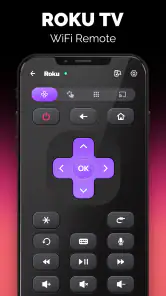
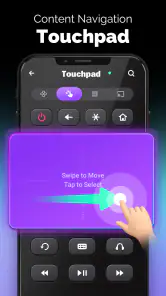
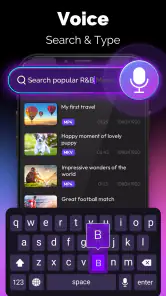
What I love about this app is its user-friendly interface. It mimics a traditional remote, so there’s no steep learning curve—just straightforward functionality. You get all the standard buttons like play, pause, rewind, and fast forward, but there’s more! The app also lets you use voice commands. Just imagine saying "Play Stranger Things" and voila, your binge-watching session commences!
Another cool feature is the ability to use your phone’s keyboard for typing. Searching for your favorite shows or entering passwords is now a breeze, especially if you dread the painstaking task of scrolling letter by letter on the TV screen.
Performance and Reliability
During my time with the app, it performed without a hitch. The response time was almost instantaneous, which is crucial when you're trying to skip those pesky ads. Plus, it didn’t drain my phone’s battery life as I initially feared. A relief for those of us who rely heavily on our devices throughout the day.
Final Thoughts
If you’re a Roku user, this app is honestly a must-have. It’s not just about replacing a lost remote; it enhances the entire viewing experience. The convenience, the ease of use, and the added features make the TV remote control for Roku app a stellar addition to anyone’s digital toolkit. So, next time you’re in a remote bind, remember that your smartphone is more than just a phone—it’s your new best friend in TV control!
Pros
- Easy setup process for quick use.
- Compatible with all Roku TV models.
- User-friendly interface design.
- Supports voice commands for convenience.
- Free to download and use.
Cons
- May occasionally lag or disconnect.
- Ads can be intrusive at times.
- Limited features in free version.
- Requires stable internet connection.
- No support for older TV models.
- Category
- Tools
- Version
- 4.7











