Trip.com: Book Flights, Hotels
- 3.09K
- 4.7
- Installs
- 50.00M
- Price
- Free

Screenshots




Analysis by Reviewed
I find Trip.com: Book Flights, Hotels most useful when I want to compare the main parts of a trip without juggling several travel sites. It is a free travel-planning app from Trip.com, and its reach makes it a familiar option: it has over 50 million installs and a 4.7 average from around 716,000 ratings. Those figures suggest plenty of travelers use it, but what matters to me is whether its screens and booking flow work for the person actually planning and taking the trip.
Readable planning, with a lot to scan
The app brings flights, places to stay, car rentals, and local tours into one place. That can reduce the mental load of keeping separate searches open, especially when I am comparing an arrival time with a hotel check-in or trying to build a rough itinerary. The trade-off is that a broad travel app has plenty of information to show. When I am tired or in a hurry, I prefer to slow down and check the details on each result rather than assume the first suitable-looking option is the right one.
For a more manageable search, I would decide the essentials before opening the results: travel dates, acceptable departure times, and the kind of stay I need. Then I can compare options against a short list instead of repeatedly changing direction. This is particularly helpful when planning with another person, because it gives us a clear basis for choosing rather than sending a stream of loosely comparable listings back and forth.
Using it across different abilities and situations
In everyday use, a straightforward layout can help people who do not want to learn a complicated booking system. Trip.com is rated for Everyone, and its current version is 8.39.0, with support for devices running Android 7.0 or later. Those details make it broadly approachable as an app, though they do not by themselves tell me how every screen will work with a particular device, assistive setting, or individual need.
Travel planning also happens in less-than-ideal conditions: on a crowded train, in bright sunlight, with one hand free, or while coordinating with family. I would avoid making a rushed booking in those moments. Search and comparison can happen on the move, but I would pause somewhere calm to verify passenger names, dates, airport or station details, and the terms attached to the booking before confirming. That small habit is more useful than relying on an app to prevent every mistake.
Your One-Stop Travel Shop
Picture this: you’re planning a trip to a destination you’ve always dreamed of. Isn’t it a hassle to hop between different apps and websites trying to piece everything together? Enter Trip.com. This app is a one-stop shop for all your travel needs, offering everything from flight bookings to hotel reservations. It's like having a travel agency right in your pocket!
Flights, Hotels, and More
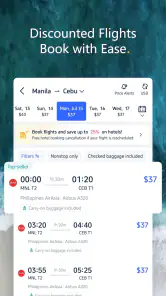
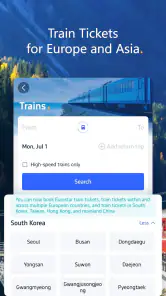
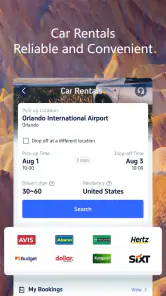
One of the standout features of Trip.com is its comprehensive approach to travel planning. The app allows you to search for and book flights with ease, covering an extensive range of airlines worldwide. Not only that, but it also offers a vast selection of hotels, ensuring you find the perfect place to rest after a long day of adventure. And if you're feeling adventurous, you can even explore car rental options and local tours directly through the app!
More From Our News Desk

Weather by Xiaomi Review: Clear at a Glance, Less Clear Up Close

X Under Pressure: Can It Recover When Posting Goes Wrong?

Clash of Clans Is Won Between the Battles

Android Auto Makes the Case for Quieter Car Software

MobiOffice: Transforming Mobile Productivity with Seamless Integration

EA SPORTS FC™ Mobile Soccer: Redefining Mobile Sports Gaming
What I love most is how user-friendly the interface is. You don’t need to be a tech wizard to navigate through it, and everything is laid out intuitively so you can focus on what matters most: enjoying your trip!
Why It Stands Out
With so many travel apps out there, you might be wondering what sets Trip.com apart. For starters, it offers some of the best deals around, thanks to its partnerships with airlines and hotels across the globe. The app is constantly updated with the latest promotions, helping you snag a bargain deal on your travels.
Another standout factor is its real-time notifications. Imagine getting instant updates about your flight status or hotel booking. It's a real game-changer, especially when you're on the move and need to adjust plans on the fly.
Making the choice with care
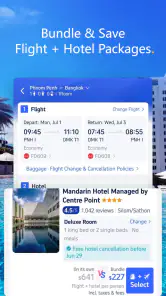
For a weekend away, I would use the app to shortlist a flight and hotel together, then compare the total cost and practical details before committing. A low fare is not automatically the best fit if its timing makes the journey difficult, and a hotel that looks appealing may not suit the route or schedule. Treating the app as a place to compare, rather than a reason to book quickly, helps keep convenience from becoming pressure.
Compared with searching airline and hotel sites one by one, Trip.com is appealing when I want a single starting point and a joined-up view of travel options. Going directly to an airline or hotel can be preferable when I already know exactly where I want to book or want to deal with that provider’s own booking process. For complex trips with several constraints, I would still cross-check the final details with the relevant provider before payment.
Putting the search to work
A useful way to use the app is to separate discovery from commitment. I might first browse flights to see which departure windows are realistic, then look for accommodation that fits those times. Once I have a short list, I can revisit each option and compare the details that affect the actual day: whether the arrival is late, whether the lodging location makes sense for my plans, and whether the booking conditions fit my flexibility. This two-pass approach is less exciting than grabbing the first appealing result, but it is much less likely to leave me with an awkward itinerary.
For a family trip, I would also agree on a few non-negotiables before sharing options: a manageable arrival time, a hotel location everyone can use, and a total budget that includes the whole group’s needs. That makes the app’s range more useful, because it narrows a broad search into a decision the group can discuss. If someone has limited energy or finds extended screen time difficult, I would avoid asking them to review every listing; I would bring a small, clear shortlist instead.
Everyday travel, not just holiday planning
The app can be useful even when I am arranging a straightforward trip rather than building a big itinerary. Imagine I need to attend an event in another city: I can compare travel times with nearby stays, then save the final checks for when I am not walking between errands or trying to follow a conversation. A travel app is most helpful in that situation when it reduces scattered searching, not when it encourages me to make a decision while distracted.
I would treat the itinerary as a practical reference, but I would still keep the key booking details somewhere I can find them independently. Before leaving, I would check the confirmation, dates, traveler names, and the relevant provider’s instructions. This is especially sensible if plans change, because an alert can draw attention to an update but does not replace reading what the booking actually says.
Where it may not be the right fit
Someone who values a very minimal interface, already has a preferred airline and hotel, or needs a booking flow tailored to a specific accessibility setup may find a narrower provider app easier. A broad selection is useful, but it also means more choices to review. I would also avoid treating notifications as a substitute for checking the booking itself: alerts are helpful prompts, while the itinerary and confirmation remain the details I would rely on.
Trip.com has been available since July 31, 2013, and its 3.1K reviews sit alongside a much larger body of ratings. For me, that makes it an established option worth trying, not a guarantee that every search or booking will suit every traveler. Its strongest case is convenience across flights, hotels, and extras; its weakest is that convenience can tempt people to skim details they should read carefully.
Comfort and access in real conditions
For readability, I find it helps to approach each search with one task in mind. If I am choosing a flight, I focus on the timing and terms first; I leave accommodation comparisons for a separate pass. That reduces the amount of information competing for attention. People who use larger text, screen readers, voice control, or other assistive settings should try the parts of the app they expect to use before relying on it for an urgent booking, since comfort can vary from one device and setup to another.
Motor and sensory needs can also change what “easy to use” means. A traveler who has difficulty with repeated taps may prefer to plan in a quiet place with the phone supported, rather than making a booking while carrying bags or navigating a station. Someone who is sensitive to busy screens or notifications may want to limit the search to a few chosen criteria and silence interruptions during comparison. These are not fixes for every barrier, but they make the planning process more deliberate and less tiring.
For a person with low vision, glare or small text can make any travel search harder, while a person with hearing differences may rely more on written itinerary details than spoken announcements. I would use the app as one part of the travel routine, not as the only source of time-critical information. Checking the airline, hotel, or transport provider directly when a detail matters gives me a second way to verify it and avoids making a phone screen carry the whole burden.
What to check before tapping confirm
When comparing fares or stays, I would look beyond the headline price and read the conditions attached to the specific option. Changes, cancellations, baggage, and check-in requirements can affect whether an apparent deal is actually suitable. The available terms can differ by booking, so I would not assume that two similar-looking results offer the same flexibility. A few extra minutes with the details can matter more than a small difference in the initial price.
I would also check whether the names and dates match the documents and plans I intend to use. For a trip with more than one leg, I would review each segment separately rather than relying on a general impression of the itinerary. If I am booking for someone else, I would ask them to confirm spelling and preferences before proceeding. That workflow is particularly useful when several people are coordinating from different places and details are easy to mix up.
Why It Stands Out
With so many travel apps out there, you might be wondering what sets Trip.com apart. For starters, it offers some of the best deals around, thanks to its partnerships with airlines and hotels across the globe. The app is constantly updated with the latest promotions, helping you snag a bargain deal on your travels.
Another standout factor is its real-time notifications. Imagine getting instant updates about your flight status or hotel booking. It's a real game-changer, especially when you're on the move and need to adjust plans on the fly.
Final Thoughts
At the end of the day, Trip.com: Book Flights, Hotels is more than just an app; it's your personal travel companion. It simplifies the often stressful process of travel planning, making it more enjoyable and less daunting. Whether you're a seasoned traveler or someone just looking to escape for the weekend, this app is definitely worth checking out. So, next time you're planning a trip, give Trip.com a try. Who knows? You might just find yourself wondering how you ever traveled without it!
My inclusive verdict is that the app can make travel planning easier for people comfortable comparing information on a phone, particularly when they want flights and accommodation under one roof. It is less ideal for anyone who finds dense choice tiring or needs to confirm that a particular assistive tool works smoothly with each screen. I would try it for the convenience, take breaks when a search becomes overwhelming, and keep a careful final check as part of every booking.
Trip.com: Book Flights, Hotels Frequently Asked Questions
Can I use Trip.com to keep my travel plans together after booking?
Trip.com is designed to help travelers explore options and manage trip bookings in one place. That can be useful if you prefer handling travel arrangements through a single app rather than switching between separate services. Before relying on it for a particular trip, check the booking details shown for each reservation so you know what information and management options are available for that itinerary.
Does Trip.com help me compare flights and hotels while planning a trip?
Trip.com brings flight and hotel booking into one travel app, so you can look for both as you plan. Its search tools are intended to help travelers compare available options, and the app also highlights deals. Comparing the details that matter to you, such as the itinerary or accommodation choice, can help you decide whether an option fits your plans before booking.
Can I find travel inspiration or guidance in Trip.com, not just make reservations?
Trip.com is more than a booking tool: it also offers travel guides and reviews to support trip planning. These can give you context as you consider destinations and travel arrangements, while the app brings booking options together in the same place. If you already know where you want to go, you can focus on searching; if not, the planning material may help you explore.
Is Trip.com free to download, and what devices can run it?
Trip.com is free to download and is rated for everyone, making it suitable for a broad range of travelers. The app runs on Android devices with version 7.0 or later, so it is worth checking your device’s operating system before installing. Once downloaded, you can use it to explore travel options and manage trip bookings in one place.
What is Trip.com and what features does it offer?
Trip.com is a comprehensive travel booking app that allows users to book flights, hotels, and car rentals all in one place. It offers a user-friendly interface, competitive prices, and special deals. Additionally, it provides travel guides and reviews, ensuring users can plan their trips with confidence and ease.
Pros
- User-friendly interface enhances booking experience
- Comprehensive travel options in one app
- Competitive pricing with exclusive discounts
- 24/7 customer support available
- Reliable booking confirmations
Cons
- Limited offline functionality
- Occasional app crashes reported
- Complex refund process
- Limited language options
- Inconsistent flight updates
- Category
- Travel & Local
- Version
- 8.39.0