TrendClean - Storage Cleaner
- 84.00
- 4.1
- Installs
- 5.00M
- Price
- Free

Screenshots

Analysis by Reviewed
When my phone starts warning me about storage, I don’t want a complicated maintenance routine; I want to work out what is taking up room and decide what I can safely remove. That is the situation where TrendClean - Storage Cleaner makes sense to me: it is a free Android productivity app from MARO APPS, aimed at scanning phone storage and helping manage unwanted files. It is rated for Everyone, and its current version is 1.0.22.
Start with a storage check, not a blind cleanup
I’d use the app when a low-space warning is getting in the way of ordinary tasks, such as saving a document or taking a few photos. The useful first move is to scan before deleting anything. That gives me a chance to inspect what the app has identified and think about whether those files are genuinely disposable. A cleaner can point me toward clutter, but I still want to make the final call rather than treat every suggested removal as automatically safe.
That distinction matters most for caches and older downloads. Some temporary files are easy to replace, while other items that look unfamiliar may be connected to an app or a task I still need. My practical tip is to run a scan when I have a few minutes to review the results, not while rushing out the door or trying to free space in the middle of a recording.
Move through the cleanup in deliberate steps
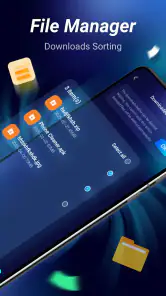
The workflow is straightforward: scan the phone, look through the categories of potential clutter, and remove only what I recognize and no longer need. TrendClean’s focus on storage management suits people who want a clear starting point without learning a complicated file-management system. I’d treat the scan as an inventory, not a command to erase everything it finds.
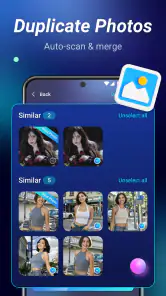
For a realistic example, imagine I’ve spent a weekend taking photos and videos, then discover I can’t download a file for work. I’d start by checking the scan’s findings, then review the photo and video suggestions separately. If I spot duplicates or similar shots, I can compare them before deleting anything. That small pause is worthwhile: near-identical pictures may include the one expression or detail I actually wanted to keep.
Choose what to hand off—and what to keep
Photo cleanup can be more useful than repeatedly clearing temporary files, but it also calls for more judgment. Similar images are not always unwanted copies; they may be alternate takes, edited versions, or pictures I meant to send to someone. I’d use the app to surface candidates, then make the final choice myself. If a photo matters, I’d make sure I have a copy somewhere I trust before removing it from the phone.
That’s also where this kind of cleaner differs from the built-in storage tools on a phone. Built-in settings are often the better choice when I want to inspect storage by app or handle a specific app’s data directly. TrendClean is more appealing when I’d rather have a dedicated scan and a guided route to possible clutter. For someone comfortable sorting folders manually, the built-in option may be enough; for someone who wants help finding candidates, a cleaner can save time.
More From Our News Desk

Weather by Xiaomi Review: Clear at a Glance, Less Clear Up Close

X Under Pressure: Can It Recover When Posting Goes Wrong?

Clash of Clans Is Won Between the Battles

Android Auto Makes the Case for Quieter Car Software

MobiOffice: Transforming Mobile Productivity with Seamless Integration

EA SPORTS FC™ Mobile Soccer: Redefining Mobile Sports Gaming
What Makes TrendClean - Storage Cleaner Stand Out?
First off, let's talk about what makes this app a game-changer. You know how some storage apps tend to overcomplicate things with too many unnecessary features? Well, not this one. TrendClean is all about simplicity and efficiency. It promises to clean up junk files, optimize storage, and speed up your device without any fuss. And guess what? It actually delivers!
A User-Friendly Interface
One of the first things I noticed was how intuitive the interface is. You don't need a degree in rocket science to use this app, which is a huge relief. All the tools you need are right there, neatly organized and easy to access. The app doesn't bombard you with ads every five seconds, which is a rare find these days. You can actually focus on cleaning up your device without any distractions.
Features That Pack a Punch
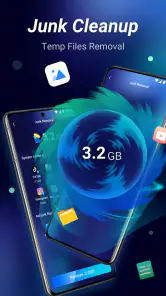
Now, onto the features. The app offers a comprehensive scan that digs deep into your device to hunt down those pesky junk files and caches that are hogging your space. It's almost like having a personal detective for your phone! Plus, the app's optimization feature is top-notch. It helps speed up your device by managing background apps and processes that tend to drag things down.
Another cool aspect is the photo and video management tool. It identifies duplicate and similar photos, giving you the option to delete the ones you don't need. This feature alone can free up a significant amount of space, especially if you're a photo hoarder like me!
Does It Really Work?
I put TrendClean - Storage Cleaner to the test, and I must say, I'm impressed. After a quick scan and clean, my phone was noticeably faster, and I had more storage space than before. It felt like I'd just given my phone a breath of fresh air. The app runs smoothly in the background, so you don't even realize it's there, quietly doing its job.
One thing I really appreciated was the detailed report after each scan. It shows exactly what was cleaned and how much space was freed up. It's always nice to see tangible results, right?
Make the freed space useful
For me, the most satisfying outcome is not simply seeing a cleaner report; it is being able to finish the task that triggered the warning. If I need to download a work document, I would first look for files that are clearly disposable, then check whether that gives me enough room. I would avoid turning a small storage problem into a long, open-ended purge. A focused scan and a few careful choices are easier to verify than a sweeping cleanup.
There is also a useful handoff between the cleaner and the phone’s own apps. If the scan brings a large video or a cluster of old pictures to my attention, I can decide whether to keep them locally, move a copy somewhere I already trust, or remove them. The important point is that the cleaner helps identify candidates; it does not decide what memories or documents matter to me. I would treat personal media differently from disposable temporary files.
Questions I’d settle before tapping remove
Would I use it for every small dip in free space? No. I’d save a scan for a point when storage pressure is affecting something I need to do, or when I have time to review the findings calmly. Would I let it delete every suggested item automatically? I wouldn’t. The safer routine is to inspect categories, remove familiar clutter in small batches, and check that the phone still has the files and apps I rely on.
Can it replace the Android storage screen? Not for every job. I’d use the phone’s settings when I need a direct view of space by app or want to handle a particular app’s storage. I’d choose TrendClean when I want a guided sweep for possible clutter, especially if I’m not sure where to begin. Those approaches complement each other better than they compete: one helps surface candidates, while the other remains useful for targeted checks.
Should I expect every cleanup to make the phone feel faster? I would not make that the reason to install it. Freeing storage may help when a device is cramped, but it is not a universal remedy for slow performance. If one app is freezing or the whole phone is acting strangely despite having room, I’d troubleshoot that specific issue instead of repeating scans and expecting a cleaner to solve it.
Where the routine can fall short
I wouldn’t make a cleaner my first choice if I need to recover space urgently but don’t have time to check what is being removed. A scan can identify possible clutter, yet deleting personal files is still a decision with consequences. Nor would I expect a storage tool to fix every cause of a sluggish phone: a nearly full device is one problem, while an app that misbehaves or a system issue may need a different solution.
There is a trade-off between convenience and control. TrendClean is aimed at people who prefer a guided scan over digging through storage menus, but anyone who wants to inspect each folder and manage files in detail may prefer the phone’s own controls. I also wouldn’t run repeated cleanups just for the sake of seeing a report; it is more sensible to scan when storage pressure is real and review the results carefully.
Who I’d recommend it to
TrendClean is a reasonable fit for people who take lots of photos, accumulate downloads, or want a more approachable way to review potential junk. It has reached over five million installs and holds an average rating of 4.1 from around eight thousand ratings, which suggests that many Android users have tried it. It was released in November 2024, and the app continues to be listed as a free option.
I’d skip it if you already know how to manage storage through your phone’s settings and prefer not to add another utility, or if you want a file manager that gives you granular control over every folder. The minimum operating-system requirement is Android 7.0, so it is also worth checking that your phone meets that requirement before planning to use it. For everyone else, the best approach is to try a scan, inspect the proposed cleanup, and keep the final say in your hands.
Where it fits among cleaner apps
Compared with a general file manager, TrendClean’s appeal is its guided starting point rather than complete control over folders and files. Compared with the storage screen already on an Android phone, it offers a more focused cleanup workflow, while the settings screen is usually the more direct route for investigating one app’s footprint. I’d choose based on the job in front of me: use the cleaner to find possible clutter, and use the built-in controls when I need a precise, app-by-app decision.
That distinction makes it most useful for people who know their phone is crowded but are unsure where to begin. It is less compelling for someone who routinely sorts downloads, backs up photos, and checks app storage already. Adding another utility only makes sense if its scan saves effort; otherwise, the phone’s existing tools may be all the maintenance routine needs.
Final Thoughts
In a world where our phones are essentially our lifelines, keeping them in top shape is crucial. TrendClean - Storage Cleaner offers a simple, effective solution to managing storage without any hassle. While it may not have all the bells and whistles of some other apps, it does what it says on the tin, and sometimes, that's all you need.
So, if you're tired of battling with storage issues and want a reliable app to help you out, give TrendClean - Storage Cleaner a shot. It might just be the storage hero you've been waiting for.
TrendClean - Storage Cleaner Frequently Asked Questions
Does TrendClean - Storage Cleaner work on my phone’s operating system?
TrendClean - Storage Cleaner is an Android app that requires Android 7.0 or later. Before downloading, check your phone’s Android version in its settings to make sure it meets that requirement. The app is a free productivity tool from MARO APPS, intended to scan phone storage and help manage mobile phone junk files.
Is TrendClean - Storage Cleaner free, and is it suitable for all ages?
TrendClean - Storage Cleaner is free to download and is rated for Everyone. It may be useful if you want a straightforward way to scan your phone’s storage and manage junk files. As with any cleaner, review the items the app identifies before removing them, so you stay in control of what is deleted from your device.
What is TrendClean - Storage Cleaner and how does it work?
TrendClean - Storage Cleaner is an application designed to help users optimize their device's storage by removing unnecessary files, such as cache, duplicate files, and junk data. The app scans your device, identifies files that can be safely deleted, and provides options to clean them up, thereby improving your device's performance and freeing up space.
Is TrendClean - Storage Cleaner safe to use on my device?
Yes, TrendClean - Storage Cleaner is safe to use. It has been developed with user safety in mind, ensuring that only non-essential files are targeted for deletion. The app does not access personal data or interfere with system files, making it a reliable tool for maintaining your device's health without compromising your privacy.
What kind of files can TrendClean - Storage Cleaner remove?
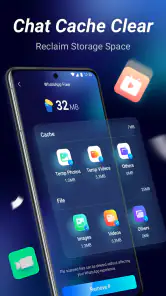
TrendClean - Storage Cleaner can remove a variety of unnecessary files, including cache files, temporary files, duplicate images, and residual files left behind by uninstalled apps. By targeting these types of files, the app helps free up storage space and improve device performance without affecting important personal data.
Pros
- Efficiently clears cache to free up space.
- User-friendly interface for easy navigation.
- Boosts device performance significantly.
- Quickly identifies large files for deletion.
- Enhances battery life by reducing background tasks.
Cons
- Contains ads that can be intrusive.
- Limited features in the free version.
- Occasional crashes reported by users.
- Requires regular updates for optimal performance.
- May delete important files if not careful.
- Category
- Productivity
- Version
- 1.0.22