Toters: Food Delivery & More
- 926.00
- 3.3
- Installs
- 5.00M
- Price
- Free

Screenshots

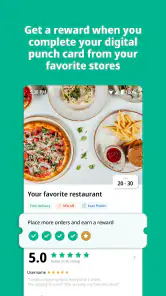
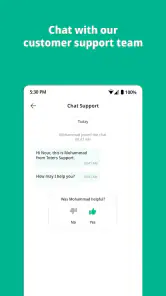
Analysis by Reviewed
I tend to open a delivery app when the day has already gone sideways: I’m hungry, short on time, and not keen to make another trip outside. That is the kind of moment when Toters: Food Delivery & More makes sense. It brings local restaurants and stores into one place, so I can start with the need—dinner, groceries, or another errand—and see what options are available nearby. It is a free food-and-drink app from TOTERapp LLC, and its broad mix is more useful when I want one practical solution than when I’m chasing a particular restaurant at any cost.
Start with the need, not the menu
Before I browse, I find it useful to decide what a successful order would look like. If I need dinner in a hurry, I’ll focus on prepared food. If the problem is an empty fridge, I’ll look at groceries instead. That sounds obvious, but the distinction matters: it keeps me from scrolling through restaurants when what I really need is breakfast for tomorrow, or adding a grocery basket when a ready-made meal would solve the immediate problem better.
Toters is a free app in the Food & Drink category, and its appeal is the chance to look for local food and store deliveries within one service. The app’s age rating is Everyone, but the practical question for an adult deciding whether to install it is whether the places they actually use appear in their area. Delivery apps are only as useful as their local selection, so I would treat the first browse as a quick availability check rather than assume that every nearby business participates.
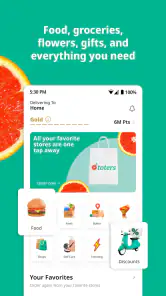
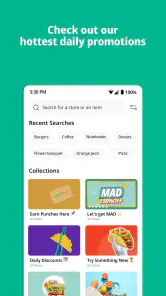
When I first stumbled upon Toters: Food Delivery & More, I was curious about what set it apart from other delivery services. The app promises not just food, but a variety of services, which piqued my interest. Upon opening the app, you're greeted with a sleek, user-friendly interface that makes navigation a breeze. The homepage neatly categorizes restaurants, grocery stores, and other services available in your vicinity.
From browsing to the doorstep
I’ll use this section to follow the order from the moment I decide what I need through the choices that shape a successful delivery. The key is to treat browsing as a practical decision, not just a search for something tempting; next, I’ll look at how that choice turns into an order and a doorstep handoff.
Choosing an order that fits the moment
For a realistic weeknight workflow, I’d first decide whether I need a ready-made meal or ingredients for something simple. Toters lets me browse restaurants and supermarkets in the same app, which saves switching between separate services. I would compare the menus or item lists before committing, especially if I’m ordering for more than one person: a restaurant may solve dinner quickly, while groceries make more sense if I also need basics for tomorrow. That small choice helps avoid treating every delivery problem as a restaurant-order problem.
One useful habit is to settle the delivery details before spending time filling a basket. A nearby option is only convenient if the address and timing suit the plan, and availability can vary by location. I’d also check the order carefully at checkout rather than assume that a familiar shop will have every item I expect. The app makes browsing straightforward, but the final value still depends on what is actually offered in my area and how well it matches the need.
More From Our News Desk

Weather by Xiaomi Review: Clear at a Glance, Less Clear Up Close

X Under Pressure: Can It Recover When Posting Goes Wrong?

Clash of Clans Is Won Between the Battles

Android Auto Makes the Case for Quieter Car Software

MobiOffice: Transforming Mobile Productivity with Seamless Integration

EA SPORTS FC™ Mobile Soccer: Redefining Mobile Sports Gaming
Compare before committing
If I’m choosing between several restaurants, I don’t treat a long menu as proof that one choice is better. I narrow it to a couple of plausible options, check whether their offerings suit everyone eating, then decide. That is particularly helpful for a shared dinner: agreeing on the type of meal first can prevent a household debate from turning into a drawn-out browse. For one person, a quick scan may be enough; for a group, the best choice is often the one that meets the most needs without overcomplicating the order.
The same logic applies to a supermarket basket. I’d put the items needed for a specific meal at the top of my list, then add useful staples only if the first part is covered. It is an easy way to catch a missing ingredient before I submit the order and to keep impulse additions from distracting from the actual reason I opened the app. If I need to compare brands, inspect produce, or choose exact sizes in person, a shop visit gives me more control than ordering remotely.
Tracking and timing the handoff
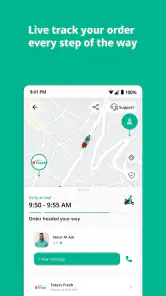
One of the features I immediately appreciated was the real-time tracking. You know that anxious feeling of waiting for your food and wondering if it's anywhere close? Toters eliminates that worry by letting you track your order every step of the way. Another cool feature is the extensive range of restaurants and cuisines available. Whether you're craving sushi, burgers, or a healthy bowl of salad, there's something for everyone.
Tracking is most helpful as a planning aid, not a reason to watch the screen constantly. If I’m working from home, I can use it to judge when to step away from a call or get ready to meet a courier, while keeping some flexibility in case the order takes longer than hoped. For shared meals, I’d agree on the restaurant and choices with everyone before placing the order; that is less fiddly than trying to coordinate preferences while navigating a menu. The handoff is still a real-world one: someone needs to be available to receive the delivery at the chosen address.
A practical example is a busy evening when I’m finishing work and two people at home want different things. I’d check the nearby options, choose a meal everyone can live with, confirm the delivery address, and place the order before getting absorbed in another task. While it is on its way, tracking helps me plan a pause in my work rather than guess when to listen for the door. The benefit is not that the app makes the evening effortless; it is that I can handle the search and arrange the handoff without making a separate trip.
Groceries, payments, and the last handoff
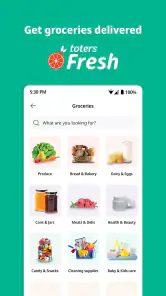
But wait, there's more! The app also offers a grocery delivery service. This was a game-changer for me, especially on those lazy Sundays when leaving the house feels like a chore. You can browse through various supermarkets, select your items, and have them delivered in no time.
Groceries are especially handy when I can plan around a short list: pantry staples, breakfast items, or ingredients for a meal I already know how to make. I’d group essentials first and treat optional extras as a second pass, so the basket stays focused. That approach also makes it easier to notice a missing key ingredient before checkout. For a large or highly specific shop, I’d still consider going in person or using a dedicated grocery service if I need to inspect products myself or compare a wider selection.
There is a useful trade-off here. A combined restaurant-and-store app can make it easier to begin with a general need and choose a route from there, but a dedicated supermarket service may be a better fit for a detailed weekly shop. Likewise, if I know the exact restaurant I want, ordering directly from that restaurant can be more straightforward than browsing a collection of alternatives. Toters is most persuasive when I value having local choices together more than I value a specialized ordering experience.
Payment and receiving the order
Using Toters is as simple as it gets. The app is designed with the user in mind, providing a seamless experience from browsing to checkout. Payment options are flexible, supporting both card payments and cash on delivery. For someone who values efficiency and convenience, this app ticks all the right boxes.
Having both card payment and cash on delivery is a practical choice when household preferences differ, but I’d pick the method I can manage easily before placing the order. Delivery apps involve more than tapping “confirm”: the address must be right, the person receiving the order must be reachable, and the contents should be checked when they arrive. If something in that chain is awkward—say, nobody can answer the door—a pickup option or a direct visit may be the less stressful choice.
I also like to make the receiving plan part of the order rather than an afterthought. If I’m ordering to a shared home, I’d tell the person who may answer the door what to expect. If I’m in the middle of work, I’d choose a time when I can respond rather than assume tracking alone will handle every interruption. These small steps do not guarantee a perfect delivery, but they reduce avoidable confusion at the point where the app gives way to a person bringing the order.
Where Toters fits—and where it doesn’t
Compared with using a restaurant’s own ordering channel, Toters is convenient when I want to browse several local options together or combine a food search with a grocery run in the same app. A restaurant’s direct channel can be the better fit when I already know exactly what I want and prefer to deal with that business directly. Likewise, a supermarket visit gives me more control over substitutions and product selection. Toters is strongest when convenience and choice in one place matter more than personally checking every item.
The app suits people who regularly need local food or store deliveries and like having those choices grouped together. It is less compelling for someone who rarely orders delivery, lives outside its service area, or needs a specific shop that is not available nearby. Its audience is broad: the app is rated for Everyone, and its average rating is 3.3 from around 19 thousand ratings, so I would treat it as a useful option rather than assume every order will be flawless. It has been available since July 21, 2016, and its current version is 4.38.0603, with 5 million-plus installs.
Who gets the most from it
I’d recommend trying Toters if local delivery is already part of your routine, particularly if you sometimes need a meal and sometimes need groceries. The broad mix gives it a useful role as a starting point: instead of choosing a delivery service before I know what I need, I can first decide what would solve the problem and then see what nearby options are available. It also makes sense for people who appreciate having a card payment or cash-on-delivery choice, depending on what works for their household.
I’d be more cautious if I need a particular business, a very precise grocery selection, or dependable timing for an event that cannot tolerate a delay. In those cases, I would check availability early and consider ordering directly or shopping in person. The same goes for anyone who rarely wants deliveries; installing another app may not improve their routine if a phone call or occasional visit already works well. The best fit is someone who values convenience enough to accept that selection and delivery experience can depend on the local options.
When the flow breaks
The smooth version of a delivery begins with a clear need, moves through a suitable nearby choice, and ends with someone available to receive the order. The weak points are easy to overlook: the address may be wrong, the chosen store may not have everything expected, or the recipient may be unable to answer when the delivery arrives. I’d slow down at checkout and verify the basics, especially when ordering groceries or sending something to a shared address.
Another possible friction is simply finding that the local selection does not match the plan. If I want one particular restaurant or an item I can only judge by seeing it, browsing in Toters may not save time. I would not keep scrolling just because the app offers several categories; if the available choices do not meet the need, switching to a direct order or a nearby shop is sensible. Convenience is useful only when it actually reduces effort.
The app’s average rating is a reason to keep expectations measured, not a verdict on every order. I’d use it first for something flexible rather than for a meal tied to a strict schedule, then decide whether the local experience suits me. That gives me a realistic sense of how well the available choices, checkout, and delivery handoff work in my own routine instead of relying on a general impression.
Ending Thoughts
In a world where time is of the essence, having an app like Toters can be a lifesaver. Its ability to deliver not just food but also groceries and other services makes it a versatile choice for anyone looking to simplify their daily routine. Plus, the intuitive interface and reliable service mean you can count on it without a hitch.
For me, the main trade-off is straightforward: Toters can reduce the effort of arranging a local delivery, but it cannot remove the need to check what is available, enter accurate details, and be ready for the handoff. The overall experience will depend on the options in your area, so I’d judge it through an order that matters but is not time-critical before relying on it for an important meal. On Android, it requires version 7.0 or later. If that fits your device and you often want food or groceries brought to you, it is worth trying; if you prefer selecting goods yourself or ordering directly from one familiar place, your usual alternative may suit you better.
So, if you're tired of the same old delivery apps and are looking for something that offers a bit more, give Toters a shot. Who knows, it might become your go-to app for all things delivery!
Toters: Food Delivery & More Frequently Asked Questions
Can I browse Toters before creating an account?
Toters is designed to help you find deliveries from local stores and restaurants, so browsing the available options can help you judge whether it suits your needs. Before ordering, expect to provide the details needed to arrange delivery and complete checkout. You can install the app for free, then explore its offering and decide whether to proceed with an order.
How can I tell whether Toters serves my location?
Toters’ usefulness depends on whether its delivery service is available where you are. Enter your location in the app and check which stores or restaurants appear before planning an order. Service coverage can vary, so seeing what is currently offered for your address is the most practical way to decide whether Toters will work for you.
Can I use Toters to order items other than restaurant meals?
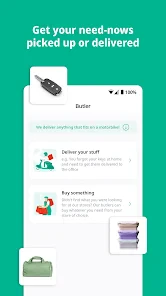
Toters: Food Delivery & More is a versatile app that provides a wide range of services beyond just food delivery. It allows users to order groceries, household essentials, and even pharmacy items, directly to their doorstep. The app partners with a variety of local and international brands, ensuring a comprehensive selection to meet diverse customer needs.
Is Toters: Food Delivery & More free to download?
Yes, Toters is free to download, so you can install it and explore the app without paying an upfront purchase price. Keep in mind that placing an order is separate from downloading the app: the cost of items and any delivery or other charges can depend on your order and location. Check the total shown at checkout before confirming.
What devices and age groups is Toters suitable for?
Toters is a Food & Drink app from TOTERapp LLC, and its content rating is Everyone. It supports devices running Android 7.0 or later. The app is intended for ordering from local stores and restaurants, so its usefulness depends on whether delivery service is available where you are. Review your device’s compatibility and the app’s permissions before installing.
Pros
- Wide variety of restaurants available.
- User-friendly and intuitive interface.
- Fast and reliable delivery service.
- Multiple payment options available.
- Real-time tracking of orders.
Cons
- Delivery fees can be high.
- Limited availability in some areas.
- Occasional delays during peak hours.
- No option for cash payment.
- Some restaurants have higher prices.
- Category
- Food & Drink
- Version
- 4.38.0603











