ToonMe photo cartoon maker
- 10.63K
- 4.5
- Installs
- 100.00M
- Price
- Free

Screenshots
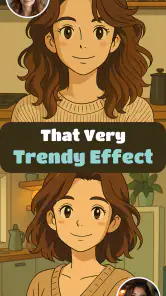
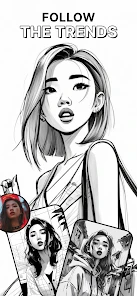
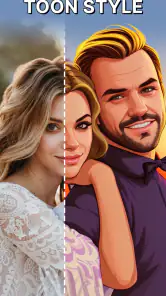
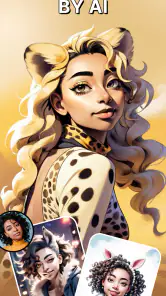
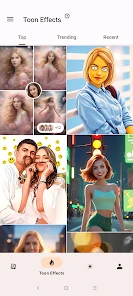
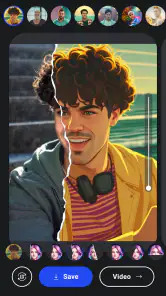
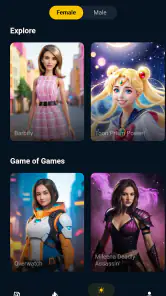
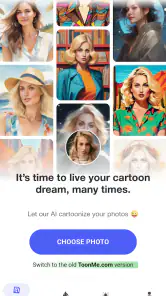
Analysis by Reviewed
I usually come to a cartoon-photo app with one ordinary picture and a fairly simple goal: make something playful enough to share, without spending the evening learning an editor. ToonMe is built for that quick transformation. It is a free photography app from PHOTO LAB DMCC, aimed at turning portraits into illustrated versions, and its appeal is the speed with which I can move from a familiar selfie to a noticeably different look.
That ease is useful, but the choice of source photo matters more than I expected. I get the most convincing result from a clear, front-facing portrait with the face unobstructed and decent light. A dramatic angle, shadow across the eyes, or several faces in one frame can make the transformation feel less consistent. My practical tip is to keep two or three candidate photos handy and compare them rather than assuming the first one will work best.
Choosing a photo that gives the effect room to work
I treat the starting image as part of the creative process, not just something to upload. If I want a profile picture, I begin with a portrait where my face is large enough to remain legible after cropping. If I want a silly image to send to a friend, I can be less strict: a slightly awkward expression may make the result funnier, even if it is not the most flattering version of me.
There is a useful trade-off between expression and clarity. A big smile or unusual pose can give the finished cartoon more personality, but a face partly hidden by hair, glasses glare, or a hand gives the effect less to work with. When I have a choice, I use a photo with even light and a simple background. I avoid taking a screenshot of an already compressed image, because starting with a clean original gives me a better chance of keeping details crisp when I share the result.
From a camera-roll portrait to a finished image
The basic flow is straightforward: choose a picture, try a visual treatment, and inspect the result before deciding whether it is worth keeping or sharing. ToonMe’s broad selection makes it tempting to tap through styles quickly, but I find it more useful to compare a few that differ in linework and color rather than selecting several near-identical options. That makes the choice clearer and helps me avoid ending up with a folder full of versions I will never use.
For an everyday example, I might take a well-lit selfie before a video call, then make a cartoon version to use as a lighthearted profile image or send to a friend. I would keep the original portrait untouched and treat the illustrated result as a separate, fun alternative. That small habit matters: a stylized face can be charming in a chat, while a conventional photo is usually better when someone needs to recognize me quickly.
One simple workflow that keeps the process tidy is to decide on the image’s destination before I start browsing. A square avatar needs a centered face; a message to a friend can tolerate a more playful crop; a keepsake or greeting may need enough surrounding space to feel composed. Thinking about that early helps me judge each result for its actual job instead of picking the most dramatic effect by default.
More From Our News Desk

Weather by Xiaomi Review: Clear at a Glance, Less Clear Up Close

X Under Pressure: Can It Recover When Posting Goes Wrong?

Clash of Clans Is Won Between the Battles

Android Auto Makes the Case for Quieter Car Software

MobiOffice: Transforming Mobile Productivity with Seamless Integration

EA SPORTS FC™ Mobile Soccer: Redefining Mobile Sports Gaming
Making the result useful beyond the preview
After I find a version I like, I pause before moving on. I check whether the face still reads at a small size, whether the colors suit the place I plan to use it, and whether the crop leaves enough breathing room. That quick review catches a common mismatch: an image can look striking on the editing screen but become crowded as a tiny profile icon.
For a small group project, such as matching avatars for a family chat, I would ask everyone to provide a similarly framed portrait rather than trying to make very different photos look uniform afterward. Consistent framing gives the images a shared feel without pretending that the app can correct every difference in lighting or angle. I would also agree on one general style before everyone starts experimenting; otherwise, a set of individually appealing portraits may not look coordinated together.
I keep the original photo available and save only the versions I genuinely want to use. That makes it easy to switch back to a natural picture for a work profile or an account where people need to identify me, while keeping the cartoon for casual spaces. It is a small organizational choice, but it prevents a novelty edit from becoming the only version I can find when I need the original.
Unleashing Your Inner Cartoon
The magic of ToonMe lies in its ability to effortlessly turn your photos into cartoonish art. When you open the app, you're greeted with a user-friendly interface that even a novice can navigate with ease. From there, you simply upload a photo, and the app works its magic. The transformation process is impressively quick, and within seconds, you’ll have your very own cartoon version staring back at you.
Features that Pop
A standout feature of ToonMe is its extensive array of styles and filters. Whether you’re into the Disney-esque look or prefer a more comic book style, ToonMe has got you covered. The app continuously updates its library of filters, ensuring you never run out of creative options. I especially love how it allows you to experiment with different styles, making each photo a unique piece of art.
Another great feature is the app’s ability to fine-tune the details of your cartoon image. You can adjust everything from the size of your eyes to the shape of your face, giving you full control over your cartoon avatar. It’s like having a personal artist at your fingertips!
Sharing and Connectivity
Once you’ve crafted your perfect cartoon image, sharing it with the world is a breeze. ToonMe integrates seamlessly with social media platforms, allowing you to post your creations directly from the app. This feature is perfect for those who love to keep their social media feeds lively and engaging. Plus, the high-quality output ensures that your images look crisp and professional, no matter where you share them.
For a more polished handoff, I’d first check the image as a small crop, the way it may appear as an avatar, and then view it full-size before posting. A face that reads well in a large preview can lose detail when reduced. I also prefer to save a favorite result before trying more styles, so I have a version to return to instead of relying on memory. For a coordinated group image, ask everyone to start with similarly framed portraits; different lighting and camera angles can make a set feel uneven even when the same style is applied.
There is also a practical difference between sharing straight away and using the image elsewhere. If I am sending it in a chat, the quick handoff is the point: the recipient sees the joke without a lot of explanation. If I am setting it as an avatar, I take another moment to check the crop in the destination app, because each service may display a different portion of the image. I would not assume a portrait that looks balanced in one preview will sit perfectly in every circular or square frame.
Fun for Everyone
ToonMe isn’t just for adults; it’s a fun app for users of all ages. Kids will have a blast turning their pictures into cartoons and exploring the different styles. It’s a creative way to engage them in the world of art and technology. And let’s be honest, who wouldn’t want to see their pet as a cartoon character?
For families, I think the best use is a short, shared activity rather than handing over a phone with no plan. Pick a photo together, compare a few very different treatments, and talk about which one feels most like the person or pet. This turns the result into a conversation instead of an endless search through options. Since the app is rated for everyone, it is suitable for a broad audience, but I would still guide younger users when choosing personal photos and deciding where to share them.
Who will enjoy it, and who may prefer another tool
I’d recommend it to people who want a fast, expressive portrait for a chat, social profile, greeting, or just a laugh with friends. The app has a 4.5 average from around 1.8 million ratings, and it has passed 100 million installs, which suggests that this playful approach has broad appeal. It is rated for everyone, though I’d still let younger users choose photos with an adult nearby and discuss what they want to share publicly.
Its strongest audience is someone who enjoys trying visual ideas but does not want to build an illustration from scratch. It is also handy for a low-pressure profile refresh: I can make a cartoon alternative, try it in a casual account, and switch back if it does not suit the setting. People who make social posts for fun may appreciate having a recognizable face with a more expressive treatment, while someone designing a polished brand identity will likely need more consistency and control than a quick portrait effect can provide.
It is less suited to someone who needs precise, repeatable retouching or a natural-looking headshot. A conventional photo editor gives finer control over exposure, blemishes, cropping, and color; a hand-drawn portrait service is a better fit if the goal is a deliberately consistent illustration rather than a quick filter treatment. ToonMe’s strength is immediacy, not replacing those more specialized tools. Results can also vary with the source image, so I would not count on every portrait producing an equally flattering interpretation.
Compared with the usual alternatives in photography, this sits closer to a playful transformation tool than an all-purpose editor. A standard editor is the better choice when I want to correct a picture while still looking like myself. A drawing app makes sense when I want to control the artwork by hand, and commissioning an illustration is more appropriate when likeness and a particular visual direction matter enough to justify a slower process. ToonMe is the convenient middle ground: fast to explore, but not a substitute for careful retouching or a custom portrait.
I would skip it if my main goal were a dependable professional image, exact control of facial proportions, or a consistent series of portraits for a formal project. A stylized treatment is an interpretation, not a neutral correction, and that can change the mood or likeness in ways I may not want. For casual use, variation is part of the fun; for a high-stakes profile or a design that must match an existing look, it becomes a reason to choose a different tool.
Cost, device fit, and a sensible first try
The app is free to download, with in-app purchases ranging from $0.99 to $99.99 per item. I’d check the purchase details before confirming anything, especially if a child is exploring the styles. It runs on Android 6.0 or later, and version 0.7.19 is the current version. Those details make it easy to judge whether it fits your device and budget before you start experimenting.
My first-session advice is to begin with one photo and a clear purpose, then explore a small handful of looks before deciding whether to keep going. The free entry point makes it easy to try the basic experience, but the presence of optional purchases means I would not treat every visible choice as automatically included. If a particular effect or extra prompts a payment, I would decide whether that one result is worth the cost rather than buying impulsively just because I have already spent time browsing.
On an older supported phone, I would also keep the first test simple: use a photo already in the camera roll, see how the transformation looks, and check that the saved image suits the intended destination. That gives me a practical answer to the question “Will this fit my routine?” without planning a whole photo session around it. The app makes most sense when the result is a small creative extra, not a step I depend on for an important image.
In a world where we’re constantly sharing photos, ToonMe offers a refreshing twist. It brings a playful and artistic element to your photo collection, making it more than just another selfie app. Whether you’re looking to spice up your Instagram feed or just want to have a bit of fun, ToonMe is definitely worth checking out.
One small trade-off is that abundance can make choosing harder: a long run of alternatives is entertaining, but it can also turn a two-minute experiment into aimless scrolling. I get better results when I decide what I want first—bold and comic, soft and portrait-like, or simply amusing—then stop once an option suits that purpose. If you want a quick novelty image, that focused approach keeps the app enjoyable; if you want exact artistic control, the same browsing process may feel limiting.
Another useful boundary is to think about privacy and audience in ordinary terms: a cartoon portrait is still built from a personal photo, so I choose an image I am comfortable using for the intended purpose and consider who will see the finished version. For a private joke among friends, my standards are different from those for a public-facing account. I also avoid treating a cartoon image as a replacement for a clear, current photograph when people need to recognize me reliably.
So, if you're ready to see yourself in a whole new light, give ToonMe a try. It's time to unleash your inner cartoon and let your creativity shine!
ToonMe photo cartoon maker Frequently Asked Questions
How much storage space should I leave for ToonMe?
Before installing ToonMe, make sure your phone has enough free space for the app and for the photos you plan to work with. Photo editing can also create additional images you may want to keep, so having room for saved results is useful. If your device is nearly full, clearing out unneeded files first can make the download and editing process more convenient.
Is ToonMe suitable for beginners who have never edited photos?
ToonMe is aimed at turning photos into illustrated styles, and its basic creative process is easy to follow: choose a picture, select a look, and let the app transform it. You do not need to be an experienced photo editor to explore the cartoon effects. If you prefer to keep things simple, start with one photo and try the available styles at your own pace.
Can I save and share the cartoon images I make in ToonMe?
ToonMe is designed to toon up photos with a range of styles, so saving a finished image for your own use is a natural part of the experience. Before sharing a result, take a moment to check that you are comfortable posting the original photo in its transformed form, especially if other people appear in it. For business use, review the relevant terms first.
Does ToonMe need an internet connection to create cartoon photos?
ToonMe is a photography app for turning pictures into illustrated styles, so a stable connection is a sensible precaution when opening the app and using its editing features. If you plan to work while offline, check that the app and any styles you want are available first. This is especially helpful when traveling or relying on a limited mobile data plan.
What should I look for before choosing a photo in ToonMe?
A clear, well-lit picture with the subject easy to see is a good starting point for a cartoon effect. Before editing, make sure the photo is one you are comfortable using in a photo-editing app, and consider whether it includes other people who have not agreed to be featured. Choosing a suitable image first can make the creative process feel more straightforward.
Pros
- Creates high-quality cartoon avatars easily.
- User-friendly interface.
- Wide variety of styles and effects.
- Regular updates with new features.
- Works offline after initial setup.
Cons
- Limited free features.
- Some ads in the free version.
- Occasional lag on older devices.
- Requires in-app purchases for premium content.
- May need internet for downloading styles.
- Category
- Photography
- Version
- 0.7.19












