Ting
- 1.44K
- 4.7
- Installs
- 500.00K
- Price
- Free

Screenshots

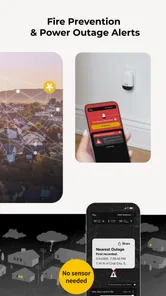
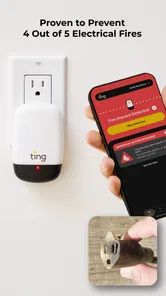
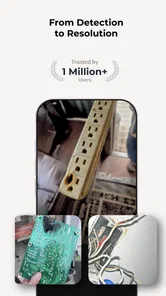
Analysis by Reviewed
I tend to trust a home-safety app less for dramatic promises than for the practical questions it helps me answer: what is being monitored, what will reach my phone, and what can I control? Ting Sensor is built around a physical sensor and a companion app, so it is best understood as part of a home-safety setup rather than as a general smart-home dashboard. Whisker Labs develops it, and the app is free, with an Everyone age rating. It has a 4.5 average from around 6,100 ratings, which gives a useful sense of its audience without telling me whether it will suit every home.
What I would check before relying on it
Because this app is connected to electrical safety, I would treat the setup as something to review rather than rush through. Read each screen as you connect the sensor, pay attention to the Wi-Fi and notification choices presented, and make sure alerts are enabled on the phone you actually carry. Those steps are more useful than assuming that installing an app automatically means the whole system is ready to reach you.
My trust in a connected home product also depends on being able to inspect its current privacy information and account controls directly in the app and its official materials. I would do that before connecting a sensor, especially in a household where more than one person uses the phone or manages the home. I would not assume what data is collected, how long it is kept, or which controls exist without checking the current disclosures and settings myself.
Setting Up Your Smart Home
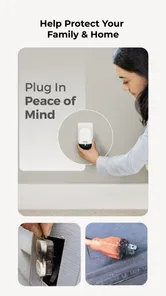
First things first, setting up the Ting Sensor is a breeze. Imagine plug-and-play, but for your house. You just plug it into any standard outlet, connect it to your Wi-Fi, and voilà! It's ready to start monitoring. This seamless integration is perfect for someone like me who isn’t the most tech-savvy individual out there. Plus, the app itself guides you through every step with clear instructions, so there’s no room for error.
What Does It Do?
So, what exactly does this little gadget do once it's plugged in? Here’s where it gets interesting. The Ting Sensor is designed to detect electrical hazards before they become a problem. It keeps an ear out for any unusual electrical activity and sends alerts straight to your phone if something’s amiss. It’s kind of like having a smoke detector, but for your electrical system. This proactive approach to household safety is a game-changer, especially for those of us who worry about potential fire hazards in older homes.
Making alerts useful in real life
A safety alert is only helpful if it reaches someone able to respond. If you travel often, share responsibility for a property, or leave home for long stretches, think through who will see a notification and what they can do next. Keep the phone’s notification access in mind, too: a quiet mode or a disabled alert can undermine the practical value of any monitoring app. I would also make sure household members know that the sensor is installed and understand how to contact one another if an alert arrives.
For an everyday example, imagine leaving for a weekend and remembering that the house will be empty. The app’s role is not to replace sensible preparation or a qualified electrician; it is another way to stay aware of a possible electrical concern while away. If a notification appears, I would read its instructions carefully and seek professional help when the situation calls for it, rather than trying to diagnose wiring from a phone. That distinction matters: detection can prompt action, but it is not the same thing as repair.
More From Our News Desk

 Block Blast!
 Makes Every Clear Feel Like One More Turn
A clean little block puzzle becomes a study in space, risk, and self-control. Its best moments come from one satisfying clear; its toughest test is knowing when to stop.

 Super Stylist Fashion Makeover
Super Stylist Turns Dress-Up into a Runway Career
Its makeover-to-client loop turns quick outfit decisions into shareable style theater. The question is whether the closet keeps giving players a reason to return.

 Block Craft 3D:Building Game
Block Craft 3D Under Pressure: How Well Does It Recover When Building Goes Wrong?
A failure-focused look at Block Craft 3D’s forgiving building loop, its uncertain recovery edges, and the moments that demand more than a cheerful village.

 Woodturning
 Trades Creative Freedom for a Satisfying Carving Loop
If your usual creative game is about building, decorating, or styling, Woodturning trades open-ended projects for a tactile, tightly guided carving loop. Here is what that switch really costs.

 PUBG MOBILE
 Shows What Battle Royale Must Get Right
PUBG MOBILE shows how battle royale has matured: bigger systems matter less than meaningful choices, readable fights, and a reason to return after every loss.

 Braindom: Brain Games Test
Braindom’s Social Life Happens Between Puzzles
Braindom turns quick logic traps into a personal ritual, but its community value is more about comparing answers than building together.
Latest News



Functionality at Its Best
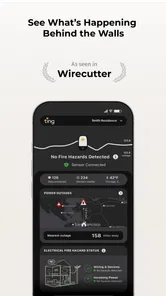
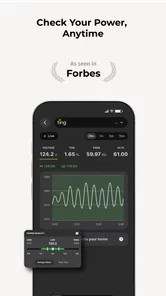
Beyond its primary safety function, the Ting Sensor collects data and provides insights into your energy usage. This can be a real eye-opener if you're trying to cut down on your electricity bill or simply want to know which appliances are the most power-hungry. I found myself checking the app more often than I’d like to admit, just to see what was going on behind the walls of my home.
For energy questions, I would use those insights as a starting point, not as a precise appliance-by-appliance audit. A whole-home view can help you notice patterns and decide when to investigate further, while a plug-in power meter is a better fit when you want to measure one specific device. That is a useful trade-off: Ting Sensor brings safety monitoring and energy awareness together, but it is not necessarily a substitute for dedicated tools when detailed consumption readings are your main goal.
Moreover, the app's interface is clean and intuitive, making it easy for anyone to navigate without feeling overwhelmed. You can customize notifications, set up multiple sensors, and even connect it with other smart home devices for a truly integrated experience.
Where it fits—and where it does not
The strongest case for the app is a homeowner who wants an additional layer of electrical awareness and is comfortable keeping a sensor connected to the home Wi-Fi. It may also suit someone responsible for a second home, provided they have a reliable plan for responding to alerts. By contrast, renters who cannot choose where a sensor goes, people who want only a conventional smoke alarm, or users seeking detailed circuit-level diagnostics may be better served by other options or by advice from an electrician.
Compared with ordinary home-safety apps that mainly organize reminders or device controls, this one is tied to a dedicated electrical sensor. That makes its purpose more focused, but also means the app’s usefulness depends on having the hardware and completing setup successfully. Before relying on it, I would check that my home’s Wi-Fi works where I plan to plug in the sensor and confirm that the app is available for my phone’s operating system. The current version is 2.4.6, and the app supports operating systems from version 8.0 onward.
Choosing a place and a response plan
Placement is worth thinking through before setup, rather than treating the nearest outlet as automatically best. I would choose a location that is accessible for installation but not likely to be blocked by furniture or forgotten behind stored items. In a larger home, I would consider whether one sensor gives the coverage I expect before assuming it represents every room or circuit. The useful question is not simply where it fits, but whether the location and the people who receive alerts make a workable safety routine.
There is also a practical difference between being notified and being able to act. Someone who lives alone and keeps their phone nearby may have a straightforward response path. A household where one person handles the app while another is usually home should agree on who checks an alert and who contacts a professional. If nobody is consistently available, the sensor may still provide awareness, but the household should not mistake that awareness for a complete response plan.
Privacy choices deserve a deliberate check
Since the app connects a home sensor to an account and phone, I would review any permission prompts at the moment they appear instead of approving everything by habit. A permission should make sense for the task the app is asking me to perform; if the explanation is unclear, I would pause and check its current in-app information or official guidance. I would also look for account-management and notification controls before inviting other household members into the routine. That is a more reliable way to make a personal decision than guessing from the app’s general purpose.
For shared homes, account access can become a practical issue as much as a privacy one. Before relying on the system, I would decide whose phone should receive safety alerts and whether another trusted adult needs access to the relevant account or information. I would avoid sharing login details casually, and I would revisit access if a household arrangement changes. These small choices help keep a safety tool useful without assuming that every resident wants the same level of access or notifications.
The Peace of Mind Factor
Let’s talk about peace of mind, because that’s where the Ting Sensor truly shines. Knowing that there’s a device constantly monitoring the electrical systems gives me a sense of security. It’s like having an extra pair of eyes (or ears, in this case) watching over your home. I sleep a little easier at night, knowing that if something goes wrong, I'll be the first to know.
That reassurance should still be paired with a little caution. I would not treat a phone notification as a guarantee that every electrical problem will be detected, nor would I use the app instead of maintaining alarms and getting professional help when needed. For a multi-sensor home, I would label or otherwise keep track of which sensor is in which area, so an alert is easier to interpret and follow up on. A small bit of organization can make monitoring feel less confusing later.
What it can and cannot replace
The closest alternative depends on what you are trying to solve. If your main concern is smoke or carbon monoxide, purpose-built alarms remain the direct choice; an electrical-monitoring sensor is not a substitute for them. If you want to inspect one appliance’s energy use, a plug-in meter gives a more focused answer. If you want a broad collection of smart-home routines, a general hub may be more appropriate. Ting Sensor makes the most sense when electrical awareness is the specific gap you want to address and you are willing to use its dedicated hardware.
That focus is both its appeal and its limitation. It does not turn a phone into an electrician’s diagnostic tool, and I would not choose it expecting detailed explanations of every issue in a home’s wiring. I would also think carefully if Wi-Fi is unreliable near the outlet I want to use, or if I rarely check the phone that would receive notifications. In either case, the gap between installing the sensor and responding effectively may be larger than the reassurance it offers.
A sensible way to decide
I would shortlist this app if I owned or manage a home, have a clear place for the sensor, and want an additional channel of electrical-safety awareness rather than a full smart-home control center. It is also a reasonable candidate for someone who likes pairing a safety purpose with broad energy insight, as long as they are comfortable treating those insights as prompts for further investigation. The app is free, and it has passed 100,000 installs, but popularity is only background context; the better test is whether its setup and alert workflow fit the home and the person expected to respond.
I would skip it if I cannot install or maintain the physical sensor, do not want a home device connected to Wi-Fi, or need a precise diagnosis before deciding what to repair. I would also hesitate if no one can reliably receive and act on alerts. In those situations, a standard alarm, an electrician’s inspection, or a dedicated energy meter may be more useful, depending on the concern. Choosing a different tool is not a knock on this one; it is simply a matter of matching the tool to the job.
The app has been available since June 5, 2018, and has passed 100,000 installs, so it is not a brand-new experiment. Still, popularity alone cannot tell me whether the sensor matches a particular building or a household’s expectations. I would read the setup guidance and current privacy and account options before deciding, then consider whether the alerts and energy insights answer a real need in my home.
In conclusion, if you’re on the lookout for an easy-to-use, effective solution to enhance home safety and smart energy management, the Ting Sensor should definitely be on your radar. It’s not just about the technology; it’s about creating a safer, smarter living environment for you and your loved ones. So, why not give it a try and see the difference it can make in your daily life?
Ting Frequently Asked Questions
Who makes Ting Sensor, and what is the app’s main purpose?
Ting Sensor is an app from Whisker Labs in the House & Home category. Its focus is fire and power safety, helping users connect with the Ting Sensor experience. The app is free to download, and its age rating is Everyone. If you are looking for a home-safety app associated with Ting Sensor, these basics can help you decide whether it fits what you need.
What devices can install the Ting Sensor app?
The app requires Android 8.0 or later, so check your device’s operating system before downloading. Ting Sensor is currently version 2.4.6. Meeting the minimum OS requirement is an important first step, but you should also make sure you have enough space and a reliable connection for downloading and setting up an app on your device.
What is Ting Sensor and how does it work?
Ting Sensor is a smart home device designed to monitor your electrical network for any hazards. It works by plugging into an outlet and continuously scanning for electrical fire hazards, such as arcing or sparking. When it detects a problem, it sends an alert to your smartphone, allowing you to take immediate action to prevent a potential fire.
Is Ting Sensor compatible with all types of electrical systems?
Ting Sensor is compatible with most standard electrical systems found in homes. It is designed to work in both single-phase and split-phase electrical systems, commonly used in North America. However, it may not be compatible with three-phase systems typically used in industrial settings. Users should check their home's electrical setup before purchasing.
Does Ting Sensor require a Wi-Fi connection to function?
Yes, Ting Sensor requires a stable Wi-Fi connection to operate efficiently. It uses Wi-Fi to send real-time alerts and notifications to your smartphone. Without an internet connection, the device will not be able to communicate with the Ting app, which is essential for receiving alerts about any detected electrical hazards.
Pros
- Accurate motion detection.
- User-friendly interface.
- Low battery consumption.
- Real-time alerts.
- Customizable settings.
Cons
- Requires stable internet.
- Limited free features.
- Occasional false alarms.
- Initial setup can be tricky.
- No offline functionality.