Thumbtack for Professionals
- 14.81K
- 3.2
- Installs
- 1.00M
- Price
- Free

Screenshots
Analysis by Reviewed
I think Thumbtack for Professionals makes the most sense when finding new customers is a regular part of your work, rather than something you handle only when business gets quiet. It gives independent service providers a place to present what they do and respond to people looking for help. I’d treat it as one channel for building a client pipeline, not as a replacement for referrals or the relationships you already have.
What to expect when opening the app
For a business app, the useful speed question is less about flashy animation and more about how quickly you can get from a customer inquiry to a clear reply. Thumbtack brings profile details and client conversations together, which can reduce the back-and-forth of checking separate inboxes. In practice, your own response time still depends on how often you check the app and how ready you are to quote a job.
That distinction matters if you work with time-sensitive requests. I’d keep a short, reusable outline of the details you need before estimating a job—such as scope, timing, and location—so a promising conversation does not stall while you gather basic information. The app can organize contact, but it cannot decide whether a lead is a good fit or prepare your pricing for you.
Busy days call for a deliberate workflow
When inquiries arrive while you are on a job, the challenge is not simply seeing them; it is avoiding rushed commitments. I would use the conversation to clarify what the customer expects, then send a quote only when the work and schedule are understandable. Keeping those details in the same thread makes it easier to revisit what was discussed instead of relying on memory after a long day.
A practical routine is to set aside a few moments between appointments to review messages, mark which conversations need an answer, and follow up on estimates you have already sent. This is especially useful for solo workers who cannot hand incoming requests to an office manager. The trade-off is that another inbox can become another obligation, so the app helps most when you build it into a routine rather than checking it continuously.
Reliability is partly a matter of follow-through
The app’s value depends on more than whether it opens smoothly: a profile that accurately describes your service and a prompt, thoughtful reply both shape the customer’s experience. I would keep service descriptions and photos current, and make sure any price range reflects the kinds of jobs you actually want. A polished profile may draw attention, but unclear scope can still lead to conversations that go nowhere.
Reviews can help a new customer judge whether your work feels right for them, so I’d treat them as part of an ongoing record, not a one-time setup task. After finishing a job, a courteous request for feedback can make the next person’s decision easier. At the same time, ratings are only one part of a client’s choice; communication, availability, and fit still matter.
More From Our News Desk

Weather by Xiaomi Review: Clear at a Glance, Less Clear Up Close

X Under Pressure: Can It Recover When Posting Goes Wrong?

Clash of Clans Is Won Between the Battles

Android Auto Makes the Case for Quieter Car Software

MobiOffice: Transforming Mobile Productivity with Seamless Integration

EA SPORTS FC™ Mobile Soccer: Redefining Mobile Sports Gaming
If your phone is temporarily unavailable or you are away from work, the safest recovery plan is a simple one: return to the conversation when you can and be clear about when you are available. I would not promise instant replies unless I could consistently provide them. That keeps expectations realistic and protects the quality of the work you have already booked.
Device demands are hard to judge in the abstract because a professional’s day can mean anything from checking one message to managing several active jobs. Thumbtack is a business app, not a tool I’d choose for heavy creative editing or complex office work; its role is customer contact and work coordination. If you prefer to do detailed admin on a larger screen, use the phone for timely client exchanges and leave longer planning for the device that suits you best.
Thumbtack is free to download, and Thumbtack, the developer, has built it for professionals seeking customers. It sits in the business category, has an Everyone age rating, and is on version 421.0. Its average rating is 3.3 from around 24,000 ratings, with roughly 14,000 reviews and over a million installs. Those figures suggest a widely used service with mixed user sentiment, so I’d try it with a clear idea of what you want to gain rather than assuming every lead will become paid work.
If your work depends on local customers finding and contacting you, the app can be a useful addition to referrals, a personal website, or neighborhood groups. Compared with posting broadly on social media, its appeal is the direct connection to people seeking a service; compared with relying only on word of mouth, it offers another way to be discovered. Neither approach guarantees a good match, so I’d keep your other sources active and judge the app by the quality of conversations it brings you.
A realistic example: a photographer with a free weekday might review new inquiries, ask a potential client about the type of shoot and preferred timing, then decide whether to send a quote. If the request fits, the app keeps the conversation close to the service profile; if it does not, a polite decline is better than accepting work that disrupts existing commitments. That small pause before quoting is a useful safeguard against filling a calendar with jobs that are wrong for your business.
The app is a better fit for independent professionals who can answer inquiries, define their service clearly, and handle customer conversations themselves. It is less suitable if you already have a steady stream of work and do not want another lead channel to monitor, or if your business needs a specialized scheduling, accounting, or project-management system. I would also be cautious about treating any platform as your only source of customers: keeping control of your own profile, referrals, and repeat-client relationships gives you more options.
Thumbtack was released on November 18, 2015, and its current minimum operating-system requirement is version 9. For someone deciding whether to install it, the practical questions are whether the phone meets that requirement, whether the service fits the kind of jobs they take, and whether they can respond consistently. The app can support those habits, but the strongest results still come from a clear offer and careful follow-through.
Connecting Professionals with Clients: A Seamless Experience
The first thing you'll notice about Thumbtack for Professionals is how user-friendly it is. The app is designed to make it super easy for professionals like us to connect with clients. Whether you're a plumber, a photographer, or a personal trainer, Thumbtack makes it a breeze to get your profile out there. You can showcase your work, list your services, and even set your price range. I love how the app lets you customize your profile to reflect your unique brand.
Getting Started: Setting Up Your Profile
Setting up your profile on Thumbtack is like putting your best foot forward. The app guides you through the process, ensuring you don’t miss any crucial details. You can upload photos of your work, write a catchy description about what you offer, and add any certifications or licenses. This attention to detail helps you stand out from the competition, and we all know how important that is in today’s market.
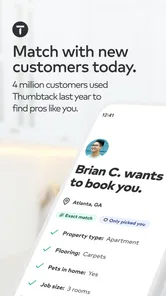
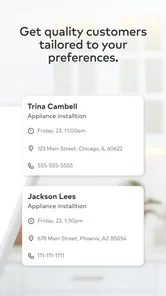
Once your profile is up, Thumbtack uses its smart algorithm to match you with clients who are specifically looking for your skills. You get notified when someone is interested in your service, and you can decide whether to accept the job. Now, that’s the kind of control I appreciate!
Managing Your Workload: The App’s Handy Features
What I find truly impressive is the array of features Thumbtack offers to manage your workload efficiently. You can communicate with clients directly through the app, schedule appointments, and even send quotes. The messaging system is intuitive and keeps all your client conversations in one place. No more juggling between emails and text messages—it’s all streamlined!
Another feature worth highlighting is the customer review section. After completing a job, clients can leave reviews and ratings, which can significantly boost your credibility. It’s like having a digital word-of-mouth working for you 24/7. And let’s be honest, a few glowing reviews can do wonders for attracting new clients.
What a good lead workflow looks like
I would separate initial screening from quoting rather than treating every inquiry as a job waiting to happen. First check that the request is within your service area and matches the work you want to take on. Then clarify any details that could change the time or cost. This two-step habit makes the app more useful as a filter, not just a stream of messages competing for attention.
For example, a home-service professional between appointments could read a request, ask whether the customer has a particular deadline, and confirm the basic scope before offering a price. If the customer’s timing clashes with existing bookings, saying so early is better than leaving the conversation open-ended. A quick, courteous response can still be useful even when the answer is no: it leaves the customer with a clear outcome and protects your calendar.
Profiles also work harder when they help the right customer rule in or rule out your service. I would use specific language about the jobs I take, rather than trying to sound suitable for every possible request. Photos should support that same message: a small set that clearly reflects your work is more useful than images that look polished but do not show what a customer is actually hiring you to do. This is a practical way to reduce mismatched conversations before they begin.
Choosing the right channel for each kind of work
Thumbtack sits between a personal referral network and broad social posting. Referrals can arrive with useful context and trust already established, while social media gives you more control over how you present your business but may require people to find and contact you themselves. This app’s appeal is that a person is already looking for help, but that intent does not automatically mean the job is profitable, nearby, or a good fit. I’d compare channels by the quality of completed work they bring, not by how busy the inbox feels.
If most of your customers come back regularly, direct relationships may remain the better foundation; the app is more compelling when you need fresh discovery. And if you manage a team, complicated projects, or detailed finances, a dedicated business system may be a better home for those tasks. Thumbtack can help start a customer conversation, but I would not make it the sole record of every operational detail across a business.
Where the convenience has limits
The practical value is strongest when you can keep the profile accurate and respond thoughtfully. That takes ongoing attention, especially if your availability changes or you offer several kinds of work. A customer may interpret a broad description differently from you, so I would be explicit about what is included in an estimate and what needs a separate conversation. Clear boundaries save time on both sides and make it less likely that a promising lead turns into a frustrating mismatch.
There is also a real trade-off in using a marketplace-style lead source: you are competing for attention alongside other professionals, and interest alone is not a confirmed booking. I would avoid making financial plans around inquiries before they become agreed work. Keep track of which kinds of requests turn into worthwhile jobs, and adjust your profile and quoting habits accordingly. That small review of your own results is more reliable than assuming a busy week of messages means the channel is paying off.
Performance verdict for working professionals
In my opinion, Thumbtack for Professionals is definitely worth checking out if you’re serious about growing your business. It’s a reliable tool that not only helps you find clients but also streamlines the entire process of managing your work—from lead generation to payment collection. While it might take a little time to get used to, especially if you’re not tech-savvy, the benefits far outweigh the learning curve.
So, if you’re ready to take your business to the next level, give Thumbtack a try. Who knows, your next big client might just be a tap away!
Thumbtack for Professionals Frequently Asked Questions
Can I use Thumbtack for Professionals on iPhone as well as Android?
Thumbtack for Professionals is a business app from Thumbtack, and it is available through mobile app stores. If you use an iPhone, check the app’s listing in the Apple App Store for compatibility with your device and operating system. Android users should check that their device meets the listed minimum operating-system requirement before downloading.
Do I need to be an established business to use Thumbtack for Professionals?
The app is intended for skilled individuals and businesses looking to connect with potential clients, so it can be relevant whether you work independently or represent a small business. Its purpose is to help providers present their services and engage with prospective customers. Consider whether you can clearly describe the work you offer and the customers you want to reach before setting up a professional presence.
Can I use Thumbtack for Professionals to find work in my service area?
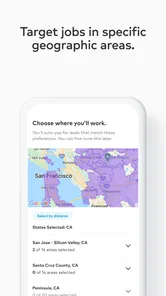
Thumbtack for Professionals is intended to help skilled individuals and businesses connect with potential clients in their area. The app lets providers present their services and engage with prospective customers, so it may be useful if you are looking to grow your local client base. Before downloading, consider whether the kinds of services you offer fit the customers you hope to reach.
Is Thumbtack for Professionals free to download, and what devices can run it?
The app is free to download and is listed for Everyone. Its current version is 421.0, and it requires Android 9 or later on Android devices. Thumbtack for Professionals is a business app from Thumbtack, with a store summary focused on finding and converting customers. Its download price is separate from any costs associated with using the platform to connect with potential clients.
What is Thumbtack for Professionals?
Thumbtack for Professionals is an app designed to help skilled individuals and businesses connect with potential clients in their area. It offers a platform where professionals can showcase their services, receive job requests, and communicate with clients directly through the app. This tool is particularly beneficial for freelancers and small businesses looking to expand their clientele.
Pros
- Easy client communication
- Wide range of job categories
- User-friendly interface
- Push notifications for job leads
- Secure payment options
Cons
- Service fees can be high
- Intense competition among pros
- Limited free features
- Occasional app glitches
- Customer support can be slow












