Thumbtack: Hire Service Pros
- 15.30K
- 4.9
- Installs
- 5.00M
- Price
- Free

Screenshots




Analysis by Reviewed
When a repair, cleaning job, or home project lands on my to-do list, I want a practical way to find and compare people who might handle it. Thumbtack: Hire Service Pros is built around that search: it connects customers with local service professionals, and its House & Home focus makes it especially relevant when the work affects your living space. I see it as a starting point for making a shortlist, not a guarantee that the first result will be the right fit.
A useful routine for choosing a pro
My most reliable approach is to describe the job clearly before I start comparing options. For a plumbing issue, for example, I’d note what is happening, where it is, and whether it seems urgent. That gives me a better basis for judging replies than a vague request, and helps prevent a mismatch between the task I have and the service a professional offers.
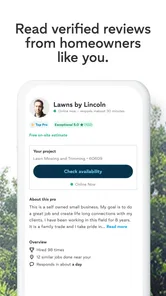
Once I have candidates, I look at reviews and examples of past work alongside the practical details of the job. A strong rating is a helpful signal, but it cannot tell me whether someone has handled my exact kind of repair. I’d use the reviews to identify questions worth asking, then clarify scope, timing, and what the estimate covers before agreeing to anything.
Getting Started with Thumbtack
Once you download the app, setting up is pretty straightforward. You create a profile, and then you’re ready to explore. The user interface is super intuitive, which I appreciated because, let’s be honest, no one likes a clunky app. You can search for services by typing in what you need or browse through categories if you're just window shopping.
Features that Stand Out
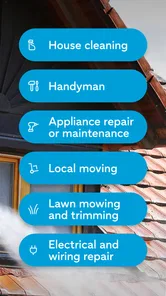
What really sets the Thumbtack app apart is its ease of use and the range of services available. From house cleaning and wedding planning to personal training and massage therapy, the app has it all. I found the rating and review system extremely helpful. It’s like having a friend recommend a service provider, except it's a whole community vouching for them.
Another cool feature is the cost estimates. You can get an idea of how much a service will cost even before you reach out to the pros. This helps in budgeting and avoids any awkward haggling later on.
Settings and faster habits that help
For a smoother search, I’d check the details of each request before sending it and make sure the location and job description reflect what I actually need. If I’m comparing several pros, I keep the same questions in mind for each one: availability, the work included, and any likely extra costs. That makes the answers easier to compare than relying on a quick impression or headline estimate alone.
More From Our News Desk

Weather by Xiaomi Review: Clear at a Glance, Less Clear Up Close

X Under Pressure: Can It Recover When Posting Goes Wrong?

Clash of Clans Is Won Between the Battles

Android Auto Makes the Case for Quieter Car Software

MobiOffice: Transforming Mobile Productivity with Seamless Integration

EA SPORTS FC™ Mobile Soccer: Redefining Mobile Sports Gaming
A simple habit that saves time is to gather useful context before beginning: measurements, photos of the affected area, or a short list of priorities can make the request more precise when relevant. I would not assume every job needs the same information, though. A design consultation and a leaking pipe call for different details, so I tailor the description instead of copying a generic request.
My Personal Experience
Okay, so I decided to hire someone for a minor home renovation project. I was able to filter through a list of professionals, check out their reviews, and even see photos of their previous work. Communication was seamless, and I could message the professional directly through the app, which was super convenient.
Once I made my selection, the pro came over on the scheduled date and did a terrific job. The process was so smooth, I felt like I had my own personal assistant organizing everything. I even got a follow-up message from the app asking for feedback on the service, which shows they care about user satisfaction.
Making comparisons more useful
One practical way to avoid decision fatigue is to separate non-negotiables from preferences before looking through profiles. I might need a pro who can visit on a particular day, while preferring someone whose past projects resemble my own. Keeping those two kinds of criteria separate helps me avoid dismissing a capable candidate over a minor preference—or choosing a polished profile that cannot meet the basic need.
I also find it useful to compare like with like. If I am weighing estimates, I first check whether each one describes the same job and level of work. A lower figure can be misleading if it leaves out a task I expected, while a higher one may cover a wider scope. I would ask for clarification rather than assume the estimates are directly comparable.
For a larger project, I would keep a short written record of what each professional says about timing, included work, and open questions. That is a simple habit, not a special app feature, but it makes it easier to return to a conversation without relying on memory. It is especially helpful when household members are sharing the decision or when the project involves several stages.
Everyday jobs and who benefits most
A realistic use for the app is a homeowner who notices a slow drain during the week but does not know which local plumber to call. They can describe the issue, review possible professionals, and ask about availability and the likely scope before deciding. That is a better fit for this kind of marketplace than treating a search result as an immediate dispatch service; if water is actively damaging the home, I would prioritize urgent direct contact instead.
Renters can also use a service marketplace when they are responsible for arranging a permitted repair or need help with a project of their own. I would first check who is allowed to approve the work and who will cover it, since the app cannot settle responsibilities between a tenant and property owner. For home design, the value is different: examples and clear descriptions of style and priorities can help start a conversation before committing to a consultation.
Thumbtack is most appealing to people who do not already have a trusted contact for every job and are willing to compare a few candidates. It is less compelling if I have a reliable professional whose work I already know, or if I want to hire only through close personal referrals. In those cases, the familiarity and history of a direct recommendation can matter more than having a broader set of profiles to browse.
Questions I would settle before hiring
Before choosing anyone, I would ask what the estimate includes, whether the professional expects to inspect the job first, and how they handle changes if the work turns out to be different from the initial description. Those questions are useful because home repairs often reveal details only once someone takes a closer look. The point is not to interrogate a pro; it is to make sure both sides understand the same job.
I would also confirm the schedule in a direct conversation instead of treating an initial reply as a firm appointment. If access to the home requires coordination, I would agree on the arrival window and make sure the person knows any relevant entry instructions. That small amount of preparation can prevent a promising match from becoming a frustrating visit.
Reviews are a starting signal, not a warranty. I look for comments that speak to the kind of work I need and note any recurring themes, then ask a candidate about anything that could affect my decision. A general high rating may be reassuring, but details about communication, cleanup, or handling an unexpected complication are more useful for predicting how a particular project might go.
Where the app has limits
Thumbtack is most useful when I have enough time to compare choices and explain the job. For an emergency that needs immediate help, I would call a trusted local contact or a service with clearly stated urgent availability rather than wait on a marketplace conversation. The app can help find possibilities, but the final decision still needs my own checks and direct questions.
It also may not suit someone who already has a dependable pro for every recurring task, or who prefers to hire only through personal referrals. A neighborhood recommendation can come with useful context about punctuality and follow-through that a profile cannot fully capture. I treat app reviews as evidence to weigh, not a substitute for confirming the details that matter to my household.
Another trade-off is that a broad service marketplace can feel less focused than a specialist directory when I know exactly what trade I need. Browsing can help when I am unsure how to frame a project, but it does not remove the work of checking whether a profile is relevant to a particular repair. If the job has technical or safety implications, I would be especially careful to establish qualifications and scope directly rather than relying on a general profile impression.
The app is also not the right tool for deciding whether a home project should be done at all. I still need to set my own budget, decide what outcome matters, and consider whether the work can wait. A marketplace can help me find potential people to speak with; it cannot make those household priorities for me, and I would not start contacting pros until I can explain what I want in practical terms.
Who should try it, and what it costs
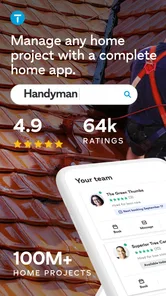
I’d recommend the app to renters and homeowners who need help beyond their regular routine, especially when they want to compare more than one option before choosing. Thumbtack is free to download, is rated for Everyone, and is developed by Thumbtack. Its average rating is 4.8 from around 53,000 ratings, with over 5 million installs, which suggests many people use it to begin a service search.
The app was released in 2017 and its current version is 402.0, with Android support from version 9. Those details make it easy to check whether it fits your device, but they do not decide whether a particular professional is right for your project. I would still compare the scope and terms of the job directly before booking.
There are more than ratings to consider when deciding whether to try it: the main question is whether you want a place to discover candidates or already have a preferred route to hiring. For a one-off household task, starting with a shortlist can be useful. For recurring work, once I have found someone dependable, I may prefer to keep that relationship direct rather than repeat the search every time.
My final take
In conclusion, if you’re someone who values your time and wants quality service without the hassle, Thumbtack: Hire Service Pros is definitely worth a try. It’s like having a little black book of trusted professionals right in your pocket. Plus, the peace of mind knowing you’re hiring someone vetted by others just like you is priceless.
So, next time you need something done, whether it’s big or small, give Thumbtack a whirl. You might just find it becomes your go-to app for all things service-related.
For a less familiar project, I’d use it as one part of a careful decision rather than rush from browsing to booking. Save time by writing down the must-haves first, then compare candidates against those same points; for a routine repair, that might mean clear availability and relevant experience, while a home design job may call for examples that match your style. The app’s breadth is convenient, but comparing very different kinds of work can make browsing feel less focused, so I narrow the search to the task at hand.
Compared with asking friends or searching a general web directory, Thumbtack puts service discovery and professional profiles in one place. That can be handy when I have no personal referral, while a direct recommendation may be better when trust and a known work history matter most. I would also keep the conversation specific: confirm who is doing the work, what is included, and how changes will be handled before settling on a plan.
Overall, I think Thumbtack works best as a practical way to discover options and start a conversation, not as a replacement for judgment. If I want one place to explore home services and compare candidates, I’d give it a look; if I need guaranteed emergency response or already know whom I trust, I’d choose a more direct route. The best results come from treating the app as the beginning of the hiring process and checking the details that affect the finished job.
Thumbtack: Hire Service Pros Frequently Asked Questions
Is Thumbtack available for my phone, and what are its basic requirements?
Thumbtack is a mobile app for finding and contacting service professionals, and its minimum operating-system requirement is version 9. Before downloading, check that your device meets that requirement and that you have enough room for an app. It is free to download, so you can install it and explore its home-service marketplace without paying an app purchase price.
Who makes Thumbtack, and is the app appropriate for all ages?
Thumbtack is developed by Thumbtack and is listed with an Everyone content rating. Its purpose is to help people connect with professionals for household projects and other services, so the app is primarily useful to people looking to arrange that kind of work. As with any service marketplace, users should make hiring decisions thoughtfully and discuss project details directly with a professional.
Can I use Thumbtack to find help with home maintenance and design?
Yes. Thumbtack is a House & Home app for connecting with professionals who offer services such as maintenance, plumbing, and home design. You can use it to explore options for a project, review professional profiles, and decide whom to contact. The app is intended to make it easier to find pros for household needs, while the right choice depends on the specific work you want done.
What is Thumbtack and how does it work?
Thumbtack is a platform that connects users with local professionals for various services such as home improvement, events, wellness, and more. Users can search for services, view professional profiles, compare prices, and read reviews before hiring. It’s designed to simplify the process of finding reliable service providers by offering a comprehensive list of options tailored to the user’s specific needs.
Is Thumbtack free to use for customers?
Yes, Thumbtack is free for customers to use. You can browse through professionals, read reviews, and request quotes without any cost. However, once you decide to hire a service provider, the cost of the service will depend on the professional’s rates. Thumbtack charges the service providers a fee for connecting with potential customers, not the customers themselves.
Pros
- Wide range of services available.
- Easy to connect with local professionals.
- User-friendly interface.
- Detailed professional profiles.
- Secure payment options.
Cons
- Limited to certain geographical areas.
- Service costs can vary widely.
- No guarantee of service quality.
- App can have occasional glitches.
- Inconsistent customer support.