Third Eye Hidden Camera Record
- 1.40K
- 4.6
- Installs
- 5.00M
- Price
- Free

Screenshots
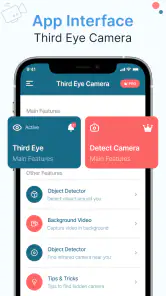
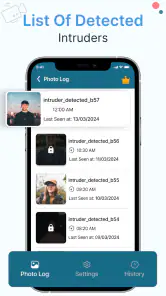
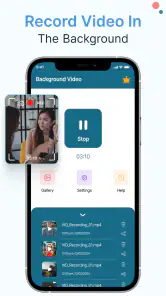
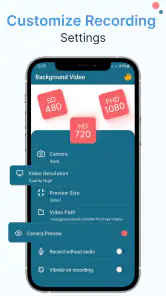
Analysis by Reviewed
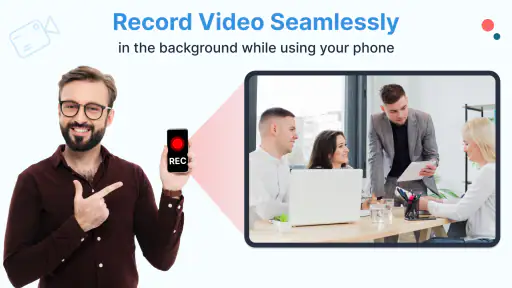
Third Eye Hidden Camera Record is the kind of Android tool that makes sense only when you need a camera to keep working quietly while you do something else. I tested it with that narrow purpose in mind rather than treating it like a normal camera replacement. Its main appeal is discreet background recording, including situations where the display is locked or turned off, and that changes the way you think about setup, battery, storage, and privacy.
Developed by DOSA Apps, this free tools app has built a strong audience, with an average rating of 4.6 from around 80 thousand ratings and more than 5 million installs. Those figures suggest that the idea is easy for people to understand, but they do not remove the need to use it responsibly. A hidden camera can be useful for legitimate personal tasks, yet it can also cross a serious privacy line if another person is recorded without their knowledge or permission.
How Third Eye Hidden Camera Record fits into real mobile use
The app’s central difference from the standard camera is not image quality or editing. It is the ability to begin a recording workflow and then leave the phone less visually distracting. In practical terms, I found that this suits hands-off situations better than ordinary camera apps, especially when keeping the screen lit would be awkward or would draw attention to the phone.
A realistic example is recording a personal demonstration while following instructions on another device, or capturing a long stationary scene where you do not want the bright display to remain active. Another is documenting your own equipment, workspace, or property while you move around nearby. In each case, the useful part is not “secret filming” as a novelty; it is reducing the phone’s visible role once the recording has been arranged.
That distinction matters because this is not the right tool for every camera job. If I want to frame a portrait, adjust composition repeatedly, monitor focus, or review a shot immediately, a conventional camera app is more comfortable. Third Eye Hidden Camera Record is better understood as a background recorder than as a complete camera studio.
What changes when the screen is locked or off
The screen behavior is the feature that separates this app from the usual alternatives. A normal camera generally expects the display to remain available for controls and preview. Here, the workflow is built around starting the task first and then minimizing the screen’s involvement. That can make a phone easier to place in a fixed position, less distracting during a long recording, and more practical in a pocket or on a nearby surface when the situation is appropriate.
There is a trade-off: once the display is no longer your constant preview, you lose immediate visual confirmation. I would not begin a critical recording without first checking the framing, the selected camera, and whether the phone has enough battery and storage. A few seconds spent preparing is more valuable than discovering later that the lens was blocked or pointed at the wrong area.
I also recommend treating the phone’s physical position as part of the setup. A discreet screen does not make a poor angle better. Before starting, I would place the device securely, check that the camera opening is unobstructed, and make sure the phone will not slide, overheat in direct sun, or be accidentally handled. These are simple habits, but they matter more here because the app’s background behavior encourages you to stop watching the device.
Connectivity and the moments when the network matters
Connectivity shapes the experience mainly around discovery, installation, updates, and any account or store activity connected with obtaining the app. The recording idea itself is local in feel: you prepare the phone, start the camera task, and allow it to continue without keeping the display active. I would not assume that network access is needed for every recording session, and I would not promise offline behavior beyond what the app itself visibly allows on the device.
That uncertainty is a reason to test the exact workflow before relying on it. If I were traveling, working in a building with weak reception, or preparing to record something important, I would install and open the app beforehand, check its controls, and perform a short trial. This avoids confusing a connectivity problem with a camera, storage, or battery problem.
The network can also affect how smoothly you recover from a problem. If you need to reinstall, update, consult the app’s store page, or make an in-app purchase, a reliable connection becomes more relevant. The app is free to download, while optional in-app purchases range from under a dollar to amounts approaching one hundred dollars per item. I would therefore avoid buying anything simply because a recording failed; first identify whether the cause was permissions, storage, battery, camera access, or the phone’s background restrictions.
For someone expecting live remote viewing, automatic cloud delivery, or a web dashboard, this is where expectations should be controlled. The app’s defining promise is background recording, not a substitute for a dedicated connected security camera system. If remote access is the main requirement, a purpose-built camera with explicit monitoring and notification features may be a better fit.
Useful mobile contexts, and where the idea becomes uncomfortable
On a phone, discreet recording can be practical because the device is already portable and familiar. I can imagine using it for a personal time-lapse-style observation, recording a rehearsal while keeping the screen from becoming a distraction, or documenting a repair from a fixed position. It can also help when the phone must remain available for other physical tasks and the display would otherwise get in the way.
However, portability makes privacy mistakes easier too. A phone can be carried into a workplace, classroom, changing area, meeting, or private home without everyone understanding what it is doing. I would never use this app to record people in spaces where they reasonably expect privacy, and I would check local rules before recording conversations or shared environments. The fact that the screen can be locked or turned off is a technical convenience, not permission to ignore consent.
There is also a practical social concern: if someone notices the app or the phone behaving unusually, a hidden recording can look deceptive even when the original intention was harmless. For shared projects, I would tell the people involved and agree on the recording plan. For personal property or equipment, the privacy risk is usually easier to control because the subject is not an unsuspecting person.
Compared with a standard camera app, this tool is less suitable when transparency and instant feedback are priorities. The normal camera makes its activity obvious and gives you a live view. Compared with a dedicated security camera, Third Eye Hidden Camera Record is more portable and less specialized, but it depends on a phone’s condition, battery, storage, and operating-system behavior. That makes it convenient for occasional use, not automatically dependable for continuous surveillance.
Failure points and a sensible recovery routine
Background operation can make failures harder to notice. A normal camera often shows a preview, recording indicator, or warning directly on screen. With the display locked or off, I may not see that the phone has stopped, lost camera access, run out of space, or been interrupted by the operating system. The first improvement is therefore procedural: run a short test under the same conditions before starting the real recording.
My recovery routine would begin with the basics. I would unlock the phone, open the app, and check whether the recording was saved. Then I would inspect available storage, battery level, camera access, and any system setting that limits background activity. If the app was recently updated, I would repeat a brief test rather than trusting an older setup. The current version is 3.0.3, so keeping the app current may be sensible, but an update is also a reason to verify a familiar workflow again.
Storage deserves special attention because a long recording can fail silently from the user’s point of view if the phone becomes full. I would clear unnecessary files before starting and leave enough room for the intended session. I would also avoid placing the phone somewhere that blocks ventilation. A screen that is off can make the device look inactive even while the camera and processor continue working.
If a recording does not appear afterward, I would not immediately repeat the same attempt. First, I would establish whether the app created a file in its expected location and whether the phone’s gallery or file browser is simply slow to show it. Next, I would perform a short recording with the screen visible, because that makes it easier to identify a permission or control problem. Only after that would I try the locked-screen workflow again.
This is one of the app’s genuine weaknesses: it rewards preparation more than casual tapping. Someone who wants a camera that always explains its status at a glance may find the background approach frustrating. The less visible the process becomes, the more responsibility moves to the user’s checklist.
Being careful with personal data and recordings
Any recording app deserves a data-conscious routine, and this one deserves extra care because its discreet behavior can make recordings easier to forget. I would review files regularly, delete clips that are no longer needed, and avoid leaving sensitive footage on a phone that other people can access. A screen lock on the device is useful, but it does not replace thoughtful file management.
I would also separate testing from important material. A short test clip can confirm that the camera is aimed correctly and that the workflow succeeds without filling the device with unnecessary footage. Naming or organizing recordings after the session can prevent accidental sharing, especially when several clips look similar in the gallery.
Before using the app around other people, I would explain what is being recorded and why. The app’s Everyone content rating describes its store suitability, not a blanket approval for every real-world recording situation. Age suitability and privacy consent are different questions. Parents, teachers, employers, and event organizers should set their own clear rules instead of treating a hidden-screen feature as automatically acceptable.
I would also be cautious about the phone itself. If the device is borrowed, shared, or managed by an employer or school, recording may conflict with the owner’s policies. If the phone is lost, any saved footage could be exposed along with other personal content. That is why I see this app as best for controlled, clearly owned situations where I can manage both the device and the resulting files.
Who should use it, and who should choose something else
I would recommend Third Eye Hidden Camera Record to someone who specifically needs a portable background recorder and is willing to test the setup before depending on it. It is a good match for personal documentation, fixed-position recording, discreet screen behavior during legitimate tasks, and users who understand that battery, storage, heat, and permissions still matter.
I would skip it if I needed professional monitoring, guaranteed long-duration operation, remote access, strong physical security, or a clear live preview throughout the session. In those cases, a dedicated camera or a more conventional recording app may offer a better balance of reliability and transparency. I would also skip it for any situation where the only reason to hide the screen is to conceal recording from people who have not agreed to it.
The app’s popularity makes it easy to assume that it is a universal solution, but its usefulness is quite specific. The developer, DOSA Apps, has built a tool around one unusual behavior rather than trying to replace every camera feature. That focus is a strength when the background workflow is exactly what I need, and a limitation when I want a polished all-purpose camera.
It is free to start, carries an Everyone age rating, and works on Android versions beginning with 6.0. Those details make it accessible to many phone owners, but compatibility alone does not guarantee that every handset will behave identically in the background. I would still perform the same short test on the actual phone I plan to use, particularly before recording something that cannot be repeated.
My verdict on connectivity, control, and trust
After looking at the app through everyday use rather than novelty, I see its value in reducing the phone’s visual presence while a recording is underway. Connectivity is part of the surrounding experience, especially for obtaining and maintaining the app, but I would not treat it as a remote surveillance platform. The important work happens in preparation: checking the camera view, confirming access, managing storage, and deciding whether the recording is appropriate.
The best feature here is also the reason to be cautious: less visible recording demands more deliberate preparation. If I need a simple background camera for a legitimate personal task, I would consider trying it. I would keep the first session short, verify the saved result, and only then use a longer workflow. If transparency, remote monitoring, or professional reliability matters more than a dark or locked display, I would choose another category of camera instead.
Overall, Third Eye Hidden Camera Record is a focused tools app rather than a magic solution. Its 5M-plus installs and 4.6 average show that the concept resonates, but my recommendation depends on using it with clear consent and realistic expectations. For the right mobile context, it can be convenient; for anything involving other people’s privacy or mission-critical recording, careful judgment matters more than the app’s hidden-screen capability.
Pros
- Discreet interface can help monitor a room without attracting attention.
- Motion-triggered recording may reduce unnecessary footage and storage use.
- Quick access to saved clips makes reviewing recordings straightforward.
- Useful for checking pets
- entrances
- or personal belongings remotely.
- Simple controls make the app approachable for first-time users.
Cons
- Recording secretly may violate privacy laws or local consent requirements.
- Background recording can drain battery quickly during extended use.
- Video quality may depend heavily on the phone’s camera and lighting.
- Some features may require in-app purchases or a premium subscription.
- A visible phone may still reveal that recording is taking place.

- Category
- Tools
- Version
- 3.0.3











