TheFork - Restaurant bookings
- 353.00
- 4.9
- Installs
- 10.00M
- Price
- Free

Screenshots
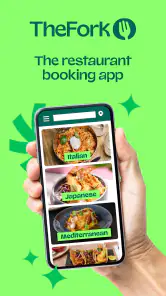
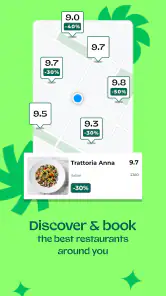

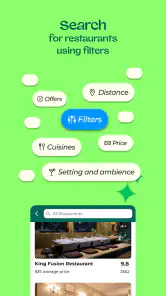
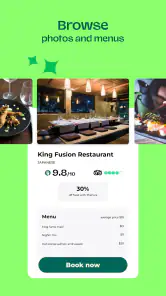


Analysis by Reviewed
I’d treat TheFork as a way to turn “Where should we eat?” into a practical shortlist, rather than as a guarantee that every restaurant in town will be listed. If you’re opening it for the first time, start with a place or area you can actually reach, then narrow the choices by the kind of meal and budget you have in mind. That simple approach makes the results easier to compare and keeps browsing from becoming an evening-long activity.
What a first visit is like
This is a free restaurant-booking app from LaFourchette SAS, in the Food & Drink category. Its average rating is 4.9 from around 678,000 ratings, and it has been installed over 10 million times. Those figures suggest it has found a large audience, but I’d still choose a restaurant by checking the details that matter to my own plans rather than treating popularity as a guarantee of fit.
The app is rated for everyone, and its current version is 25.21.0, with Android support from version 9. I’d check that your device meets that requirement before downloading. Once it’s installed, think of the app as a discovery and reservation tool: it is most useful when you’re flexible about where to eat and want to explore available options in one place.
Starting with the right expectations
For a first-time user, the useful question is not whether the app can name the “best” restaurant, but whether it can help you find a suitable place for this particular meal. I’d begin with the practical constraints: where everyone will be, when you want to eat, how much you’re comfortable spending, and whether you have a cuisine in mind. Having those answers before browsing helps keep attractive photos from pulling you toward a place that doesn’t work for the group.
It also helps to think of a booking app as a window into participating options, not a complete directory of every place nearby. If your favorite neighborhood spot doesn’t appear, that doesn’t necessarily mean it’s closed or unsuitable; it may simply be easier to check that restaurant directly. I like using TheFork when I’m open to alternatives, and switching to a map or direct search when I have a very specific destination already picked.
So, the other day I decided to try out TheFork app, and let me tell you, it’s a game-changer for foodies out there. Whether you're looking for a cozy spot for a date night or a bustling place for a family brunch, this app has got you covered.
Discovering Dining Delights
First things first, opening TheFork app feels like stepping into a treasure trove of dining options. It’s like having a personal concierge that knows all the best eateries in town. The interface is super user-friendly, making it easy to browse through a plethora of restaurants. You can filter by location, cuisine type, and even price range, which is a lifesaver when you're trying to stick to a budget.
More From Our News Desk

Weather by Xiaomi Review: Clear at a Glance, Less Clear Up Close

X Under Pressure: Can It Recover When Posting Goes Wrong?

Clash of Clans Is Won Between the Battles

Android Auto Makes the Case for Quieter Car Software

MobiOffice: Transforming Mobile Productivity with Seamless Integration

EA SPORTS FC™ Mobile Soccer: Redefining Mobile Sports Gaming
Making the first search useful
When I’m new to an area, I avoid searching too narrowly at the start. I’ll choose a neighborhood or meeting point first, then compare a handful of restaurants that fit the budget and type of food I’m considering. If the results feel thin, I’ll widen the area before abandoning the search. This small adjustment is more useful than repeatedly changing cuisine filters while keeping an unrealistically tight location.
For a group, I’d share two or three plausible options rather than asking everyone to browse independently. That keeps the decision manageable and lets people compare the details that matter to them: location, menu expectations, price, and available booking times. It is a better use of the app than scrolling until one person gets tired and picks the first appealing listing.
Booking Made Easy
One of the features I absolutely love is how seamless the booking process is. Gone are the days of calling restaurants and being put on hold. With just a few taps, you can reserve a table at your favorite spot. Plus, the app sends you a confirmation email, so you have all the details handy. It's perfect for someone like me who tends to forget things easily!
Reading listings with a little care
Before I commit, I treat the restaurant page as a decision aid, not a substitute for asking a necessary question. Photos and descriptive wording can create a strong impression, but neither tells me everything about the room, the service on a particular evening, or whether a special request can be accommodated. When a requirement could affect someone’s comfort or safety, I’d contact the restaurant directly and get a clear answer before relying on the booking.
I also check that the selected date, time, and party details match what we actually agreed on. That may sound obvious, but it’s easy to focus on the restaurant and overlook the small booking choices when making plans in a hurry. After reserving, I keep the confirmation email accessible and use the reservation details as the reference point if plans shift, rather than relying on a vague memory of tapping through the process.
Reviews and Recommendations
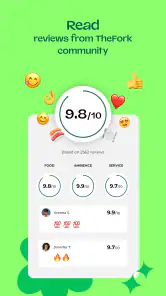
Before making a reservation, I always check out the reviews and ratings from other users. It’s like having a community of food critics at your fingertips. The comments are honest and give you a good idea of what to expect. I also appreciate the recommended dishes section; it’s a great way to discover the must-try items at each restaurant. And yes, I’ve found some hidden gems thanks to this feature!
My tip is to read comments for patterns rather than treating one unusually glowing or unhappy review as a verdict. If several people mention the same practical detail, it may be worth considering; if opinions conflict, I remind myself that diners value different things. A lively, noisy room might be a plus for a casual celebration and a poor fit for a quiet conversation. Reviews are most useful when I translate them into my own priorities instead of asking them to make the choice for me.
Another cool aspect is the loyalty program. Every time you book through the app, you earn points that can be redeemed for discounts on future reservations. Who doesn’t love a good deal, right?
Using it for a real plan
Imagine finishing work and needing somewhere for dinner with a friend who is already on the way. I’d search near the meeting point, set a realistic price range, and compare a few options rather than choosing the first appealing photo. Before committing, I’d read recent comments for clues about the atmosphere and dishes, then check the reservation details carefully. That sequence helps turn browsing into a plan without relying on a last-minute phone call.
For a first booking, I’d keep the plan simple: pick a time you can make, confirm the party details, and save the confirmation email somewhere easy to find. If your plans change, revisit the reservation information promptly and follow the options shown there. I wouldn’t assume every restaurant handles changes in the same way, so checking the details is better than relying on memory or a general expectation.
Small habits that make the app work better
One trade-off I’ve learned to accept is that more filters are not always better. Narrowing by location, cuisine, budget, and timing all at once can leave you with a short list that reflects the limits of the search rather than the range of good possibilities. I’d set the two most important constraints first, look at what appears, and relax a less essential preference if the results don’t suit the occasion.
For a spontaneous meal, I’d search close to where I’ll already be instead of starting from home or the center of town by habit. For a planned celebration, I’d browse earlier and compare the overall fit before choosing a time. These are different jobs: the first is about finding a practical option without delay; the second is about making sure the venue suits the people and mood. Using the same search approach for both can make the app feel less helpful than it is.
How it fits beside other ways to find dinner
Compared with searching a map app, TheFork is more focused on browsing restaurants and making a reservation in the same flow. A map is still better when I mainly need directions, broad coverage, or a quick view of what is immediately nearby. Searching the web or calling directly can also be more useful when I have a specific restaurant in mind or need to ask about a particular request before booking.
The trade-off is that an app-based shortlist can only help with the choices it presents, and reviews are personal impressions rather than a promise that your meal will match someone else’s. I use comments to look for recurring, practical signals—such as whether people mention a lively room or a dish they enjoyed—rather than expecting every opinion to agree. If the occasion depends on a precise dietary or accessibility need, I’d contact the restaurant to confirm instead of treating a listing or review as definitive.
There is also a difference between finding a restaurant and deciding whether it is right for a special occasion. A broad search is convenient when I’m happy to discover somewhere new; a direct call is often more reassuring when I need to discuss a detail that could change the plan. I don’t see those options as competitors in every situation. I use the app to narrow the field, then switch to direct contact when the decision needs an answer that a listing cannot provide.
Who will get the most from it
I’d recommend it most to people who eat out regularly, enjoy trying unfamiliar places, or want to reserve without making a call. It can also help when friends have different budgets or cuisine preferences, because filtering gives you a starting point for a shared decision. On the other hand, if you already know exactly where you’re going, prefer to choose solely from a map, or need an answer from staff before booking, going directly to the restaurant may be simpler.
A useful everyday case is a weekend lunch with relatives who have different ideas about what counts as a good outing. I’d use the filters to establish a reasonable area and budget, then bring a short selection to the group instead of sending everyone a long list. The app can make the first stage less chaotic, but it cannot settle personal disagreements about food or atmosphere. That part still takes a quick conversation.
I’d also skip it as my main tool if I need exhaustive coverage, have a fixed restaurant in mind, or am planning around a request that must be confirmed by staff. In those cases, a local map search or direct contact is more dependable for the specific job. The app’s strongest role is helping me discover and reserve among options that fit a flexible plan, not replacing every other way of checking a restaurant.
The app is free to download, so it’s easy to try without making it the only way you plan meals. Its release date is November 3, 2011, and the version available now is 25.21.0. I’d judge it by whether the restaurants and reservation options around my own area are useful; a strong overall rating can’t tell me whether the selection suits my neighborhood or taste.
What to do after the first booking
Once you’ve completed one reservation, I’d take a moment to notice which parts of the process actually saved effort. Perhaps comparing nearby restaurants was the useful bit; perhaps having a confirmation email mattered most. That tells you how to use the app next time, instead of assuming you need to explore every screen or rely on it for every meal. A tool is worth keeping in a routine when it solves a problem you genuinely have.
If your first search doesn’t produce a good choice, I wouldn’t treat that as a failed setup. Try a nearby area, loosen one preference, or use a map to find a place and contact it directly. TheFork works best when you let it help with discovery and booking while keeping your own judgment in charge. That approach is especially reassuring when you’re unfamiliar with the neighborhood or coordinating plans with other people.
Final Thoughts
In a nutshell, TheFork app is a must-have for anyone who enjoys dining out. It simplifies the reservation process, offers a wide range of restaurant options, and provides valuable insights through reviews and recommendations. Whether you’re a local or just visiting a new city, this app ensures you’ll never be at a loss for where to eat next. So, go ahead and give it a try – your taste buds will thank you!
My practical advice is to use it as a dependable starting point, not as the final authority on every detail of a meal. Shortlist a few places, read reviews with your own priorities in mind, and check the booking information before you head out. If that process feels easier than calling around or jumping between searches, it has earned a place in your dining routine; if not, a map search or direct contact may suit you better.
TheFork - Restaurant bookings Frequently Asked Questions
Can I use TheFork to find restaurants before deciding where to eat?
Yes. TheFork is designed to help you discover restaurants as well as book a table, so it can be useful when you have not settled on a venue yet. You can browse restaurant options and, as you compare them, look at details such as menus and customer reviews. That makes the app a practical starting point for planning a meal out.
Can I check available booking times in TheFork before making a reservation?
Yes. TheFork lets users check available time slots while exploring restaurants, so you can see whether a restaurant suits the time you have in mind before confirming a booking. Availability is part of the app’s reservation experience, alongside browsing restaurant information and menus. This can make it easier to compare options and plan a meal around your schedule.
What should I know about TheFork before downloading it?
TheFork is a Food & Drink app from LaFourchette SAS, designed to help people find restaurants and make bookings. It is free to download and is rated for Everyone. The app’s store summary is “Create delicious memories,” which captures its focus on helping users plan a meal out and manage restaurant reservations from a mobile device.
Is TheFork free to download, and which devices can run it?
TheFork is free to download, and its minimum operating system requirement is version 9. It is available for Android and iOS, so people can use it on supported devices running either platform. Before installing, check that your device meets the requirement and that the app is available through your platform’s app store. The app is suitable for a general audience, with an Everyone content rating.
What is TheFork app and how does it work?
TheFork is a restaurant booking app that allows users to discover and reserve tables at various restaurants in real-time. With an easy-to-use interface, users can browse restaurant menus, view customer reviews, and check available time slots. The app also offers special promotions and discounts for certain bookings, enhancing the dining experience.
Pros
- Simple and intuitive user interface.
- Wide range of restaurant options.
- Easy reservation management.
- Integrated reviews and ratings.
- Exclusive discounts available.
Cons
- Limited customer support options.
- Some restaurants not updated.
- Occasional app crashes.
- Lacks variety in filter options.
- Inconsistent user notifications.
- Category
- Food & Drink
- Version
- 25.21.0











