Sutter Health My Health Online
- 1.94K
- 4.1
- Installs
- 500.00K
- Price
- Free

Screenshots
Analysis by Reviewed
When I need to check a health detail quickly, I want an app that gets me to the useful part without turning a small task into a project. Sutter Health My Health Online is aimed at that everyday role: it brings medical information onto a phone and gives Sutter Health patients a place to handle some routine care tasks. It is a free medical app from Sutter Health, and its appeal is less about replacing a clinic visit than making the in-between moments easier to manage.
Quick checks, with sensible expectations
For simple actions, a phone-based patient portal can save the effort of calling or signing in on a computer. I’d reach for it to review information before an appointment or take care of a small administrative task while away from home. Speed still depends on the phone, connection, and the service behind the app, so I wouldn’t treat instant loading as a guarantee. The useful question is whether the app gets me to the right information with less friction than switching to a browser or making a call.
That distinction matters when something feels urgent. A medical portal is for managing care, not for deciding what to do in an emergency. I’d contact an appropriate care provider directly when time matters rather than waiting for an app message or an online result to answer an urgent question.
Where it fits into a busy day
A realistic use is checking an appointment detail while planning the rest of the day, then returning later to review a health update when there is time to read it carefully. Keeping those tasks in one place can also help when a family member is coordinating transport or trying to remember what needs follow-up. I’d use the app as a practical reference, while keeping a separate note of questions I want to ask at the next visit; a portal can show information, but it cannot replace a conversation about what that information means for me.
Compared with calling a clinic for every routine query, a patient app can be more convenient when the task is straightforward. A desktop portal may still feel better for longer forms or careful reading, and a phone call is the better route when I need a timely back-and-forth. The trade-off is simple: the app is most useful when I know what I need and can handle it digitally.
Your Health, Just a Tap Away
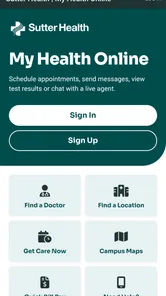
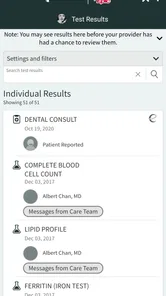
Let me dive into the nitty-gritty of what makes this app tick. First off, the user interface is super intuitive. The developers clearly understand that not everyone is tech-savvy, so they’ve kept things simple. Whether you're booking an appointment or checking your test results, everything is just a tap away. I remember the first time I used it, I was amazed at how easily I could navigate through the various options without a hitch.
Features that Make Life Easier
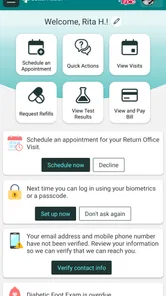
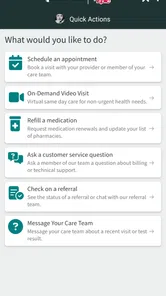
One of the standout features of Sutter Health My Health Online is the ability to communicate directly with your healthcare provider. Gone are the days of endless phone calls and waiting on hold. You can send messages, request prescription refills, and even get advice on minor health issues. There's also a pretty nifty appointment scheduling feature. I scheduled my yearly check-up in less than two minutes while sipping my morning coffee!
More From Our News Desk

 Block Blast!
 Makes Every Clear Feel Like One More Turn
A clean little block puzzle becomes a study in space, risk, and self-control. Its best moments come from one satisfying clear; its toughest test is knowing when to stop.

 Super Stylist Fashion Makeover
Super Stylist Turns Dress-Up into a Runway Career
Its makeover-to-client loop turns quick outfit decisions into shareable style theater. The question is whether the closet keeps giving players a reason to return.

 Block Craft 3D:Building Game
Block Craft 3D Under Pressure: How Well Does It Recover When Building Goes Wrong?
A failure-focused look at Block Craft 3D’s forgiving building loop, its uncertain recovery edges, and the moments that demand more than a cheerful village.

 Woodturning
 Trades Creative Freedom for a Satisfying Carving Loop
If your usual creative game is about building, decorating, or styling, Woodturning trades open-ended projects for a tactile, tightly guided carving loop. Here is what that switch really costs.

 PUBG MOBILE
 Shows What Battle Royale Must Get Right
PUBG MOBILE shows how battle royale has matured: bigger systems matter less than meaningful choices, readable fights, and a reason to return after every loss.

 Braindom: Brain Games Test
Braindom’s Social Life Happens Between Puzzles
Braindom turns quick logic traps into a personal ritual, but its community value is more about comparing answers than building together.
Latest News



Another cool feature is the health tracker. You can log your daily steps, monitor your weight, and keep tabs on your blood pressure. It's like having a personal health assistant who never takes a day off. Plus, the app sends gentle reminders to ensure you’re on top of your health game.
Making routine tasks easier to finish
The most useful way to approach a portal is to group small tasks together instead of opening it repeatedly for every passing thought. I’d check appointment information, write down questions, and review anything I need to discuss during one quiet moment. That habit helps me avoid reading a health update in a rush and then forgetting what I wanted to ask. It also makes a short visit to the app feel purposeful rather than like another notification-driven chore.
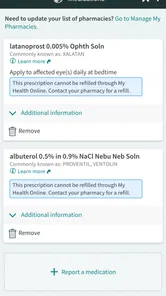
Prescription refills are a good example of where expectations matter. A request can begin in the app, but it is still part of a care process, not an instant replacement for medication or a guarantee that a prescription will be ready at once. I’d submit a routine request with enough time to handle follow-up, and call the appropriate provider or pharmacy if I’m close to running out. The same principle applies to a message: it is convenient for a non-urgent issue, but not a channel I’d rely on for time-sensitive care.
For someone helping a relative organize appointments, the portal may be useful as one part of a shared routine. I’d agree on who is responsible for checking dates and making calls, rather than assuming that access to a phone automatically makes coordination easy. A family member can help remember questions or arrange a ride, but health information should be handled with the patient’s understanding and permission. That little bit of planning can prevent confusion about who is following up.
Keeping the app useful over time
For best results, I’d treat the portal as a companion to care rather than a complete health record for every situation. Before relying on it during a busy day, I’d sign in when I have a calm moment and get familiar with where the information I use most often appears. That small bit of preparation makes a later appointment check or message less stressful. If a screen takes longer than expected, I’d check the connection and try again before assuming the information itself has changed.
People who prefer paper records, rarely use a smartphone, or want one app to manage care across unrelated health systems may find a broader tool or direct contact more practical. The experience is naturally most relevant to people already receiving care through Sutter Health. It is also worth remembering that messages are not the same as a live conversation: for a complicated concern, I’d call and explain the situation rather than trying to compress it into a short written exchange.
That distinction also helps answer whether this is a general health tracker. It includes tools for recording some personal measurements, but I’d choose it primarily for connecting with Sutter Health care, not as my main way to build a fitness routine or compare health information across providers. Someone who wants a single place for records from several unrelated systems may be better served by a broader records organizer, while someone who wants timely clarification should use direct contact. The right choice depends on the job, not on how many functions an app appears to offer.
Reliability, access, and device fit
My practical expectation is that a patient portal should be dependable for ordinary checks, while allowing for occasional delays caused by connectivity or service availability. I would not make the app the only place I keep information I need immediately, especially when preparing for travel or an appointment; a written reminder can be a useful backup. If the app behaves unexpectedly, closing and reopening it or trying again later is a reasonable first step, but a persistent access problem is a reason to contact the health provider through another channel.
For recovery from a frustrating session, I’d keep the steps simple: confirm the phone has a working connection, reopen the app, and give the task another try. If the same issue continues, switching to a call or another available way of contacting the provider is more sensible than repeatedly tapping through screens. I would avoid assuming that an unfinished action, such as a message or refill request, has gone through unless the app makes that clear. Checking before submitting again can reduce duplicate requests and unnecessary confusion.
The app is rated for everyone and requires Android 9 or later, so an older Android phone may not be able to install its current release. Its current version is 11.4.5. If you share a device, I’d also make a habit of signing out when finished and keeping the phone’s screen lock in place, particularly before opening personal health information in a public setting. These are sensible habits for any medical portal, not a substitute for the provider’s own security practices.
In everyday use, I’d also think about the screen and setting. A phone is handy when I’m away from a desk, but reading detailed health information on a small display can be tiring, especially when I’m distracted or in a noisy place. For a longer review, I’d wait until I can focus or use a larger screen if that is more comfortable. The app’s convenience is strongest for brief checks and simple actions; it does not make every health task easier just because it fits in a pocket.
How I’d decide whether it suits me
With an average rating of 4.3 from around 3,200 ratings, more than 500,000 installs, and about 1,700 written reviews, the app has a substantial audience. Those figures can help establish that it is widely used, but they cannot tell me whether it will suit a particular person’s care routine or device. I’d choose it for convenient access to Sutter Health-related tasks, not as a general wellness app or a replacement for urgent clinical advice.
The app has been available since April 27, 2016, and the current release is 11.4.5. It costs nothing to download, which makes trying it a low-cost decision, but the more important question is whether you already use Sutter Health services and want a mobile route to related tasks. If your care is elsewhere, the app is unlikely to become useful simply because you want a medical portal; your own provider’s system is the more relevant alternative.
For someone who already has a Sutter Health relationship, I’d consider it a practical addition when checking information, arranging routine care, or sending a non-urgent message from a phone. For someone who does not want to manage personal health information digitally, or whose main need is urgent advice, I’d skip it and use a more suitable route. The free price removes one barrier, but it does not change the need to choose the right channel for each kind of question.
Security and Accessibility
Security is a big deal when it comes to health apps, and this app doesn’t disappoint. It uses state-of-the-art encryption to ensure that your personal information stays private. I felt a sense of relief knowing that my health data was as secure as Fort Knox. Moreover, the app is accessible across various devices, so whether you're an Android enthusiast or an iOS loyalist, you’re covered.
For those who need a bit of extra help, there are resources available within the app to guide you through its features. It’s like having a manual that talks back to you, offering tips and solutions whenever you need them.
Even with an easy interface, I’d take a moment to learn where the help resources are before I need them. That is especially useful if I am trying to complete a task while out of the house, when there may be less time to explore. I’d also avoid leaving health details open on a shared phone or relying on a public screen to keep information private. These small habits make a mobile portal easier to use responsibly without turning routine access into a security project.
Final Thoughts
In a world where time is of the essence, having a tool like this is invaluable. Sutter Health My Health Online is more than just an app; it's a revolution in personal healthcare management. It offers a seamless, user-friendly experience that makes keeping track of your health a breeze. Sure, nothing’s ever perfect, but this app is pretty darn close. If you haven’t tried it yet, I’d say it’s high time you do. Your health will thank you for it!
My more measured recommendation is to see it as a useful front door to routine Sutter Health tasks, rather than a complete solution for every part of care. Its strongest case is a person who wants to check or manage something straightforward from a phone and is comfortable following up through a different channel when needed. A computer, a phone call, or a paper note can still be the better tool for longer or more urgent work. Used with those limits in mind, the app can make the administrative side of care feel more manageable without pretending to replace the people providing it.
Sutter Health My Health Online Frequently Asked Questions
Who is the Sutter Health My Health Online app intended for?
The app is for people who want to access their Sutter Health medical information on a mobile device. It is a medical app developed by Sutter Health, and its content rating is Everyone. Before downloading, consider whether you are looking for a mobile way to manage healthcare information and whether you already use Sutter Health services.
Is Sutter Health My Health Online free to download?
Yes, Sutter Health My Health Online is free to download. It is a healthcare companion rather than a paid entertainment app, and its purpose is to give you access to your medical information on your mobile device. As with any app, check that you are downloading the Sutter Health app from the official store for your device.
What features does the Sutter Health My Health Online app offer?
The Sutter Health My Health Online app provides a comprehensive platform for managing your healthcare needs. It allows you to schedule appointments, view test results, renew prescriptions, and communicate with your healthcare providers. Additionally, you can access your medical records anytime, which is particularly useful for tracking your health over time and preparing for doctor visits.
Is the Sutter Health My Health Online app secure and private?
Yes, the app is designed with robust security and privacy measures to protect your personal health information. It complies with all relevant healthcare regulations, including HIPAA, ensuring that your data is encrypted and secure. Users can access their information through secure login, providing peace of mind while managing health details online.
Can I use the Sutter Health My Health Online app without an internet connection?
While some basic features of the app might be accessible offline, a stable internet connection is generally required to use the app effectively. Most functionalities, such as viewing real-time test results or messaging your healthcare provider, need an internet connection to ensure you have the most up-to-date information.
Pros
- User-friendly interface for easy navigation
- Access to lab results and medical history
- Convenient appointment scheduling
- Secure messaging with healthcare providers
- 24/7 access to health information
Cons
- Limited features available offline
- Occasional login issues reported
- Some users find notifications overwhelming
- Not all test results available immediately
- Requires stable internet connection