SuperVPN - Fast VPN Proxy
- 46.36K
- 4.6
- Installs
- 100.00M
- Price
- Free

Screenshots

Analysis by Reviewed
Let’s dive into the world of online privacy with SuperVPN - Fast VPN Proxy, an app that’s been catching quite a bit of attention lately. If you’ve ever felt a little uneasy about your online privacy or just wanted to access content that’s geo-blocked, this app might just be your new best friend. So, I decided to give it a whirl and see what all the fuss is about.
Getting Started with SuperVPN
First things first, downloading SuperVPN - Fast VPN Proxy was a breeze. It’s available for both Android and iOS, so you can grab it from the Google Play Store or the Apple App Store without any hassle. The app itself is lightweight, so you don’t have to worry about it hogging all your phone’s storage space. Once installed, opening it up brought me to a sleek and straightforward interface that even my grandmother could navigate.
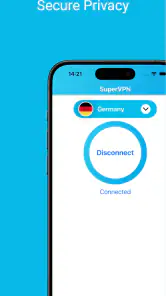
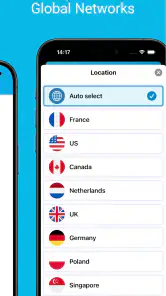
Setting it up was as simple as it gets. No need to create an account, which is a huge plus for those who, like me, hate being bombarded with registration forms. Just a tap and you’re connected! The app selects the best server for you, but if you’re feeling adventurous, you can choose a server yourself from a list of countries.
Performance and Speed
Now, let’s talk speed. I’ve tested a fair share of VPNs in my day, and I can honestly say that SuperVPN holds its own. Whether I was streaming videos or just browsing, the connection was smooth with minimal buffering. Of course, like any VPN, your speed might vary depending on the server you choose, but for the most part, it was reliable.
The app claims to offer unlimited bandwidth and high-speed connections, and I must say, it didn’t disappoint. I was able to stream my favorite shows in HD without any significant lag, which is a huge win in my book.
Security Features
Security is the name of the game when it comes to VPNs, and SuperVPN doesn’t skimp in this department. The app encrypts your internet traffic, making it harder for anyone to snoop on your online activities. It’s like having a personal bodyguard for your data. Plus, it masks your IP address, which is great if you’re concerned about privacy or just want to dodge those pesky geo-blocks.
However, it’s worth noting that while SuperVPN offers basic security features, it doesn’t specify the exact encryption protocols it uses, which might be a concern for more tech-savvy users. But for the average Joe looking to secure their connection, it’s more than sufficient.
Usability and Interface
The user interface is intuitive and clean, which I absolutely love. There aren’t any unnecessary bells and whistles to confuse you. Everything is clearly laid out, making it easy to switch servers or disconnect when needed. The app also runs quietly in the background, so you can go about your day without any interruptions.
One neat feature is the ability to set the VPN to automatically connect when you’re on public Wi-Fi. This is super handy if you’re someone who works out of coffee shops or airports frequently.
Final Thoughts
All in all, SuperVPN - Fast VPN Proxy is a solid choice if you’re looking for a no-fuss VPN that gets the job done. It’s not overloaded with features, which might be a downside for some, but I found its simplicity refreshing. For a free app, it offers decent performance and security, making it a worthwhile addition to your app arsenal if you’re dipping your toes into the world of VPNs.
If you’re ready to give it a shot, you can download it directly from the Play Store or the App Store. Happy browsing!
Pros
- Easy to set up and use immediately.
- Provides unlimited bandwidth for free.
- Supports a variety of global servers.
- No registration required to start.
- Compatible with both Android and iOS.
Cons
- Contains frequent ad interruptions.
- Inconsistent connection speeds reported.
- Limited privacy policy transparency.
- Potential security vulnerabilities.
- No customer support chat available.

- Category
- Tools
- Version
- 3.1.4











