Sun Position, Sunrise/set PRO
- 300.00
- 4.9
- Installs
- 50.00K
- Price
- $9.99

Screenshots
Analysis by Reviewed
When I’m planning around daylight, a reliable forecast of the sun’s position is more useful than a vague guess based on the weather app. Sun Position, Sunrise/set PRO is aimed at that practical need: it helps photographers and planners think ahead about where the sun will be and when key light will occur. I see its strongest appeal in preparation, not as a replacement for a camera, compass, or local weather forecast.
A planning tool rather than a casual sunrise widget
The app is a paid photography tool from Stonekick, priced at $9.99, and its focus is more specific than a general-purpose camera app. Its Pro edition is designed to track the sun and moon for a chosen date, which makes it useful when a shoot, walk, or outdoor event is planned well in advance. It has a 4.9 average from around 2,600 ratings, and more than 50,000 installs; those figures suggest a well-liked niche tool, though they don’t guarantee that its approach will suit everyone.
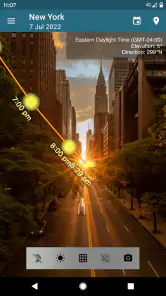
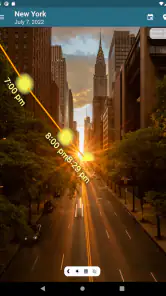
One helpful way to use a solar planner is to check both the timing and the direction of light before leaving home. For example, if I’m arranging a portrait session beside a building, a map-based sun path can help me decide whether to use the open side of the street or the shaded side at a particular time. That advance check can save a rushed change of location, but it cannot tell me whether clouds, haze, or nearby obstacles will spoil the light on the day.
Why You Need This App
Imagine you're planning a romantic sunset picnic or a sunrise hike. Timing is everything, right? That's where Sun Position, Sunrise/set PRO shines the brightest. This app gives you all the solar details you need, and it's super easy to use. Whether you're a photographer chasing the golden hour or just someone who loves to bask in the sun, this app could be your new best friend.
Features That Stand Out
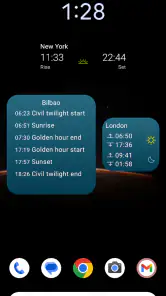
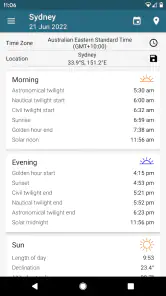
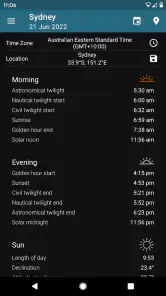
One of my favorite things about this app is its accuracy. It provides detailed information on sunrise and sunset times, but that's not all. It also includes the solar noon, the golden hour, and even the twilight phases. So, if you're into photography or any activity that depends on sunlight, this app has got your back.
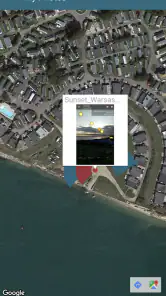
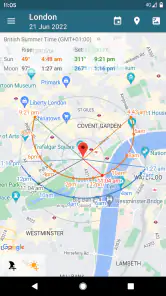
The interface is intuitive and user-friendly. You don't need to be a tech wizard to navigate through it. Plus, it offers a map view that shows the sun's path, which is pretty neat if you ask me. The app also supports multiple locations, so if you're a traveler, you can plan your activities anywhere in the world with ease.
Making a plan that holds up outdoors
For a photographer, I’d treat the map as a composition aid: choose a likely spot, inspect the sun’s route for the intended date, then visit early enough to check actual shadows and access. A useful trade-off is that a predicted path is only as practical as the location information and terrain you’re working with. A ridge, tall buildings, or tree cover can block sunlight even when the calculated sun position looks promising. The app can help narrow down a plan, but a quick on-site check remains worthwhile.
More From Our News Desk

Weather by Xiaomi Review: Clear at a Glance, Less Clear Up Close

X Under Pressure: Can It Recover When Posting Goes Wrong?

Clash of Clans Is Won Between the Battles

Android Auto Makes the Case for Quieter Car Software

MobiOffice: Transforming Mobile Productivity with Seamless Integration

EA SPORTS FC™ Mobile Soccer: Redefining Mobile Sports Gaming
It also suits people who coordinate an outing around daylight rather than taking photographs. If I were setting a meeting point for a group hike, I could compare the planned start time with sunrise and avoid relying on a rough seasonal guess. For a sunset picnic, I’d plan to arrive before the stated sunset rather than at the last minute: the changing light is part of the experience, and the horizon may be obscured at the chosen spot.
Who will get the most from it
I’d recommend it to photographers who scout locations, travelers planning outdoor sessions, and planners who need more than a basic sunrise time. It’s less compelling if you only want a quick answer about tomorrow morning; a free weather app or a simple sunrise widget may be faster and sufficient for that occasional check. Likewise, it is not a weather forecast, so anyone deciding whether conditions are safe or comfortable still needs a separate source for clouds and local conditions.
The app is rated for Everyone, and its current version is 4.3.0, with Android support beginning at version 5.0. Those details make it straightforward to assess compatibility, while the one-time $9.99 price means I’d want to use its date-based planning often enough to justify paying rather than relying on a basic alternative.
Using date and location together
The main planning advantage is not simply knowing when sunrise happens; it is being able to think about a particular place and a particular day as a pair. If I’m visiting a coastal overlook next month, I can consider whether the sun’s direction fits the view I want, then compare that with the time I can realistically arrive. A sunrise that sounds ideal on paper may be a poor choice if the route is unfamiliar or the viewpoint faces away from the light. Checking the map before committing helps me make that decision earlier, while leaving room to adjust the plan.
For travel, I’d make a short list of candidate locations rather than trying to plan every minute inside the app. A city square, a riverbank, and a hilltop can offer very different sightlines even at the same time. The sun path helps me rule out a spot where the light would fall behind the subject, but it does not replace checking whether I can actually stand there, whether access is permitted, or whether the view is blocked at ground level. That distinction keeps the tool useful without asking it to answer questions it cannot answer.
A practical workflow for a shoot
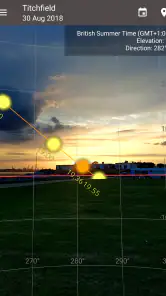
For a planned portrait or landscape session, I’d start by choosing the date and marking a plausible shooting area on the map. Then I’d look at the predicted direction and the relevant light window, and write down a backup time or nearby alternative. On the day, I’d arrive with enough margin to compare the real scene against that plan. This is more dependable than treating a forecasted golden hour as a guaranteed look: the app helps with geometry and timing, while the atmosphere and the scene itself determine how the light feels.
One non-obvious benefit of planning this way is that it can make a short visit more efficient. If I only have an hour at a location, knowing in advance which side of a building or landscape is likely to catch the sun can help me spend that hour shooting rather than wandering around trying to orient myself. The trade-off is that a precise plan can become a little rigid. I’d use it to arrive with options, not to insist that the first composition must work regardless of clouds, crowds, or unexpected shade.
What the map can and cannot settle
A map view is valuable because a time alone rarely tells me what I need to know. “Sunset at this time” does not reveal whether the light will be in front of a subject, behind it, or off to one side. The path gives me a way to reason about direction before I travel. Still, a line on a map represents the sun’s position, not every feature between the viewer and the horizon. Buildings, trees, steep terrain, and the exact place I stand can alter what I see, so I treat the display as a guide to investigate rather than a promise about the finished image.
That also explains why this is not automatically the best choice for every outdoor plan. If my only concern is whether to leave home before sunrise, a basic clock or weather app may answer faster. If I need a safe route, current trail conditions, or a forecast of cloud cover, a solar planner is the wrong tool for that decision. I would use it alongside those resources when light direction matters, not ask it to replace them.
Which users should choose another option
The strongest fit is someone who expects to revisit the same sort of planning question: a photographer scouting in advance, a traveler organizing a time-sensitive outing, or an event planner trying to place an activity in useful daylight. The ability to consider a future date and the sun’s path is more valuable when the date and location both matter. For someone who checks sunrise once in a while, the paid edition may be more capability than they need, and a free sunrise widget is a sensible alternative.
I would also look elsewhere if I wanted an all-in-one outdoor companion. A photography planner can help me decide when and where sunlight may fall, but it is not a substitute for navigation, a camera’s exposure tools, or a live weather service. That separation is a strength for focused planning, but it means I may need to switch between apps and make my own judgement. Anyone who prefers a single screen that handles every part of an outing may find that extra step inconvenient.
Questions worth answering before you pay
Does it help with a future shoot? Yes: its date-based sun and moon tracking is the central reason to choose the Pro edition over a simple daily sunrise display. Can it tell me whether the conditions will be good? No solar-position tool can settle that by itself; I’d still check weather and inspect the location. Is it useful without professional photography? It can be, especially for organizing walks, outdoor gatherings, or travel around daylight, but the value depends on how often I plan around the sun’s direction rather than just the clock.
Another sensible question is whether the price makes sense for my habits. At $9.99, I’d consider how often I plan ahead and whether a basic alternative already covers my needs. A person preparing several shoots or trips may value the extra planning detail; someone who only wants tomorrow’s sunrise may not. Its Everyone content rating makes it broadly suitable from an age perspective, and the current version is 4.3.0, with Android support starting at version 5.0. I’d check that compatibility before installing, then judge the purchase by how much the planning workflow actually helps me.
Is It Worth the Download?
In one word: absolutely. The app is a gem for anyone who loves the outdoors or needs to keep track of the sun for any reason. Its precision and range of features make it a valuable tool. I mean, who wouldn't want to know the exact moment the sun will dip below the horizon while sipping on a cold drink?
Moreover, it doesn’t bombard you with ads, which is a huge plus in my book. It's a paid app, but considering the wealth of information it provides, it's worth every penny.
All in all, whether you're a dedicated sun chaser or just someone who likes to be in the know, Sun Position, Sunrise/set PRO is definitely worth checking out. It's like having a little piece of the sky in your hands, ready to tell you its secrets.
So, go on, give it a try, and let the sun guide your plans!
Sun Position, Sunrise/set PRO Frequently Asked Questions
What does the Pro version add for tracking the sun and moon?
Sun Position, Sunrise/set PRO is the Pro version of Stonekick’s sun-position app, with an augmented-reality tracker for the sun and moon that can be used for any date. This can help you preview where they will appear in the sky and plan photography or outdoor activities around their position. The app is in the Photography category and is intended for photographers and planners.
What is the main purpose of the Sun Position, Sunrise/set PRO app?
The Sun Position, Sunrise/set PRO app is designed to provide users with detailed information about the sun's movements, including sunrise and sunset times, solar noon, and the sun's position throughout the day. This is particularly useful for photographers, travelers, and outdoor enthusiasts who want to plan their activities according to the sun's position.
How accurate is the Sun Position, Sunrise/set PRO app in predicting sunrise and sunset times?
The Sun Position, Sunrise/set PRO app uses precise algorithms and GPS data to provide highly accurate sunrise and sunset times for any location worldwide. This accuracy makes it a reliable tool for photographers and outdoor enthusiasts who need precise solar information for planning their activities.
Can the Sun Position, Sunrise/set PRO app be used offline?
Yes, the Sun Position, Sunrise/set PRO app can be used offline once you have loaded your location data. This feature is particularly beneficial for users who may be in remote areas without internet access but still need to access crucial solar information for their activities.
Is the Sun Position, Sunrise/set PRO app suitable for professional use?
Absolutely, the Sun Position, Sunrise/set PRO app is designed with both casual and professional users in mind. It offers detailed solar data that can be invaluable for professionals such as photographers, architects, and event planners who need to consider sunlight and shadowing in their work.
Pros
- Accurate sun tracking data
- User-friendly interface
- Customizable notifications
- Supports multiple locations
- Offline functionality
Cons
- Initial learning curve
- Battery consumption
- Limited free features
- Occasional GPS inaccuracies
- Ads in free version
- Category
- Photography
- Version
- 4.3.0












