Stitch Photos: Long Screenshot
- 109.00
- 4.7
- Installs
- 50.00K
- Price
- $2.99
Screenshots
Analysis by Reviewed
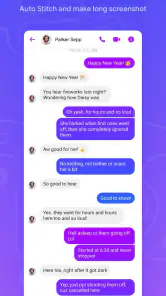
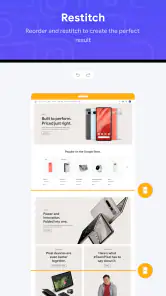
When a useful piece of information runs longer than a screen, I’d rather keep it as one readable image than juggle a stack of separate captures. Stitch Photos: Long Screenshot is built for that specific job: it joins screenshots into a continuous image, which can make a long chat, guide, or webpage easier to review and share. I find the idea most valuable when the order of the content matters as much as the words themselves.
A focused tool, not a full image editor
This is an Art & Design app from TAPUNIVERSE, but its appeal is practical rather than artistic. It is meant to solve a narrow problem—turning separate screen captures into one long screenshot—rather than replace a general photo editor. That focus is useful if you regularly save scrolling material, but it also sets expectations: I would choose a broader editing app for layered designs, detailed retouching, or creative layouts.
The app costs $2.99, so I’d think about how often I need stitched images before paying. If I only combine screenshots once in a while, the phone’s built-in capture options or a manual collage may be enough. If I often need a clean, continuous record, automatic joining can save fiddly alignment work. It has a 4.7 average from around 3,600 ratings and over 50,000 installs, which gives prospective users some context without telling them whether the workflow suits their own device or habits.
What Makes Stitch Photos Stand Out?
First off, the app's ease of use is worth mentioning. With Stitch Photos: Long Screenshot, you can effortlessly stitch multiple screenshots into a single, coherent image. The interface is user-friendly, allowing for a smooth navigation experience even for those who aren't tech-savvy. I personally love how intuitive the design is—it feels like the app just knows what you want to do, and gets it done without any hassle.
Features That Simplify Screenshot Stitching
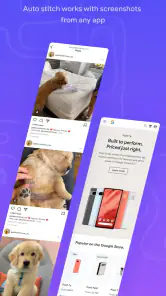
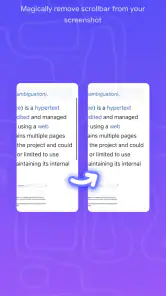
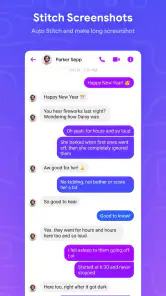
The app automatically detects overlapping areas in your screenshots, aligning them perfectly to ensure a flawless merge. I remember trying to manually align screenshots before using this app, and let me tell you, it was a nightmare. The automation here is a lifesaver.
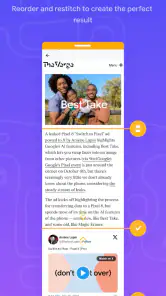
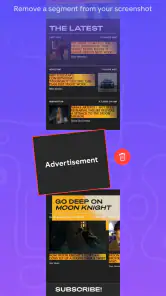
Another feature I appreciate is the editing tools. Once your screenshots are stitched, you can easily edit the final image. Whether it’s cropping out unnecessary parts or adding annotations, the app provides a variety of options to customize your screenshot according to your needs. This is especially handy when you're trying to highlight specific sections of a conversation or webpage.
Keeping the result useful and readable
A continuous image is convenient, but it can become awkward to read or share if it grows very tall. I’d use the stitched version as a reference copy, then crop or annotate a separate version if I only need to show one passage. For a work note, for example, a brief label or mark can help a colleague find the relevant section without changing the original sequence. If the information is sensitive, I’d inspect the finished image before sharing it: joining captures makes them easier to pass along, but it can also bring more private material into view at once.
More From Our News Desk

Clash of Clans Is Won Between the Battles

Android Auto Makes the Case for Quieter Car Software

MobiOffice: Transforming Mobile Productivity with Seamless Integration

EA SPORTS FC™ Mobile Soccer: Redefining Mobile Sports Gaming

How Microsoft OneDrive Became a Mobile Productivity Giant

How Google Translate Breaks Language Barriers Effortlessly
For the cleanest join, I’d capture each screen with steady, consistent movement and leave a recognizable overlap between consecutive images. That gives automatic alignment a useful visual match to work with. If the page shifts, loads new content, or contains repeating sections, I’d check the joined result from top to bottom rather than assuming every seam is perfect. A quick review is especially worthwhile for numbers, names, and message order, where a small visual mismatch can change how a record is understood.
Performance and Efficiency
The app runs smoothly without any noticeable lags or crashes, which is crucial for anyone needing to quickly capture and share information. During my use, I found the processing time to be impressively quick, even with multiple screenshots being stitched together.
Moreover, Stitch Photos supports high-resolution outputs, ensuring that the quality of your screenshots remains intact. This is a big deal for anyone who relies on clear, detailed images for professional or personal use.
When stitching is the right next step
One practical way I’d use it is after saving a sequence from a lengthy set of setup instructions. I’d take captures as I move through the steps, making sure each one repeats enough of the previous screen to give the join a clear visual anchor. After stitching, I’d inspect the transitions and keep the separate captures until I know the combined image is complete. That small routine helps avoid the frustrating situation of discovering a missing step only after I have sent the result to someone else.
For a long conversation, I’d first decide whether the goal is to preserve context or simply show one point. A stitched image is useful when someone needs to follow the exchange in order, but it can expose more of the conversation than the recipient needs. If I only need to show one message, a single carefully checked screenshot is usually clearer and more considerate. If I need a record of the full exchange, I’d review the entire stitched image for names, unrelated messages, and account details before sharing it.
Who will get the most from it
I can see this being handy after a long support chat, when I want one image that preserves the conversation’s sequence, or while collecting instructions from a page that does not fit on one screen. It can also make a comparison easier to pass to someone else when the context is spread across several captures. I would not use it as my only record of important information, though: a tall image is less searchable and can be harder to navigate than the original page or a text document.
Compared with taking screenshots manually and arranging them in a collage, automatic stitching is better suited to continuous content because it aims to preserve the flow rather than present separate tiles. A phone’s built-in scrolling capture is often the simpler choice when it works well in the app or page you are viewing. Stitching separate images is more useful when I already have captures to combine; a standard editor is preferable when I need precise design control rather than a quick continuous record.
Small workflow choices that make a difference
I’d treat the input set as part of the editing process, not as a pile to throw in at the end. Captures made at the same zoom and orientation are easier to compare and give the automatic join a more consistent starting point. I’d also avoid mixing screenshots from different points in a page unless I know their order; when several images look similar, sorting them first reduces the chance of a repeated section or jump in the final image.
There is a trade-off between one long image and several shorter ones. A single stitched result is convenient for sending or keeping together, but it may be cumbersome to inspect on a small screen and less convenient to retrieve later. For material I expect to revisit, I’d consider making separate stitched sections by topic instead of one enormous image. That takes an extra moment but makes the saved result easier to scan and less likely to bury the useful part.
Trust, cost, and practical fit
The app is rated Everyone and is listed at version 1.1.16, with Android 7.0 as its minimum operating system. Those details help me judge basic compatibility, but they do not tell me what permissions it requests or how it handles image data. Since screenshots can include private messages, account details, or personal documents, I’d review the permission prompts and the app’s privacy information before importing anything sensitive. I would also avoid assuming that editing or stitching makes a screenshot safe to share; I’d check the full image and remove details I do not want others to see.
Because this kind of tool works with screenshots, my trust check is practical rather than theoretical: I’d notice which access requests appear, consider whether they make sense for the task, and read the app’s privacy information before bringing in personal material. I would not treat an easy interface as evidence about data handling. If I’m preparing a sensitive record, I’d first use non-sensitive captures to understand the workflow, then decide whether I’m comfortable using it for anything private.
The question of keeping control also matters after the image is made. I’d save only the version I actually need, inspect it at a readable zoom, and choose deliberately where to share it rather than sending a full conversation by habit. Cropping or annotating can help focus attention, but it does not automatically remove every detail that may be visible elsewhere in the long image. I’d check the whole canvas, not only the section I intended to highlight.
For someone deciding whether to pay, the useful comparison is not simply “app versus no app.” If the phone’s own scrolling capture handles the content, that is likely the least fussy route. If I already have a batch of separate screenshots, a stitcher has a clearer role; if the result needs careful visual design, a general image editor offers more flexibility. The $2.99 purchase makes most sense for a repeated task where saved alignment effort matters, rather than a one-off experiment.
For Android users, the listed minimum is Android 7.0, and the app is marked for Everyone. I’d still check that my own device and intended workflow feel comfortable before relying on it for an important record. The Everyone label is an age classification, not a promise about privacy or a judgment that every screenshot is suitable to share, so I’d make that decision based on the content itself.
For me, the deciding question is frequency: if I regularly need long, orderly screenshot records, the $2.99 price may be worthwhile for the time saved. If I only need an occasional long capture, a built-in scrolling screenshot function is a sensible first option, and it avoids adding another app to my workflow. Either way, I’d keep the original captures until I’ve checked the final image, especially when accuracy or context matters.
Final Thoughts
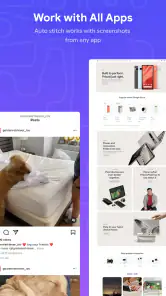
In a world where information sharing is key, Stitch Photos: Long Screenshot is an indispensable tool. It’s efficient, easy to use, and packed with features that cater to both casual and professional needs. Whether you’re capturing chat histories, social media posts, or extensive web pages, this app handles it all with ease.
I’d recommend it most to someone who repeatedly needs to turn separate screen captures into a continuous record and is willing to check the result before relying on it. I’d skip it if my main goal were advanced photo design, searchable notes, or occasional captures that my phone can already make as one scrolling image. That distinction matters more than the star score: the right fit depends on whether stitching solves a recurring annoyance for you.
If you’re tired of struggling with chaotic screenshot collections, give Stitch Photos a try. It’s definitely made my life easier, and I have no doubts it will do the same for you. Happy stitching!
Stitch Photos: Long Screenshot Frequently Asked Questions
Is Stitch Photos: Long Screenshot free to download, and what should I know about its cost?
Stitch Photos: Long Screenshot is listed at $2.99, so it is a paid app rather than a free download. Before installing, consider whether you regularly need to join screenshots into one long image, such as when saving a lengthy conversation or webpage. Its focused purpose may make the cost worthwhile for people who often create this kind of image.
What is Stitch Photos: Long Screenshot and how does it work?
Stitch Photos: Long Screenshot is a mobile application designed to simplify the process of combining multiple screenshots into a single, seamless image. Users can take consecutive screenshots of a webpage or any application, and the app automatically stitches them together with precision, maintaining the continuity of the content without any visible breaks.
Is Stitch Photos: Long Screenshot available for both Android and iOS devices?
Yes, Stitch Photos: Long Screenshot is available for download on both Android and iOS platforms. This ensures that users can enjoy its features regardless of their preferred mobile operating system, making it a versatile tool for anyone looking to create long screenshots easily.
Does Stitch Photos: Long Screenshot require an internet connection to function?
No, Stitch Photos: Long Screenshot does not require an internet connection to function. It operates entirely offline, allowing users to stitch their screenshots anytime and anywhere without the need for data or Wi-Fi access, enhancing its convenience and accessibility.
Are there any in-app purchases or ads in Stitch Photos: Long Screenshot?
Stitch Photos: Long Screenshot is a free app but it may contain optional in-app purchases and ads. These purchases might offer additional features or an ad-free experience, providing users with the choice to enhance their functionality based on their needs and preferences.
Pros
- Easy to capture long screenshots.
- Intuitive user interface.
- Supports multiple image formats.
- Fast stitching process.
- High-quality output.
Cons
- Limited editing features.
- Occasional app crashes.
- Ads can be intrusive.
- Requires in-app purchases for some features.
- Limited sharing options.

- Category
- Art & Design
- Version
- 1.1.16













