Resume Builder - CV Maker
- 51.00
- 4.8
- Installs
- 100.00K
- Price
- $4.99

Screenshots


Analysis by Reviewed
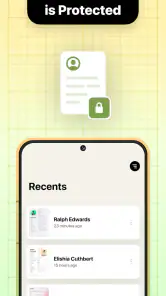
I’d judge a resume app less by how impressive its templates look on day one and more by whether it helps me make a better application when I’m short on time. Resume Builder - CV Maker is most useful as a guided workspace: it can help turn a blank page into a draft, organize career details, and prepare a cover letter. Its value lasts when I return to those materials with a real job in mind, rather than repeatedly redesigning the same document.
A practical first week, not a finished career story
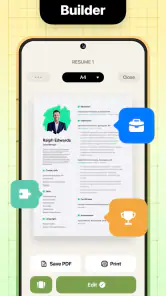
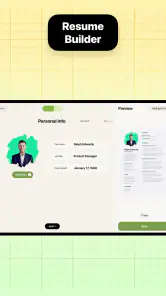
The early value is clearest when I need to turn scattered work history into a presentable first draft. I’d use it to get the structure in place before polishing every sentence: list roles, skills, and achievements, then review the wording against the job I actually want. A template can solve the intimidating blank-page problem, but it cannot decide which accomplishments matter most. That judgment still belongs to you.
For example, if I had an application due after work, I could use the guided prompts to assemble a draft, then spend my limited time checking dates, job titles, and examples rather than formatting a page from scratch. I would still read the finished document carefully; a fluent-looking layout is not proof that every detail is accurate or relevant.
A useful first-week habit is to gather source material before choosing a design. I’d collect accurate dates, role names, relevant projects, and specific outcomes in one place, then decide what belongs in the resume. This prevents a common trap: treating every prompt as a request to add more information. A shorter, targeted document is often easier to scan than a complete history of everything I have done.
It can also help someone returning to work or changing fields, provided they approach the prompts as a way to organize evidence rather than manufacture a new professional identity. A customer-facing role, for instance, may involve listening, resolving problems, and coordinating tasks; those are useful details only when they reflect real experience and connect to the new position. The app can give the material a shape, but I still have to make that connection clearly.
Getting from a draft to an application
One of the first things I noticed about the Resume Builder - CV Maker app is its user-friendly interface. Even if you're not tech-savvy, you'll find it a breeze to navigate. From the moment you open the app, it guides you through the process with simple prompts and a clean design. It's almost as if the app is saying, "Don't worry, I've got your back!"
Choosing a template without losing the point
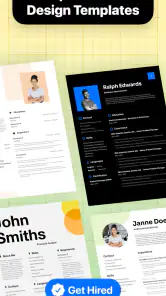
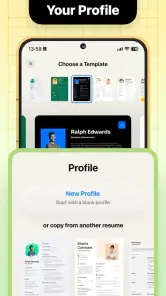
What sets this app apart from the rest are its customizable templates. Whether you're in the creative field or applying for a more traditional role, there's a template that fits your needs. The app offers a wide range of design options, ensuring your resume doesn't just blend in with the others. Plus, each template is professionally designed, so you know you're putting your best foot forward.
More From Our News Desk

Weather by Xiaomi Review: Clear at a Glance, Less Clear Up Close

X Under Pressure: Can It Recover When Posting Goes Wrong?

Clash of Clans Is Won Between the Battles

Android Auto Makes the Case for Quieter Car Software

MobiOffice: Transforming Mobile Productivity with Seamless Integration

EA SPORTS FC™ Mobile Soccer: Redefining Mobile Sports Gaming
That flexibility is most useful when you treat design as a final adjustment, not the main task. I’d keep one clean, restrained version for roles where easy scanning matters, and reserve more distinctive styling for applications where visual presentation fits the work. Switching templates should not become an excuse to keep redesigning instead of tailoring the content. In practice, the strongest choice is usually the one that makes experience easy to find.
When I compare a builder like this with the usual alternatives, the main difference is where the effort goes. A general document editor gives me direct control over layout and can be convenient if I already have a polished resume. A builder offers more structure and a faster way to begin, which is appealing when I need guidance. Neither approach automatically produces a stronger application; the better choice depends on whether I need help getting organized or precise control over a document I already know how to maintain.
I’d also make a deliberate distinction between a master record and a submission-ready resume. Keeping a fuller account of responsibilities and projects gives me material to draw from later, while each application can stay focused on the role. That workflow reduces the temptation to squeeze every detail into one crowded document, and makes it easier to adapt the same experience for different kinds of work.
Importing information is a shortcut with a proofreading cost
Another cool feature is the app's ability to import your LinkedIn profile. This is a game-changer, as it saves you the hassle of manually entering all your experiences and skills. In just a few taps, all your professional information is transferred to your resume, ready for customization. Talk about a time-saver!
Importing is a starting point rather than a finished application. I’d check whether the profile contains older roles, broad skill lists, or descriptions that do not fit the vacancy, then remove or revise anything that distracts from the relevant experience. A practical workflow is to keep a fuller career record as a source, make a focused copy for each kind of role, and proofread the final version before sending it. This helps prevent an imported profile from making every application look identical.
One detail worth checking after an import is consistency across the whole document. Dates, tense, job titles, and the level of detail should feel as though they belong together, not like separate profile entries pasted into a new layout. I’d read the resume from top to bottom after editing, then compare important facts with my source information. That extra pass is more valuable than another round of template changes because a tidy design cannot correct an inaccurate entry.
Suggestions and cover letters need your judgment
The app doesn't just stop at templates and imports. It also offers personalized tips and suggestions to enhance your resume. It's like having a little cheerleader on your phone, encouraging you to highlight your strengths and achievements. Whether it's tweaking your wording or suggesting skills that match your job title, these insights can make all the difference.
I’d use those suggestions as prompts, not rules. A suggested skill is only worth keeping if I can support it with a real example, and a stronger-sounding phrase should not exaggerate what I did. This distinction matters especially for career changers: transferable skills can be valuable, but they need to be connected to actual tasks or outcomes rather than added as a generic list.
And let's not forget about the cover letter feature. Many job seekers overlook this crucial component, but the app makes it easy to create a compelling cover letter that complements your resume. With pre-written examples and customizable sections, you can craft a letter that truly reflects your personality and professionalism.
I’d treat the letter as a separate piece of communication, not a second copy of the resume. A useful check is to make sure it explains why this particular role makes sense for me, while the resume supplies the supporting history. If the examples or suggested wording sound unlike something I would say in a conversation, I’d rewrite them. A matching visual style can make the documents feel coordinated, but the content should still have its own purpose.
Month-to-month value comes from keeping good material
The long-term value depends less on opening the app every day and more on having a reliable place to prepare when your circumstances change. A new responsibility, completed project, or shift in career direction is easier to capture while it is fresh than to reconstruct months later. I’d update the underlying career details occasionally, then adapt the resume and letter when a real opportunity appears. That makes the app a practical tool for job-search periods without turning resume editing into a constant chore.
A realistic routine could be to note a meaningful new project after it finishes, rather than waiting until an application deadline forces me to remember what I contributed. When I later find a suitable opening, I can select the relevant details, adjust the resume, and write a focused letter. That is a more sustainable use than opening the app every week just to make cosmetic changes. The benefit is having credible material ready when timing matters.
This approach also helps people who apply to more than one type of role. I’d keep the underlying facts consistent but change which examples lead, which skills are emphasized, and how the letter explains my interest. The trade-off is that tailoring still takes thought: a builder can make editing more manageable, but it cannot make every application equally relevant with a single generic version.
For someone who rarely changes jobs and already has a strong resume, the app may not become a regular part of their routine. That is not necessarily a weakness; resume preparation is often occasional work. I’d decide based on whether the guided structure and accompanying letter save enough effort during a search to justify keeping a dedicated paid tool available.
Where convenience meets its limits
Compared with writing in a general document editor, a dedicated builder can provide more structure and ready-made layouts, which helps when you want a quick starting point. A document editor may be better if you need precise control over formatting or already have a polished resume you only revise occasionally. The choice is a trade-off: guided convenience here, more direct control in a conventional editor.
This is a paid business app: it costs $4.99, is developed by TAPUNIVERSE, and is rated for Everyone. Its 4.8 average from around 3,100 ratings and more than 100,000 installs suggest that many people have found it useful, though popularity cannot tell me whether a particular template suits a specific employer. It was released on October 24, 2023; version 1.2.4 supports Android 5.0 and later. I’d weigh the price against how often I expect to create or revise application documents rather than assuming a one-time draft makes it worthwhile for everyone.
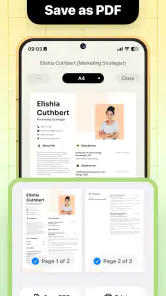
The practical question before paying is whether I need a guided process or merely a place to store an existing document. If I’m starting from scratch, organizing career details, or preparing a resume and cover letter together, the dedicated workflow may be worth it. If I only need to correct a date or change a line in a document I already trust, a regular editor could be the simpler choice. I would also check that the final file looks clear and complete before submitting it, rather than assuming the first export is ready just because the layout appears polished on a phone.
The main fatigue risk is polishing the appearance repeatedly while leaving the substance unchanged. Templates and suggestions can make revisions feel productive, but the useful questions are whether the document is accurate, targeted, and easy to scan. If I only need a minor edit to an existing resume, a familiar editor may be quicker. If I need a guided start, a cover letter alongside the resume, or help organizing a job-search draft, this app has a clearer role.
There is also a limit to how much any template can do for a weak or unclear account of experience. If I cannot explain what I contributed, a new layout will not supply that evidence. I’d pause and write down concrete examples first, then return to the builder to organize them. Likewise, someone who requires exact control over every spacing and formatting decision may feel more at home in a conventional editor. The convenience is real, but it works best when the user’s needs match the guided approach.
Who is likely to keep it around?
It seems best suited to people who want a structured beginning, have several career details to organize, or expect to tailor documents during an active search. It may also help someone who finds a blank page discouraging and benefits from prompts that move the task forward. It is less compelling for a person with a settled, carefully formatted resume who makes only rare, tiny edits, or for anyone who prefers building a document entirely from scratch in a standard editor.
For a quick decision, I’d ask myself three things: Do I need help shaping the first draft? Will I prepare a cover letter as well as a resume? Am I willing to proofread imported information and tailor the result for each role? If the answer is yes to most of these, the app’s guided workflow has a practical purpose. If not, a tool I already use may be enough.
A measured long-term recommendation
In a competitive job market, having a well-crafted resume is essential. The Resume Builder - CV Maker app is an invaluable tool in your job-seeking arsenal. It's not just about creating a resume; it's about creating a resume that stands out. With its easy-to-use interface, customizable templates, and insightful suggestions, this app is a must-have for anyone looking to make a great impression on potential employers. So why not give it a try? Your future job is just a download away!
My more measured recommendation is to see it as a focused assistant, not a guarantee of interviews or a replacement for careful editing. It should suit people starting from a blank page, applicants who want a matching cover letter, and anyone who benefits from prompts and layout choices. People who already have a strong document and rarely change it may get more lasting value from a regular editor. Before submitting anything, I’d verify every imported detail, tailor the content to the role, and choose the simplest design that serves the application.
What makes the app worth returning to is not novelty but readiness: when a suitable opportunity appears, there is a structured way to turn accurate career notes into a targeted document. I would keep it as a job-search aid rather than a daily habit, and judge its value by whether it saves time without encouraging careless or generic applications. Used that way, it can earn a place in my toolkit; when I only need occasional precise edits, the familiar document editor remains the better fit.
Resume Builder - CV Maker Frequently Asked Questions
What does Resume Builder - CV Maker help me create?
Resume Builder - CV Maker is a business app for creating a curriculum vitae, designing a resume, and preparing a professional cover letter. It brings these job-application documents together in one place, which can be useful when you want to organize your experience and present it clearly to employers. Before downloading, consider whether you want a dedicated tool for building and formatting application materials.
Who develops Resume Builder - CV Maker, and is it suitable for everyone?
The app is developed by TAPUNIVERSE and is rated for Everyone. Its focus is on making resumes and cover letters, so it may be relevant to job seekers at different stages, from people preparing their first CV to those updating an existing one. The age rating describes its content suitability; it does not determine whether its features match your particular career or application needs.
What platforms is Resume Builder - CV Maker available on?
Resume Builder - CV Maker is available for both Android and iOS devices. You can download it from the Google Play Store if you have an Android device, or from the Apple App Store for iOS devices. It is designed to be user-friendly on both platforms, ensuring a seamless experience regardless of your device.
Is Resume Builder - CV Maker free to use?
The app is priced at $4.99. Before downloading, check the price shown for your device and region so you know what to expect. Its purpose is to help create resumes, cover letters, and related designs, so consider whether those tools suit your needs before purchasing. The app has a 4.8 average from around 3,100 ratings.
Can I customize my resume templates in the app?
Yes, Resume Builder - CV Maker offers a variety of customizable templates. Users can choose from different styles and adjust elements such as font, color, and layout to match their personal preferences or industry standards. This customization ensures that your resume stands out and reflects your personal brand effectively.
Pros
- User-friendly interface.
- Customizable templates.
- Wide variety of templates.
- Guidance for content creation.
- Export in multiple formats.
Cons
- Some features require payment.
- Limited free templates.
- Ads in free version.
- Occasional app crashes.
- Limited design customization.
- Category
- Business
- Version
- 1.2.4













