Passport Photo: ID Photo Print
- 30.00
- 4.8
- Installs
- 100.00K
- Price
- $4.99

Screenshots
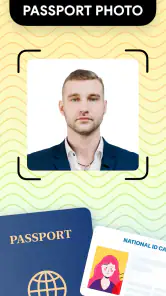
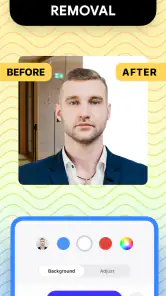
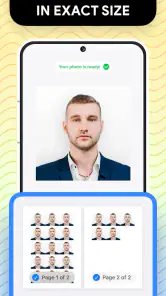
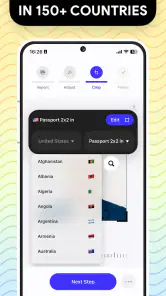
Analysis by Reviewed
My most realistic use for Passport Photo: ID Photo Print is a small, time-sensitive errand: I realize an application needs a fresh photo, and I have a phone, a bright room, and enough time to check the official instructions. That is a much better starting point than trying to make an unsuitable snapshot pass. The app, made by TAPUNIVERSE, is an Art & Design tool for preparing document photos and moving them toward a print or saved-file outcome. I see its appeal in bringing several practical steps together, not in replacing the rules set by the agency receiving the photo.
Make the requirements your first checkpoint
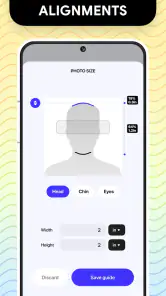
Before taking a picture, I’d find the photo requirements for the passport, visa, or ID in question. Country rules can differ, and an image that looks neat on a phone may still fail an official check because of framing, background, expression, or another requirement. The app’s country-specific size choices can help with dimensions, but choosing a size is not the same as confirming every current application rule. That quick check is the most useful first step in the whole workflow.
Then I’d set up a plain, uncluttered background, face a steady light source, and ask someone else to take the photo if holding the phone makes it hard to keep my head straight. A simple setup often beats trying to rescue a poor shot later. I’d take a few versions with a neutral expression and enough space around my head to adjust the crop, rather than framing tightly from the start. That gives me room to choose the clearest image without having to repeat the setup.
For a household handling more than one application, I’d take each person’s pictures separately and keep the files clearly distinguishable. That simple habit reduces the chance of sending the wrong image to a print shop or attaching it to the wrong form. It also makes it easier to revisit one person’s photo if the first attempt has glare, a tilted head, or an awkward crop, without disturbing the rest of the work.
From phone photo to something you can use
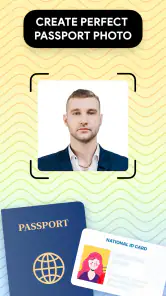
First things first, downloading and setting up the Passport Photo: ID Photo Print app was as smooth as butter. Available on both Android and iOS, it was a quick download, and within minutes, I was ready to take my first shot. The interface? Super intuitive. Even if you're not the most tech-savvy person, you'll find your way around in no time. The app guides you step-by-step, ensuring you get the perfect shot.
Choose a frame, then inspect the image
The app isn't just about snapping a photo. It's packed with some pretty nifty features. Need a specific size for your passport photo? No worries, this app's got you covered. It offers a variety of sizes tailored for different countries' requirements. Plus, the auto-enhance feature is a game-changer. It tweaks your photo just enough to ensure it's clear and crisp, which is exactly what you want for official documents.
I would treat any automatic enhancement as a convenience, not as a substitute for checking the original. A brighter-looking face may be easier to see on screen, but document photography is not the place to chase a flattering filter or a dramatic finish. I’d compare the prepared image with the untouched camera photo and look for changes that make facial details less natural. If the source picture is blurry or lit unevenly, a quick adjustment cannot reliably turn it into a strong starting image; taking another photo is usually the cleaner fix.
More From Our News Desk

Clash of Clans Is Won Between the Battles

Android Auto Makes the Case for Quieter Car Software

MobiOffice: Transforming Mobile Productivity with Seamless Integration

EA SPORTS FC™ Mobile Soccer: Redefining Mobile Sports Gaming

How Microsoft OneDrive Became a Mobile Productivity Giant

How Google Translate Breaks Language Barriers Effortlessly
When choosing among the available country sizes, I’d match the option to the exact document and application rather than selecting a familiar-sounding label. The photo dimensions are only one part of a specification, and requirements can change or include conditions beyond the crop. If the authority’s instructions are unclear, I’d pause and ask the relevant service rather than assume that a correctly sized image automatically qualifies.
Save deliberately before handing it off
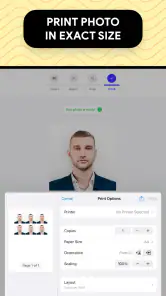
Another highlight is the built-in printing option. You can print directly from the app to any compatible wireless printer. No printer? No problem. The app lets you save your photo and take it to any store offering print services. Talk about convenience!
The choice between printing at home and taking the saved image to a shop depends on what you already have available. A wireless printer is convenient, but I’d still inspect a test print for sharpness, color, and crop before making several copies. If I use a print shop, I’d tell the staff that the image is intended for an official document and ask them not to apply extra cropping or automatic enhancement. A small adjustment at the final stage can change the framing I carefully prepared.
I’d also keep the original camera photo until the application is complete. It gives me a fallback if I notice that the saved version looks too soft or the lighting is uneven, and it avoids having to recreate the same conditions. For a family errand, that matters: one person can take the photos while another checks the relevant requirements, then the final files can be handled together instead of discovering a mistake at the counter.
Before leaving for a shop, I’d check that I can find the saved image and that it is the version I meant to use. At home, I’d make sure the printer is actually compatible and available before building the plan around direct printing. These small handoff checks are easy to overlook when the app makes the image preparation feel quick; they are also where an otherwise smooth process can stall.
Convenience has a price and a limit
One of the things I loved the most was the cost-effectiveness. Let's face it, getting passport photos can be pretty pricey, especially if you're in a bind and need them urgently. With this app, not only do you save money, but you also save time. No more waiting around in queues or dealing with grumpy studio photographers.
The app costs $4.99, so I’d think about how often I expect to prepare document photos before buying it. Its 4.8 average comes from around 5,200 ratings, and it has more than 100,000 installs, which suggests that many people have found it useful. Still, those figures cannot tell me whether it will suit my particular printer, document rules, or preferred workflow. For someone who needs a single photo and has a nearby service, paying for an app may be less convenient than simply using that service.
And let's not forget the flexibility. Took a photo and didn't like how it turned out? Just retake it. The app gives you unlimited tries until you're satisfied with the result. This feature is perfect for perfectionists who want to ensure everything is just right.
Retakes are most helpful when I change something meaningful between attempts: moving toward softer, more even light, asking the photographer to hold the phone level, or stepping back to leave room for a crop. Repeating the same setup without correcting the cause of a bad picture can produce several near-identical results without improving the final one. I’d use the freedom to compare deliberate variations, then choose the most natural and clear image rather than the one that looks most polished.
Who benefits most—and who may prefer a studio
I see the strongest fit for someone who already has a suitable phone camera, can take a careful portrait, and wants to prepare several document-style photos without arranging a studio visit. It can also be handy for parents handling a child’s photo, since taking another attempt at home is easier than trying to get a perfect expression in one appointment. The practical advantage is control over timing and retakes, not a guarantee that every image will meet every authority’s rules.
A studio or official photo service is a better choice if the application has strict technical checks, if you are unsure how the requirements apply, or if you need another person to help with posing and lighting. Compared with a general photo editor, this app is more focused on document-photo sizing and the print handoff; a general editor may offer broader creative control, but that flexibility can mean more manual work and more chances to alter an image in ways an official application won’t accept.
For example, if I am preparing a child’s photo at home, I can wait for a calm moment, take several attempts, and choose one where the face is clear. But if the child cannot sit or look as required, or if the application’s rules leave me uncertain about what is acceptable, a professional service is the sensible option. The app helps organize a home workflow; it cannot make a difficult pose or unclear rule disappear.
It is also a poor fit for someone who wants to create a stylized portrait or extensively retouch a face. A general editing app is better suited to creative work, while an ID photo calls for restraint and faithful appearance. Conversely, someone who only needs to crop a picture once and already understands the required dimensions may find a dedicated app unnecessary. The useful middle ground is a person who values a guided document-photo process but is willing to verify the result independently.
Check compatibility and the finished print
The app is rated Everyone, was released on March 19, 2024, and version 1.2.13 lists Android 9 as its minimum operating system. I’d check that my phone meets that requirement before planning to use it, especially if I’m preparing a photo close to an application deadline. It is available for Android and iOS, so the basic choice is not limited to one mobile platform, but I’d still make sure the device I plan to use is ready before starting the photo session.
My final check would be to compare the finished image with the official instructions, then inspect the printed copy at normal viewing distance rather than trusting only the enlarged screen preview. The app has 30 written reviews, a smaller pool than its ratings count, so I’d treat its overall score as a useful signal, not proof that every workflow will suit me. For a quick, at-home photo with a clear print route, I’d consider it; for a high-stakes application or uncertain rules, I’d choose expert help instead.
That last comparison matters because a screen can hide practical problems: a print may look softer than expected, a crop may feel tighter on paper, or a shop’s automatic processing may alter the image. I’d check the actual copy before relying on it and keep the original file until the document has been submitted. If the result does not match the instructions, I’d rather retake or use a professional service than hope an official reviewer overlooks a visible issue.
My verdict after following the whole workflow
In a world where convenience is king, the Passport Photo: ID Photo Print app is a gem. It's user-friendly, efficient, and a huge time-saver. Whether you're a frequent traveler or just someone who needs an ID photo for various purposes, this app is worth the download. So, the next time you need a quick passport photo, skip the studio and reach for your phone instead. Trust me, you won't look back!
Passport Photo: ID Photo Print Frequently Asked Questions
What devices can run Passport Photo: ID Photo Print?
Passport Photo: ID Photo Print is an app in the Art & Design category, developed by TAPUNIVERSE. Its minimum operating-system requirement is version 9, so check your device’s software version before downloading. The app is rated for Everyone. These details can help you decide whether it is suitable for your device and intended users.
What features does Passport Photo: ID Photo Print offer?
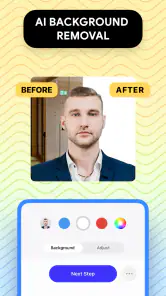
Passport Photo: ID Photo Print offers a variety of features designed to help users create professional-quality ID photos. These include automatic background removal, size adjustment for different document requirements, and a user-friendly interface that guides you through the process. Additionally, you can print the photos directly from the app or save them for later use.
Is Passport Photo: ID Photo Print free to use?
Passport Photo: ID Photo Print costs $4.99. Before downloading, consider whether that price fits your needs and whether you plan to use its tools for a single document or for multiple photo projects. The app is intended to help make passport-size, ID, and visa photos, so its value will depend on how often you need those kinds of images.
How accurate are the ID photos created with Passport Photo: ID Photo Print?
Passport Photo: ID Photo Print is designed to meet official requirements for ID photos. It includes guidelines for various countries and document types to ensure accuracy. The app uses advanced algorithms for facial recognition and size adjustments, making it reliable for producing compliant ID photos. However, it's always a good idea to double-check specific requirements before submitting the photos.
Can I use Passport Photo: ID Photo Print for documents other than passports?
Yes, Passport Photo: ID Photo Print is versatile and can be used to create photos for a variety of official documents, not just passports. The app supports different size requirements for visas, driver's licenses, school IDs, and more. It provides templates and guides to ensure that your photos meet the necessary specifications for each type of document.
Pros
- User-friendly interface
- Wide range of ID photo sizes
- High-quality photo output
- Supports various formats
- Quick photo processing
Cons
- Limited free features
- Occasional ads disrupt flow
- Requires in-app purchases
- No offline mode
- Limited editing tools

- Category
- Art & Design
- Version
- 1.2.13













