Print Photo - Print to Size
- 15.00
- 3.8
- Installs
- 50.00K
- Price
- $2.99
Screenshots
Analysis by Reviewed
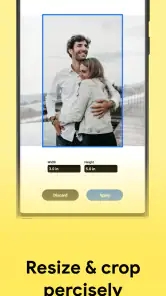
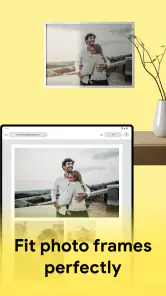
When I choose a photo-printing app, I care less about filters and effects than about control over the finished size. A picture can look fine on a screen yet come out awkwardly cropped or too large for a frame. Print Photo - Print to Size is aimed at that practical gap: preparing a photo for printing at a size I choose, rather than simply making the image look more polished on a phone. That makes it worth considering if exact dimensions are part of the job.
Start with the print you actually need
Before opening the app, I find it useful to decide what the print is for: a small keepsake, a frame, or a page with several images. That one choice affects how I judge the result. A picture intended for a specific frame needs careful sizing and composition; a casual print can tolerate more cropping. Keeping the frame or paper in mind while arranging a photo helps avoid the common frustration of making a layout that looks right on-screen but does not suit its destination.
There is also a useful distinction between changing a photo’s dimensions and improving its image quality. A size-control tool helps prepare a print, but it cannot restore detail that was not captured in the original image. I would start with the clearest version of the photo available, especially for a larger portrait, and check the crop before printing. That small bit of preparation matters more than repeatedly adjusting the layout afterward.
A Handy Tool for Every Photo Lover
The first thing that caught my eye about Print Photo - Print to Size is its user-friendly interface. I’m no tech wizard, but navigating through this app felt like a breeze. As soon as you open it, you’ll notice how everything is laid out neatly. No complex menus or confusing settings here—just straightforward options that let you get down to business.
Features That Spark Joy
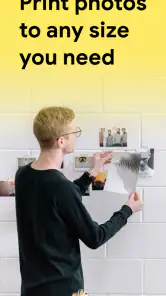
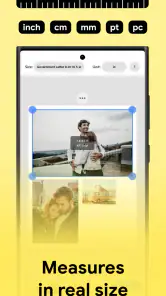
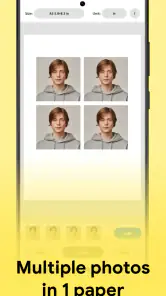
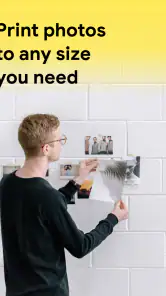
One standout feature is the ability to print photos in any size you desire. Sounds pretty cool, right? Whether you’re looking to print wallet-sized memories or frame-worthy portraits, this app has got you covered. I particularly enjoyed the drag-and-drop functionality, which made rearranging and resizing photos on the print sheet an absolute delight.
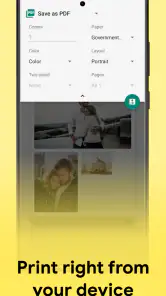
Another sweet feature is the option to choose from various paper sizes and types. It’s like having a mini print shop at your fingertips! Plus, the app supports multiple photo formats, so you don’t have to worry about compatibility issues. I tried printing everything from JPEGs to PNGs, and the results were consistently impressive.
Getting Creative with Layouts
Feeling a bit artsy? This app lets you unleash your creativity with custom layouts. You can mix and match different photo sizes on a single page, add borders, and even tweak the color settings for that perfect print. It’s like scrapbooking, but a whole lot easier and mess-free!
More From Our News Desk

Clash of Clans Is Won Between the Battles

Android Auto Makes the Case for Quieter Car Software

MobiOffice: Transforming Mobile Productivity with Seamless Integration

EA SPORTS FC™ Mobile Soccer: Redefining Mobile Sports Gaming

How Microsoft OneDrive Became a Mobile Productivity Giant

How Google Translate Breaks Language Barriers Effortlessly
A practical way to use that flexibility is to group prints by purpose. For example, I’d place several small snapshots on one sheet when preparing keepsakes, but give a single portrait its own space when the crop and presentation matter most. Before printing a mixed page, I’d check that each image has enough room and that borders do not crowd the subject. This is where a layout tool can save paper and reduce trial-and-error compared with sending each photo to a printer separately.
Printing Made Easy
Once you’re satisfied with your masterpiece, printing is just a tap away. The app connects seamlessly to your wireless printer, and in no time, you’ll have your photos in hand. And if you don’t have a printer, no worries! You can save your layouts and print them at a local print shop. Convenience at its best!
For a familiar everyday example, imagine sorting through a phone gallery before a family visit and wanting a few small prints to share. I’d choose the images first, arrange them on a sheet, and inspect the faces and edges before committing to paper. If the print is for a gift or a frame, I’d make a test print when possible rather than assume the screen preview will match the final result exactly. The app helps with preparation; the printer and paper still influence what comes out.
When another option makes more sense
Compared with a basic gallery print command, this app’s appeal is the extra attention to size and page arrangement. A gallery tool may be quicker when I only need one ordinary print and do not care about exact dimensions. A dedicated photo editor is a better fit if the main task is retouching, removing distractions, or making extensive color changes. And when I want a professionally produced set delivered to me, a print-ordering service is more convenient than arranging a local printer workflow.
The trade-off is that a more deliberate layout takes a little planning. I would keep the original image untouched and treat the prepared sheet as a print version, so I can return to the source if I want a different crop later. Also, choosing a paper size is not the same as confirming that a printer has that paper loaded; checking the printer setup before sending a carefully arranged page can prevent a disappointing mismatch.
Who should choose it—and who should skip it
I’d recommend this app to people who print from home, make small batches of keepsakes, or need photos to fit particular spaces. It is also a sensible option for anyone who prefers to decide the layout before using paper. Someone who prints only occasionally and is happy with automatic sizing may find the phone’s built-in printing route simpler. If precise physical dimensions are essential, I’d still measure the finished print after the first test rather than rely on a preview alone.
Print Photo is an Art & Design app from TAPUNIVERSE, priced at $2.99, with an Everyone age rating. It was released on November 29, 2022, and version 1.2.3 requires Android 6.0 or later. Its average rating is 3.8 from around 250 ratings, and it has over 50,000 installs. Those figures suggest a modest, established audience rather than a universal must-have, so I’d weigh the one-time cost against how often I actually print and whether exact sizing would save me time.
One question I’d ask before buying is whether my usual printer and paper setup suits the way I plan to work. I’d also decide whether I need layout control often enough to justify a dedicated app, or whether a basic print option already covers my needs. For a few prints now and then, the simpler route may win; for repeated size-specific jobs, having the sheet arranged in advance is the stronger reason to use this tool.
Making a first print with less guesswork
I would treat the first run as a small calibration exercise, not as the final batch. Start with one photo whose subject is easy to inspect, and choose a size that has a clear purpose, such as filling a frame you already own. Compare the intended dimensions with the paper and printer settings before sending it. If the physical result is slightly off, you can adjust the next layout based on what actually happened rather than guessing from the phone preview.
For a page of small pictures, I’d arrange the most important image first and fit the secondary snapshots around it. That makes it easier to notice whether a face, caption, or important edge is being crowded. A sheet can look efficiently packed but still be awkward to cut apart, so leave practical room between images when the final prints need to be separated by hand. This is a simple workflow choice, but it can matter more than adding another decorative element.
What the app can—and cannot—settle
Exact size is useful, but it does not automatically settle every printing decision. The image’s shape, the paper’s dimensions, and the printer’s own output all affect the final result. When a photo has a different aspect ratio from the space you want to fill, decide whether preserving the whole image or filling the space matters more. I would rather accept a little unused margin than unexpectedly lose part of a person’s face or an important detail at the edge.
Color adjustments deserve similar restraint. The app’s layout tools can help prepare the page, but the appearance on a bright phone screen is not a dependable promise of how ink and paper will look. If color accuracy matters for a keepsake or a small display, avoid making several speculative tweaks at once. Change one thing, print a test, and judge the physical copy in ordinary light. That keeps the process manageable and helps distinguish a source-photo issue from a printer or paper issue.
Choosing between layout control and convenience
The main decision is not whether a dedicated app is automatically better than a gallery’s print command; it is whether you benefit from arranging the page before printing. If I need one quick copy and accept whatever default fit the system chooses, the built-in route has fewer steps. If I want several images on one sheet, different print sizes, or a deliberate border, a layout-focused tool gives me more control over the job before it reaches the printer.
A photo editor solves a different problem. It is the better choice when the picture itself needs serious work, such as removing an unwanted object or making a more involved visual change. A print service, meanwhile, avoids managing a home printer and can suit someone who wants an order delivered rather than a file prepared for local output. I see this app’s niche between those choices: it is for people whose images are already selected and who want more say over how they occupy a page.
That distinction also helps with the price decision. At $2.99, I would not buy it just because I occasionally want a standard print; I’d first try the print controls already available on my device. The purchase makes more sense if sizing and page composition are recurring annoyances, or if a few planned sheets can replace repeated, wasteful attempts. The time saved is personal, though: someone who prints only once in a while may reasonably prefer the familiar default tools.
Who is likely to get the most from it
I think the strongest fit is someone who regularly turns phone photos into physical objects: small gifts, family keepsakes, reference pictures, or prints for frames and albums. It can also suit a person helping relatives prepare a page of images without needing a full desktop publishing workflow. The practical benefit is not that every print becomes professional, but that the user can think through size and arrangement before using paper.
I would skip it if my priority were extensive image editing, automatic enhancement, or ordering prints without handling a printer setup. It is also less compelling if I rarely print and do not mind a standard, automatically fitted result. And if a particular document or image must meet strict physical dimensions, I would verify the finished paper copy with a ruler; an app layout is a useful preparation step, not a substitute for checking the output.
For a shared household workflow, I’d keep the source photos in a clearly named album before making a sheet. That reduces the chance of selecting a similar but lower-quality duplicate from a busy camera roll. I’d also make a note of the paper choice and layout that worked, especially if I expect to repeat the same kind of print later. Those habits do not add features to the app, but they make its size and arrangement controls easier to use consistently.
Print Photo is an Art & Design app from TAPUNIVERSE, priced at $2.99, with an Everyone age rating. It was released on November 29, 2022, and version 1.2.3 requires Android 6.0 or later. Its average rating is 3.8 from around 250 ratings, and it has over 50,000 installs. Those figures suggest a modest, established audience rather than a universal must-have, so I’d weigh the one-time cost against how often I actually print and whether exact sizing would save me time.
One question I’d ask before buying is whether my usual printer and paper setup suits the way I plan to work. I’d also decide whether I need layout control often enough to justify a dedicated app, or whether a basic print option already covers my needs. For a few prints now and then, the simpler route may win; for repeated size-specific jobs, having the sheet arranged in advance is the stronger reason to use this tool.
Overall, my experience with Print Photo - Print to Size was nothing short of fantastic. It’s an app that truly delivers on its promise of making photo printing accessible and enjoyable for everyone. Whether you’re a seasoned photographer or someone who just loves capturing moments, this app is sure to become your go-to tool for all things photo printing.
So next time you’re looking to bring your digital memories to life, give this app a shot. Trust me, you won’t be disappointed!
Print Photo - Print to Size Frequently Asked Questions
Can I choose an exact print size before sending a photo to the printer?
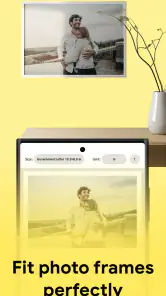
Yes. Print Photo - Print to Size is intended for resizing photos and printing them at an exact size, which is useful when you need a particular print dimension rather than a photo that simply fills the page. You can set the size and layout to suit your paper, then check the arrangement before printing. Results still depend on the photo and printer.
Does Print Photo - Print to Size support printing several photos on one sheet?
Yes. The app lets you select multiple photos to print on a single page, as well as customize their size and layout. This can be handy when preparing a group of small prints without arranging each image separately on different sheets. You can also adjust photo orientation to better fit the paper and the layout you want.
What features does Print Photo - Print to Size offer for customizing photo prints?
Print Photo - Print to Size provides a variety of features to ensure your photo prints meet your exact needs. Users can customize the size and layout of their photos to fit any paper size, adjust photo orientation, and even select multiple photos to print on a single page. The app supports high-resolution photo printing, ensuring that your prints look professional and crisp.
Is Print Photo - Print to Size compatible with all printer models?
Print Photo - Print to Size is designed to be compatible with most wireless printers. It supports AirPrint for iOS devices and can connect to various printer models via Wi-Fi. However, it’s always a good idea to check the printer compatibility list provided by the app to ensure that your specific printer model is supported before downloading.
How user-friendly is the Print Photo - Print to Size app for beginners?
The app is highly user-friendly, designed with a simple and intuitive interface that makes it easy for beginners to navigate. It offers step-by-step guidance on how to select, customize, and print photos, ensuring even those new to photo printing can achieve great results without a steep learning curve. The app also provides helpful tips and customer support to assist users as needed.
Pros
- User-friendly interface for easy navigation
- Supports multiple photo formats
- High-quality print output
- Customizable print sizes
- Fast processing and printing
Cons
- Limited editing features
- Requires an internet connection
- Subscription needed for some features
- Occasional app crashes
- Limited support for older devices
- Category
- Art & Design
- Version
- 1.2.3













