Spruce: Medical Communication
- 6.67K
- 4.9
- Installs
- 500.00K
- Price
- Free

Screenshots



Analysis by Reviewed
For a patient, the useful part of healthcare messaging is not simply being able to send a note; it is having a more orderly way to continue a conversation with a care team. That is the role I see for Spruce: Medical Communication: a medical app from Spruce Health built around communication between patients and healthcare providers, rather than general-purpose texting.
A private channel, with a practical purpose
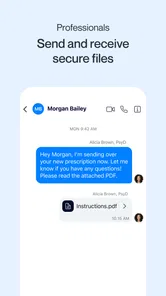
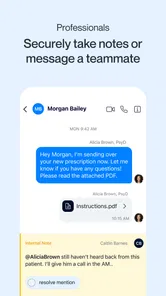
HIPAA-compliant communication is central to the app’s appeal. In day-to-day use, that matters when a question involves personal health details or an image that would feel out of place in an ordinary text thread. Spruce lets patients message a provider and exchange images and files, so a care conversation can stay together instead of being scattered across calls, texts, and email.
That does not mean a message is the right route for every concern. I would use it for a non-urgent clarification or a follow-up that can wait for the practice to respond, not for symptoms that need immediate attention. The channel can make routine contact less cumbersome, but it is not a substitute for emergency care or a scheduled visit when an examination is needed.
What a conversation can look like
Imagine I have a question after an appointment and want to share a photo that helps explain what I mean. Rather than trying to describe it in a voicemail, I can send the question and image through the care conversation. The provider can reply when convenient, and I have the exchange in one place to refer back to. That is a modest change, but it can save effort when a detail would otherwise have to be repeated.
When several clinicians are involved, separate conversations can also help me keep track of which question belongs with which provider. I would still make my messages concise: explain the issue, say when it began if that is relevant, and attach only material that helps answer the question. This makes the exchange easier to follow than a long message containing several unrelated concerns.
Where it fits among healthcare options
Compared with calling a clinic, messaging can be easier for a question that does not need a live conversation, and it avoids the back-and-forth of trying to catch someone by phone. Compared with ordinary SMS or email, a healthcare-focused channel is a better fit for sensitive patient-provider communication. But messaging is not automatically faster: replies depend on the practice, and a phone call may be the better choice when the issue is complicated or needs discussion in real time.
The app is most useful when the patient’s provider or practice uses Spruce. Installing it alone does not create a connection to a clinician, so I would first check whether the care team offers it and how they want patients to use it. That small check can prevent the frustration of setting up another app without a provider on the other end.
More From Our News Desk

 Block Blast!
 Makes Every Clear Feel Like One More Turn
A clean little block puzzle becomes a study in space, risk, and self-control. Its best moments come from one satisfying clear; its toughest test is knowing when to stop.

 Super Stylist Fashion Makeover
Super Stylist Turns Dress-Up into a Runway Career
Its makeover-to-client loop turns quick outfit decisions into shareable style theater. The question is whether the closet keeps giving players a reason to return.

 Block Craft 3D:Building Game
Block Craft 3D Under Pressure: How Well Does It Recover When Building Goes Wrong?
A failure-focused look at Block Craft 3D’s forgiving building loop, its uncertain recovery edges, and the moments that demand more than a cheerful village.

 Woodturning
 Trades Creative Freedom for a Satisfying Carving Loop
If your usual creative game is about building, decorating, or styling, Woodturning trades open-ended projects for a tactile, tightly guided carving loop. Here is what that switch really costs.

 PUBG MOBILE
 Shows What Battle Royale Must Get Right
PUBG MOBILE shows how battle royale has matured: bigger systems matter less than meaningful choices, readable fights, and a reason to return after every loss.

 Braindom: Brain Games Test
Braindom’s Social Life Happens Between Puzzles
Braindom turns quick logic traps into a personal ritual, but its community value is more about comparing answers than building together.
Latest News



Making messages easier for a care team to answer
A useful habit is to put the main question first, then add only the background that changes how the clinician might respond. If I am asking about a symptom, a short description of what changed and when can be more useful than a stream of updates sent one at a time. I would also separate unrelated topics into distinct messages or conversations where possible, so a medication question does not get buried beneath an appointment request.
Images and files are most helpful when they support a specific question. Before sending one, I would say what the clinician should look at and why it matters, rather than assuming the attachment will explain itself. This is a small but practical advantage of having text and supporting material in the same exchange: the context travels with the item instead of being left in a separate email or text.
For caregivers coordinating care with permission, a patient-provider messaging channel may also make it easier to pass along a concise question without relying on a family group chat. I would still confirm with the practice who is authorized to communicate and whose account should be used. Health conversations need clear ownership; convenience should not turn into confusion about who received instructions or who is expected to act.
Using Spruce in the rhythm of care
Ever found yourself caught in the endless loop of phone tag with your healthcare provider? Well, let me introduce you to Spruce: Medical Communication, a game-changer in the healthcare communication realm. This app promises to streamline all your medical communication needs into one neat package.
What is Spruce All About?
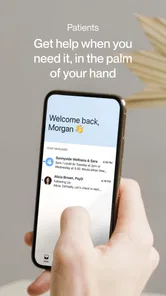
At its core, Spruce is like having a magic portal on your phone that connects you directly with your healthcare provider. No more waiting on hold or trying to remember your doctor’s business hours. With Spruce, you can send messages, share images, and even exchange files with your doctor securely. It's HIPAA-compliant, so your privacy is in good hands.
Features That Stand Out
One of the coolest features is the secure messaging system. You can shoot a text to your doctor just like you would to a friend, and they can get back to you when convenient. It’s like having a direct line to your healthcare provider without the fuss of scheduling an appointment for every little question.
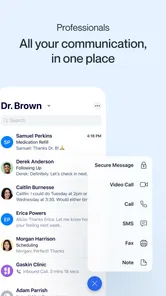
Another fantastic feature is the ability to manage multiple conversations. If you’re juggling specialists, primary care, and maybe even a nutritionist, Spruce keeps all these conversations organized. It’s like having a personal health secretary in your pocket.
Getting Down to Business
Ease of use is where Spruce truly shines. The interface is intuitive, making it easy for even the least tech-savvy among us to navigate. Setting up an account is a breeze, and once you're in, the dashboard is clean and straightforward, allowing you to focus on what's important—your health.
Another highlight is the app’s ability to integrate with existing practice management systems. This means your doctor can seamlessly incorporate Spruce into their workflow, making the transition smooth for both parties.
Why You Might Love It
If you’re someone who values convenience and hates the hassle of traditional healthcare communication, Spruce is definitely worth a look. It's particularly useful for chronic patients who need frequent communication with their healthcare providers. Imagine no longer having to make a call and wait on hold just to ask a simple question.
Moreover, the app is also perfect for those who appreciate a more personalized healthcare experience. By breaking down the barriers of communication, Spruce allows for a more fluid interaction between you and your provider, potentially leading to better care outcomes.
One ordinary use case, and the limits of messaging
Suppose I notice a change after a routine appointment and want to ask whether it affects the plan we discussed. I can write a focused question, include a relevant image if it adds context, and send it when I have a moment rather than trying to call during a busy part of the day. The practical benefit is not guaranteed speed; it is having a clear, written question that the care team can review and answer through its chosen workflow.
That distinction matters if the answer depends on a back-and-forth discussion. A written exchange can be convenient for a straightforward clarification, but it may become cumbersome when I need to explain several moving parts or respond immediately to follow-up questions. In that situation, I would ask for a call or arrange an appointment rather than trying to force a complicated conversation into messages.
I would also avoid treating a sent message as proof that someone has seen it or taken action. For anything time-sensitive, the clinic’s direct phone route is the safer choice. Before depending on asynchronous communication, I would learn the practice’s preferred channel and its expectations for messages, including what to do if the issue becomes urgent.
What to expect from the trade-off
The convenience comes with a boundary: a message can be sent at a time that suits me, but that does not guarantee an immediate answer. I would keep using the clinic’s usual phone route for a time-sensitive concern, and ask the practice what response window to expect before relying on the app for ongoing questions. That is especially important if I am managing a condition where waiting could change what I need to do.
It also helps to treat the conversation as a record for communication, not as a complete personal health file. I would keep a separate note of medication changes, appointments, and instructions I need to remember, then use Spruce to clarify details with the relevant clinician. That simple habit reduces the risk of assuming that one messaging thread replaces every part of care coordination.
There is another trade-off: a secure, purpose-built channel is only useful if the practice is active on it. Patients accustomed to texting a clinician directly may find the extra step worthwhile for sensitive topics, but anyone expecting an app to locate a provider or connect every part of their healthcare will need a different solution. The real starting point is the clinic, not the download.
Questions to settle before relying on it
Can I use it with any doctor? In practice, I would first ask whether my own provider uses Spruce and how patients are invited into the conversation. The app is not a directory that automatically links me to a care team, so confirming access before setting it up is the most useful first step.
Is it suitable for urgent symptoms? I would not use a message for an emergency or anything that needs a prompt decision. A secure channel does not change the fact that responses can take time; use emergency services or the practice’s faster contact option according to the situation.
Can it replace appointments or keep all my health information in one place? I would not count on either. Messaging can support care between visits, but it cannot perform an examination, and I would keep my own important instructions and records organized separately. For ongoing care, it works best as a communication route within a broader relationship with the provider.
Who is likely to get the most from it?
Spruce is a strong fit for patients whose care teams already use it, especially people who regularly need to ask practical questions between visits or share information with more than one clinician. It may be less useful for someone whose provider does not offer access, someone who prefers every medical conversation to happen by phone, or anyone looking for a general health tracker rather than a communication tool.
The app is free and is rated for Everyone; its average rating is 4.9 from around 16,000 ratings, with over 500,000 installs. It was released on February 25, 2016, and version 4.3.54 requires Android 5.0 or later. Those figures give a sense of its established audience, but I would judge the fit mainly by whether my own practice supports it and whether asynchronous messaging suits the kind of care I receive.
Spruce Health’s medical communication app makes the most sense for people who already have a participating care team and value an organized place for non-urgent exchanges. It may be especially helpful when routine questions otherwise lead to repeated calls, or when a patient needs to keep conversations with different clinicians distinct. If my care is mostly handled through scheduled visits and I rarely need between-visit contact, the app may add little to my routine.
Compared with a clinic portal, a practice’s existing portal may be a better choice if it is where that team already handles appointments, results, and instructions. Compared with ordinary texting, Spruce is designed for healthcare communication rather than casual chat. Neither comparison makes one option universally superior: I would follow the clinic’s established process, because a message sent in the channel staff actually monitor is more useful than a theoretically convenient app they do not use.
Final Thoughts
In the ever-evolving world of healthcare apps, Spruce stands out as a robust tool designed to enhance the way we interact with our healthcare providers. It’s a well-rounded app that prioritizes user-friendliness, security, and practicality.
If you're tired of the traditional ways of managing your healthcare communication, Spruce might just be the app you've been waiting for. It’s like having a healthcare assistant in your pocket—one that’s always ready to help you navigate your health journey with ease. I would recommend it as a practical communication option, provided your care team uses it and you keep urgent concerns on a faster, more direct route.
Spruce: Medical Communication Frequently Asked Questions
Can I use Spruce without my healthcare provider or care team?
Spruce is most useful when your healthcare provider or care team uses it to communicate with patients. The app is designed around communication and care between providers and patients, so downloading it alone may not give you access to a care team or its services. If you are considering Spruce as a patient, check whether your provider uses the platform before relying on it for communication.
Is Spruce intended for patients, healthcare providers, or both?
Spruce is designed for communication and care between healthcare providers and patients, so both groups may encounter it. Patients can use it to communicate with a participating provider, while healthcare professionals may use it as a patient communication platform. The experience depends on how a provider or care team uses Spruce in its workflow, so it is worth checking with them before downloading.
Who is Spruce: Medical Communication intended for?
Spruce is a medical communication app from Spruce Health, built around communication and care between healthcare providers and patients. It may be relevant if you are looking for a way to communicate with a healthcare provider through an app, or if you work in healthcare and need a patient communication platform. The app is free to download and is rated for Everyone.
What is Spruce: Medical Communication and what does it offer?
Spruce: Medical Communication is a versatile app designed to streamline communication between healthcare providers and patients. It offers features like secure messaging, video calls, and electronic health records integration, allowing users to manage appointments, consultations, and follow-ups efficiently. This app enhances the patient experience by providing easy access to healthcare professionals and ensuring privacy and security.
Is Spruce: Medical Communication secure for handling sensitive patient data?
Yes, Spruce is designed with robust security measures to ensure the protection of sensitive patient data. The app complies with HIPAA regulations, providing end-to-end encryption for all communications. This means that only authorized users have access to the information, making it a safe platform for managing healthcare communications and protecting patient privacy.
Pros
- User-friendly interface for all ages.
- Secure messaging for patient privacy.
- Real-time updates on appointments.
- Easy integration with existing systems.
- Supports video conferencing with doctors.
Cons
- Requires stable internet connection.
- Limited offline functionality.
- Subscription may be costly for some.
- Occasional bugs and glitches.
- Initial setup can be time-consuming.