Splice - Video Editor & Maker
- 4.21K
- 3.7
- Installs
- 5.00M
- Price
- Free

Screenshots
Analysis by Reviewed
I approach phone video editors with one practical question: can I turn a handful of clips into something worth sharing without getting bogged down in menus? Splice - Video Editor & Maker makes that sort of quick, hands-on editing feel approachable. It is a free video editing app from Bending Spoons, with optional in-app purchases ranging from $0.99 to $209.99 per item. It is rated for Everyone, and its 3.7 average across around 138,000 ratings suggests that people’s experiences are mixed rather than universally glowing. I’d treat it as a useful starting point, not a guarantee that every tool will suit every project.
What to expect from a phone-first editor
For me, the main decision is not whether a mobile editor can replace a computer setup, but whether it makes ordinary edits easy enough to finish. Splice is aimed at that middle ground: shaping clips, adding a little context, and giving a video a more deliberate rhythm without turning the phone into a complicated production workstation. It belongs to the video editing side of the app world, where the useful question is how smoothly the whole process fits together, from selecting footage to reviewing the result.
That makes it a particularly sensible option for short personal projects: a quick recap of a day out, a small birthday montage, or a clip that needs a title and music before sharing. I would not choose it simply because I want the largest possible toolset. I would choose it when I want to stay close to the footage and make a straightforward edit on the device I already use to capture and watch videos.
Intuitive Editing at Your Fingertips
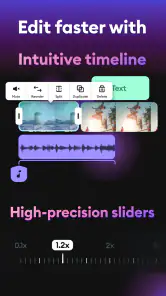
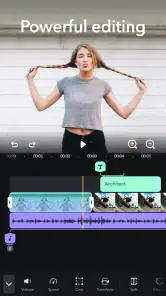
Splice is one of those apps where you don’t need a PhD in tech to navigate. From the moment you open it, the clean and straightforward layout makes it feel like a breeze to jump into editing. You’ve got your timeline at the bottom, preview screen at the top, and all the tools you need just a tap away. Honestly, it’s like having a mini editing suite right there on your phone.
Features That Make You Go Wow
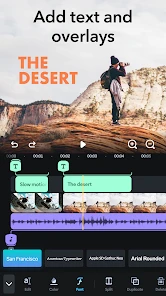
Now, onto the features because oh boy, does this app have them. Whether you’re a beginner or a seasoned pro, Splice offers a plethora of options to make your videos pop. The ability to cut, trim, and crop videos is just the beginning. You can add transitions that are so smooth, they’d make a professional editor nod in approval. Plus, the fact that you can add text overlays and choose from a wide range of fonts and colors means your videos can truly express your style.
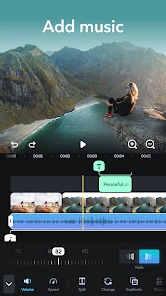
But wait, it gets better. The music library is a game-changer. We’re talking about a huge selection of tracks you can add to your videos to give them that extra oomph. And if you’re like me, constantly on the lookout for copyright-free music, Splice has your back.
Making a Short Edit Work in Real Life
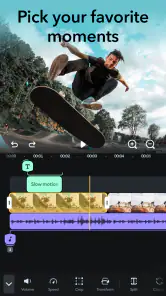
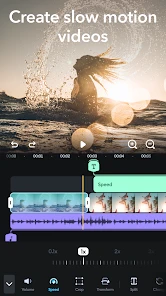
For a useful everyday workflow, I’d start by choosing only the clips that tell the story, then trim their beginnings and endings before adding text or music. That order matters: it keeps a quick family recap or weekend clip from becoming a pile of effects in search of a purpose. Slow motion is handy when a brief action deserves emphasis, but I’d use it sparingly; slowing every shot can make a short video feel oddly sluggish. A music track can set the mood, yet I’d listen through the finished edit once before exporting so that it doesn’t overpower speech or make a quiet moment feel too busy.
More From Our News Desk

Weather by Xiaomi Review: Clear at a Glance, Less Clear Up Close

X Under Pressure: Can It Recover When Posting Goes Wrong?

Clash of Clans Is Won Between the Battles

Android Auto Makes the Case for Quieter Car Software

MobiOffice: Transforming Mobile Productivity with Seamless Integration

EA SPORTS FC™ Mobile Soccer: Redefining Mobile Sports Gaming
Text is most useful when it adds context the footage cannot show on its own, such as a place or a short caption. I’d keep overlays brief and check them in the preview, because a title that looks tidy on one clip can compete with a face or important action in another. That small review step is especially worthwhile when the video will be watched on a phone screen.
A small workflow that saves rework
One habit I find useful is to make a rough cut before choosing a soundtrack. Music can make footage feel more finished, but it can also tempt me to keep shots that do not help the story just because they happen to fit a beat. Once the sequence works silently, I can add a track with a clearer sense of where it should support the edit and where the original sound should remain audible.
I would also treat transitions as punctuation rather than decoration. A simple cut often keeps a personal montage feeling natural; a transition makes more sense when the location or moment genuinely changes. If every clip gets a different effect, the editing starts to call attention to itself. This is a small creative choice, but it is one of the easiest ways to make a phone edit feel considered without adding more work.
Who Will Get the Most from It
I can see Splice working well for someone who wants to assemble social clips, make a simple travel recap, or add music and captions to a personal video without learning a desktop editor. It is also a sensible fit if you prefer editing on the same device where you recorded the footage. If your projects involve careful audio mixing, detailed multi-track work, or a complex sequence with many layers, I’d compare it with a more full-featured editor before committing. A beginner may appreciate the accessible layout, while an experienced editor may find the phone-first workflow limiting for precision work.
Compared with the usual alternatives in mobile video editing, Splice’s appeal is its direct path from trimming clips to adding text, music, and transitions. Some editors put more emphasis on templates and fast, pre-shaped social posts; others offer deeper controls that take longer to learn. I’d choose Splice when I want to shape a short edit myself, and consider a template-led app when speed matters more than fine choices. For a demanding project, a desktop editor is still the more comfortable place to manage intricate timing and sound.
Where it fits—and where it doesn’t
A realistic example would be filming a few moments during a weekend walk, then making a short recap while the details are still fresh. I would remove the shaky start of a clip, keep the moments that show the route or mood, and use a brief caption only where the scene might otherwise be unclear. A restrained soundtrack can tie those clips together, while leaving a natural sound or spoken remark intact may make the result feel more personal. That kind of edit plays to Splice’s strengths: a small set of familiar jobs that can be handled in one phone-based workflow.
It is less convincing when the job depends on exact sound balancing or lots of simultaneous visual elements. If I were building a tutorial with frequent callouts, lining up voiceover precisely, or revising a long sequence frame by frame, I would want to compare the workflow with a more advanced editor before investing time in a large project. A template-focused app may also be a better match when I want a polished preset quickly and do not care much about shaping every cut myself. Splice is most appealing when I want control over the basics without needing a desktop-style workspace.
Exporting Made Easy
One of the things I love most about Splice is how simple it is to export your creations. You can save your videos in multiple resolutions, which is perfect for sharing on different platforms. Whether you’re posting to Instagram, YouTube, or just saving it to your phone, the app ensures your videos look crisp and professional.
Before exporting, I’d check the opening and ending as well as the middle: short edits often feel abrupt because the first clip starts late or the final shot cuts off too quickly. Choosing a resolution is useful, but the best choice depends on where you plan to watch or share the result. If you are keeping several versions, give them clear names in your phone’s library so you can distinguish a draft from the finished cut later. These are simple habits, but they save time when you return to a project.
Questions worth settling before a bigger project
Can I start without paying? The app is free to install, so I would begin with a small, low-stakes edit and see whether the available tools suit my needs. If a particular option is important to the project, I would check its price in the app before building the whole edit around it. That is a more useful test than assuming that every feature is included or that every purchase has the same cost.
Is it suitable for someone new to editing? The approachable layout and familiar operations make it a reasonable place to learn the basics. I would still keep the first project simple: a few clips, clean trims, and only the text or music that improves the story. That gives a beginner room to understand how their choices affect the finished video, instead of trying to learn every tool at once.
Will it replace a desktop editor? For short, uncomplicated videos, it may be enough. For projects where exact audio control, intricate layering, or careful long-form organization matters, I would not treat a phone editor as an automatic substitute. The right choice depends on how much precision the project needs and whether editing on a small screen feels comfortable for the person doing it.
Room for Improvement?
No app is perfect, right? While Splice is a fantastic tool, I did notice that some of the more advanced features require a subscription. It’s not a deal-breaker, but something to keep in mind if you’re on a budget. That being said, the free version is still incredibly robust and will meet most of your editing needs.
In practice, I’d begin with a small edit before building a larger project, then check which options are available without paying. That helps avoid planning a whole video around a tool that turns out to require an in-app purchase. The purchase range runs from $0.99 to $209.99 per item, so I would read the price shown for any specific option rather than assume every extra costs the same. With over 5 million installs and roughly 4,200 reviews, it has clearly found an audience, though popularity alone doesn’t tell me whether its paid tools are right for my needs.
What its history can—and can’t—tell you
Splice arrived on May 5, 2021, and its continued presence in a crowded field makes it a familiar option for people looking at mobile editors. That release date gives a little context, but it does not tell me which tools have changed or how any particular update affects someone’s workflow. I would judge the app by what I can use today, rather than assume a long-standing product has every capability I might expect from a desktop editor.
For someone who already edits in Splice, the practical test is whether its current workflow still matches the videos they make. If the usual project is a short recap with trims, captions, and music, a familiar editor can be valuable because there is less friction between filming and finishing. If projects have grown more demanding, it may be worth comparing the time spent working around a phone-first layout with the learning cost of a more advanced tool. I would make that comparison using an actual project, not a list of promised possibilities.
Looking ahead, I would pay attention to whether the tools I rely on remain easy to find and whether the purchase choices make sense for occasional use. Those are the details that affect my decision more than a vague expectation of new features. A future change could make the app a better fit, but I would not count on it when choosing an editor for a video I need to finish now.
Splice was released on May 5, 2021, and it remains a recognizable choice in a crowded field of mobile video editors. Its broad appeal is easy to understand: the workflow is approachable, and the central jobs—trimming, text, music, and transitions—are familiar needs for casual creators. I’d watch how the app’s editing options and purchase structure develop, but I wouldn’t base a decision on hoped-for changes. What matters now is whether the tools available to you handle the video you want to make.
In conclusion, Splice - Video Editor & Maker is a must-have for anyone looking to dive into video editing without the steep learning curve. Its features are robust, the interface is user-friendly, and it provides enough flexibility to cater to both beginners and advanced users. Give it a try, and I promise, you won’t be disappointed!
Splice - Video Editor & Maker Frequently Asked Questions
Can I edit videos on Splice without an internet connection?
Splice is built around editing video projects on your phone, so it may suit you when you want to work directly on a mobile device. Whether particular tools or media are available offline can depend on how they are accessed in the app. If offline editing is important, try opening a project and the tools you plan to use before relying on them away from a connection.
Can I add my own clips, music, and text to a Splice project?
Splice is intended for making and editing videos, with tools for music and text alongside slow motion. These features make it useful for combining video with creative touches in a phone-based project. Before starting a larger edit, check how the app handles the clips and audio you want to use, then preview the result to make sure the additions fit your project.
Is Splice suitable for editing videos for social media?
Splice is a mobile video editor, so it can be convenient for preparing a video on your phone before sharing it. Its editing tools include music, text, and slow motion, which can help shape a clip for different viewing contexts. Consider the format and destination you have in mind while editing, and review the finished video before sharing it from your device.
Can I save a Splice project and return to it later?
Splice is designed to work with video projects, making it relevant if you prefer to build an edit in stages rather than finish everything at once. How a project is stored and reopened can depend on the app and device, so it is sensible to check your project is preserved before closing or switching devices. Keep your original clips available while you work.
Does Splice work well for short, quick edits as well as larger projects?
Splice brings several editing tools together in a mobile app, including slow motion, music, and text, so it can be considered for quick adjustments as well as more involved creative work. The time and effort required will depend on the length of your footage and the changes you want to make. Starting with a small test edit can help you judge whether its workflow suits you.
Pros
- Intuitive user interface for easy navigation.
- Wide range of editing tools available.
- Supports high-resolution video exports.
- Includes music library for background tracks.
- Offers advanced features for professionals.
Cons
- Requires subscription for full feature access.
- Occasional crashes during video editing.
- Limited free version capabilities.
- Large app size may consume device space.
- Some features require internet connection.
- Category
- Video Players & Editors
- Version
- Varies with device