Speedtest by Ookla
- 37.41K
- 4.5
- Installs
- 100.00M
- Price
- Free

Screenshots
Analysis by Reviewed
When the household Wi-Fi feels fine in one room and frustrating in another, I like having a quick way to check whether the connection is actually changing. Speedtest by Ookla is a tools app I use for that kind of reality check: it can measure internet and cellular performance, and it gives me a concrete result to compare with what I notice while browsing or streaming. It is free to install, though in-app purchases are available, so I treat the basic speed check as the main reason to try it.
A shared device needs a clear routine
On a phone that several people borrow, I’d keep the purpose simple: run a test when the connection is acting up, then explain what the result can and cannot tell you. A speed test is a snapshot, not a guarantee that every video call or game will behave the same way. I would avoid treating one unusually low reading as proof that the provider is at fault; moving closer to the router and testing again can help distinguish a weak room signal from a broader service problem.
Keep account boundaries practical
For a shared household device, I’d decide who is responsible for keeping track of results and avoid assuming that everyone’s tests belong to one person’s account or history. The useful habit is to note the room, whether the phone was on Wi-Fi or cellular, and roughly when the test was run. That context makes comparisons more meaningful without turning a simple troubleshooting check into a complicated household project.
If a test is meant to support a conversation with an internet provider, repeat it under similar conditions rather than collecting random readings all day. I find that comparing a few results from the same place and connection type is more useful than comparing a Wi-Fi reading in the kitchen with a cellular reading outdoors. It also helps to test at the time the slowdown normally happens, since a reading taken during a quiet part of the day may not explain a busy evening.
Using Speedtest in everyday household life
The app is made by Ookla and has an average rating of 4.5 from around 1.5 million ratings, with more than 100 million installs. That level of adoption makes it familiar to many people, but popularity does not make every result a diagnosis. I use the figures as evidence that it is widely used, while still interpreting each test in the context of the device, location, and connection I’m checking.
What a result can—and cannot—settle
A realistic example: someone in the living room says a show keeps pausing, while another person is having no trouble in the study. I’d run a test in both spots using the same Wi-Fi, then repeat the living-room check after moving nearer the router. If the readings differ, that points toward a location-related issue worth investigating; if both are poor, the household has a stronger reason to check the router or contact the provider. Neither result alone identifies the exact cause, but this small comparison is a better starting point than guessing.
For a fair comparison, pause large downloads and avoid running several tests back to back just to chase a higher number. Other activity on the network can affect what the phone measures, and repeated tests can use mobile data when cellular is selected. Before checking on a metered plan, I make sure the device is using the connection I intend to assess. That one step prevents a useful troubleshooting check from becoming an avoidable data surprise.
More From Our News Desk

Weather by Xiaomi Review: Clear at a Glance, Less Clear Up Close

X Under Pressure: Can It Recover When Posting Goes Wrong?

Clash of Clans Is Won Between the Battles

Android Auto Makes the Case for Quieter Car Software

MobiOffice: Transforming Mobile Productivity with Seamless Integration

EA SPORTS FC™ Mobile Soccer: Redefining Mobile Sports Gaming
Choosing between a speed test and other checks
Compared with a provider’s own diagnostic tool, Speedtest is handy when I want a quick reading that is not tied to navigating the provider’s support pages. A router’s built-in status screen may be better for checking the home network itself, while a provider’s tool can be more useful when following that company’s formal troubleshooting process. I wouldn’t use a single Speedtest result to prove that a particular service tier is consistently being delivered; a repeatable set of tests, taken under comparable conditions, is more persuasive.
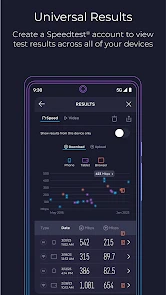
The app’s test history and sharing option are useful when I want to compare results over time or show someone what I measured. My tip is to share a result only with enough context to make it interpretable: say whether it was Wi-Fi or cellular and where you were standing. Otherwise, a number passed around without context can create more confusion than clarity. For a household that just wants to know whether a connection feels usable, the app’s simple test may be enough; people who need detailed router diagnostics should use a more specialized network tool as well.
Setup, age, and everyday trust
Speedtest is free, rated for Everyone, and its current version is 6.5.1, with Android 7.0 as the minimum operating system requirement. Those details make it accessible to many devices, but I’d still check that an older phone can install the version available to it. The app can also be used by younger household members, though I’d explain that its results are measurements rather than a promise about what a provider owes or what a particular game will feel like. In-app purchases range from $0.99 to $8.99 per item, so I’d review purchase prompts before letting a child use the device unsupervised.
Coordination matters more than assigning everyone a technical role. If one person runs tests and another contacts the provider, agree on a consistent place, connection type, and time of day first. That gives the conversation a clear basis and avoids mixing cellular results with home Wi-Fi results. For a one-off question—“Is the connection slow right here?”—the app is straightforward. For ongoing household network management, it is a measuring tool, not a substitute for router controls or provider support.
Where the app earns its place
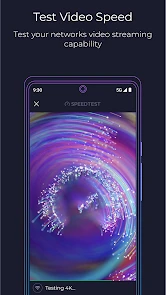
The video test is a useful extra when the concern is streaming rather than a raw speed number, because it gives a more experience-focused way to think about playback. I’d use it when a household is deciding whether buffering is tied to the connection, but I would not assume it predicts every streaming service or every device’s behavior. Real playback also depends on the service, the device, and what else is using the network at that moment.
My household verdict is that Speedtest is a practical first check for anyone who wants to compare Wi-Fi and cellular performance, document a recurring slowdown, or make a provider conversation more specific. It is less suitable for someone expecting it to repair the connection, identify every fault automatically, or replace a router’s own diagnostic tools. Used with a little discipline—same place, same connection, and a note of the circumstances—it turns a vague complaint into information I can act on.
Testing Internet Speed: Quick and Easy
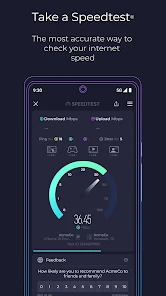
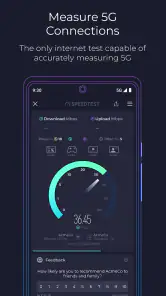
One of the things I absolutely love about Speedtest is how quick and user-friendly it is. The app displays real-time data on your download and upload speeds, ping, and even your network provider's name. It’s like having a techy friend explaining everything in a language you actually understand. In less than a minute, you get a comprehensive report of your internet's performance.
Why Speed Matters
In today’s digital age, a fast internet connection is crucial. Whether you're streaming your favorite show, gaming with friends, or just browsing the web, no one likes the dreaded buffering circle. Speedtest helps you identify if your ISP is delivering what they promised. I’ve found it particularly useful when switching providers or upgrading my plan to ensure I’m getting the best bang for my buck.
Features that Stand Out
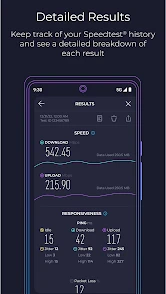
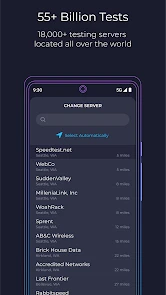
Besides basic speed testing, the app offers some neat features. You can keep a detailed history of your test results, which is great for tracking your internet speed over time. It also allows you to share your results easily. The app even suggests the best server for testing based on your location, ensuring the most accurate results possible.
What’s more, Speedtest includes a video test feature. This is a game-changer for those who need to know more than just download and upload speeds. It provides insight into streaming quality, including load time, buffering, and resolution. As someone who enjoys binge-watching series, this feature is a lifesaver!
Getting more useful comparisons at home
One practical way I use the history is to treat it as a small log rather than a scoreboard. If the family reports a problem on several evenings, I compare tests from the same room and connection type instead of focusing on the highest result. A brief note about whether a video call, download, or stream was happening can explain why readings vary. This is especially helpful when different people use the same phone: the result becomes useful evidence only when the circumstances travel with it.
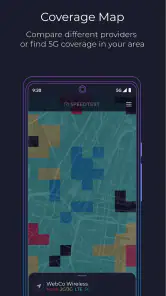
When checking cellular service, I keep the test separate from the home Wi-Fi comparison. A weak cellular result indoors does not tell me that the household router is failing, and a strong Wi-Fi result does not show how the phone will perform elsewhere. If the question is whether one particular corner of the house is a dead spot, I compare nearby locations on the same network. If the question is whether coverage changes outside, I test cellular in the relevant place instead.
When a quick test is not enough
Speedtest is a good first stop when the complaint is “the internet feels slow,” but it is not the right final tool for every problem. If one device struggles while others work normally, I would check that device and the app or service being used before blaming the connection. If every device has trouble in one room, moving the router or looking into home Wi-Fi coverage is more relevant than repeatedly testing from the same spot. And if a provider requests a specific diagnostic procedure, I would follow that process rather than assume a general speed result answers every support question.
There is also a difference between a high result and a satisfying experience. A test can show a strong connection at one moment while a live call still stutters later, especially if conditions change or other household activity competes for the network. I use the result to narrow down possibilities, not to promise that gaming, streaming, or a work meeting will always run smoothly. That modest expectation is what makes the app more useful, not less.
Who I would recommend it to
I’d recommend it to people who want a quick, understandable check before restarting equipment, calling a provider, or deciding whether a slowdown is tied to Wi-Fi or cellular. It also suits households that need to explain a recurring issue to someone else without relying on vague impressions. The free app is easy to try, and its familiar test-and-history approach works well for occasional checks as well as simple comparisons over time.
I would not choose it as the only tool for someone managing a complex home network, diagnosing a specific router fault, or needing a formal provider-side assessment. In those cases, the router’s own information, a dedicated network utility, or the provider’s troubleshooting steps may answer the actual question better. Nor would I keep running tests simply to produce a reassuring number: if the connection is behaving normally, the extra readings rarely add much.
Final Thoughts
All in all, Speedtest is a must-have app for anyone who relies on a fast and stable internet connection. It's reliable, easy to use, and packed with features that go beyond just basic speed testing. Whether you're a tech guru or someone who just wants to check if their internet is slow, this app has got you covered. Next time you’re questioning your internet speed, give Speedtest a try—you might be surprised at what you find.
Speedtest by Ookla Frequently Asked Questions
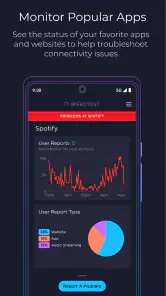
Can Speedtest by Ookla help me tell whether a problem is with my internet connection or a cellular connection?
Yes. Speedtest by Ookla is designed to monitor internet outages and measure internet and cell performance, so it can help you assess different kinds of connections. Running a test can give you a clearer picture of how your current connection is performing. Results can vary with network conditions, so consider the circumstances when interpreting them.
Is Speedtest by Ookla suitable for someone who only needs an occasional connection check?
It can be useful even if you do not plan to test your connection frequently. The app is a Tools app for measuring internet and cell performance and monitoring outages, so you can open it when you want to check how a connection is behaving. It is free to download, with in-app purchases available, and it has an Everyone content rating.
What does Speedtest by Ookla measure besides internet speed?
Speedtest by Ookla can help you monitor internet outages and assess internet and cell performance, alongside measuring connection speed. This makes it useful when you want to check whether a connection is working as expected or compare how it performs across different network types. It is a Tools app developed by Ookla, with an Everyone content rating.
What is Speedtest by Ookla and how does it work?
Speedtest by Ookla is a popular application used to measure internet connection speeds. It provides users with real-time data on download and upload speeds, as well as ping information. The app works by connecting to the nearest test server, running a series of tests to determine your connection's speed and performance. This helps users identify any potential issues with their internet service.
Is Speedtest by Ookla free to use?
Yes, Speedtest by Ookla is free to download and use. However, it offers in-app purchases ranging from $0.99 to $8.99 per item. The free version is sufficient for most users who want to perform basic speed tests and check their internet connectivity.
Pros
- Fast and reliable performance results.
- Simple and intuitive user interface.
- Supports multiple devices and platforms.
- Provides data for network troubleshooting.
- Offers history of test results.
Cons
- Contains ads in the free version.
- Requires internet connection for testing.
- Subscription needed for premium features.
- May show different results on various devices.
- Limited features in the free version.
- Category
- Tools
- Version
- 6.5.1








