Speechify – Text to Speech
- 8.69K
- 4.0
- Installs
- 10.00M
- Price
- Free

Screenshots
Analysis by Reviewed
I reach for text-to-speech when a screen starts to feel tiring but the reading still needs doing: a long article, a PDF for work, or a document I want to review while handling a routine task. Speechify Text to Speech Voice is built for that change of mode. It turns text into audio, and I find the idea most useful when listening helps me fit reading into a day rather than trying to replace every kind of reading.
As a productivity app from Speechify - Text To Speech | Dyslexia Reading, it has a broad audience: students, people working through documents, and anyone who benefits from hearing written material. It is free to install, rated for Everyone, and its current version is 5.29.5782; optional in-app purchases range from $0.49 to $139.99 per item. Its 4.0 average from around 262,000 ratings and more than 10 million installs suggest it has reached many readers, though popularity alone cannot tell you whether its voices or workflow will suit you.
Start with the material, not the app
The first useful decision is what to listen to. Speechify is easiest to judge with text that already has a clear reading order: a straightforward article, a letter, or the main body of a work document. If the task is to compare figures in a table, scan a page for one clause, or check how a paragraph sits beside a chart, I would keep reading visually. Converting a document to audio does not make its layout disappear; it simply makes the words available through another channel.
That distinction also helps set expectations for people who are trying text-to-speech because reading feels difficult. Hearing words can reduce the effort of decoding or give tired eyes a break, but it does not automatically make complex information simple. I’d begin with a short, familiar passage and notice whether listening improves concentration, comprehension, or just comfort. Those are different benefits, and the app is more useful when I know which one I’m seeking.
A small test before a daily habit
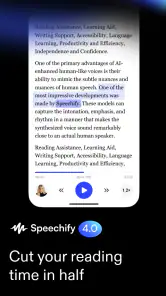
Picture this: You’ve got a pile of articles, emails, or even books to get through, and your eyes are just not cooperating. What do you do? You let Speechify Text to Speech Voice do the heavy lifting! This app transforms written text into spoken words with just a few taps. Imagine having your own personal narrator for everything you need to "read." Cool, right?
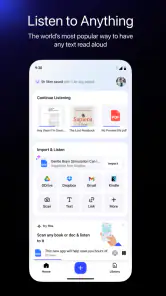
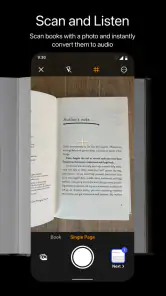
A practical place to begin is with one short item you already understand, rather than a dense document full of tables, footnotes, and unfamiliar names. That gives you a chance to judge the narration without also having to learn a complicated subject. I’d use a PDF or a photo of printed text when the material is awkward to read on a phone; for a page where layout and visual details matter, I’d keep the original open and treat the audio as a companion, not a substitute.
For a printed page, taking a photo is a handy bridge between paper and listening, but it works best when the page is clear and the text is easy to distinguish. I’d position the camera squarely, avoid shadows, and check the result against the page if a word sounds odd. This is a practical quality-control step, not busywork: one misheard name or instruction can change the meaning. For a scan-heavy handout or a page with columns, I’d expect to do more visual checking than I would with a clean, ordinary document.
You May Like

Clash of Clans Is Won Between the Battles

Android Auto Makes the Case for Quieter Car Software

MobiOffice: Transforming Mobile Productivity with Seamless Integration

EA SPORTS FC™ Mobile Soccer: Redefining Mobile Sports Gaming

How Microsoft OneDrive Became a Mobile Productivity Giant

How Google Translate Breaks Language Barriers Effortlessly
From a reading backlog to a listening routine
Choose material that works well as audio
Picture this: You’ve got a pile of articles, emails, or even books to get through, and your eyes are just not cooperating. What do you do? You let Speechify Text to Speech Voice do the heavy lifting! This app transforms written text into spoken words with just a few taps. Imagine having your own personal narrator for everything you need to "read." Cool, right?
A practical place to begin is with one short item you already understand, rather than a dense document full of tables, footnotes, and unfamiliar names. That gives you a chance to judge the narration without also having to learn a complicated subject. I’d use a PDF or a photo of printed text when the material is awkward to read on a phone; for a page where layout and visual details matter, I’d keep the original open and treat the audio as a companion, not a substitute.
Set the pace, then listen with a purpose
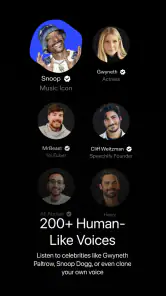
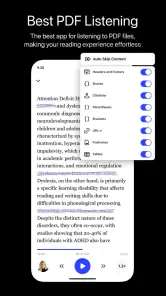
One of the features I absolutely love is the variety of voices and languages. Whether you’re in the mood for a soothing British accent or something more upbeat, Speechify's got your back. It’s like having a multilingual friend who can read your text in over 20 languages!
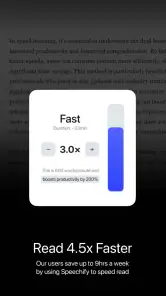
Another nifty feature is the ability to adjust the reading speed. So, whether you’re in a rush and need to speed things up, or you want to take it slow and savor every word, Speechify lets you customize the pace. Plus, you can upload PDFs or even snap a photo of text, and the app will read it to you. It’s like magic!
My useful trick is to change the pace according to the material, not to chase the fastest setting I can tolerate. Familiar prose can often handle brisk narration, while instructions, technical terms, and unfamiliar language deserve a slower pass. When I’m listening to something I may need to act on, I keep a way to return to the source nearby: audio is convenient for a first pass, but it can make it easier to miss a heading, a number, or a qualification buried in the text.
Voice choice is worth treating as a comprehension setting rather than decoration. A voice that sounds pleasant for a few minutes may become tiring over a long session, while a more familiar pronunciation may help with a language you are still learning. I’d test a couple of options on the same short passage, then keep the one that makes the words easiest to follow. If a voice mispronounces a name or abbreviation, I would slow down and verify that part from the original rather than assume the audio is exact.
Fit listening around real tasks
For those of us always on the go, Speechify is a lifesaver. Picture yourself driving, cooking, or even working out, and still being able to "read" through your daily material. It’s like having your cake and eating it too. Not to mention, it’s a boon for people with reading difficulties or visual impairments. Accessibility is where this app truly shines.
A realistic routine might be saving a work PDF for a quieter moment, listening to its main text while preparing dinner, then returning to the document before sending a reply. That handoff matters: narration can help you get through the material, but the final check is still better done against the written page when precise wording matters. I would not use audio while driving as a reason to handle the phone; the sensible approach is to set up what you need before the trip and keep attention on the road.
There is a useful middle ground between passive listening and stopping every few seconds. For a long document, I’d listen once to understand its overall argument, then revisit only the sections that inform a decision or require a response. That approach makes the audio a first-pass tool and the source document the reference copy. It also avoids a common trap: listening to an entire file at high speed can feel productive even when little of it sticks.
For students, the same workflow can help separate review from first-time learning. A chapter’s main prose may work well as a listening pass after class, while formulas, diagrams, and definitions are better checked on the page. I’d use spoken reading to revisit explanations during a walk or a routine chore, then sit down with the material for any work that depends on exact details. The app can make review more flexible, but it cannot replace the focused practice a subject may require.
When another reading tool is enough
Compared with a basic built-in screen reader or a simple text-to-speech option, Speechify’s appeal is the combination of document-oriented listening, voice choice, adjustable speed, and ways to bring in printed or PDF text. A built-in option may be enough if you only want occasional read-aloud support and prefer not to add another app. Speechify makes more sense when listening is a regular part of how you process reading, especially across different kinds of material.
The comparison is not simply about which voice sounds better. A built-in accessibility reader can be the more direct choice when you want spoken feedback across the phone interface, or when your needs are already met by the tools on your device. A dedicated reading app is more attractive when your regular task is sitting down with documents and turning them into listening sessions. I’d choose based on the job I do most often, rather than installing another app just because it has more options.
There is also a trade-off between a flexible listening workflow and a conventional e-reader or PDF reader. Those reading tools are usually the better fit when I want to annotate, compare pages, preserve formatting, or jump around a document visually. Speechify is strongest when the material is primarily prose and the goal is to hear it. If I need both, I would use it alongside the original file instead of expecting one tool to do both jobs equally well.
Move from listening back to the source
What's more, the app's interface is super user-friendly. Even if you're not tech-savvy, navigating through its features is a breeze. Everything is laid out intuitively, so you spend less time figuring things out and more time listening to your content.
Still, audio is not effortless in every setting. A noisy room can make narration hard to follow, and listening takes attention even when your eyes are free. Names, abbreviations, tables, and page layout can also be less clear when heard than when seen, so I would switch back to the document for anything where exact formatting or wording matters. If you mainly skim headlines, annotate pages, or need to compare several columns at once, ordinary reading is likely quicker.
One small but important habit is to decide what “finished” means before pressing play. If I only need the gist of an article, a listening pass may be enough. If I need to follow an instruction, quote a sentence, or send a careful answer, I treat the audio as preparation and verify the relevant passage on screen. That boundary makes it easier to benefit from convenience without confusing a smooth listening experience with a complete accuracy check.
Who should skip it? Someone who reads only short snippets, has no trouble reading on a screen, and rarely wants audio may get little from adding another step to the process. It may also be a poor match for people who need to inspect complex page layouts or who find spoken narration distracting. In those situations, a built-in read-aloud setting for occasional use—or simply a conventional reader—can be simpler and more appropriate.
Where the workflow needs a second look
The app is a particularly good fit for someone who wants a flexible way to hear articles and documents, or who finds sustained visual reading difficult. It is less compelling if you only need occasional spoken text, dislike listening for long stretches, or depend on visual scanning and detailed annotation. I’d test it with the kind of material I actually read before making it part of a daily routine; a pleasant voice cannot make every document easy to absorb.
One question people often have is whether they must pay to try it: the app is free to install, while in-app purchases are available, so check the options shown in the app before committing to any paid choice. Another is whether a PDF or photo will be useful; both are supported as ways to bring text in, but documents with complex layouts are still worth checking visually. And if you are wondering whether it replaces reading, my answer is no: it is a useful alternate route through text, not a reliable replacement for reviewing details on the page.
For a realistic workday, I would use it selectively rather than funnel every message through narration. A long briefing that I need to understand while folding laundry is a sensible candidate; a short email that calls for a precise reply is not. I’d listen to the briefing, note the decision or question it raises, then reopen the relevant page before responding. This keeps the handoff clear and avoids relying on memory for a detail that is easy to check.
The app is rated Everyone and was released on August 16, 2021. That makes it accessible to a broad range of users, but I’d still choose listening content thoughtfully, especially for younger users and material that needs context or discussion. Overall, I see Speechify as most valuable when it turns a specific reading bottleneck into a manageable listening session, rather than as a tool that should be running all day.
Final Thoughts
To wrap it up, Speechify Text to Speech Voice isn’t just an app; it’s a whole new way of consuming information. It’s perfect for anyone who wants to maximize their time and efficiency. So, if you're looking to give your eyes a rest while still keeping up with your reading, Speechify might just be the tool you didn’t know you needed. Give it a whirl, and join the listening revolution!
Speechify – Text to Speech Frequently Asked Questions
Can Speechify help me listen to written content while doing other tasks?
Yes. Speechify is designed to turn written material into audio, which can make it easier to listen while you are occupied with another task. Its read-aloud tools are aimed at documents, books, and PDFs, and the app also includes a voice AI assistant and AI podcasts. It is a productivity app, so it may suit people who want to make listening part of their study or work routine.
Is Speechify suitable for students and people who prefer learning by listening?
Speechify may be useful for students and other users who find it easier to take in information by listening. It can read written content aloud, including documents, books, and PDFs, so you can listen to material rather than relying only on a screen. The experience will depend on your own preferences and the content you want to use, but its focus is making written material available as spoken audio.
What does Speechify do, and what kinds of content can it read aloud?
Speechify is a text-to-speech productivity app that turns written material into spoken audio. Its store summary highlights read-aloud support for documents, books, and PDFs, as well as a voice AI assistant and AI podcasts. It can be useful when you would rather listen than read on a screen, whether you are studying, working, or catching up with written content.
Is Speechify free to download, and are there in-app purchases?
Speechify is free to download, so you can try the app without paying upfront. It also offers in-app purchases, with listed item prices ranging from $0.49 to $139.99, so some features or options may involve additional costs. Check the purchase details in the app before confirming anything, particularly if you are comparing the free experience with paid choices.
What is Speechify Text to Speech Voice?
Speechify Text to Speech Voice is an advanced mobile application designed to convert text into natural-sounding speech. It's perfect for users who want to listen to written content on the go, whether it's for learning, multitasking, or accessibility purposes. The app is available on both Android and iOS platforms, offering a seamless experience for all users.
Pros
- Wide variety of voice options.
- Supports multiple languages.
- User-friendly interface.
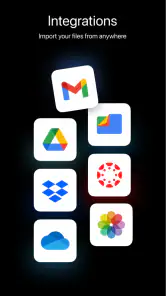
- Integrates with many apps.
- High-quality speech output.
Cons
- Limited free version features.
- Occasional pronunciation errors.
- Requires stable internet.
- Subscription can be pricey.
- Not all accents available.

- Category
- Productivity
- Version
- 5.29.5782











