SmartRent
- 2.84K
- 4.5
- Installs
- 500.00K
- Price
- Free

Screenshots
Analysis by Reviewed
When I try a home-management app, I want to know one thing before anything else: will it help me do a useful task without making me learn a new technical language? SmartRent is aimed at bringing smart-home controls together in one place, and its appeal is clearest when your home already has compatible connected devices. It is a free House & Home app from SmartRent, with an Everyone age rating. The app has a 4.4 average from around 20,000 ratings, and more than 100,000 installs.
What to expect from a home-control app
I would approach SmartRent as a shared control point, not as a replacement for every device’s own app or for the physical controls around the home. The practical benefit is having fewer places to check when you want to manage connected equipment. That can make a difference when you are heading out, getting home late, or trying to keep household routines consistent.
It is also worth setting expectations before downloading: a central app is only useful if it works with the devices and setup available in your home. I would first check whether SmartRent is the app intended for the equipment or property arrangement I use, rather than assuming that any smart lock, thermostat, or light will automatically connect. That small check can save time and avoid mistaking an incompatibility for a setup failure.
Getting Started with SmartRent
Setting up SmartRent was as easy as pie. Once you download it, the app walks you through the setup process with clear and straightforward instructions. Whether you’re a tech newbie or a seasoned smart home user, you’ll find it pretty intuitive. The app connects seamlessly with a variety of devices, and within minutes, my entire home was under my control – all from my smartphone!
First setup: make the first session count
For a first-time user, I would begin with the device or task I care about most instead of trying to organize everything at once. Follow the in-app prompts, keep the relevant device nearby, and make sure you can access the account or property details the setup asks for. If you are helping a family member, it is useful to have them present so you can confirm that the phone in hand is being set up for the right home and the right person.
Once the initial connection is ready, test a low-stakes action before relying on it in a hurry. For example, try a light or another convenient control while you are at home, then check that the physical control still works as expected. This gives you a clearer sense of what the app can do in your particular setup and leaves time to resolve a mistake before it matters.
User Experience
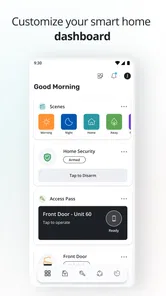
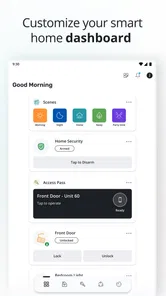
The user interface is sleek, modern, and incredibly user-friendly. I’ve tried a fair share of smart home apps, and some can be downright clunky. But not this one! Navigating through the app is smooth, with everything neatly categorized, making it easy to find what you need without any hassle. Plus, the app’s responsiveness is top-notch, with commands executing almost instantaneously.
More From Our News Desk

 Block Blast!
 Makes Every Clear Feel Like One More Turn
A clean little block puzzle becomes a study in space, risk, and self-control. Its best moments come from one satisfying clear; its toughest test is knowing when to stop.

 Super Stylist Fashion Makeover
Super Stylist Turns Dress-Up into a Runway Career
Its makeover-to-client loop turns quick outfit decisions into shareable style theater. The question is whether the closet keeps giving players a reason to return.

 Block Craft 3D:Building Game
Block Craft 3D Under Pressure: How Well Does It Recover When Building Goes Wrong?
A failure-focused look at Block Craft 3D’s forgiving building loop, its uncertain recovery edges, and the moments that demand more than a cheerful village.

 Woodturning
 Trades Creative Freedom for a Satisfying Carving Loop
If your usual creative game is about building, decorating, or styling, Woodturning trades open-ended projects for a tactile, tightly guided carving loop. Here is what that switch really costs.

 PUBG MOBILE
 Shows What Battle Royale Must Get Right
PUBG MOBILE shows how battle royale has matured: bigger systems matter less than meaningful choices, readable fights, and a reason to return after every loss.

 Braindom: Brain Games Test
Braindom’s Social Life Happens Between Puzzles
Braindom turns quick logic traps into a personal ritual, but its community value is more about comparing answers than building together.
Latest News



For everyday use, I find it helpful to think in terms of a simple routine rather than a long list of controls. If you share a home, agree on which actions people should handle in the app and which are easier to do at the switch or device itself. That avoids a common source of confusion: assuming that everyone sees the same controls or knows which app to open. When a command does not seem to work, I would first check the device’s own status and connection, then retry, rather than repeatedly tapping and creating uncertainty about what happened.
Features That Stand Out
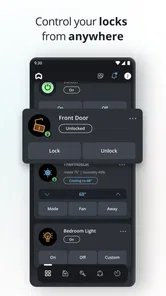
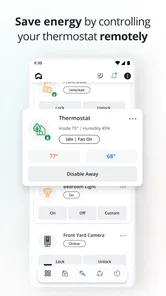
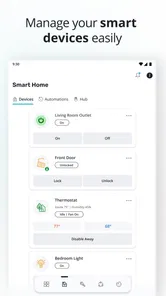
One of the standout features of this app is its ability to integrate with a wide range of smart devices. From smart locks to thermostats, and even lighting systems – you name it, SmartRent probably supports it. This level of integration means you can control multiple aspects of your home from one central hub, which is a huge plus in my book.
The real payoff is less about collecting controls and more about choosing a few that solve recurring annoyances. A household member who often forgets to adjust a device can use one place to check it, while someone arriving home with bags in hand may appreciate having a relevant control on the phone. For locks in particular, I would treat app access as convenient backup rather than the only way into the home; keeping a familiar alternative available is a sensible habit.
Compared with using each manufacturer’s app separately, a central home app can reduce switching and make a mixed-device setup feel more manageable. The trade-off is that manufacturer apps may still be the better place to troubleshoot or reach device-specific settings. I would keep them installed until I know which tasks SmartRent handles reliably in my home, then use the central app for the actions I do most often.
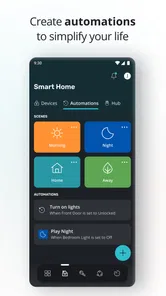
Another cool feature is the automation capability. You can set schedules for different devices, so they turn on or off based on your daily routine. Imagine having your lights dim automatically in the evening or your thermostat adjusting itself to the perfect temperature before you get home. It’s like having your own personal assistant!
Common confusion and useful limits
Schedules are most useful when a routine is genuinely predictable. I would start with one simple schedule, observe it for a few days, and only then add more. A changing workday or irregular travel can make a fixed routine less helpful than manual control, so I would avoid automating something important until I understand how it behaves when plans change. The same goes for household members with different schedules: a setting that suits one person may surprise another.
Connectivity is the main friction to keep in mind. The published version is 4.7.1, and the app supports devices running Android 8.0 or later; even with a current app and compatible setup, a connected device can still be temporarily unavailable. If a command fails, check whether the device itself responds and whether the issue is limited to the app before changing several settings at once. That approach helps narrow down the problem without making the setup harder to recover.
SmartRent is a better fit for people who already have a supported smart-home arrangement and want a straightforward everyday control point. If you only need one device’s advanced options, or you prefer not to depend on connected equipment, its central approach may add little; the manufacturer’s app or a manual control could be the simpler choice. It is also not the right place to assume every device from every brand will work together automatically.
A realistic first week with the app
My advice is to make the first few days deliberately boring. Pick a task that is convenient but not critical, such as checking a connected control while you are already at home. Use the same action at the same point in your routine, and notice whether the app’s status matches what you see in the room. That simple comparison helps separate a useful everyday control from one that merely looks promising on a setup screen.
For example, if you often leave home in a rush, first use the app to check or adjust one supported device before you walk out, while keeping its ordinary control available. If the action is reliable over several outings, it can become part of your leaving routine. If it is inconsistent, you have learned that before depending on it when time is tight. I see this as a better test than connecting every available device in one sitting and then trying to remember which control belongs to which room.
There is a small but worthwhile household benefit to naming and organizing controls in a way other people understand, if the setup offers that choice. Plain room or purpose labels are easier to act on than technical device names, especially for a visitor or family member who did not do the installation. I would also explain which actions are safe to repeat and which should be checked first; with a lock or temperature control, a mistaken tap can matter more than toggling a lamp.
Choosing between a central app and device apps
The usual alternative is to keep using each device maker’s own app. That can be preferable if you own only one connected product, rely on its detailed settings, or need the maker’s own troubleshooting tools. The drawback is the extra switching when several devices are involved. SmartRent’s central approach is more compelling when the supported equipment is already part of the home arrangement and your common tasks are simple enough to handle from one place.
I would not uninstall a device’s original app just because the central app is working today. The original may be useful if you need to change a specialized setting, reconnect equipment, or work out whether a fault belongs to the device or the central control. Keeping both for a while is not elegant, but it gives you a practical fallback and makes it easier to identify what SmartRent actually simplifies for your household.
There is also a difference between consolidating controls and making a home fully automatic. A schedule can help with a stable routine, but it cannot know that your plans changed unless the setup gives it a way to respond. When people come and go at different times, a manual check may be more predictable than a timetable. I would use automation to remove repetitive actions, not to replace judgment around access, comfort, or an unusual day.
Who will get the most from it
I think the strongest fit is someone whose home or property already uses compatible SmartRent equipment and who wants a less fragmented way to handle ordinary controls. It can also suit a household where one person is willing to do a modest setup and then show others the handful of actions they need. The app is less attractive to someone starting from scratch who expects it to discover and connect any smart-home product, or to a person who wants one specialist device’s full range of settings in a single-purpose interface.
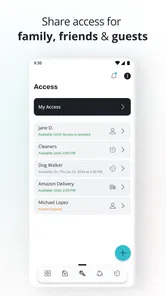
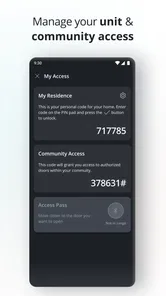
If you rent or share a home, it is sensible to confirm that you are meant to use this app for that specific arrangement before trying to add devices. Home access and connected equipment are not always managed like personal gadgets, so the right starting point may be the property’s established setup rather than a new account created independently. That check is especially useful before relying on a phone as an entry method or changing anything another resident depends on.
For a household with mixed comfort levels around technology, I would keep the app’s role narrow: make it the convenient option for a few agreed tasks, not a rule that everyone must use a phone for everything. Physical switches and familiar routines remain valuable when a phone is unavailable, a connection is acting up, or someone simply prefers a direct control. That balance is what makes a connected setup feel helpful instead of demanding.
What to check before relying on it
New users often wonder whether the app will work with the devices they already own. The practical answer is to verify compatibility with the home’s actual arrangement before investing time in setup; broad smart-home language is not a guarantee that every brand or model will connect. If it is the designated app for your property or equipment, follow that setup path and test the specific actions you plan to use.
Another reasonable question is whether a phone command replaces the physical method of controlling a device. I would treat it as an additional route, not an automatic substitute. A control that works through the app can still depend on the device and its connection, so keep a sensible backup for important functions. If a command appears to fail, pause and check the device before repeating it several times; that prevents uncertainty about whether the first attempt took effect.
People also ask whether schedules are worth setting up immediately. I would wait until you have observed your normal routine and confirmed that manual control behaves as expected. Start with a low-impact schedule, review it when your week changes, and remove it if it creates more exceptions than convenience. A schedule is useful when it fits the people who share the home, not simply because automation is available.
One final practical point is the platform requirement: the current release is 4.7.1, and Android use requires version 8.0 or later. The app is free and rated for Everyone, which makes trying it straightforward for eligible users, but the real deciding factor is still whether the home setup is compatible and whether a central control point solves a problem you actually have.
The Verdict
In a world where convenience is king, SmartRent is a game-changer. It’s perfect for anyone looking to simplify their smart home experience. While it’s not without its minor quirks – like occasional connectivity issues with certain devices – the benefits far outweigh the drawbacks.
So, if you’re in the market for a smart home management app that’s easy to use and packed with features, give SmartRent a whirl. It might just make your life a whole lot easier. Happy smart living!
SmartRent Frequently Asked Questions
What is SmartRent’s age rating, and is it suitable for all household members?
SmartRent is rated Everyone, so its content rating is suitable for a broad audience. The app is designed around home and property services, including tools for residents and property managers. Whether a particular person can use its features still depends on having access to a participating property and any account or permissions that property requires.
Which phones can run SmartRent?
SmartRent is available for Android and iOS, making it an option for residents using either type of smartphone. On Android, the minimum operating system requirement is version 8.0. It is worth checking your phone’s operating system before downloading, then confirming that your residence or property management team uses SmartRent so the app can connect to relevant services.
Do I need an account or an invitation to use SmartRent?
SmartRent is intended for renters and property managers connected to participating properties, so access is tied to the property’s setup. Have any resident or property account details ready if your community requires them. Once connected, the features available to you may depend on your role and the services your property uses, rather than being identical for every user.
Is SmartRent free to download, and who can use it?
SmartRent is a free House & Home app from SmartRent, intended for renters and property managers using participating properties. Its content rating is Everyone, and it requires Android 8.0 or later. Before installing, consider whether your residence or property management team uses SmartRent, since access to property-specific tools depends on that connection.
What should I check before installing SmartRent on my phone?
Check that your device meets the app’s operating system requirement and that SmartRent is relevant to your home or rental community. The app is available on Android and iOS, and its current Android version is 4.7.1. As with any property app, have your resident or property account details ready if your community requires them to connect you with its services.
Pros
- User-friendly interface makes navigation easy.
- Integrates well with various smart devices.
- Reliable performance with minimal glitches.
- Provides real-time alerts for security.
- Energy-saving features enhance efficiency.
Cons
- Limited compatibility with some devices.
- Subscription required for premium features.
- Occasional connectivity issues reported.
- Initial setup can be time-consuming.
- Customer support response can be slow.