Sky Tonight - Star Gazer Guide
- 2.33K
- 4.7
- Installs
- 5.00M
- Price
- Free

Screenshots
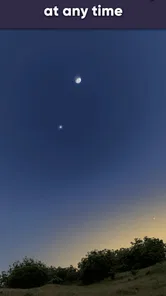
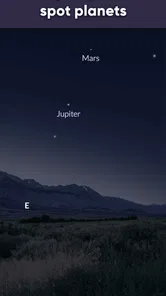
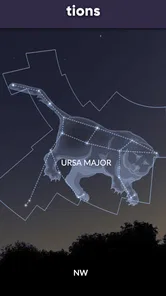
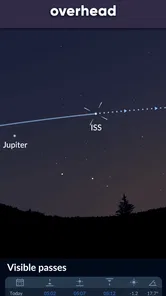
Analysis by Reviewed
Have you ever gazed up at the night sky and wished you knew more about what you were seeing? Well, you're not alone. I recently stumbled upon this fantastic app called Sky Tonight - Star Gazer Guide, and let me tell you, it's a game changer for both amateur and seasoned astronomers alike. I’d still suggest treating it as a viewing companion rather than a substitute for a clear sky, basic observing skills, or specialist equipment.
Trust begins with what you can check
Sky Tonight is a free Books & Reference app from Vito Technology, and its 4.7 average across around 72,000 ratings suggests that many people find it useful. It has passed five million installs, but popularity alone isn’t a reason to trust an app with sensitive choices. I’d take a moment to review the permissions and privacy information shown on your device and in the app store before deciding what to allow. I can’t responsibly infer data practices or account controls that aren’t visible to me, so I’d base that decision on the actual prompts and settings you encounter.
Keep the experience on your terms
A sky guide can feel more personal when it uses your position or device sensors to line up the map with the sky. That is useful outdoors, but it is also the moment I’d pause and check which permissions are being requested. If you prefer not to grant location access, see whether the app offers a way to explore the sky without it; if precise alignment matters to you, consider whether enabling the relevant permission is worth the convenience. Notifications are another choice: event reminders can help you plan, but you can leave them off if you would rather check the sky on your own schedule.
Before you head outside
For a first session, I’d keep the routine simple: open the map indoors, choose one bright object or one constellation to look for, then step outside and use the screen briefly to orient yourself. That avoids the common beginner trap of trying to identify every point of light at once. The map is most useful as a guide to direction and context; it doesn’t promise that every object shown will be visible from your particular spot. Clouds, buildings, haze, and nearby lighting can all make the real view differ from the neat display.
If the map seems not to match the sky, I’d first check the way I’m holding and pointing the phone, then move to a more open spot and give the display a moment to settle. Device sensors and a moving hand can make alignment feel less steady than a printed chart. Rather than assuming the sky has changed or that the app is wrong, I’d use a few stable landmarks and compare the general pattern. This is a small but useful habit when showing the app to children or friends, because it keeps the phone from becoming a source of confusion.
Unveiling the Universe
Okay, let's dive right in. The first thing that struck me about Sky Tonight - Star Gazer Guide is its sleek and intuitive design. From the moment you open the app, you're greeted with a stunning interface that makes navigating through the cosmos feel like a breeze. It's like having a personal guide to the universe right in your pocket. It’s aimed at everyday curiosity, not at replacing a telescope or a dedicated observing plan, so I see it as a handy first stop when I want to know what might be overhead.
Stellar Features at Your Fingertips
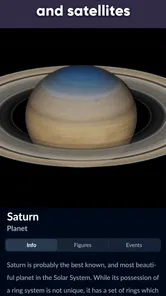
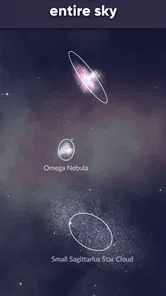
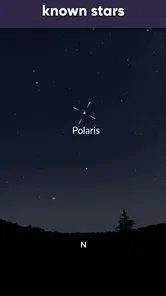
Now, let's talk features. One of the standout elements of this app is its real-time sky map. Imagine pointing your phone towards the heavens and instantly identifying stars, planets, constellations, and even satellites. It’s like magic! The app uses your device's sensors to pinpoint your location and provides a detailed layout of the night sky. It's perfect for those impromptu stargazing sessions. A practical tip is to start by checking the map before stepping outside, then compare it with what you can actually see; that gives you a useful reference if clouds, streetlights, or a bright Moon make faint objects hard to spot.
More From Our News Desk

Weather by Xiaomi Review: Clear at a Glance, Less Clear Up Close

X Under Pressure: Can It Recover When Posting Goes Wrong?

Clash of Clans Is Won Between the Battles

Android Auto Makes the Case for Quieter Car Software

MobiOffice: Transforming Mobile Productivity with Seamless Integration

EA SPORTS FC™ Mobile Soccer: Redefining Mobile Sports Gaming
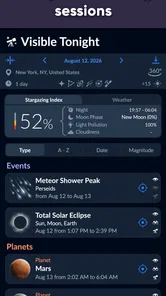
But wait, there's more! The app also offers a comprehensive calendar of celestial events. Whether it's a meteor shower or a lunar eclipse, Sky Tonight - Star Gazer Guide keeps you in the loop with notifications so you never miss a moment. Plus, the augmented reality feature is absolutely mind-blowing. You can overlay constellations over your actual sky view and learn all about them with just a tap. For a casual evening, I’d use the event calendar to choose one target, then use the sky view to get oriented rather than trying to chase several objects at once. That small bit of planning can make an outing feel less like aimless phone-checking and more like actual observing.
Useful in the field, with a few trade-offs
Here’s a realistic use: I’m outside after dinner with a friend who spots a bright point and asks whether it’s a planet. A quick look at the live map can help us identify the object, while the event calendar gives us a reason to stay out a little longer if something interesting is due. The phone screen is also a bright light in a dark setting, though, and repeatedly raising it can interrupt dark adaptation. I’d check the map, lower the screen or put the phone away, and give my eyes time to adjust instead of keeping the display in front of me continuously.
Compared with a basic star chart or a general-purpose search, the advantage here is the connection between a sky map, object information, and event planning in one place. A paper chart may be easier on the eyes and needs no screen interaction, while a telescope’s own controls are better suited to detailed viewing through optics. If you mainly want a simple written astronomy reference, this app’s live orientation may be more than you need; if you want help connecting names to what you see overhead, that combination is its strongest use.
Planning around an event without overplanning
The event calendar is most helpful when it gives an outing a clear purpose, not when it becomes a promise that conditions will cooperate. I’d check it earlier in the day, decide whether the event is worth staying up for, and then use the map to get familiar with the area of sky before going out. For a meteor shower, for example, I’d avoid expecting the phone to show where every meteor will appear; the app is better used to help me understand the sky and prepare than to turn an unpredictable display into a scheduled show.
This distinction matters for families and first-time observers. A child may be more engaged by a simple goal—find the Moon, locate a bright planet, or recognize one constellation—than by a long list of objects. I’d let the map answer the immediate question, then put the phone away and look up together. That makes the app a prompt for observation rather than the activity itself, and it helps reduce the temptation to keep tapping through information while the sky is right there.
Educational and Fun
One of my favorite aspects of the app is its educational component. It's not just about looking at pretty stars; it's about understanding them. The app offers detailed information about each celestial body, including its history, mythology, and scientific data. It's like having a mini astronomy lesson every time you use it. And for those who love a bit of trivia, there are fun facts sprinkled throughout the app to keep you entertained. I find this most useful when I pick one object and read about it, rather than trying to absorb everything at once; a short explanation can turn a quick glance into a small learning moment.
Oh, and did I mention the community feature? You can connect with other stargazers, share your observations, and even participate in astronomy challenges. It's a great way to engage with fellow enthusiasts and learn from each other. If you would rather keep your use private or simply want a solo reference, you can focus on the map and reading material instead. I’d treat any social or sharing option as a deliberate choice and check what is displayed before posting an observation, especially if you prefer not to attach personal details to public activity.
Privacy choices in everyday use
My approach to a location-aware sky guide is to make the decision based on what I want to do in that moment. If I’m at home browsing object descriptions, I may not need the same degree of alignment as I do outdoors. Before accepting a permission prompt, I’d read its wording and consider whether the requested access is relevant to the feature I’m trying to use. If the prompt is unclear, I’d pause rather than grant access automatically. This is not a claim about the app’s data handling; it is a practical way to keep control of a phone’s permissions.
I’d apply the same care to notifications and sharing. A reminder can be useful if I’ve chosen a particular event, but it is not essential for someone who prefers to check the calendar manually. Likewise, sharing an observation can be enjoyable, yet I’d review the details shown before publishing anything. These choices are easy to overlook when excitement about a sky event takes over, so I think it is worth deciding in advance what level of participation feels comfortable.
Who will enjoy it, and who may prefer another tool
I’d recommend it to curious beginners, families looking for a low-pressure way to talk about the sky, and casual observers who want to identify an object without first learning a full chart. It can also help someone plan a short viewing session around a celestial event. The trade-off is that a phone guide cannot make faint objects visible through haze or urban light pollution, and the on-screen map is not the same as a detailed observing atlas. Experienced observers who already plan sessions around equipment and precise targets may prefer a specialist chart or telescope workflow for that job.
If you are choosing between this and a paper star chart, think about whether live orientation or a quiet, screen-free reference matters more to you. If you want an app to explain what is overhead and connect that to event dates, this is a convenient fit. If your main goal is to plan a technical observing list, compare equipment, or work at length with a telescope, a dedicated astronomy tool may be the better companion. For someone who mostly wants facts to read indoors, a conventional reference source may feel simpler and less distracting.
The app is free to start, rated for Everyone, and includes optional in-app purchases priced from $0.99 to $12.99 per item. I’d explore the free experience first and only consider a purchase if a feature I actually want is clearly presented as paid. It was released on August 18, 2021, and version 2.3.1 supports Android 7.0 and later. Those details make it easier to judge basic compatibility, but I’d still check the device’s own store page for the version currently offered before installing.
Making a first week of use worthwhile
I wouldn’t try to master every screen on the first night. I’d begin with one simple question—what is that bright object?—and use the map to answer it. On another evening, I’d browse the event calendar and decide whether anything suits my schedule. Later, I might explore the reading material for an object I have already seen. This gradual approach makes the app more useful because each visit has a purpose, and it prevents the amount of information from feeling like homework.
It is also worth matching expectations to the setting. From a balcony in a bright neighborhood, the app can still help explain the arrangement of the sky, but the actual number of visible stars may be limited. At a darker location, it can help me orient myself among more points of light, although a red-light setup or paper chart may be kinder to night vision during longer sessions. I’d choose the tool that supports the outing rather than insist on using a phone for every part of it.
Final Thoughts
In a nutshell, Sky Tonight - Star Gazer Guide is a must-have for anyone with even a passing interest in astronomy. It’s user-friendly, packed with features, and provides a wealth of information that makes stargazing not only enlightening but incredibly fun. Whether you're a curious beginner or a seasoned star chaser, this app is sure to enhance your cosmic adventures. So, next time you find yourself under a starry sky, give this app a spin. Trust me, you won’t regret it! My more cautious recommendation is to start with the map and reading tools, decide for yourself whether location access or reminders suit your habits, and keep expectations grounded: it can help you make sense of the sky, but it can’t control the conditions above you.
Sky Tonight - Star Gazer Guide Frequently Asked Questions
Who develops Sky Tonight - Star Gazer Guide, and what kind of app is it?
Sky Tonight - Star Gazer Guide is an astronomy reference app developed by Vito Technology. It is intended for people who want to explore the night sky and learn about the objects they can see. Its live map is presented as a way to discover stars and planets and view current constellations in detail, so it can serve as a companion for casual skywatching as well as a starting point for learning more.
What does Sky Tonight - Star Gazer Guide focus on?
The app focuses on stargazing and astronomy, with a live map designed to show current constellations in detail. It is a reference for discovering stars and planets, so it may appeal to anyone who wants to connect a view of the sky with useful information on a screen. If you are looking for a dedicated astronomy guide rather than a general-purpose reading app, its subject and purpose are clearly centered on the night sky.
Is Sky Tonight - Star Gazer Guide free to download, and are there in-app purchases?
Sky Tonight - Star Gazer Guide is free to download, so you can try its stargazing tools without paying upfront. The app also offers optional in-app purchases, with individual items ranging from $0.99 to $12.99. Consider whether you want any paid extras before purchasing; the free download and optional purchases make it possible to start exploring without committing to a purchase immediately.
What devices and age groups is Sky Tonight - Star Gazer Guide intended for?
The app is rated Everyone, making it suitable for a broad audience interested in exploring the night sky. Its minimum operating system requirement is version 7.0, so check your device’s software before downloading. Sky Tonight - Star Gazer Guide is an astronomy reference app from Vito Technology, and its approachable tools can make it useful for individuals and families curious about stars and planets.
What is Sky Tonight - Star Gazer Guide and what features does it offer?
Sky Tonight - Star Gazer Guide is a comprehensive stargazing application designed to enhance your astronomical experience. It offers features like real-time sky maps, detailed information on stars, planets, and constellations, and augmented reality (AR) capabilities to help identify celestial bodies. Users can also access weather updates for optimal stargazing, set reminders for astronomical events, and explore educational content about the night sky. Its live map is designed to show current constellations in detail, making it a practical reference when you want to connect what you see overhead with information on your screen.
Pros
- User-friendly interface enhances exploration.
- Real-time sky updates keep data current.
- Customizable notifications for celestial events.
- Educational content for astronomy enthusiasts.
- Offline mode available for remote stargazing.
Cons
- Limited features in free version.
- Ads may disrupt the experience.
- Requires a stable internet connection.
- Battery drain during prolonged use.
- Complex features may overwhelm beginners.













