Star Walk 2 Pro:Night Sky View
- 1.58K
- 4.7
- Installs
- 500.00K
- Price
- $2.99
Screenshots

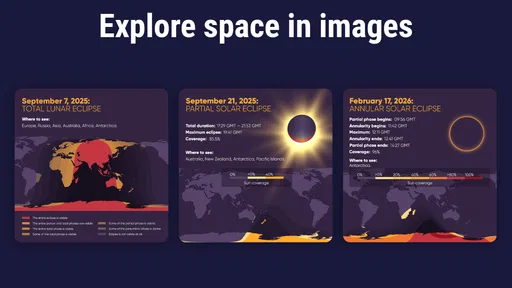
Analysis by Reviewed
I tend to get more out of a clear evening when I have a way to turn “what’s that bright one?” into a useful answer. Star Walk 2 - Night Sky View is an astronomy education app from Vito Technology that makes exploring the sky feel approachable. It costs $2.99, with optional in-app purchases priced from $0.99 to $2.99 per item, so I’d think of it as a paid guide rather than a free map. Its Everyone age rating and accessible presentation make it easy to share with curious family members, though younger users will get more from it with an adult helping connect the screen to the actual sky.
What to expect when you open it
The app’s appeal is the combination of a sky map and explanations, rather than a promise to replace a telescope or teach advanced observing techniques. The screen can help orient you among stars, constellations, and planets, while tapping an object gives you background to read at your own pace. That makes it useful both outdoors and indoors: I can check what I might look for before going outside, then use the map as a prompt when I’m actually under the sky.
Star Walk 2 has an average rating of 4.6 from around 32,000 ratings, and it has been installed over 500,000 times. It was released on March 12, 2015, and version 2.18.4 requires iOS 7.0 or later. Those figures provide context, but they don’t tell me how quickly it will respond on a particular device or how much battery a long session will use. I’d treat performance as something to judge on my own phone, especially if I plan to keep the screen on while outside.
Using the map without losing your place
Pointing the phone toward a patch of sky is an intuitive way to begin, but it isn’t always the most comfortable way to browse. I’d use the map first to get a broad sense of the scene, then tap a promising object for details rather than swinging the phone around to inspect every label. That small change in approach makes the session feel less like searching through a crowded screen and more like following a question: identify one object, learn a little, then move on.
A practical trick is to explore indoors before heading out. Pick a constellation or planet in the app, read its description, and then look for it outside once your eyes have adjusted. This reduces the temptation to stare at a bright display continuously, which can make night viewing less pleasant. Night mode is helpful here, but I’d still keep screen checks brief and dim the display to a comfortable level when possible.
Where it fits among astronomy tools
Compared with a paper star chart, the app is easier to consult when you’re unsure which direction to look, and its object descriptions add context a printed map may not provide. A basic phone compass or weather app can help with orientation and planning, but neither is designed to connect a point of light with a constellation and a short explanation. On the other hand, a chart can be a better choice if you want to avoid looking at a screen altogether, while dedicated astronomy software or observing equipment is more suitable for people who need detailed planning or telescope control.
I wouldn’t rely on any phone sky map as the final word when the view is difficult. Buildings, trees, clouds, and local light can block what the map suggests should be visible, and the screen can encourage you to search for objects that are simply not easy to see from your location. Use it to orient yourself, not as a guarantee that every marked star will be obvious. That distinction matters most for beginners, who may otherwise assume they are looking in the wrong place.
More From Our News Desk

Weather by Xiaomi Review: Clear at a Glance, Less Clear Up Close

X Under Pressure: Can It Recover When Posting Goes Wrong?

Clash of Clans Is Won Between the Battles

Android Auto Makes the Case for Quieter Car Software

MobiOffice: Transforming Mobile Productivity with Seamless Integration

EA SPORTS FC™ Mobile Soccer: Redefining Mobile Sports Gaming
What Makes Star Walk 2 Shine?
From the moment I launched Star Walk 2, I was hooked. The app boasts a sleek and intuitive design that's as captivating as the night sky itself. With a simple swipe, you can explore stars, constellations, and even satellite passes in real-time. The interface is fluid, making navigation feel like a breeze, which is crucial when you’re trying to track a fast-moving satellite or identify a constellation before it dips below the horizon.
User Experience and Features
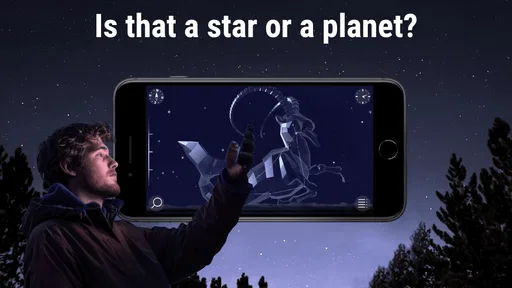
One of the standout features has to be the augmented reality mode. By pointing your phone towards the sky, Star Walk 2 overlays celestial information onto your camera view, allowing you to identify stars and constellations in a snap. This feature is a game-changer for amateur astronomers and stargazing enthusiasts alike.
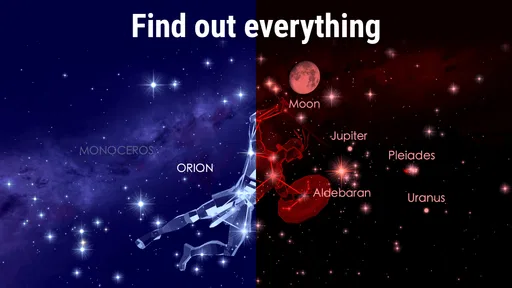
The app also provides a wealth of information about each celestial body. Simply tap on a star or planet, and you'll get a detailed description, including its history, visibility, and even its mythological significance. It’s like having an astronomy textbook right in your pocket, minus the heavy lifting.
Perfect for Stargazers of All Levels
Whether you’re a seasoned astronomer or a newbie just discovering the wonders of the universe, Star Walk 2 caters to all levels. The app's customization options allow users to filter what they see in the sky, focusing on planets, stars, or constellations, depending on their interest. Plus, the night mode feature is a thoughtful addition, ensuring that your stargazing session isn’t disrupted by screen glare.
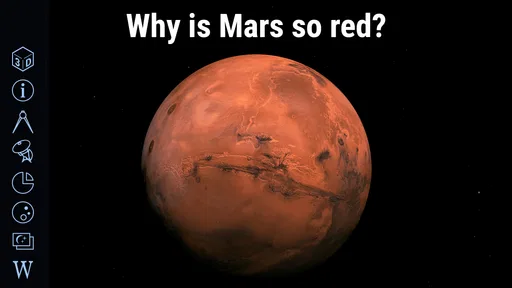
One of the things I love most about this app is how it makes learning about astronomy accessible and fun. The visuals are stunning, with 3D models that bring the solar system to life. It’s an educational tool disguised as a fun app, which is perfect for kids and adults alike.
Making a short session count
For an ordinary evening, I’d use it in two passes: first at home to see what is worth looking for, then outside for quick checks rather than constant viewing. If a child asks about a bright object, the map and object information give us something concrete to explore together. For a casual observer, that is a stronger use than trying to turn every outing into a formal astronomy lesson.
The trade-off is that a feature-rich display can feel busy when all you want is a quick answer. Filtering the view to the kind of object you’re seeking can make the map easier to read; I’d avoid leaving every category visible during a first search. If your main goal is a minimal, screen-free experience, a printed chart may suit you better. If you want an accessible visual guide that also offers explanations, this app has a clearer advantage.
Reliability and device fit
For an app used outdoors, the most useful test is whether it stays comfortable and responsive through a real session, not just whether it looks polished at launch. I’d check the map at home before relying on it at a dark-sky spot, and keep the phone secure while moving so attention stays on the surroundings. Long sessions with the screen active can be demanding on a phone, so bringing a charged device and limiting unnecessary screen time is sensible advice for any stargazing outing.
Star Walk 2 is a good fit for curious beginners, families, and casual sky-watchers who want identification and learning in one place. It is less suited to someone seeking a specialist observing planner, detailed telescope workflow, or an entirely screen-free night. The app was released in 2015 and its current version is 2.18.4; I’d still make sure it runs smoothly on my own device before planning a long session. Overall, I see it as a polished educational companion whose value comes from helping a simple glance upward become a small, satisfying lesson.
Choosing the right way to use it
The best choice depends on what you want from an evening outside. If you mainly need a quick directional reference, a simple compass may be enough; if you want a hands-on lesson about what you have found, this app gives that moment more context. I find the combination most useful when curiosity is the point, not when I’m trying to record a careful observing session. Someone who already knows the constellations and wants technical planning tools may get more from specialist astronomy software.
There is also a useful distinction between learning the screen and learning the sky. I’d pick one recognizable landmark constellation, use the map to understand its shape, and then try to find that pattern without looking at the phone. That turns the app from a continuous visual overlay into a reference you can put away. It also gives children a manageable challenge: search for a pattern together, then check the answer rather than having the screen do all the noticing.
A realistic evening with the app
Imagine stepping outside after dinner because a bright point has caught your attention. Instead of opening the camera view and scanning everything, I’d first check the map, narrow the display to the relevant objects, and tap the likely candidate to read a little about it. Then I’d lower the phone and see whether the object is visible from that spot. If trees or nearby lights make the view confusing, I’d move to a clearer area or save the question for another night rather than assume the app is wrong.
This slower routine helps with both comfort and attention. A phone can orient you, but it cannot make a cloudy or obstructed sky clear, and a bright screen can make it harder to enjoy the darkness. I’d keep the session short when the goal is simply to identify one object, and save longer browsing for indoors. The app is at its best when it prompts you to look up, not when you spend the whole evening looking down.
Speed, stability, and practical limits
On a device that handles its map and visual presentation comfortably, the quick, swipe-led style should suit casual exploration. Still, I wouldn’t promise the same responsiveness on every phone: performance can depend on the device and the demands of a particular session. If the display feels crowded or navigation feels less immediate, reducing the visible object categories is a sensible first step before deciding that the app itself is a poor fit.
For reliability, I’d open it before leaving home and make sure the view is comfortable to use on my device. That simple check is more useful than discovering a usability snag after arriving somewhere dark. Long screen-on use can also drain a phone, so I’d arrive with a good charge and avoid keeping the map open between observations. These are practical constraints of using a phone outdoors, not a reason to expect the app to replace dedicated equipment.
Who will get the most from it
I’d recommend it to a beginner who wants to connect names with visible points of light, a family looking for an easy shared activity, or a casual observer who enjoys learning a little during an evening walk. The short descriptions and visual presentation help make an unfamiliar sky less intimidating. Its educational focus is also useful at home, where you can explore an object before trying to spot it outside.
I’d suggest skipping it if you want a purely paper-based experience, need detailed telescope-control tools, or expect a phone screen to make faint objects easy to see. The $2.99 purchase price is worth considering alongside the optional purchases: I’d decide whether the core map and explanations match your needs before spending beyond the initial cost. For people who want identification plus approachable context, the value is clearer than for someone who only needs a bare-bones direction finder.
Final Thoughts
In a world where we often forget to look up, Star Walk 2 - Night Sky View is a delightful reminder of the wonders that lie above us. It’s more than just an app; it’s a bridge to the universe. Whether you're planning a night out under the stars or just curious about what’s out there, Star Walk 2 is your go-to companion. So, grab your phone, step outside, and let this app guide you through the night sky. Trust me; you won’t be disappointed!
Star Walk 2 Pro:Night Sky View Frequently Asked Questions
Is Star Walk 2 a good choice for learning about astronomy with family?
Star Walk 2 is an education app focused on the night sky, with a map of stars and constellations and a tool for finding planets in the solar system. Those features can give families a shared way to explore what is visible and learn basic astronomy together. Its Everyone age rating also makes it suitable for a broad audience.
Can I use Star Walk 2 to identify planets as well as stars?
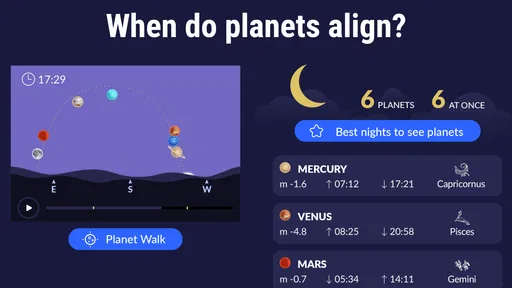
Yes. Star Walk 2 is described as a solar system planets finder as well as a stargazing guide, and its map covers stars and constellations too. This makes it useful when you want to explore several kinds of objects in the night sky rather than focus only on star patterns.
Can Star Walk 2 help me plan a stargazing session before I go outside?
Yes. Star Walk 2 is a stargazing guide with a map of stars and constellations, so you can explore the sky and use the app to learn what to look for. It is also described as a solar system planets finder, which makes it useful for preparing to spot planets as well as familiar star patterns. The app is an education app from Vito Technology.
What is Star Walk 2 and how does it enhance stargazing?
Star Walk 2 is a popular stargazing app that transforms your device into a virtual planetarium. It enhances the stargazing experience by providing real-time information about stars, constellations, and celestial events. Using augmented reality, the app overlays information onto the night sky, allowing users to easily identify celestial objects and learn more about them with detailed descriptions and 3D models.
Is Star Walk 2 suitable for beginners in astronomy?
Absolutely, Star Walk 2 is designed to cater to both beginners and seasoned astronomy enthusiasts. The app's user-friendly interface and interactive features make it easy for newcomers to navigate the night sky and understand complex astronomical concepts. It offers helpful tutorials and tips, making it a great starting point for anyone interested in exploring the universe.
Pros
- Stunning
- user-friendly interface.
- Accurate real-time sky mapping.
- Comprehensive celestial database.
- Educational content for astronomy enthusiasts.
- Offline mode available.
Cons
- Requires in-app purchases for full features.
- Battery drain with prolonged use.
- Occasional inaccuracies in rural areas.
- Limited customization options.
- Ads in the free version.