SingleCare - Rx Coupons
- 5.13K
- 4.6
- Installs
- 1.00M
- Price
- Free

Screenshots

Analysis by Reviewed
When a prescription becomes a household errand, the tricky part is often not finding a coupon but keeping each person’s needs straight. I can imagine checking prices for my own medicine while helping a relative compare theirs, then realizing that the most convenient pharmacy for one prescription may not be the best choice for another. SingleCare - Rx Coupons is useful in that narrow, practical moment: it helps me look at prescription prices before heading out, without turning the errand into a hunt through several pharmacy websites or phone calls.
I would treat it as a price-checking tool, not as a shared medical record or a way to manage a family’s treatment. That distinction matters when phones are shared, one person picks up for another, or an older relative needs help navigating an app. The savings can be worth checking, but each prescription still belongs to the person it was prescribed for, and a lower displayed price is not a reason to change medication or pharmacy without considering the full situation.
When a prescription becomes a household errand
I can see the appeal most clearly when one person is handling errands for several adults. Imagine a weekday pickup: you have a prescription to collect, a family member has asked you to check the cost of theirs, and the usual pharmacy is not necessarily the cheapest option. Searching each medication and comparing nearby locations before leaving can make that trip more deliberate. The useful habit is to check the exact prescription and pharmacy choice rather than assume a discount shown for one situation will apply to another.
This makes the app a practical price-checking companion, not a household medical record or a shared medication manager. I would use it to compare costs and help someone find a coupon, while keeping each person’s prescriptions and health decisions under their own control. If someone else is collecting a medication, I’d make sure they have the relevant coupon details and know which pharmacy was selected instead of assuming that another household member can retrieve everything from my phone.
What’s the Buzz About?
SingleCare is essentially your pocket-sized pharmacy assistant, designed to provide discounts on medications. You might think it sounds too good to be true, but trust me, it’s legit. The app partners with thousands of pharmacies nationwide, meaning you’re likely to find savings at your local drugstore.
Getting Started
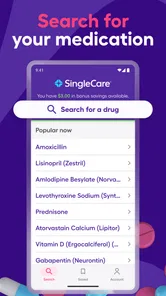
Downloading the app was a breeze. It didn’t take up much space on my phone, and setting it up was pretty straightforward. Once you’re in, you can search for your prescribed medication and see the discounts available. What’s cool is that you don’t even need to sign up to start saving, which is a huge plus if you’re wary about sharing personal info.
That no-sign-up route is especially useful for a quick check on a shared device: you can look up a price without turning a family member’s account into the default place for everyone’s health details. I’d still avoid leaving prescription searches open on a phone other people use, and I wouldn’t treat a shared screen as permission to make decisions for someone else. For a person who prefers to keep their health information separate, using their own device for searches is the cleaner choice.
More From Our News Desk

 Block Blast!
 Makes Every Clear Feel Like One More Turn
A clean little block puzzle becomes a study in space, risk, and self-control. Its best moments come from one satisfying clear; its toughest test is knowing when to stop.

 Super Stylist Fashion Makeover
Super Stylist Turns Dress-Up into a Runway Career
Its makeover-to-client loop turns quick outfit decisions into shareable style theater. The question is whether the closet keeps giving players a reason to return.

 Block Craft 3D:Building Game
Block Craft 3D Under Pressure: How Well Does It Recover When Building Goes Wrong?
A failure-focused look at Block Craft 3D’s forgiving building loop, its uncertain recovery edges, and the moments that demand more than a cheerful village.

 Woodturning
 Trades Creative Freedom for a Satisfying Carving Loop
If your usual creative game is about building, decorating, or styling, Woodturning trades open-ended projects for a tactile, tightly guided carving loop. Here is what that switch really costs.

 PUBG MOBILE
 Shows What Battle Royale Must Get Right
PUBG MOBILE shows how battle royale has matured: bigger systems matter less than meaningful choices, readable fights, and a reason to return after every loss.

 Braindom: Brain Games Test
Braindom’s Social Life Happens Between Puzzles
Braindom turns quick logic traps into a personal ritual, but its community value is more about comparing answers than building together.
Latest News



Coordinating a pickup without mixing things up
For a household errand, I’d search each person’s medication separately and note the pharmacy and price for each result before setting out. That small pause can prevent a frustrating detour if the best option differs by prescription. It also helps when one person is comparing a recurring medicine while another needs a one-time prescription: the cheapest location for one does not automatically make it the right choice for the other.
There is a trade-off here. A coupon app can make the price comparison easier, but it does not replace the pharmacist’s role or a conversation with a prescriber. If a medication, dose, or pharmacy choice is uncertain, I’d confirm it with the appropriate professional rather than use a lower displayed price as a reason to switch treatment. The app is most helpful after the prescription itself is settled.
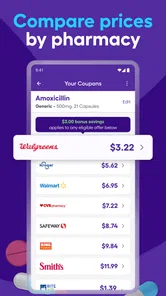
After selecting your medication, the app displays a list of pharmacies nearby with the discounted prices. You can then choose where you want to go. It’s super convenient, especially if you’re like me and always on the go.
How Does It Stack Up?
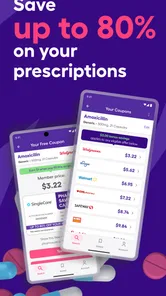
One of the standout features of SingleCare - Rx Coupons is its user-friendly interface. The design is clean, and navigation is intuitive, even for those who aren’t tech-savvy. Plus, the savings are real. I’ve personally saved up to 80% on some prescriptions, which is mind-blowing!
Compared with calling pharmacies one by one or relying only on a pharmacy’s own discount program, having several nearby prices visible in one place can make an initial comparison less tedious. I’d still treat the result as a starting point: prices and availability can depend on the particular prescription and pharmacy, so I would check the coupon details and confirm the amount with the pharmacy before making a special trip. If your existing insurance or pharmacy arrangement already gives you a better price, there is no reason to assume the coupon is automatically the better option.
Another thing I appreciated was the app’s transparency. It clearly shows you the price you’ll pay at the pharmacy, so there are no surprises at checkout. It even includes a price comparison tool, which is handy if you want to ensure you’re getting the best deal possible.
Age, trust, and knowing when to skip it
The app is rated for Everyone, but prescription choices still call for adult judgment and, where appropriate, guidance from a clinician or pharmacist. I would not hand a child a phone and expect the app to decide what medicine is suitable. For an older relative who finds phone searches difficult, I could help compare prices with them, then let them review the choice and keep their own prescription information private.
SingleCare is a better fit for people willing to compare pharmacy prices before collecting a prescription, including those paying out of pocket or simply checking whether another option is cheaper. It is less useful if you need clinical advice, medication reminders that coordinate across a family, or a complete record of everyone’s prescriptions. In those cases, a pharmacist, prescriber, or a purpose-built health organizer is the more appropriate resource.
For those who love to plan ahead, the app allows you to set reminders for refills. It’s a small feature, but it makes a world of difference when you’re juggling a busy schedule.
Choosing the right comparison for your situation
The most useful way I’d bring this into a routine is as a second check, rather than a replacement for every other source of pricing. If I have a prescription ready to fill, I can compare the app’s options with the price I expect from my current pharmacy or insurance arrangement. That gives me a concrete decision: stay with the familiar option if it is already competitive, or investigate another location if the difference seems worthwhile. It avoids assuming that any coupon must beat an existing arrangement.
For someone who fills the same prescription regularly, I’d compare again when it is time to refill instead of relying on a price remembered from a previous visit. The prescription, selected pharmacy, and timing all matter to the decision, so an old comparison may not be a dependable guide to a new pickup. I would also consider the practical cost of changing locations: a lower price is less appealing if getting there adds a difficult trip or disrupts a routine that matters to the person taking the medication.
This is where the app differs from simply asking a pharmacist for a price. Calling or visiting a pharmacy can answer questions about that location directly, while a comparison tool is useful for seeing alternatives without contacting each place first. I’d use both when the choice is close: scan the options in the app, then contact the pharmacy I’m considering to confirm the details. That extra check is especially sensible before traveling across town or arranging for someone else to pick up the prescription.
Small checks that make a coupon more useful
My practical tip is to keep the comparison focused: search the medication as prescribed, review the pharmacy attached to the price, and make a note of the option you intend to use. If I’m coordinating for another adult, I’d ask them to confirm the prescription and destination before I pass along the coupon information. This prevents a common household mix-up: having the right price in mind but the wrong pharmacy or prescription when the errand begins.
I would also separate price research from medical decisions. If a result makes a different pharmacy look attractive, I’d first think through whether that location works for the person who needs the prescription, then confirm the final amount directly. If the prescription details are confusing, I would pause and ask the pharmacist or prescriber rather than guess at a search term. The app can help me shop more deliberately; it cannot interpret a treatment plan for me.
There is a privacy trade-off with convenience on a shared phone. Searching without an account makes a quick comparison easier, but a phone left unlocked can still reveal what someone searched. I’d close the app after helping a relative and avoid storing or sharing another person’s medication details casually. For a household with adults who prefer separate boundaries, each person can make their own search or explicitly ask for help, instead of treating one family member’s device as a common medication hub.
Final Thoughts
All in all, SingleCare - Rx Coupons is a game-changer for anyone looking to cut down on medication costs. It’s simple, effective, and most importantly, it delivers on its promises. Whether you’re uninsured or just looking for a better deal, I’d say it’s worth giving this app a shot. After all, who doesn’t love saving money?
SingleCare, LLC develops this free medical app, and its 4.7 average from around 9,500 ratings suggests many people find it useful. It has over a million installs, is rated for Everyone, and version 7.0.2 runs on Android 7.0 or later. Those details make it easy to consider as a low-cost tool, but they do not change the practical rule I’d follow: compare the coupon price with the options you already have, then verify the final cost at the pharmacy.
If you’re tired of overpaying for prescriptions, this app might just be your new best friend. Give it a whirl and see how much you can save. You might just thank yourself later!
SingleCare - Rx Coupons Frequently Asked Questions
What medications can I look up with SingleCare?
SingleCare lets users search for prescription medications and compare prices at participating pharmacies. You can look up a medication before heading to the pharmacy, then review the available coupon information and choose a pharmacy that suits you. The app is focused on prescription savings, so it is intended for comparing Rx prices rather than serving as a general medical advice or treatment tool.
Do I need to create an account or share personal information to use the app?
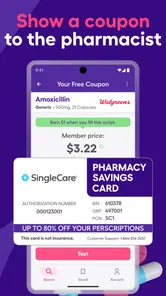
The main coupon process is straightforward: search for a prescription, review pharmacy prices, and present the coupon at checkout. You do not need a membership to use SingleCare. As with any app, check its current privacy information and permissions during installation so you understand what information is involved in using its features.
Can I use SingleCare if I am traveling or filling a prescription for someone else?
SingleCare coupons are intended to be presented at participating pharmacies in the United States. If you are away from your usual pharmacy, use the app to check whether a convenient participating location accepts the coupon for the medication you need. For a prescription being filled for another person, confirm that the pharmacy can process the coupon for that prescription before relying on the discount.
What is SingleCare and how can it help me save on prescriptions?
SingleCare is a free app that offers Rx coupons to help users save money on their prescription medications. By partnering with major pharmacies, SingleCare provides discounts of up to 80% on prescription drugs, making healthcare more affordable. Users can search for their medications in the app, compare prices, and present the coupon at the pharmacy to receive savings.
How does SingleCare work and is it difficult to use?
SingleCare is user-friendly and easy to navigate. After downloading the app, users can search for their prescription medications using the search bar. The app then displays a list of pharmacies with prices for the selected drug. Users simply choose a preferred pharmacy, download the coupon, and present it at checkout to receive the discount. No membership or insurance is required.
Pros
- User-friendly interface
- easy to navigate.
- Offers significant prescription savings.
- Wide range of participating pharmacies.
- Real-time price updates for transparency.
- No membership required for discounts.
Cons
- Limited to U.S. pharmacies only.
- Some discounts may vary by location.
- Requires internet for price updates.
- Not all medications are covered.
- Occasional app glitches reported.