

Wish: Shop and Save
- 1.32M
- 4.7
- Installs
- 500.00M
- Price
- Free

Screenshots





Analysis by Reviewed
I approach Wish: Shop and Save as a place to browse for inexpensive, varied finds rather than a shortcut for urgent shopping. It is a free shopping app from Wish US Holdings LLC, with a 4.7 average across around 14 million ratings and over 500 million installs. That reach makes it familiar to many bargain hunters, but my advice to a first-time user is to shop with a specific idea in mind and leave room to compare before buying.
Getting from browsing to a sensible first purchase
Wish is aimed at people who enjoy looking across fashion, electronics, and home items in one place. Its Teen content rating is worth keeping in mind if you are setting it up for a younger shopper. The app was released in 2012, and version 24.37.10 supports devices running Android 7.0 or later. Those details aside, what matters most in day-to-day use is the trade-off: browsing can be entertaining, but a low displayed price does not by itself tell you whether an item suits your needs.
What to expect when you open it
The first thing I noticed about Wish: Shop and Save is its user-friendly interface. The app is sleek and straightforward, making it super easy to navigate. When I opened the app, I was greeted with a plethora of categories ranging from fashion and gadgets to home decor and even quirky little knick-knacks. It was like stepping into an online bazaar where you never knew what treasure you might stumble upon.
For a new shopper, the broad mix is both the draw and the first point of confusion: a feed of appealing objects can make it hard to decide what is actually worth investigating. I get better results by beginning with a use, not a product category. “A small organizer for this drawer” gives me a practical test; “something for the home” invites aimless scrolling. I also treat the first session as a chance to learn how listings present their details, rather than as a reason to place an order immediately.
The shopping experience: a treasure hunt with a purpose
One of the most exciting aspects of shopping on Wish is the unpredictability. It’s a bit like a treasure hunt; you never quite know what you’re going to find, but that’s part of the fun. I found myself scrolling endlessly, adding items to my cart that I didn’t even know I needed. From quirky phone cases to trendy clothing, the selection is vast and varied. Plus, the prices are often unbeatable, making it a haven for bargain hunters like myself.
That open-ended browsing is best when I treat it as inspiration, not a shopping plan. For a first purchase, I’d choose something non-urgent and easy to assess from its listing, rather than an item whose exact fit, finish, or performance matters a lot. For example, if I were browsing for a decorative accessory, I would check the photos and customer feedback closely and compare the item with similar options before adding it to my cart. This turns a casual scroll into a more considered decision.
A useful first success is not necessarily finding the lowest price; it is finding one listing that answers the questions that matter for that particular item. With a decorative piece, I would look for clear photos and feedback that speaks to how it looks in practice. With clothing, I would be more cautious because a picture cannot settle questions of fit and fabric. For electronics, I would not let a bargain price replace checking whether the listing describes what I need. The more the purchase depends on exact specifications, the more careful I become.
More From Our News Desk

 Prime Video
Switching to Prime Video: What Changes in Your Viewing Routine
Prime Video can make a compelling second home for streaming, but switching means learning a different catalog, rental layer, and route from browsing to playback.

 Universal TV Remote Control
Universal TV Remote Control Works Best as a Reliable Backup
A phone remote earns its place through quick setup and reliable habits. Here is how to get more from Universal TV Remote Control—and where its limits show.

 Weather - By Xiaomi
Weather by Xiaomi Review: Clear at a Glance, Less Clear Up Close
Xiaomi’s weather app makes everyday forecasts quick to scan, but its calm surface can leave useful details and recovery paths harder to find than they should be.

 X
XX Under Pressure: Can It Recover When Posting Goes Wrong?
A resilience-focused review of X, examining setup, mistaken posts, interruptions, weak connections, and the gaps that matter when recovery needs to be dependable.

 Clash of Clans
Clash of Clans Is Won Between the Battles
Its raids are quick; its community is a long-term project of coordination, teaching, rivalry, and shared responsibility—with all the friction that entails.

 Android Auto
Android Auto Makes the Case for Quieter Car Software
The car interface is no longer judged by how much it can do, but by how quietly it helps. Android Auto shows what drivers now expect—and what still gets in the way.
Latest News



One practical way to make that check less overwhelming is to decide your non-negotiables before comparing. If I need an accessory to fit a particular space, I focus first on the listed dimensions; if I want a particular look, I compare the images and feedback rather than being distracted by unrelated bargains. This makes it easier to reject a listing quickly when it does not answer the main question. It also helps keep a first order small and purposeful instead of letting a long browsing session turn into a bundle of guesses.
How I check whether a deal is worth it
Now, let’s talk about the quality. It’s important to set realistic expectations. While many items offer incredible value for the price, not everything is a hit. I’ve had my fair share of both pleasant surprises and "you-get-what-you-pay-for" moments. It’s crucial to read reviews and check ratings. Delivery times can vary, and it’s usually on the longer side, so patience is key. It's a trade-off between price and speed, but for those killer deals, it’s worth the wait.
My practical tip is to slow down before checkout: use the listing details and buyer feedback to look for consistency, not just an appealing picture or a low price. If comments describe different experiences, or if the item’s important details are unclear, I would keep browsing rather than assume the cheapest option is the best value. I would also consider the whole purchase in context: this is a better fit for a flexible want than for a replacement I need by a particular day.
When reviews seem mixed, I try to identify whether the disagreement concerns something I care about. A variation in color may be acceptable for a decorative item, while uncertainty about a product’s dimensions could make it a poor choice for a space with limited room. This is more useful than treating a general rating as a guarantee. I also compare the listing with other options before getting attached to it; that can show whether a low price reflects a sensible compromise or simply leaves too many questions unanswered.
Compared with a conventional retailer or a shopping app built around familiar brands, Wish feels more like a broad bargain marketplace. That variety can make browsing more playful, but it also asks me to do more of the evaluation myself. When I need a dependable match, straightforward comparison, or a quick purchase, I would use a retailer whose products and delivery options better fit that need. Wish makes more sense when price and discovery matter more than certainty and speed.
That difference also affects how I use it alongside other shopping options. I would not make Wish my first stop for a replacement charger before a trip, a gift needed by a fixed date, or clothing for an event where fit must be dependable. For those jobs, a retailer with clearer product standards or a local shop is more practical. But when I have time to compare, and I am open to alternatives rather than searching for one exact branded item, its wide assortment gives me another place to look.
Daily deals and a calmer way to browse
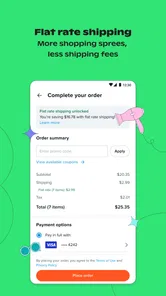
Wish keeps things interesting with features like daily deals and flash sales, which can save you even more money. I love checking the app daily to see what new deals pop up. It’s like a mini-gift to myself every time I snag a deal. Plus, the app often offers discounts just for using it, which is a nice little incentive to keep coming back.
For a first-time user, I would avoid letting a deal set the agenda. A useful routine is to browse with a short mental list, save attention for items I genuinely want, and revisit a tempting find before deciding. That small pause helps separate a real bargain from something that only looks attractive because it is presented as a limited-time opportunity. The app is most enjoyable when I can walk away without feeling that every offer needs an immediate answer.
I also find it helpful to make the cart a comparison space, not a promise. If two items seem similar, I can look again at their descriptions and feedback before choosing, rather than checking out simply because one is presented as a deal. A short pause is especially useful when browsing on a phone, where it is easy to move from seeing an appealing image to making a purchase without considering whether the item solves a real problem. If I would not want it without the discount framing, I leave it behind.
Who will enjoy Wish—and who may prefer another shop
I think Wish is a good match for patient shoppers who like exploring unusual options, are comfortable weighing listing details and reviews, and do not need every order quickly. It can also suit someone looking for a small, low-stakes item to try the experience before relying on it for a more important purchase. On the other hand, I would steer away if I needed a precise fit, a predictable arrival, or a familiar brand standard; in those cases, a specialist shop or established retailer is the more reassuring choice.
A realistic first outing might be browsing for a nonessential home accessory after dinner. I would compare a few listings, read the feedback, and choose only if one seems to meet my needs and I can wait for it. That gives me a clear first success without turning impulse browsing into a large order. If the options do not feel convincing, closing the app is a perfectly sensible result too.
For a different everyday use, I might open it while making a list of small items for a room refresh, then compare possibilities over more than one sitting. That approach suits Wish better than trying to furnish a room in a single rushed session: I can consider whether an item’s appearance and described size fit the space before deciding. I would skip that process if I needed coordinated pieces or a guaranteed match, since browsing a broad marketplace is less reassuring than buying from a retailer with a tightly defined range.
Parents setting it up for a teenager should also decide together what kinds of purchases are appropriate and how carefully to assess listings. The Teen content rating is a useful age cue, but it does not replace a family conversation about spending or choosing products. I would encourage a younger shopper to bring a possible purchase to an adult before checking out, especially when the item’s details or suitability are not immediately clear.
My next step after installing
If I were guiding a friend through their first session, I’d suggest opening the app with one category in mind, taking time to inspect an item’s listing and reviews, and treating the cart as a shortlist rather than a commitment. Wish is free to install, but a purchase still deserves the same attention I would give anywhere else. The app’s appeal is its mix of discovery and low-cost possibilities; the key is to keep patience and careful comparison alongside the excitement.
If you are wondering whether you need to buy anything to get value from a first visit, I would say no. Browsing can help you get a feel for the range and how listings are presented, and it is entirely reasonable to leave without ordering. If you do find something promising, check that the listing gives you enough confidence about the item and that waiting for it would not cause a problem. That is a better test of whether the app fits your habits than placing an order just to try it.
In conclusion, if you’re looking for an app that offers a wide variety of products at competitive prices, Wish: Shop and Save might just be your new go-to. Sure, it has its quirks, but the thrill of finding that perfect item at a steal is part of its charm. So, if you're up for a bit of adventure in your shopping experience, why not give it a try?
Wish: Shop and Save Frequently Asked Questions
What kind of app is Wish: Shop and Save?
Wish: Shop and Save is a shopping app for browsing products in areas such as Home & Life, Fashion, and Electronics. It brings several types of products together, so it may appeal to people who like exploring different categories in one place. Before downloading, consider whether you want a general shopping experience or are looking for an app focused on a particular kind of product.
Who publishes Wish: Shop and Save?
Wish: Shop and Save is published by Wish US Holdings LLC. Checking the publisher name can help you make sure you have found the intended shopping app when browsing an app store. Wish is designed for exploring products across several areas, including Home & Life, Fashion, and Electronics, so it may be worth considering whether that kind of broad shopping experience suits you.
Is Wish: Shop and Save suitable for teenagers?
Wish has a Teen content rating, which gives families useful context when deciding whether it is appropriate for a younger user. The app is centered on shopping, so it is also worth discussing who will manage account activity and any purchase decisions. Parents or guardians may want to stay involved when a teen browses products or considers placing an order.
Which operating system version is needed to install Wish?
Wish: Shop and Save requires Android 7.0 or later. Before downloading, check the operating-system version on your device to make sure it meets that minimum requirement. If it does, you can consider whether the app’s shopping focus and product range suit you. The app is free to download, so the main preparation is making sure your device can run it.
What is the current version of Wish: Shop and Save?
The current version of Wish: Shop and Save is 24.37.10. If you are comparing the app before installing it, the version number can help you identify which release you are looking at. Wish is a shopping app for browsing products across categories such as Home & Life, Fashion, and Electronics, and it is published by Wish US Holdings LLC.
Pros
- Wide variety of products available.
- User-friendly interface for easy navigation.
- Discounts and deals on numerous items.
- Secure payment options provided.
- Personalized product recommendations.
Cons
- Shipping can take a long time.
- Quality of products may vary.
- Limited customer support options.
- In-app ads can be intrusive.
- Return policy is not very flexible.











