

JUMIA Online Shopping
- 6.04K
- 4.5
- Installs
- 100.00M
- Price
- Free

Screenshots






Analysis by Reviewed
In a shared household, a shopping app can be useful for more than one person, but it also makes it easy to mix up who wants what. I find JUMIA Online Shopping most helpful when one person handles the browsing and checkout while everyone else agrees on the list first. That keeps a quick search for household supplies from turning into a cart full of unrelated impulse buys.
Make a shared shopping run easier to manage
A practical routine is to collect requests outside the cart, then search for each item and check the product details together before buying. For example, if a household needs a replacement kettle and pantry staples, I’d compare the kettle options separately, confirm the preferred model with the person who will use it, and only then add it alongside the groceries. That small pause matters: a product that looks right in a thumbnail may not match the intended size, style, or use.
This approach also helps when several people share one device. Before checkout, I’d review the cart line by line and make sure the quantities and choices still reflect the group’s plan. The app can help with browsing and ordering, but clear communication between shoppers is what prevents accidental duplicates or purchases nobody meant to make.
Keep account and purchase boundaries clear
For a household, convenience should not mean everyone casually using one person’s account. I’d keep the account holder involved in decisions about orders and payment, especially if other people can access the same phone or tablet. That is a sensible boundary for any shopping app: it reduces confusion over who placed an order and makes it easier to keep personal choices separate from shared purchases.
If a child is helping choose an item, I’d treat the app as a supervised shopping tool rather than handing over checkout. The listed age guidance is Teen, so it is worth keeping the audience in mind, but that does not replace a parent or guardian’s judgment about spending, product suitability, or device access. For younger family members, I would browse together and let the adult make the final purchase decision.
Shop Till You Drop – Digitally!
Alright, first things first, let's talk about the user interface. The moment you open the JUMIA Online Shopping app, you’re greeted with a sleek and intuitive design. Everything's laid out in a way that even a newbie can navigate without a hitch. It's like the app guides you through aisles of virtual products, making browsing a breeze.
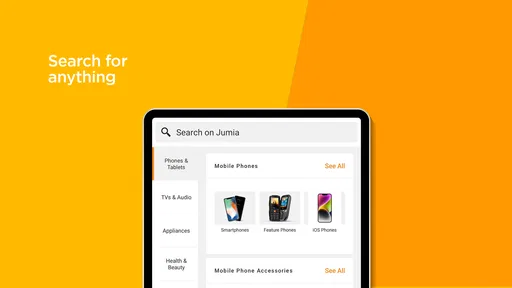
The search functionality is pretty robust too. Whether you're hunting for the latest smartphone, a pair of trendy sneakers, or even just some daily groceries, the app has got you covered. Just type in what you're looking for, and voila, the results are at your fingertips. Plus, the filters! Oh, the filters! You can customize your search by brand, price, and even ratings, which is super helpful when you’re trying to make an informed purchase.
More From Our News Desk

 Clash of Clans
Clash of Clans Is Won Between the Battles
Its raids are quick; its community is a long-term project of coordination, teaching, rivalry, and shared responsibility—with all the friction that entails.

 Android Auto
Android Auto Makes the Case for Quieter Car Software
The car interface is no longer judged by how much it can do, but by how quietly it helps. Android Auto shows what drivers now expect—and what still gets in the way.

 MobiOffice: Word, Sheets, PDF
MobiOffice: Transforming Mobile Productivity with Seamless Integration
MobiOffice: Word, Sheets, PDF is redefining mobile productivity with a surprising blend of functionality and innovation.

 EA SPORTS FC Soccer Mobile 26
EA SPORTS FC™ Mobile Soccer: Redefining Mobile Sports Gaming
Dive into EA SPORTS FC™ Mobile Soccer, where immersive gameplay and strategic depth transform mobile sports gaming.

 Microsoft OneDrive
How Microsoft OneDrive Became a Mobile Productivity Giant
Discover how Microsoft OneDrive defies expectations, reshaping mobile productivity with its surprising features and unmatched integration.

 Google Translate
How Google Translate Breaks Language Barriers Effortlessly
Google Translate is not just a tool; it's a cultural force breaking language barriers with unprecedented ease and accuracy.
Latest News



Deals and Discounts Galore
One of the standout features of JUMIA Online Shopping is the plethora of deals and discounts. I’m talking flash sales, daily deals, and even seasonal promotions that’ll make your wallet do a happy dance. If you’re someone who loves a good bargain, this app is a treasure trove. Make sure you keep those notifications on, so you never miss out on a deal!
And here's a tip – always check the app during special shopping events like Black Friday or Cyber Monday. The discounts during these times are insane, and you can save a ton on big-ticket items.
Seamless Shopping Experience
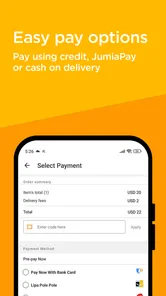
Now, let's chat about the shopping experience itself. Adding items to your cart is as easy as pie, and checking out is even simpler. The app supports multiple payment methods, including credit/debit cards and mobile money, which is super convenient. I personally love the cash-on-delivery option, as it adds that extra layer of trust when you're trying out a new vendor.
Delivery times are pretty decent too. While sometimes there might be a delay due to high demand, most of the time, you can expect your items to arrive within a few days. And if you're not satisfied with your purchase, the return policy is straightforward, ensuring you can shop with peace of mind.
Customer Support That Actually Supports
One of the things that can make or break an online shopping app is customer support, and thankfully, JUMIA Online Shopping doesn’t disappoint. Whether you’ve got issues with an order or just need some guidance, the support team is just a chat away. They’re responsive and really seem to care about resolving your issues.
Who it suits, and where I’d be cautious
I’d recommend this app to people who enjoy comparing choices across different kinds of everyday shopping in one place, particularly bargain hunters who are willing to check details rather than buy at the first tempting price. JUMIA is a shopping app from JUMIA, and its scale is reflected in an average rating of 4.5 from around 2.5 million ratings, with more than 100 million installs. Those figures suggest a widely used service, but popularity is not a substitute for checking whether a particular listing fits your needs.
Compared with visiting a single brand’s own shop, a marketplace-style browsing experience can make it easier to look across products and prices. The trade-off is that shoppers need to pay attention to the exact item and seller information shown in each listing. I would use the search filters to narrow a shortlist, then read the available product details carefully before deciding. If you already know the exact model and prefer buying directly from its manufacturer or a local shop where you can inspect it, that route may be more reassuring.
Small habits that prevent avoidable surprises
When I’m shopping for something that needs to fit or match—such as clothing, a phone accessory, or a household replacement—I treat the product page as part of the decision, not just the search result. I check the stated specifications and compare them with what I own or need. For shared orders, I’d also ask the person who requested the item to confirm the choice before checkout. These steps take longer than tapping the first result, but they are especially worthwhile for products where a near-match is still the wrong purchase.
For an everyday run, I might use the app during a quiet moment to find a few household essentials, save time by narrowing the results with filters, and then review the full cart later with whoever shares the order. That split between browsing and final approval is useful when people are busy or using a common device: it avoids rushed decisions while keeping the order organized. I would still compare the final choices with other options if delivery timing or seeing an item in person matters more than convenience.
The app is free, and its Teen content rating makes the intended age context clear for households deciding who should browse. It was released in 2013; version 17.16.1 is the current version, and it requires Android 7.0 or later. JUMIA has around 6,000 written reviews, but I’d still judge the experience by the product and order in front of me rather than assuming every purchase will be identical. On a shared phone, I’d also keep the account holder present for payment and order decisions instead of treating access to the device as permission to shop.
In conclusion, if you're looking for a reliable and user-friendly online shopping app that offers a wide range of products and great deals, JUMIA Online Shopping is definitely worth checking out. Just remember, with great power (or discounts, in this case) comes great responsibility! Happy shopping, folks!
Plan the order before opening the app
A household order tends to go more smoothly when everyone separates the request from the purchase. I’d keep a short shared note with the item, the person who needs it, and any must-have details, such as color or compatibility. Then the person placing the order can search deliberately instead of trying to remember several spoken requests while scrolling. This is particularly useful when one person is shopping on behalf of roommates or relatives who are not beside them.
That small bit of preparation also helps with deciding what belongs in one order and what should be handled separately. A common device does not necessarily mean a common budget or a common preference. I would confirm which items are genuinely shared, and leave personal purchases for the person who requested them to review. It avoids the awkward moment when someone discovers that a household cart included an item they only mentioned as an example.
Use search results as a shortlist, not a verdict
One practical way to get more from the search tools is to start broad, then narrow in stages. I’d first search by the everyday name of the item, apply a filter only when it helps remove irrelevant choices, and compare the remaining product pages side by side. Sorting or filtering can make a long result list manageable, but it cannot tell me whether a particular option is the right fit for a real need. The final check should be against the specifications and the household request, not just the position of a result or a striking offer.
This matters most for purchases where small differences have consequences. For a phone accessory, I’d verify the model compatibility rather than trusting a similar-looking image. For clothing or footwear, I’d check the available size and product details before asking someone else to approve it. For an appliance, I’d confirm the dimensions and intended use. Those checks are not extra fuss for its own sake; they are a way to reduce the chance that a convenient online purchase becomes a return or a replacement search.
Keep bargains in perspective
Deals can be a useful reason to open the app, but I wouldn’t let a discount create the need for something. My rule is to decide what the household actually needs before browsing promotions. If a deal appears on an item already on the list, it is worth comparing the full listing and confirming the choice. If it is an unplanned product, I’d pause and ask whether it solves a real problem or simply looks appealing in the moment.
Notifications may help a dedicated bargain hunter notice promotions, but I would choose them deliberately rather than treating every alert as a reason to shop. For shared devices, an alert can prompt another person to start browsing without the account holder knowing what is being considered. I’d agree on who can act on purchase prompts and who must approve an order. The distinction between seeing an offer and committing household money is important, especially when multiple people use the same screen.
What to check before confirming
Before placing a shared order, I’d do one final pass through the cart: check that each item belongs to the intended person, verify quantities, and remove anything that no longer fits the plan. I’d also make sure the person paying has seen the final selection. This is a more reliable safeguard than assuming that an earlier conversation still applies after browsing has introduced different options.
People often wonder whether they can browse without being ready to buy. In practice, I’d use the app for research and comparison when that is all I need, and avoid moving an item toward checkout until the decision is settled. If a purchase depends on another person’s approval, I’d share the product details through an agreed conversation rather than relying on memory or a quick description. That makes it easier for the other person to assess the exact choice, not a vague version of it.
Another reasonable question is whether the app replaces a local store. For routine products where comparing choices is the main task, it can be a convenient starting point. A physical shop may be the better option when I need to inspect texture, judge fit, take an item home immediately, or get advice face to face. I see the app as another route to shopping rather than a reason to abandon every other one.
A sensible fit for different households
I think the app suits households that are comfortable making purchase decisions from product information and willing to coordinate before checkout. It can be handy for someone who is already gathering requests, comparing everyday items, or checking whether a listed option matches what the family needs. It is less appealing for a person who wants every product inspected in person, dislikes browsing alternatives, or expects every purchase to be identical in quality and suitability. In those cases, a local retailer or a direct purchase from a known brand may offer more confidence.
For a family sharing a tablet, I would keep browsing and buying as separate activities. A teenager can help research a requested item, while an adult checks the final choice, spending decision, and order details. For roommates, I’d make the same division without assuming that everyone has equal permission to use the account. A clear agreement about who can add suggestions and who can confirm a purchase is more useful than informal access to a shared device.
My household verdict
My overall view is that JUMIA works best when I treat it as a broad shopping and comparison tool, not as an automatic shortcut to the right choice. Its appeal is the ability to browse different kinds of products in one place and use search filters to make a shortlist. The trade-off is that the shopper still has to inspect each relevant listing and make sure it matches the request. For a shared household, that careful final review is the difference between a convenient group order and a confusing one.
I’d use it for planned household purchases, comparison shopping, and browsing when I have time to check details. I would not let a sale or an unlocked shared device make the decision for me. Keep the account holder involved, confirm personal requests with the person who made them, and choose a local shop or a direct retailer when inspection or immediate availability matters more. With those boundaries, the app can be a useful option for coordinated shopping without turning every browse into a household commitment.
JUMIA Online Shopping Frequently Asked Questions
Can I browse JUMIA Online Shopping before creating an account?
JUMIA Online Shopping is made for exploring products and shopping from a phone, so browsing is a natural place to start. You can look through the app and decide whether it suits your needs before going further with a purchase. When you are ready to buy, follow the account and checkout steps shown in the app, and review the details before placing an order.
What kinds of products can I find on JUMIA Online Shopping?
The app brings together a broad selection of shopping categories, including electronics, fashion, and groceries. This makes it useful if you want to explore different kinds of products in one place rather than use separate apps for each category. Product selection can depend on where you shop from, so browse the app with your location in mind before deciding whether it has what you need.
Does JUMIA Online Shopping let me track an order after I buy something?
JUMIA Online Shopping includes order tracking after a purchase, making it possible to follow an order through the app rather than having to rely only on the initial checkout screen. Delivery and pick-up options may depend on your location. Check the order details and the options displayed during checkout so you understand how your purchase will be fulfilled.
Is JUMIA Online Shopping free to download, and what devices can run it?
JUMIA Online Shopping is free to download, so you can install it without paying an upfront app fee. It is a shopping app for Android and iOS, and the Android version requires Android 7.0 or later. Before downloading, check that your device meets that requirement and has enough available storage for the installation and any app updates.
Who develops JUMIA Online Shopping, and what is its main purpose?
JUMIA Online Shopping is developed by JUMIA and is designed for browsing and buying products through a mobile app. Its store summary invites shoppers to get ready for big deals, while the short description identifies it as an online shopping app. If you want to shop from your phone rather than a browser, the app gives you a dedicated place to explore the service.
Pros
- Wide range of products available.
- User-friendly interface for easy shopping.
- Regular discounts and promotions.
- Fast delivery options available.
- Secure payment methods.
Cons
- Limited customer service response.
- Occasional app crashes reported.
- Some items may not match description.
- High shipping fees on certain items.
- Limited delivery areas in rural locations.











