Temu: Shop Like a Billionaire
- 521.17K
- 4.6
- Installs
- 500.00M
- Price
- Free

Screenshots



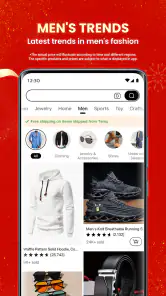
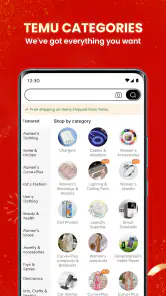



Analysis by Reviewed
I find Temu: Shop Like a Billionaire most useful when I treat it as a place to browse and compare, rather than a shortcut to buying the first tempting offer. The app is free, and Temu’s shopping experience puts a broad mix of products and promotions in one feed. That can make it easy to discover inexpensive everyday items, but it also means I need a clear idea of what I want before I start scrolling.
Make a shortlist before the feed takes over
When I use a broad shopping app, the first decision is whether I am browsing for ideas or trying to finish a particular errand. Those are different tasks. For an open-ended browse, Temu’s mix of product types and offers can be entertaining. For a specific need, I get a better result by writing down the item and any requirements before opening the app. That simple step helps me recognize when a suggested product is genuinely relevant and when it is simply an attractive distraction.
I also separate “cheap enough to consider” from “good value for me.” A low price does not help if the item is the wrong size, unsuitable for its intended use, or something I would not have bought otherwise. Before moving an option to my shortlist, I check the listing’s wording and images against the practical details that matter to me. For a home item, that might mean measuring the available space; for an accessory, it might mean checking compatibility rather than relying on a product photo.
The Latest on Temu: Shop Like a Billionaire
What browsing deals changes in practice
The central appeal is the way deals and product discovery sit side by side. Instead of opening a shop with one narrow purpose, I can move between different kinds of goods and see offers while browsing. In my experience, that is convenient when I have a loose shopping list—say, a storage item for home and a small accessory—and want to compare possibilities in one session. It is less helpful when I need one exact product quickly, since a busy stream of offers can pull attention away from the original task.
A calmer way to use the app
I get more value by searching for a specific item first, then checking comparable results and saving plausible options rather than shopping from whatever promotion catches my eye. The wishlist is particularly useful as a pause button: I can keep an item in view and decide later instead of treating every deal as urgent. If I return to a saved product, I can see whether it still suits my needs before committing. That small habit makes browsing feel more deliberate and helps limit impulse purchases.
Notifications can be useful when they relate to something I have already saved, but frequent shopping prompts may be distracting for anyone who prefers a quiet phone. I would keep only the alerts that help me act on a real intention, rather than letting promotions set the day’s shopping agenda. A low displayed price is also only one part of the decision: I still consider whether the item matches its description and whether it is worth buying at all.
From discovery to a considered decision
One useful way to compare saved options is to decide on your non-negotiables before looking at the offers. I might set a maximum size for a storage item or rule out an accessory unless its listing clearly matches the device I own. Then I compare only products that pass those checks. This is more reliable than ranking everything by the most prominent discount, because it keeps the practical question—will this work for me?—ahead of the excitement of a low displayed price.
More From Our News Desk

Weather by Xiaomi Review: Clear at a Glance, Less Clear Up Close

X Under Pressure: Can It Recover When Posting Goes Wrong?

Clash of Clans Is Won Between the Battles

Android Auto Makes the Case for Quieter Car Software

MobiOffice: Transforming Mobile Productivity with Seamless Integration

EA SPORTS FC™ Mobile Soccer: Redefining Mobile Sports Gaming
For a realistic everyday example, imagine I need a few small things for a kitchen drawer but have no urgent deadline. I can search for each type of item, check dimensions against the drawer, and save the plausible choices. Later, I can review that shortlist without the distraction of unrelated offers. If I cannot tell whether a listing meets an important requirement, I would rather leave it out than guess. That approach makes the app’s broad selection useful without turning a minor household errand into an unplanned shopping session.
Where it fits among shopping apps
Compared with a specialist retailer, Temu is better suited to browsing across a range of product types than to relying on a focused, familiar catalogue. A specialist shop may be the easier choice when I need expert product guidance, a particular established brand, or a purchase where fit and specifications matter a great deal. A broad marketplace can be handy for comparing everyday options, but it asks me to do more of the checking myself. I treat product details, images, and reviews as part of the decision, not as a reason to skip common sense.
That difference matters most when I am deciding how much certainty a purchase needs. For an inexpensive, non-urgent household extra, I may be comfortable comparing listings and making my own call. For something that depends on a precise specification, I would rather use a retailer whose focused range and product guidance make it easier to verify the choice. A familiar brand or specialist shop can also be a better fit when consistency matters more than exploring alternatives. Temu’s breadth is useful, but breadth is not the same as expert support.
Who benefits most—and who may prefer another route
Temu is a good fit for patient deal hunters who enjoy comparing options and are comfortable making their own judgement about product descriptions. It can also work for someone collecting small, non-urgent household or personal items, where browsing widely is part of the appeal. I would look elsewhere for a time-sensitive need, a purchase that depends on precise technical advice, or an item where I would rather rely on a dedicated retailer’s specialised selection. The right choice depends less on the size of a discount than on how much certainty and guidance I need.
It is also a better match for people who can stop once they have found a suitable option. If browsing tends to turn into buying items simply because they look like bargains, the constant discovery element may work against them. I would set a short list and a spending limit before opening the app, then close it when the planned items are handled. That boundary is more useful than trying to resist every appealing offer one by one.
Temu is a shopping app developed by Temu, and its scale is reflected in an average rating of 4.6 from around 10 million ratings and more than 500 million installs. It is rated for teens, runs on Android 5.0 and later, and version 4.11.2 is the current release. Those figures tell me it is widely used, but they do not replace the everyday checks I would make before buying: compare the options, read the item information carefully, and decide whether the product solves a real need.
Unveiling the World of Temu
So, what's the buzz about Temu: Shop Like a Billionaire? It's an app that combines a wide array of shopping categories all under one roof. From fashion to electronics, and home decor to beauty products, Temu seems to have it all. The best part? The deals are insane! I mean, we're talking about prices that make you do a double-take. The app claims to bring billionaire-like shopping experiences to the everyday user, and honestly, it does a pretty neat job.
Interface and User Experience
First impressions matter, right? Temu greets you with a sleek and intuitive interface. It's one of those apps where you don't need a tutorial to find your way around. The categories are clearly laid out, and finding what you need is as simple as pie. One thing I particularly liked is the search function, which is quite robust. Whether you're looking for a specific brand or a particular type of product, Temu's got your back.
Shopping Features Galore
What sets Temu apart from the myriad of shopping apps out there is its plethora of features. There's a wishlist option, which is great for those "I'll buy it later" items. Plus, the app sends you notifications for any price drops or special offers on your wishlist items. Talk about being a savvy shopper! The app also supports multiple payment methods, including credit cards, PayPal, and even some local payment options, ensuring a hassle-free checkout process.
For me, the wishlist is most valuable when it holds a few options I am actively considering, rather than becoming a second feed of things I might want someday. I would revisit those saved items with a clear question in mind: does this still meet the need, and is the listing clear enough for me to choose? If the answer is no, removing it is part of shopping well. Saving an item is a way to delay a decision, not a promise that I will eventually buy it.
Before checkout, I would also take a moment to review the whole basket as one purchase rather than focusing on each item in isolation. A collection of individually tempting finds can add up to a larger spend than intended, and unrelated add-ons are easy to overlook while browsing. I find it helpful to ask whether I would still choose each item if it had not appeared beside another offer. If not, I take it out and keep the order focused on what I actually set out to find.
The Deals and Discounts
Now, let's talk about the core of Temu—its deals and discounts. The app is packed with promotional offers and discounts that seem too good to be true. Flash sales, daily deals, and exclusive offers are some of the highlights. It's like having your own personal shopping festival every time you open the app. And the cherry on top? The app rewards you with points for each purchase, which you can later redeem for discounts. It's a win-win!
I would treat promotions as a reason to compare, not as proof that a product is the right choice or that I need to act immediately. A useful check is to return to the item after looking at alternatives and see whether it still makes sense against the requirements I wrote down. That pause is especially helpful if I am shopping for several small things: it lets me distinguish a genuine planned purchase from an add-on that only looked appealing in the moment.
Final Thoughts
After spending some quality time with Temu, I have to say, it lives up to its name. Shopping like a billionaire doesn't seem so far-fetched with this app in your arsenal. It's perfect for those who love snagging a good deal and enjoy an easy-to-navigate platform. Whether you're a shopaholic or someone who just wants to save a few bucks, Temu is worth checking out. So, why not give it a try and see if it can transform your shopping game?
My recommendation is more specific: try it if you like browsing across categories and are willing to check each choice carefully, especially for small purchases that do not need specialist advice. Keep a short list, use saved items to create breathing room, and let your actual requirements decide what makes the cut. If you need a product urgently, want hands-on guidance, or depend on exact specifications, a focused retailer may make the decision easier. Used with that distinction in mind, Temu can be a handy place to explore offers without letting the offers do all the choosing.
Temu: Shop Like a Billionaire Frequently Asked Questions
Can I browse Temu before deciding what to buy?
Yes. Temu is a shopping app built around browsing products on a mobile device, so you can explore what is available and decide whether anything interests you before placing an order. The store summary invites users to shop for offers. As with any marketplace, take time to review the items you are considering and make purchasing decisions at your own pace.
Do I need to create an account before browsing Temu?
If you are mainly interested in exploring products, you can start by looking through the app and seeing whether its shopping experience suits you. Account or sign-in requirements may depend on the action you want to take, particularly when moving from browsing toward a purchase. Before sharing personal details, review the prompts shown in the app and decide whether you are comfortable proceeding.
How should I approach offers and product prices on Temu?
Temu’s store summary highlights offers, and the app is designed for shopping. An offer can be a reason to explore an item, but it is still sensible to consider whether the product suits your needs before buying. Review the item details and any information shown during checkout so you understand your purchase. Treat promotional language as an invitation to browse, not a reason to buy something you do not want.
What kinds of products can I find on Temu?
Temu is a shopping app where you can browse products and consider what you might want to buy. The range of items shown can vary, so it is best to explore the app’s categories and listings to see what is available at the time you use it. Check each product’s information rather than assuming that every listing will suit your needs or preferences.
Can I use Temu to shop from my phone?
Temu is a shopping app for browsing and buying products through a mobile device. Its store summary invites users to shop for offers, and its short description is simply “Temu.” The experience is centered on exploring items and deciding what to purchase, so it may suit people who prefer to browse a marketplace from their phone rather than visit a physical store.
Pros
- Wide range of products available.
- Competitive prices and deals.
- User-friendly interface.
- Fast and reliable shipping.
- Secure payment options.
Cons
- Limited customer support.
- Occasional app crashes.
- Some items may be low quality.
- Shipping may take time for some areas.
- Limited international availability.
- Category
- Shopping
- Version
- 4.11.2