Selfie Camera - Beauty Camera
- 191.00
- 4.6
- Installs
- 10.00M
- Price
- Free

Screenshots
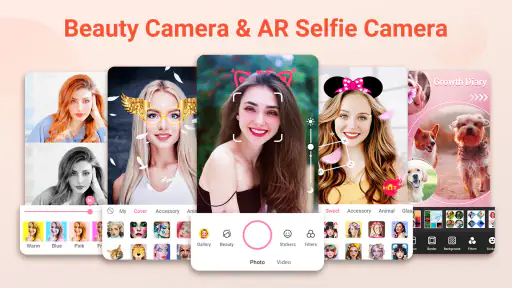
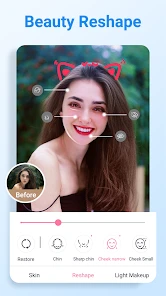
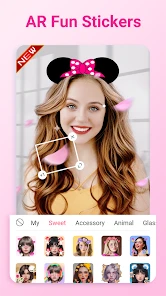
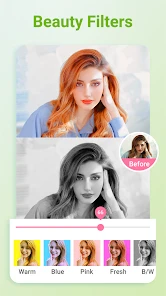

Analysis by Reviewed
My most useful approach to Selfie Camera - Beauty Camera is to treat it as a quick selfie camera with creative touches, rather than a full photo-editing suite. I decide what kind of picture I want before opening the camera: a natural-looking portrait, a brighter social post, or something playful with a sticker. That small choice keeps me from cycling through effects until the original moment has passed.
When a selfie camera fits the moment
I find this style of camera most useful when the aim is a finished-looking portrait without a separate editing session. It suits a quick check-in photo, a casual picture with friends, or a profile image where a light touch is welcome. If I already know I want to adjust several details independently, though, I’d take the picture with my regular camera and work on it in a dedicated editor instead.
One small but useful habit is to decide whether the photo is meant to look like a portrait or a playful post before choosing an effect. That gives me a simple stopping point: once the picture communicates the mood I wanted, I stop adjusting. It avoids the common trap of making every available effect compete for attention.
Effortless Beauty Enhancements
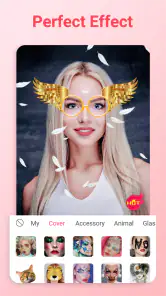
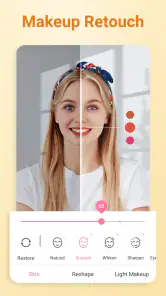
The first thing you'll notice when you fire up the Selfie Camera - Beauty Camera is how effortlessly it enhances your natural beauty. With a slew of filters and beauty effects, you can easily tweak your photos to smooth out skin, brighten eyes, and even add a touch of blush to your cheeks. I have to say, the real-time beauty filter is a lifesaver. It means that you can see the magic happen as you snap your photo, saving you loads of time on edits later.
Start with a repeatable camera routine
For a more consistent result, I’d begin with the same light and camera angle, then compare a couple of effects before taking the shot. A window or open shade can give a softer, more even look than harsh overhead lighting; that matters because a strong filter can make uneven light feel even more obvious. I also check the preview at normal size, not just enlarged, so I can tell whether an effect looks flattering in the finished image rather than merely dramatic on screen.
A practical everyday use is a quick photo before heading out: find a bright spot, frame the face, choose a subtle treatment, and take a few expressions while the light stays consistent. If I’m making a group selfie, I’d keep the effect restrained so everyone’s skin and features still look like themselves. Stickers are better saved for a casual chat or playful post, where decoration is part of the point.
Intuitive User Interface
One of the features that really stood out to me was the app's intuitive user interface. Navigating through the various options is a breeze, even if you’re not exactly tech-savvy. The buttons are well-labeled and the controls are straightforward, making it easy to adjust settings on the fly. Trust me, you don't have to be a pro photographer to make the most out of this app.
More From Our News Desk

Weather by Xiaomi Review: Clear at a Glance, Less Clear Up Close

X Under Pressure: Can It Recover When Posting Goes Wrong?

Clash of Clans Is Won Between the Battles

Android Auto Makes the Case for Quieter Car Software

MobiOffice: Transforming Mobile Productivity with Seamless Integration

EA SPORTS FC™ Mobile Soccer: Redefining Mobile Sports Gaming
Settings worth checking before a session
Before settling into a routine, I’d take a moment to inspect the available camera and effect controls rather than assume the last look is right for every photo. A filter that suits warm indoor light may feel too strong outside, so I compare the preview with the unembellished scene and reduce the visual intensity by choosing a gentler effect. If a setting changes the whole mood of the image, I treat it as a creative choice, not a correction the photo necessarily needs.
It also helps to separate capture from decoration. I take the portrait first, then decide whether a sticker or more noticeable effect adds something. That makes it easier to keep a clean version for a profile picture or work chat and reserve the more expressive treatment for a story or message. The app is aimed at fast, approachable selfie-making; for precise retouching of several separate details, I’d rather use a dedicated editor after the shot.
Check the result for the place it will appear
I also think about where the picture is going before I settle on a finish. A face that looks polished in a large preview can feel heavily processed when reduced to a small profile image. For that use, I prefer a restrained look and a clear expression over a dramatic filter. A playful sticker can work well in a message to friends, but it may distract from the face in a profile picture or a more serious post.
For anyone wondering whether this replaces the phone camera, I wouldn’t treat it as an all-purpose replacement. Its appeal is the selfie-first flow and the effects close to capture. A standard camera is usually more convenient for ordinary snapshots, while an editor gives more room to work on a photo afterward. I’d keep the choice tied to the picture I’m trying to make rather than force every camera task into one app.
Fun Filters and Effects
Beyond the beauty enhancements, there’s a treasure trove of fun filters and effects to explore. From vintage vibes to quirky stickers, there’s something to suit every mood and occasion. I spent way too much time experimenting with different looks, and honestly, each one had its unique charm. It's like having a mini photo studio right in your pocket!
Faster habits, with a little restraint
Once I find a look I like, I avoid restarting the search for every selfie. Keeping the same framing and light while trying just one or two alternatives makes a series feel deliberate and saves time. For a set of pictures from one outing, I’d choose a consistent treatment rather than applying a different mood to every frame. The trade-off is that a favorite effect can become a habit even when the scene calls for something more natural, so I still check the preview before committing.
Compared with the phone’s standard camera, this app puts beauty effects and playful additions closer to the moment of capture, which is handy when I want a ready-to-share selfie without moving through several editing steps. A general photo editor is the better choice when I want detailed control or need to refine a picture that is already taken. For someone who mostly wants quick portraits with an easy creative option, the simpler camera-first approach makes more sense.
A quick workflow for repeat photos
For a recurring task such as refreshing a profile photo, I’d make the process repeatable rather than chase a perfect look from scratch. I would choose a familiar setting with even light, keep the camera angle and distance similar, and try a small number of expressions. Then I’d compare the images at the size people are likely to see them. That makes it easier to choose a photo based on expression and clarity, not only on which effect is most noticeable.
There is a practical trade-off here: matching the framing and light helps a set feel coherent, but it can also make several shots feel too similar. I’d change one thing at a time, such as expression or background, while leaving the effect alone. If I change lighting, pose, and filter all at once, it becomes hard to tell what improved the result.
Sharing without over-editing
After perfecting your selfie, sharing it with the world is just a tap away. The app offers seamless integration with social media platforms, so posting your masterpiece on Instagram or Facebook is as easy as pie. Plus, the high-resolution output ensures your photos look sharp and professional, no matter where you share them.
My own rule is to review the image once more before sharing, especially if I have added both a beauty treatment and a sticker. Each can be fun on its own, but together they may compete with the expression that made me take the photo. If the goal is a simple portrait, I’d remove the extra decoration; if the goal is a lighthearted post, I’d let the sticker carry the personality and keep the rest of the image calmer.
Who it suits, and where it falls short
I’d recommend this photography app to anyone who regularly takes casual selfies, enjoys trying filters, or wants a quick way to add a little personality before sharing. It is a less natural fit for people who prefer unedited portraits, want fine-grained control over every retouch, or need a broader toolkit for landscapes and other subjects. I’d also keep expectations sensible: a beauty effect can change the look of a photo, but it cannot replace good light, thoughtful framing, or a moment when everyone is ready.
It is also worth asking what you want to keep after taking a selfie. If your priority is a straightforward image with no stylizing, the regular camera is likely the simpler choice. If you want to make precise corrections after capture, an editor built for detailed retouching offers a better fit. This app occupies the middle ground: it is for people who want the portrait and its creative treatment to happen in one approachable flow.
For a realistic use case, imagine taking a quick photo with a friend before leaving a café. I’d first check that both faces are in even light, choose a mild effect, and take the picture while the moment is still relaxed. If the preview makes the treatment seem too strong, I’d switch to a subtler look instead of trying to compensate with extra decoration. That is a better use of the app’s speed than spending the whole break testing every option.
Easyelife’s app is free, rated for Everyone, and its current version is 3.2.9; it runs on Android 6.0 or later. It has a 4.6 average from around 35,000 ratings and over 10 million installs. Those figures suggest plenty of people have tried it, but what matters more to me is whether its direct, effect-led workflow suits the way you take pictures. I’d choose it for an uncomplicated selfie session, not as my only camera or my main tool for careful photo editing.
A mastery verdict
In conclusion, if you're on the hunt for a reliable app to up your selfie game, Selfie Camera - Beauty Camera is definitely worth checking out. It's packed with features that make taking and editing photos fun and easy. Whether you’re capturing memories with friends or just want to enhance your solo shots, this app has got you covered. Give it a try, and you might just find yourself snapping selfies more often than you’d care to admit!
Selfie Camera - Beauty Camera Frequently Asked Questions
Who develops Selfie Camera - Beauty Camera, and what kind of app is it?
Selfie Camera - Beauty Camera is a photography app developed by Easyelife. Its focus is taking and enhancing selfies with effects, stickers, and filters, making it worth considering if you want those tools in a camera app. The short description is simply “Selfie Camera,” while its broader summary emphasizes beauty-focused selfie effects.
Is Selfie Camera - Beauty Camera suitable for all ages?
The app has an Everyone content rating, so it is classified as suitable for a broad audience. Its main purpose is taking and editing selfies with beauty effects, stickers, and filters. As with any photo app, it is sensible for parents to consider how a child uses cameras and shares images, but the app’s stated content rating is Everyone.
When was Selfie Camera - Beauty Camera released, and what is its current version?
Selfie Camera - Beauty Camera was released on October 21, 2022, and its current version is 3.2.9. These details can help you identify the app and check whether the version offered for your device is current. Before installing, compare the app’s name and developer, Easyelife, with the option you are considering.
Can I use Selfie Camera - Beauty Camera on my phone?
Selfie Camera - Beauty Camera is a photography app for Android devices running Android 6.0 or later. It is designed for taking and enhancing selfies, so it may suit you if you want beauty effects, filters, stickers, and editing tools in one camera app. Check your device’s operating system before downloading to make sure it meets the minimum requirement.
Is Selfie Camera - Beauty Camera free to download?
The app is free to download. Selfie Camera - Beauty Camera is developed by Easyelife and has an Everyone content rating, making it suitable for a broad audience. Its beauty camera focus is reflected in its short description, “Selfie Camera,” and its summary highlights effects, stickers, and filters for selfies. Consider your own preferences for photo editing before installing.
Pros
- User-friendly interface for quick navigation.
- Wide range of filters and effects available.
- High-resolution photo capture capability.
- Lightweight app with fast performance.
- Real-time editing with instant preview.
Cons
- Contains in-app purchases for premium features.
- Some filters require internet connection.
- Occasional ads can disrupt user experience.
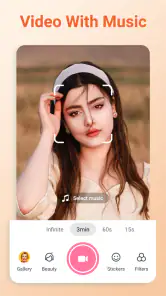
- Limited video recording features.
- Lacks advanced editing tools for professionals.
- Category
- Photography
- Version
- 3.2.9












