DJ Music mixer - DJ Mix Studio
- 415.00
- 4.4
- Installs
- 50.00M
- Price
- Free
Screenshots
Analysis by Reviewed
I’d approach this app as a low-pressure way to try DJ-style mixing on a phone, rather than as a replacement for a dedicated setup. DJ Music Mixer - DJ Mix Studio is a free music and audio app from Easyelife, with a 4.4 average from around 55 thousand ratings and over 50 million installs. That gives a newcomer plenty of company, but the useful question is whether its hands-on approach fits how you want to make music.
What to expect from a phone-based mixer
The main appeal is immediacy: you can bring two tracks together, adjust their relationship, and hear how a transition changes the feel of a song. Its virtual turntables and familiar mixing controls make the idea of DJing less intimidating than opening professional software full of unfamiliar panels. I’d treat it as a place to explore timing and effects, not as a promise that every mix will sound polished automatically.
That distinction matters if you’re comparing it with a conventional music player. A player is better when you simply want a playlist to run without attention; this app makes sense when you want to stay involved and shape what you hear. On the other hand, someone preparing a carefully arranged set may prefer desktop DJ software or purpose-built hardware, where a larger interface can make detailed adjustments easier.
Who will get the most from it
I think the best fit is someone who has songs they know well and wants to understand what happens when one gives way to another. Familiar tracks make it easier to notice whether a transition is smooth, whether the incoming song changes the energy too suddenly, and whether an effect helps or distracts. You don’t need to be planning a performance; a few minutes of casual experimentation can be rewarding on its own.
It can also suit a music fan who wants to make a short recording for friends or to accompany a relaxed gathering. The key is to keep the goal modest: prepare a small sequence, practice the handoffs, then listen to the recording before sharing it. If you’re looking to produce original songs from scratch, arrange a long set with detailed cue points, or manage a demanding live performance, a more specialized tool is likely a better match.
A sensible first setup
Before you start mixing, decide what you want from the first session. I’d pick two songs with a similar general mood and listen to each on its own first. That gives you a simple reference for how they sound before you start changing levels, tempo, or effects. Choosing tracks you already recognize is more useful than trying to learn the controls and unfamiliar music at the same time.
It’s also worth making the first attempt somewhere you can listen attentively, rather than while you’re trying to do something else. A transition may feel fine while you’re focused on the screen but less natural when you hear it back. Keep the first session short and treat it as practice, not a finished set. That helps you identify what the controls do without turning the experience into a test you have to pass.
More From Our News Desk

Weather by Xiaomi Review: Clear at a Glance, Less Clear Up Close

X Under Pressure: Can It Recover When Posting Goes Wrong?

Clash of Clans Is Won Between the Battles

Android Auto Makes the Case for Quieter Car Software

MobiOffice: Transforming Mobile Productivity with Seamless Integration

EA SPORTS FC™ Mobile Soccer: Redefining Mobile Sports Gaming
The app is free to download and is rated for Everyone, so it is approachable for casual experimentation. It has in-app purchases, with listed items ranging from $1.99 to $9.99; you can begin by trying the basic experience before deciding whether anything paid is relevant to your needs. It requires Android 6.0 or later, and the current version is 2.5.6.
Getting Started with DJ Mix Studio
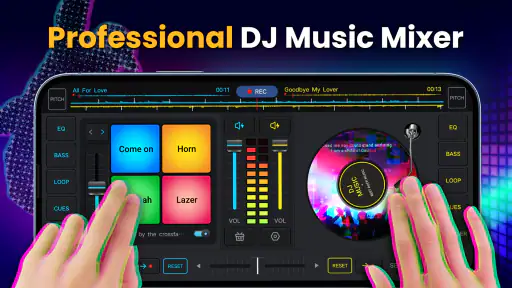
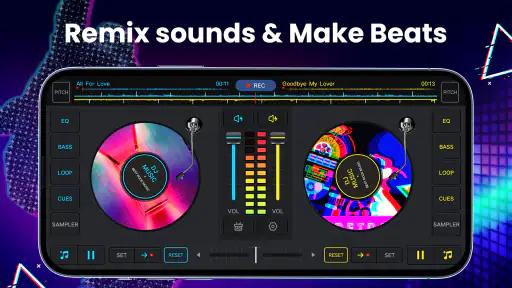
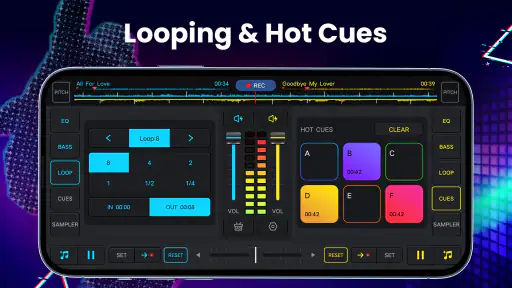
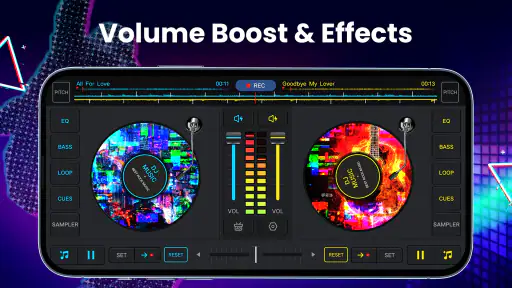
First things first, when you open DJ Music Mixer - DJ Mix Studio, you’re greeted with an interface that’s pretty intuitive. Even if you’re a newbie, the layout makes it super easy to jump in and start mixing. You’ve got your dual turntables, and all the essential controls are right at your fingertips.
Make one transition your first success
Rather than aiming for a complete mix right away, I’d focus on a single handoff between two tracks. Let one play, bring the next one in gradually, and pay attention to the point where the second song becomes prominent. The goal isn’t to make every control move; it’s to hear how a small crossfade changes the transition. If it feels too abrupt, try easing into it more slowly on the next attempt.
The app’s tempo control can be useful, but it’s easy to give it too much importance at first. A visual control position won’t tell you whether the pairing sounds right to your ears. Start with songs that already feel compatible, make small changes, and listen. If the transition becomes strained, switching to a more suitable pair is often better than pushing the tempo adjustment further.
Once the basic handoff feels comfortable, test one effect briefly. Reverb, echo, and flanger each change the character of what you hear, so using one at a time makes it easier to understand its contribution. I’d avoid layering effects just because they’re available. When a track already has a strong sound, restraint can make the mix feel more intentional.
Use recording as a listening tool
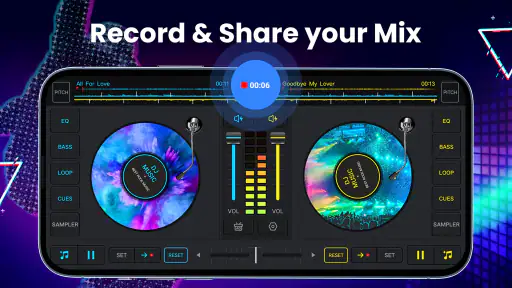
Another cool feature is the ability to record your mixes. Whether you’re practicing for a gig or just want to share your creations with friends, recording is as straightforward as it gets. Just hit the record button, and you’re good to go. Plus, you can save your mixes in high-quality audio formats.
Recording also gives you a way to review your choices with fresh ears. I’d make a short practice mix, listen back, and note where a transition feels rushed or where an effect distracts from the song. That’s a better use of recording than assuming the first take is ready to share. If you plan to send a mix to someone, check the saved result first so you know it sounds the way you intended.
This playback check is especially useful when you’re mixing for a particular moment, such as a casual get-together. A transition that sounds exciting while you’re actively adjusting it may feel too busy when heard as part of a sequence. Listening from beginning to end helps you judge the pacing, not just the individual controls. If one handoff is awkward, you can practice that section again rather than rebuilding everything.
Common points of confusion
Now, let’s talk about the learning curve. While the app is beginner-friendly, mastering all the features might take a bit of time. But hey, that’s part of the fun, right? The app provides a fantastic platform to experiment and learn at your own pace. Before you know it, you’ll be mixing tracks like a seasoned DJ.
One common expectation to reset is that two songs will automatically work well together just because they can be played side by side. They may differ in pace, energy, or the way their openings and endings feel. If a transition sounds awkward, that doesn’t necessarily mean you’ve used the app incorrectly; the pairing itself may not be a good fit. Try another pair before spending a long time adjusting controls.
It’s also easy to mistake activity for progress. Moving several controls at once makes it hard to know which change improved the sound. I’d adjust one thing, listen for a moment, and then decide whether to keep it. That simple habit makes experimentation less confusing and gives you a clearer sense of how crossfading, tempo changes, and effects shape the result.
If you’re unsure whether a mix is ready to share, save a short recording and listen away from the live controls. That separates the performance of making the mix from the result itself. It also gives you a practical answer to a common question: does the transition still feel natural when you’re no longer watching your hands move across the screen?
Where it fits among other music tools
For everyday listening, a standard music player is simpler and asks less of you. You choose songs and let them run; you don’t have to manage transitions or think about effects. This app is for the moments when that passive approach feels limiting and you want to participate in how the music changes. If your main goal is just to enjoy an album while commuting or working, a regular player is the more comfortable choice.
At the other end, desktop DJ software and dedicated hardware are better suited to longer sessions and detailed performance work. Their larger controls and purpose-built layouts can make precision easier, especially when you need to monitor several decisions at once. A phone-based mixer trades that workspace for convenience: it’s easy to pick up and explore, but a small touch interface can feel limiting when you want sustained, precise control.
That middle ground is where I see the strongest case for this app. It can help a beginner get a feel for transitions without first committing to a more elaborate setup. It’s also convenient for trying an idea when you have a few spare minutes. It isn’t the right choice if you depend on a highly controlled live rig, need a comprehensive production workflow, or simply don’t want to interact with your music.
Taking the next step without overcomplicating it
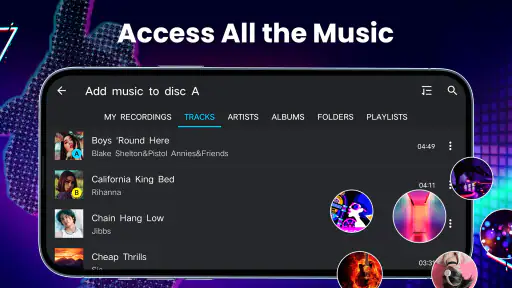
For those who are more advanced, there’s plenty to sink your teeth into. The app supports different audio formats and even lets you import songs from your library, giving you endless possibilities to create unique mixes.
A useful everyday scenario is making a quick mix for a small get-together: pick a few songs that suit the mood, practice the handoff between them, then record a version you can replay. For a larger event or a performance where reliability and precise control matter, I’d choose dedicated DJ equipment or desktop software instead. A phone is convenient for trying ideas, but the smaller touch interface is a real trade-off when you need sustained, detailed control.
For a low-pressure next step, try making a short sequence around a clear mood rather than collecting songs at random. Listen for whether each new track changes the atmosphere in a way you want. A gradual transition can keep the flow steady; a sharper change may be more fun when you deliberately want to lift the energy. Thinking about the purpose of each handoff gives your choices direction without requiring a complicated plan.
When importing music from your library, I’d choose tracks you know you can use for personal practice and pay attention to how they behave in a transition. The best test is not whether a song is popular or technically impressive, but whether its ending gives you a natural opportunity to bring in the next one. This small selection decision can save time and make practice more satisfying than trying to force an unsuitable pair to work.
My take after weighing the trade-offs
One of the reasons I love this app is because it makes DJing so accessible. Whether you’re using it for fun or as a serious tool in your DJ arsenal, it delivers on all fronts. The interface is slick, the features are robust, and it’s just plain fun to use.
It will suit curious beginners, casual music fans who want to make transitions themselves, and anyone who likes experimenting with a track before sharing a recording. I’d skip it if your priority is simply uninterrupted listening, or if you need the precision and room to work that a larger DJ setup provides. Its best role is somewhere between a music player and a more involved mixing workstation: more hands-on than the first, less suited to complex preparation than the second.
Easyelife’s app is an approachable starting point, but I’d keep expectations practical: experiment, listen back, and build confidence one transition at a time. That makes it a worthwhile free download for a first taste of mixing, while leaving room to move to a more specialized tool if your needs grow.
Before spending on an in-app purchase, I’d first work out what part of the experience you actually want to extend. The free starting point is enough to discover whether you enjoy the basic process of combining tracks. If your interest is only occasional experimentation, there’s no need to assume you must pay to get value from trying it. If you do consider a purchase, check the item and its price in the app so it matches what you intend to use.
In conclusion, DJ Music Mixer - DJ Mix Studio is a fantastic app for anyone looking to dive into the world of DJing. It’s packed with features that cater to both beginners and experienced DJs alike. So, if you’re ready to take your music mixing skills to the next level, give this app a spin. You won’t be disappointed!
DJ Music mixer - DJ Mix Studio Frequently Asked Questions
What kind of app is DJ Music Mixer - DJ Mix Studio?
DJ Music Mixer - DJ Mix Studio is a Music & Audio app for people interested in making and recording mixes. Its description focuses on remixing songs, creating beat music, and recording a DJ mix. It may appeal to listeners who want to experiment with mixing on a mobile device, whether they are exploring the idea for the first time or already enjoy making mixes.
Who is DJ Music Mixer - DJ Mix Studio intended for?
The app is aimed at people who want to try making music mixes on a mobile device, from curious beginners to users who already enjoy DJ-style experimentation. Its focus on remixing songs, making beat music, and recording a mix gives you a clear idea of the creative activity it supports. It is rated for Everyone, so its content rating is suitable for a broad audience.
What is the current version of DJ Music Mixer - DJ Mix Studio?
The current version of DJ Music Mixer - DJ Mix Studio is 2.5.6. If you are deciding whether to install it, checking the version shown for your device can help you understand which release you are getting. The app requires Android 6.0 or later, so it is also sensible to make sure your phone or tablet meets that minimum before downloading.
Is DJ Music Mixer - DJ Mix Studio free to download?
Yes, DJ Music Mixer - DJ Mix Studio is a free music and audio app from Easyelife. You can get started without paying for the download, while in-app purchases are available for users who want to buy additional options. The app is rated for Everyone, and it requires Android 6.0 or later, so it is worth checking your device’s Android version before installing.
What features does DJ Music Mixer - DJ Mix Studio offer?
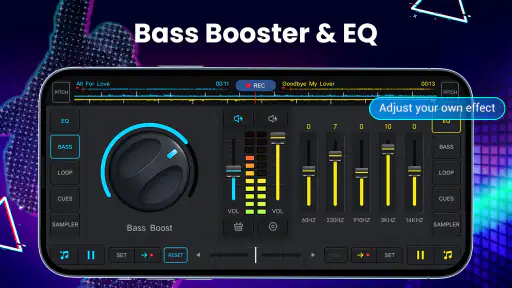
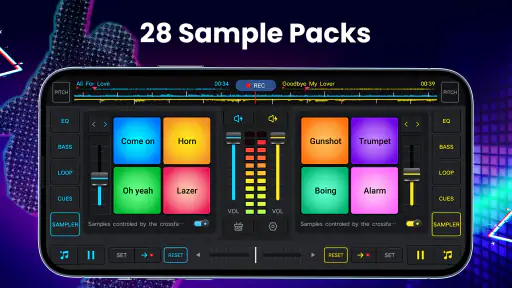
DJ Music Mixer - DJ Mix Studio provides a comprehensive set of features for music enthusiasts and DJs, including real-time effects, pitch and tempo control, sample editing, loops, and crossfading between tracks. It also supports various audio formats, allowing users to create seamless mixes with high-quality sound. Additionally, the app offers an intuitive interface suitable for both beginners and professional DJs.
Pros
- User-friendly interface for beginners.
- Wide range of sound effects.
- Compatible with various audio formats.
- Frequent updates with new features.
- Low latency for real-time mixing.
Cons
- Limited free version features.
- Ads can be intrusive.
- Requires internet for some features.
- Occasional app crashes reported.
- Advanced features need premium access.
- Category
- Music & Audio
- Version
- 2.5.6













