Screen Recorder: Facecam Audio
- 10.66K
- 4.3
- Installs
- 10.00M
- Price
- Free

Screenshots


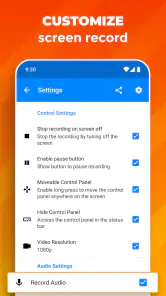
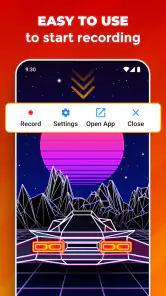
Analysis by Reviewed
When I need to show someone exactly what happened on my phone, a screen recording is often clearer than a long explanation. Screen Recorder: Facecam Audio is designed for that kind of task, from capturing a game moment to demonstrating a setting. I like the idea of being able to record the screen and, when it helps, add my voice or a camera overlay. The main question is not whether every recording needs those extras, but whether they make the clip easier for another person to understand.
Quick captures work best with a little planning
I find a screen recorder most useful when something is happening in real time: a short game sequence, a setting I need to explain to a relative, or a bug that disappears when I try to describe it. With this app, the appeal is being able to get recording started without turning a quick task into a project. For a tutorial, I’d plan the steps first and keep the demonstration focused; a clear, short clip is easier to share and follow than a long recording with pauses and detours.
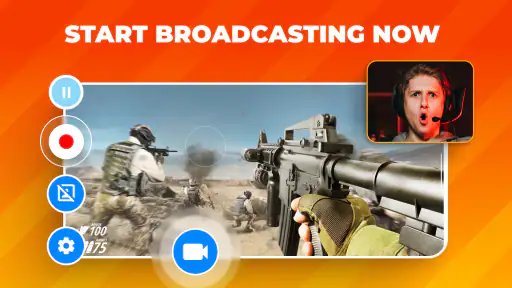
A practical tip is to decide before recording whether the clip needs your face and voice, or only the screen. A facecam can make instructions feel more personal, but it also takes up part of the display and may compete with small buttons or text. For a walkthrough where the exact interface matters, I’d keep the overlay out of the way; for a reaction or commentary-led gaming clip, it can add useful context.
Recording Made Easy
One of the standout features of Screen Recorder: Facecam Audio is its intuitive interface. Right from the get-go, I found it incredibly user-friendly. You don't need a degree in computer science to figure this one out. The app allows you to start recording with just a couple of taps, which is perfect when you need to capture something quickly. No more fumbling through complicated menus or settings.
Facecam is useful only when it earns its space
For content creators, the ability to add a facecam while recording is a big plus. This feature is a boon for gamers who want to add a personal touch to their walkthroughs or for educators who wish to enhance their tutorials with a more personal touch. The facecam integration is smooth, and you can easily adjust the size and position of your video window. It's as if the app knows exactly what you need to make your content shine.
There is a real trade-off here: an overlay can cover information that matters. When I explain a small interface detail, I would place the camera where it does not hide labels, controls, or the result of a tap, then review the clip before sending it. If the phone’s layout changes as I rotate it or open a panel, a position that looked safe at the start may become distracting later. For a demonstration, clarity matters more than keeping my face visible throughout.
Audio needs a quick check before a long take
Audio is just as important as video, if not more so. Thankfully, this app doesn't skimp on that front. The audio recording is crisp and clear, capturing the nuances of whatever you're documenting. Whether you're recording a game session or a how-to video, the sound quality enhances the overall experience. Plus, the app allows you to toggle between different audio sources, giving you control over what gets recorded.
More From Our News Desk

Clash of Clans Is Won Between the Battles

Android Auto Makes the Case for Quieter Car Software

MobiOffice: Transforming Mobile Productivity with Seamless Integration

EA SPORTS FC™ Mobile Soccer: Redefining Mobile Sports Gaming

How Microsoft OneDrive Became a Mobile Productivity Giant

How Google Translate Breaks Language Barriers Effortlessly
A short sample can prevent a wasted recording
Audio choices are worth testing before an important capture. If you are narrating a tutorial, a quiet room and a brief test clip can help you catch distracting background noise before you record the whole explanation. For gameplay, listen back to a short sample and check that your voice and the game sound are balanced enough for the point you want to make. This small check can save time compared with discovering an issue after a long session.
It also helps to think about the viewer’s situation. Someone watching on a phone may not hear quiet narration clearly, while a clip meant to show a visual sequence may need little or no speech at all. I would keep instructions concise, pause before tapping a small control, and avoid talking over the exact moment I want the viewer to notice. That simple pacing can make a recording feel more polished without adding production work.
Heavy use calls for realistic expectations
Screen recording can also put strain on a phone, especially during a demanding game or a lengthy capture. I’d close apps I don’t need, start with enough free storage for the clip, and avoid recording a long session on a nearly drained battery. Those are sensible precautions rather than a promise of a particular speed or battery life: how smoothly it runs depends on the device and what is happening on screen. If a recording is especially important, a short test on the same phone is a better guide than assuming every device will behave alike.
For a long gaming session, I would treat recording as a heavier task than capturing a quick settings walkthrough. Games already demand resources, and adding screen capture may make any limitations in an older or busy phone more noticeable. I would record a representative short section first, check that the game remains comfortable to play, and save the final clip before continuing. If the phone heats up, slows down, or the game becomes less responsive, it is wiser to stop and adjust the session than to keep going just to capture everything.
Editing is for cleanup, not a full production pipeline
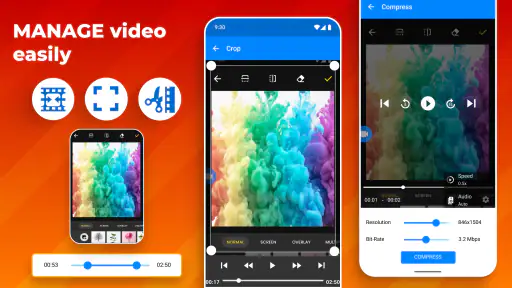
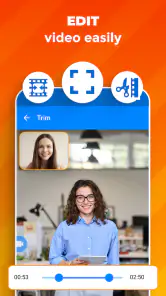
Once you've recorded your video, the app offers a suite of editing tools to polish your content before sharing it with the world. You can trim clips, add text, and even include background music. It's like having a mini editing studio right in your pocket. The tools are robust yet straightforward, catering to both novices and seasoned editors alike.
In practice, I’d use trimming to remove the awkward lead-in while keeping enough context for the viewer to understand what happens next. Text can help point out a control or explain a step, but too much annotation competes with the screen itself. Background music is better suited to a casual highlight than a tutorial where spoken instructions need to remain easy to hear. Keeping the edit modest also makes it simpler to reuse the clip in a message or a short guide.
Choose it when built-in recording is not enough
For someone who only needs an occasional capture, a phone’s built-in screen recording option may be enough and can mean one less app to learn. I’d choose this app when the facecam, audio controls, or the ability to tidy a clip before sharing are central to the task. It is aimed at recording and preparing screen videos, not replacing a full desktop editor; creators who need a more elaborate post-production workflow may prefer to move their footage to dedicated editing software.
The practical difference from a basic recorder is the combined workflow: capture the screen, optionally add a camera view and audio, then make simple adjustments before sharing. That is useful when I want one phone-based process rather than recording first and opening a separate editor for small corrections. The trade-off is that a dedicated editor is usually the better destination for layered projects, detailed timing, or a more controlled finishing process. I would not choose a mobile screen recorder as a substitute for that kind of work.
Everyday sharing benefits from a viewer-first workflow
A useful everyday example is showing a family member how to change a phone setting. I’d record the steps, keep the facecam small or off so the labels stay visible, trim the moment before and after the instructions, then share the finished clip. For a game tip, I’d do the opposite if my reaction helps explain the moment: include the facecam, speak briefly, and cut out the waiting around. Thinking about the viewer first makes the recording more effective than simply capturing everything.
The same approach works for reporting a problem to someone who can help. I would start just before the issue appears, avoid unrelated screens, and keep the clip long enough to show the steps that lead to it. A brief recording can communicate timing and taps that are hard to describe in text. If the screen contains private messages or account details, I would close or move away from them before capturing; a recording can preserve more of the visible screen than the part I intend to demonstrate.
Who benefits, and who may prefer another tool
This free video recording app is from Prometheus Interactive LLC, is rated for everyone, and has an average rating of 4.3 from around 634,000 ratings. It has over 10 million installs, and its current version is 2.7.3; the app first appeared on March 16, 2016, and requires Android 5.0 or later. Optional in-app purchases range from $0.99 to $99.99 per item, so I’d check the purchase details in the app before spending anything. The rating and reach suggest it has found a large audience, but they cannot guarantee how it will perform on a particular phone.
I’d recommend it to people who regularly explain what is happening on their screen, make casual gameplay clips, or want a facecam alongside a phone recording without starting with a computer-based workflow. I’d skip it if you rarely record, prefer to avoid optional purchases, or need advanced editing beyond quick clip preparation. Before an important recording, check that your device has room for the video, decide which audio source suits the clip, and make a short test. That answers the practical question of whether it will suit your setup far better than relying on general expectations.
It is also a reasonable fit for someone who wants to share a short lesson directly from a phone, but less appealing if the goal is a carefully produced channel video with extensive editing. If you mostly need to preserve a quick moment and never use a camera overlay or editing tools, trying the phone’s built-in recorder first is a sensible choice. If you do use this app, a small trial recording lets you confirm the screen layout, sound, and available storage before you commit to an important take.
What to check before relying on a recording
People often wonder whether they need to use the facecam every time, or whether it can stay out of the way. I would treat it as optional in the creative sense: use it when expressions or direct commentary add meaning, and leave it off when the screen itself carries the explanation. The same goes for audio. A spoken walkthrough benefits from narration, while a visual bug report may be clearer with only the relevant screen activity. Choosing deliberately makes each clip easier to watch and keeps unnecessary elements from obscuring the point.
Another sensible question is whether the app is a good choice for every phone and every recording length. I would not assume that. Android 5.0 is the minimum operating-system requirement, but a device’s age, available storage, current workload, and the intensity of the app being recorded can all affect the experience. For a quick clip, the recording may be straightforward; for a long or demanding session, a test on the same device is the more useful check. Save important recordings promptly, and do not make a single long take your only copy of something you cannot recreate.
There is no need to turn every recording into an edited project. For a one-off explanation, trimming the beginning and end may be enough; for a more polished tutorial, text and music can help only if they serve the viewer. I would keep the original purpose in mind before adding decoration. A clean, understandable clip is often more useful than one with extra elements that make the screen harder to follow.
My performance verdict
Overall, I see this as a practical recorder for short, purposeful captures rather than a tool I would leave running without considering the phone. Its quick-start approach suits spontaneous moments, while the camera, audio choices, and basic editing make it more flexible than a bare screen capture when those options matter. Performance is still dependent on the device and the workload, so I would test before a long game recording and keep an eye on storage and battery. For everyday tutorials, quick demonstrations, and casual gameplay clips, that balance makes it worth considering.
In conclusion, Screen Recorder: Facecam Audio is a powerful app for anyone looking to capture and share their screen activities. Its ease of use, combined with the facecam and high-quality audio features, makes it a must-have tool. Whether you're a gamer, educator, or just someone who loves creating content, this app has something for everyone. Trust me, once you start using it, you'll wonder how you ever managed without it.
Screen Recorder: Facecam Audio Frequently Asked Questions
Can I use Screen Recorder: Facecam Audio to capture gameplay or make tutorials?
Yes. Screen Recorder: Facecam Audio is aimed at screen capture, and its store summary specifically mentions gaming use, an optional camera overlay, microphone support, and sharing. That makes it a potential fit for gameplay clips, demonstrations, or tutorials where you want to show what is happening on your screen and add your face or spoken commentary.
Can I share recordings from Screen Recorder: Facecam Audio?
Sharing is included among the app’s highlighted capabilities, so it can be useful if you want to pass a screen recording along after capturing it. Before sharing, take a moment to review the video for private messages, account details, or other personal information visible on screen. That simple check is especially helpful when recordings include app notifications or conversations.
Does Screen Recorder: Facecam Audio add a watermark to recordings?
The app’s summary highlights recording without watermarks, which is useful if you want your captured video to look clean when sharing it or using it in a project. It also mentions an optional camera overlay and microphone support. If those are the features you need, check the available options in the app and consider whether any in-app purchases are relevant to your use.
Does Screen Recorder: Facecam Audio work on my device?
Screen Recorder: Facecam Audio is an Android app for recording your screen. It requires Android 5.0 or later, so check your device’s operating system before downloading. The app is listed in the Video Players & Editors category and is rated for Everyone. If you use an iPhone or iPad, this Android app is not the right version for your device.
What features does Screen Recorder: Facecam Audio offer?
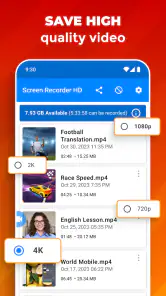
Screen Recorder: Facecam Audio provides a robust set of features designed for seamless screen recording experiences. These include high-resolution video capture, integrated facecam functionality, and crystal-clear audio recording. Users can also enjoy editing tools such as trimming, adding annotations, and including background music. The app is perfect for creating tutorials, gameplays, and video reviews directly on your device.
Pros
- Easy to use interface
- High-quality video recording
- Supports external audio
- No watermark on videos
- Various output formats
Cons
- Can lag on older devices
- Consumes significant storage
- Ads can be intrusive
- Limited editing features
- Requires in-app purchases for premium features
- Category
- Video Players & Editors
- Version
- 2.7.3













