DaTuner: Tuner & Metronome
- 7.35K
- 4.2
- Installs
- 10.00M
- Price
- Free
Screenshots

Analysis by Reviewed
I judge a pocket tuner by what happens in the minute before I start playing: can I check my instrument quickly, understand what the display is telling me, and get on with practice? DaTuner: Tuner & Metronome makes a convincing case for keeping pitch and pulse in one place. Its appeal is practical rather than flashy: I can check a note, then work through a passage with a metronome, all from a free music and audio app. It is not a replacement for every dedicated practice tool, but for everyday tuning and timing it aims to remove friction.
Where a phone tuner earns its place
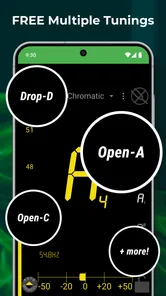
A phone tuner is most useful when it is already within reach, and DaTuner suits that role well. Before a quick practice session, I can tune a guitar or ukulele without setting up a separate device; a violinist or bass player can use the same basic workflow. Its chromatic approach is handy when I am checking a note outside the usual set of open strings, rather than relying only on a preset for one instrument.
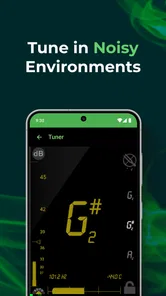
A small but useful habit is to make each tuning check deliberate: pluck one string, let its sound settle, and watch the note and frequency rather than striking again immediately. In a room with other people playing, the adjustable sensitivity gives me another control to try before assuming the instrument or app is the problem. It is still a phone listening through its microphone, so nearby sound can interfere; moving a little away from the group or tuning between songs is often more sensible than chasing a perfectly steady reading in the middle of a loud rehearsal.
One tool for pitch and pulse
The metronome makes the app more useful after tuning is finished. A realistic routine might be to tune before leaving home, then use a chosen tempo and time signature to work on a difficult bar later that evening. I would start at a tempo where I can play the passage cleanly, then raise it gradually only when the rhythm stays controlled. That approach makes the metronome a practice aid, not just a device for counting in.
DaTuner is a better fit for someone who wants a compact utility than for a musician seeking a complete practice studio. Compared with using separate tuner and metronome apps, having both together can mean less app switching and fewer things to organize. On the other hand, a dedicated clip-on tuner may be easier to read in bright outdoor conditions or in a noisy room, while a more specialized metronome may suit players who want a broader set of rhythm-training tools. I would choose based on the practice environment, not on the assumption that one phone app can replace every piece of music gear.
Getting in Tune with DaTuner
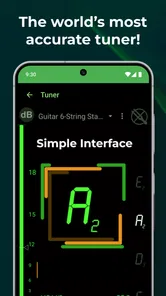
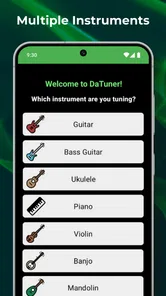
The first thing you'll notice when you fire up DaTuner: Tuner & Metronome is its straightforward, no-nonsense interface. It's like a breath of fresh air compared to some of the clunky tuners I've wrestled with in the past. Whether you're a guitarist, a violinist, or even a ukulele enthusiast, DaTuner's got your back. The app supports a wide range of instruments, so no one gets left out in the cold.
Simplicity Meets Functionality
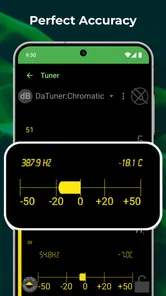
Now, I'm all for apps that are easy on the eyes, but DaTuner takes it a step further by being incredibly intuitive. You don't need to be a tech wizard to figure it out. Just pluck a string, and the app's chromatic tuning feature jumps into action, displaying the note and frequency. It's like having a personal music coach right in your pocket!
More From Our News Desk

Weather by Xiaomi Review: Clear at a Glance, Less Clear Up Close

X Under Pressure: Can It Recover When Posting Goes Wrong?

Clash of Clans Is Won Between the Battles

Android Auto Makes the Case for Quieter Car Software

MobiOffice: Transforming Mobile Productivity with Seamless Integration

EA SPORTS FC™ Mobile Soccer: Redefining Mobile Sports Gaming
Another sweet feature is the adjustable sensitivity settings. Whether you're in a quiet room or a buzzing rehearsal space, DaTuner adapts to your environment, ensuring your instrument is always pitch-perfect. Plus, the visual feedback is crystal clear, which is a godsend when you're fine-tuning those tricky notes.
Keeping Time with Precision
But wait, there's more! DaTuner doesn't just stop at tuning. It also packs a metronome that's as reliable as your morning coffee. You can customize the tempo and time signature to suit any piece you're working on. The visual and audio cues are spot-on, so there's no excuse for missing a beat.
One feature I found particularly cool is the app's ability to save settings for multiple instruments. If you're someone who hops between guitar and piano, this is a game-changer. No more fiddling around every time you switch instruments; DaTuner remembers your preferences like a trusty old friend.
Making those settings work for you
That saved-settings workflow is especially helpful if I keep a guitar and a second instrument ready for short practice sessions. I can switch instruments without rebuilding my setup each time, which makes the app more useful than a tuner I open only when something sounds obviously wrong. If I share the phone with another player, though, I would check the selected settings before tuning; a remembered preference is convenient only when it matches the instrument in my hands.
There is a useful distinction between convenience and certainty here. Saved preferences can reduce setup, but they do not decide whether the instrument is in tune or whether a string has settled after an adjustment. I still pluck again after turning a peg, and I listen as well as watching the display. That extra check matters most on a newly changed string, which can drift as its tension settles. The app can make the reading easier to access; it cannot replace the player's ear or the physical tuning process.
Everyday sessions, not just a quick check
For a practical example, imagine I have ten minutes before heading out and want to play a song without spending the whole window setting up. I can bring up the tuner, check the strings one at a time, and then use the metronome to isolate the section that keeps rushing. Rather than restarting the full song, I can repeat that bar at a manageable pace and concentrate on keeping the beat steady. A combined utility is particularly useful in this kind of short session because the transition from tuning to timing is immediate.
For a shared rehearsal, I would use a slightly different routine: tune while the room is quiet, then put the phone somewhere visible and use the metronome for a focused practice passage rather than expecting its microphone tuner to cut through everyone playing. If the room is already loud, a clip-on tuner is likely the more dependable tool for checking pitch. This is a simple but important trade-off: DaTuner is convenient when the phone can hear the instrument, not a substitute for equipment designed to isolate a vibrating string.
Who will get the most from it
I would recommend this app to beginners who already know which note or string they are aiming for, casual players who want a tuner close at hand, and multi-instrument musicians who value keeping basic tools together. Its chromatic reading can be useful when a player needs to check a note beyond a standard open-string routine, while the metronome gives a clear next step once tuning is done. For a student practising at home, that combination can cover two recurring needs without requiring a larger music-learning setup.
It is less suitable for someone who expects the app to teach fingerings, identify a song, record a practice session, or build a structured course. I would also be cautious about relying on a phone screen during a performance where visibility and quick hands-free use matter. A dedicated stage tuner, a clip-on device, or a specialist rhythm tool may be a better purchase for those situations. The right choice depends less on how many tools an app contains than on whether its way of listening and displaying information fits the room and the task.
The developer is Prometheus Interactive LLC, and the app has been around since its release on January 6, 2011. Its current version is 3.7.7, and it supports Android 5.0 and up. That long-running, utility-first character suits the straightforward experience, though anyone using an older device should check compatibility before relying on it for a session.
It is free to install, rated for Everyone, and offers optional in-app purchases ranging from $0.99 to $99.99 per item. I would treat the free starting point as a way to see whether its tuner and metronome fit my routine, rather than assuming every option is included at no cost. The app’s 4.2 average from around 447,000 ratings, alongside more than 10 million installs and around 7,300 written reviews, suggests it has reached a substantial audience, but those figures cannot tell me whether it suits my instrument or room.
When I would choose another tool
I would skip a microphone-based tuner as my only solution if I regularly tune in a loud ensemble, need hands-free tuning, or depend on a large display while performing. In those situations, a clip-on tuner or a dedicated stage device is the safer choice. I would also look elsewhere if my main goal were structured lessons, recording, or detailed progress tracking: DaTuner is a focused utility, not an all-in-one music-learning environment.
For a beginner, the key question is whether the note display is enough guidance. It can show what the instrument is producing, but the player still needs to know which string or note they intend to tune and make the adjustment themselves. For a casual player, that simple feedback can be plenty; someone who wants step-by-step instruction may prefer a teaching app alongside it.
A sensible way to decide
If you are unsure whether a phone tuner will work for you, I would try it in the place where you actually practise rather than judging it only in a silent room. Check whether the microphone can pick up one string clearly, whether the note display is comfortable to read, and whether the metronome’s visual and audio cues suit your routine. That quick test answers the most useful questions before you build the app into a rehearsal habit. If it behaves well at home but struggles where you play with others, keep it for quiet practice and use a clip-on tuner in the louder setting.
For players wondering whether they need a separate metronome, the answer depends on how much rhythmic detail they want. DaTuner covers tempo and time signature for straightforward practice, which is enough for working slowly through a passage or maintaining a steady pulse. If you want more specialized rhythm exercises or a broader practice system, a dedicated metronome may be a better match. I see the app’s value in covering everyday essentials, not in trying to make every musician’s other tools obsolete.
Final Thoughts
In a world crowded with tuning apps, DaTuner holds its own by focusing on what matters most: accuracy, ease of use, and versatility. It's not just an app; it's a tool that grows with you, whether you're practicing at home or performing on stage. And let's be honest, who wouldn't want a little more harmony in their musical journey?
So, if you're looking to enhance your music-making experience, give DaTuner a whirl. It might just become your new best friend in the world of music. And remember, practice makes perfect, but a good tuner and metronome make it a lot easier!
DaTuner: Tuner & Metronome Frequently Asked Questions
Can DaTuner help me tune an instrument before a rehearsal or practice session?
Yes. DaTuner combines a chromatic tuner with a metronome, so you can use it to prepare an instrument and work on keeping time in one app. Its store summary names guitar, bass, violin, ukulele, and banjo, among other tuning uses. It can be a practical option to consider if you want these music tools together on your device.
Does DaTuner include a metronome as well as a tuner?
Yes. Tuning and metronome tools are both part of DaTuner: Tuner & Metronome, which may appeal if you want one app for pitch and rhythm practice. The tuner is described as chromatic, while the metronome gives the app a second role during rehearsals or solo practice. You can decide whether that combination fits your routine after trying the free download.
Which instruments can I use DaTuner to tune?
DaTuner is presented as a chromatic tuner for several kinds of instruments. Its store summary specifically mentions guitar, bass, violin, ukulele, and banjo, and the app is intended for musicians with different tuning needs. If you play one of those instruments, the stated coverage makes it worth considering; if you use another instrument, check the available tuning options in the app to see whether they suit you.
Is DaTuner: Tuner & Metronome free to download, and does it include purchases?
DaTuner is free to download, so you can try its tuning and metronome tools without paying upfront. It also offers in-app purchases, with items ranging from $0.99 to $99.99. If you prefer to keep your spending limited, check the purchase options in the app before buying anything; downloading it for free does not mean every available option is free.
Will DaTuner work on my phone or tablet?
DaTuner is an Android app that requires Android 5.0 or later. Before downloading, check the operating system version on your device to make sure it meets that requirement. The app is listed for Everyone, and its Music & Audio focus makes it relevant for players who want a tuning tool and metronome on a compatible device.
Pros
- Accurate tuning for various instruments
- User-friendly interface
- Wide range of tuning modes
- Lightweight and fast performance
- Highly customizable settings
Cons
- Ads in free version can be intrusive
- Limited features without premium
- Requires microphone access
- Occasional calibration issues
- No offline mode













