Schlage Home
- 6.30K
- 4.0
- Installs
- 1.00M
- Price
- Free

Screenshots
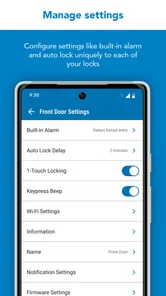
Analysis by Reviewed
For a first-time smart-lock owner, the most useful thing about Schlage Home is the simple promise: manage a compatible Schlage lock from your phone instead of treating every trip to the door as a key-only routine. I’d approach it as a companion to the lock, not a way to make an ordinary deadbolt smart by itself. The app is free, made by Schlage Lock Company, LLC, and sits in the house-and-home category; it has a 4.0 average from around 12,000 ratings and over 500,000 installs. It is rated for everyone, and its current version is 6.3.1.
What to expect from a lock companion
Schlage Home is most useful when your household has a compatible Schlage smart lock and more than one person needs dependable access. The main payoff is practical rather than flashy: checking the lock, managing entry, and avoiding the small coordination hassles that come with spare keys. If you rent, own a lock from another brand, or only want a general home-security dashboard, this is probably not the right app to install first.
Compared with a traditional key, a smart-lock app can make access easier to manage when family, guests, or a service provider need to enter. Compared with a broad smart-home app, Schlage Home is more focused on the door and its access routines. That focus is a plus if you want lock-related controls in one place; it is less compelling if you expect one app to manage every connected device in your home.
Setting Up Your Smart Fortress
Getting started with Schlage Home is as easy as pie. First things first, make sure your smart lock is compatible. The app walks you through the setup process with a step-by-step guide that's so clear, even your grandma could do it. You download the app, create an account, and pair it with your lock. Voila! You’re now the proud owner of a smart lock setup.
First setup: make the lock the starting point
Before you begin, identify the exact Schlage lock you plan to use and keep its instructions nearby. That simple preparation matters: a phone app cannot compensate for a lock that is not compatible or not ready to pair. I’d also do the initial setup while standing near the door, with enough time to follow each prompt rather than trying to squeeze it into the few seconds before leaving home.
Once pairing is complete, test the basic lock action while you are still at the door. Confirm that the app and physical lock agree about whether the door is locked, and try the normal key or interior control as well. This gives you a familiar backup routine before you depend on phone access. If you are setting it up for a household, decide who should have their own access and who only needs occasional entry before creating codes.
Features That Make Life Easier
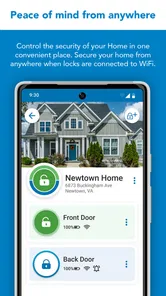
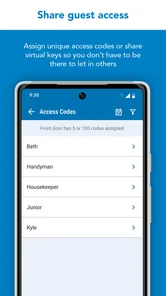
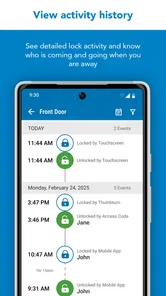
Once you're in, the app offers a bunch of cool features. You can lock and unlock your door remotely, which is perfect for those "Did I lock the door?" moments. Plus, you can set up customized access codes for family members, friends, or even the dog walker. The app also keeps a log of who enters and exits, which is great if you want to keep tabs on who's coming and going.
More From Our News Desk

 Block Blast!
 Makes Every Clear Feel Like One More Turn
A clean little block puzzle becomes a study in space, risk, and self-control. Its best moments come from one satisfying clear; its toughest test is knowing when to stop.

 Super Stylist Fashion Makeover
Super Stylist Turns Dress-Up into a Runway Career
Its makeover-to-client loop turns quick outfit decisions into shareable style theater. The question is whether the closet keeps giving players a reason to return.

 Block Craft 3D:Building Game
Block Craft 3D Under Pressure: How Well Does It Recover When Building Goes Wrong?
A failure-focused look at Block Craft 3D’s forgiving building loop, its uncertain recovery edges, and the moments that demand more than a cheerful village.

 Woodturning
 Trades Creative Freedom for a Satisfying Carving Loop
If your usual creative game is about building, decorating, or styling, Woodturning trades open-ended projects for a tactile, tightly guided carving loop. Here is what that switch really costs.

 PUBG MOBILE
 Shows What Battle Royale Must Get Right
PUBG MOBILE shows how battle royale has matured: bigger systems matter less than meaningful choices, readable fights, and a reason to return after every loss.

 Braindom: Brain Games Test
Braindom’s Social Life Happens Between Puzzles
Braindom turns quick logic traps into a personal ritual, but its community value is more about comparing answers than building together.
Latest News



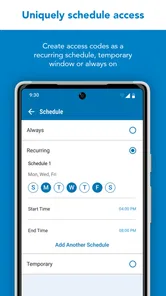
One feature I particularly love is the ability to schedule access codes. If you’ve got Airbnb guests or a cleaner coming in at specific times, you can set codes that work only during those hours. It’s like having a personal assistant for your front door.
Your first useful win: a controlled handoff
A good first test is arranging a planned visit rather than waiting for an emergency. For example, if a cleaner is coming while you are out, give them an access code intended for that visit and check the activity log afterward. This tests the whole routine—sharing access, the guest using it, and your ability to review what happened—without making the app’s remote controls your only way into the house.
For recurring visitors, a schedule can reduce the need to send a fresh message every time, but it is worth matching the access window to the actual arrangement. A code that remains useful longer than intended is convenient, yet it also leaves access open longer than necessary. I’d review temporary access after a guest or service relationship ends, rather than assuming an old code will never be used again.
Common confusion: remote control and everyday access
Remote unlocking and phone-based access are not quite the same expectation. Whether a remote action is available depends on the lock setup and its connection arrangements, so I would test the specific action you plan to rely on before promising someone they can enter while you are away. For day-to-day use, keep a backup entry method available and do not make a time-sensitive handoff depend on a feature you have not tested.
The activity log is helpful for understanding access, but I would treat it as a record to review, not as a substitute for deciding who should have a code. A practical habit is to use distinct codes for different people when your lock supports that workflow, and to remove or change access when circumstances change. That makes the log more useful than a single shared code would be, because activity is easier to connect with the person who was meant to enter.
Make access useful without making it messy
One trade-off worth thinking through is whether every visitor needs a separate code or whether a household can manage with fewer. Individual access takes a little more organizing, but it makes changes easier: if one person no longer needs entry, you can address that access without disrupting everyone else. A shared code is simpler to explain, yet it becomes harder to manage when the group changes.
I’d also keep code sharing separate from casual household messages. Sending access details through a busy group chat can make them easy to find later by people who no longer need them. A better routine is to share only with the intended person, explain the allowed time or purpose, and remove temporary access when the visit is over. The point is not to turn a front door into a security project; it is to make the convenience manageable.
User Experience
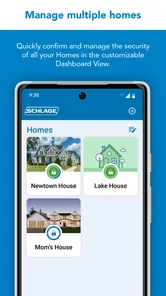
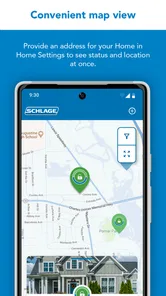
The user interface is sleek and intuitive. Navigating through the app is a breeze, and everything is laid out logically. You won’t find yourself hunting through endless menus trying to find what you need. It’s all right there, at your fingertips.
The app is compatible with both Android and iOS, so no matter your device preference, you’re covered. Plus, it integrates with smart home systems like Alexa and Google Assistant, allowing you to lock and unlock your door with a simple voice command. Talk about feeling like you’re living in the future!
For a first-time user, I’d keep the lock’s most important routine simple: use the app for the actions you have tested, and keep voice control as an optional convenience rather than the sole way to secure the door. A voice assistant can be handy when your hands are full, but it adds another device and setup layer. If your household does not already use one, installing an assistant just to operate the lock may be more effort than benefit.
When a focused app beats a broader system
Schlage Home’s narrow focus is useful if your main question is, “Who can use this door, and when?” A general smart-home platform may suit someone who wants to coordinate lights, sensors, and several brands from one place, but that wider scope can also mean more setup and more places to look for a lock setting. If you already use a broader system, compare its lock controls with the dedicated app before deciding which one should be your everyday starting point.
For a home with several unrelated smart devices, I would not assume this app replaces the software those devices already use. Its value is clearest around a compatible Schlage lock. Likewise, if you are choosing a new lock rather than managing one you own, decide on the hardware first; the app alone does not solve compatibility. That is a more useful first question than installing it and hoping it will work with any deadbolt.
Security: The Top Priority
Security is obviously a big concern when it comes to smart locks, and Schlage Home doesn’t disappoint. The app uses advanced encryption to keep your information safe, and there are plenty of security features baked in to prevent unauthorized access. Personally, I feel much safer knowing I can control and monitor access to my home so easily.
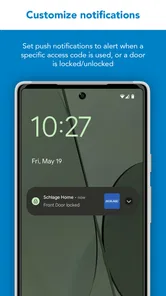
If you’re ever in doubt, the app provides notifications for every action taken, right to your smartphone. So even if you’re halfway across the world, you’re in the loop about what’s happening back home.
For everyday peace of mind, I’d treat alerts as prompts to check, not as proof that every situation is handled automatically. A notification is only helpful if you can recognize the event and decide what to do next. Before relying on alerts while traveling, make sure the phone you use is the one you expect to carry and that you understand which lock events matter to you. That small check can prevent a useful feature from becoming background noise.
Who benefits most—and who may prefer a key
I’d recommend this setup to someone who already owns a compatible Schlage lock, regularly coordinates entry with other people, and is willing to manage access deliberately. A household can find it especially useful when routines change: a family member arrives before the others, a visitor needs temporary access, or you want to check the door after leaving. The useful benefit is fewer key handoffs and a clearer way to manage who can enter.
On the other hand, if you rarely share access, are happy with a physical key, or do not want to maintain phone-based routines, the app may add little to your day. It is also not a universal controller for unrelated locks. In those cases, a regular key or the app made for your existing lock is the simpler choice. Smart access brings convenience, but it asks you to keep codes and connected devices in good order.
A realistic example is a household where one person leaves early and another returns later, while a relative occasionally checks in. The app can help reduce the need to pass a physical key around, and a time-limited code may suit the occasional visit. But if the household’s routine is stable and everyone already has a key, the phone-based layer may not save enough effort to justify learning and maintaining it. I’d judge it by the coordination problem it solves, not by how futuristic the setup feels.
Questions to settle before relying on it
Can you use it with any Schlage lock? I would start by checking the exact lock model and its compatibility instructions, because the app is meant to accompany a compatible smart lock rather than convert a standard one. Is a phone the only way to enter? No: keep the lock’s ordinary backup method available, especially while you are learning the app or preparing for a visit.
Can you safely give someone access while away? You can plan that kind of handoff with a code, but I’d first test the code and any remote actions you intend to use. Does it replace a whole smart-home app? Not for someone who wants to control unrelated devices; its strength is the door. These are practical distinctions to resolve before inviting others to depend on your setup.
Next step: build a routine you can trust
After the first successful test, take a minute to decide which access should be permanent and which should be temporary. Keep a reliable backup way to enter, especially before travel or a scheduled visit, and check that the people who need access understand the routine. These small habits make the app more dependable without turning door access into another complicated project.
Released on August 15, 2017, Schlage Home has had time to become an established companion for Schlage’s connected locks, and its current version is 6.3.1. My overall view is that it is most convincing when used for a specific job—managing a compatible lock and coordinating entry—not as a reason to add smart-home technology for its own sake. If that is the problem you want to solve, starting with one tested code and one familiar entry routine is a reassuring way to see whether it fits your home.
To wrap things up, Schlage Home is a game-changer for anyone looking to upgrade their home security system. It's user-friendly, packed with features, and offers peace of mind that you just can't put a price on. Whether you’re tech-savvy or a complete newbie, this app is worth checking out. So go ahead, give it a try, and turn your house into the smart home you’ve always dreamed of.
Schlage Home Frequently Asked Questions
Is Schlage Home free to download, and what devices can install it?
Schlage Home is free to download and is intended for iOS and Android users who want to manage compatible Schlage smart locks from a phone. The app is listed for everyone, and its current version is 6.3.1. Before installing, check that your device meets the minimum operating-system requirement: version 11. The app is most useful when you already own a compatible Schlage lock.
What is Schlage Home and how does it work?
Schlage Home is a smart home application designed to seamlessly integrate with Schlage smart locks. It allows users to control their locks remotely, receive notifications about lock activity, and manage access codes for family and guests. The app communicates with the locks via Bluetooth or Wi-Fi, enabling users to lock and unlock their doors from anywhere using their smartphone. The app is compatible with both iOS and Android devices, providing a convenient and secure way to manage home security.
Is Schlage Home compatible with all Schlage smart locks?
Schlage Home is primarily compatible with the Schlage Encode, Schlage Sense, and Schlage Connect smart locks. Users should ensure their lock model supports the app by checking the product specifications or consulting with Schlage customer support. While the app offers extensive features for these models, it's essential to verify compatibility for optimal functionality and to make the most of the app's capabilities.
What are the security features of the Schlage Home app?
The Schlage Home app offers robust security features to ensure the safety of your home. It uses advanced encryption protocols to protect data transmission between the app and your smart lock. Additionally, users can set up personalized access codes for different individuals, track usage history, and receive real-time alerts about lock activity. These features help in monitoring and maintaining the security of your home, even when you're not there.
How easy is it to install and set up Schlage Home?
Installing and setting up Schlage Home is designed to be user-friendly. After downloading the app from the App Store or Google Play, users are guided through a step-by-step process to pair their smart lock with the app. The interface is intuitive, making it easy to navigate through settings, manage access codes, and customize notifications. Most users find the process straightforward and can start using the app within minutes of installation.
Pros
- User-friendly interface
- Secure remote access
- Easy installation process
- Customizable alerts
- Works with Alexa
Cons
- Limited compatibility
- Occasional connectivity issues
- Subscription for advanced features
- Battery replacement required
- No Apple HomeKit support