Samsung Find: Location Sharing
- 129.00
- 4.2
- Installs
- 10.00M
- Price
- Free
Screenshots
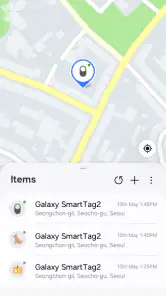
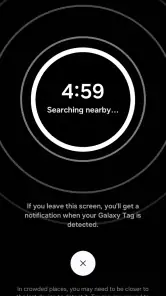
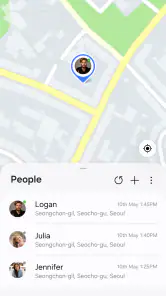
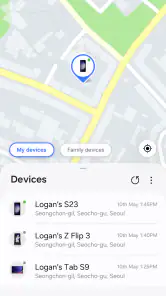
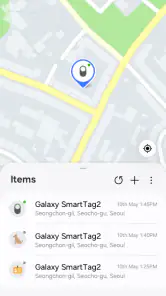
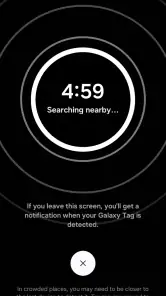
Analysis by Reviewed
What makes this app worth considering is not just the map view, but the way it brings two related tasks together: checking on Samsung devices and sharing a person’s location. I find that distinction useful when deciding whether to install it. If I only need directions, a navigation app is the better fit; if I want to locate a Samsung device or coordinate a meetup with someone I trust, this is more relevant.
A practical fit for Samsung households
For a household where several people use Samsung devices, having a familiar place to check device locations and share whereabouts can make everyday coordination simpler. It can be helpful when a family member is travelling home, when someone is trying to find a misplaced phone, or when people are meeting in a place where written directions are easy to misunderstand. The benefit is convenience, not a guarantee that every person or device will be visible in every situation.
I would set it up before there is a reason to depend on it. Take a moment to find the sharing controls, see how the device view is arranged, and talk through who should have access. This is a small preparation step with a real payoff: it avoids trying to learn an unfamiliar interface while you are late, worried, or standing in a crowded place.
Using location sharing thoughtfully
A useful way to approach location sharing is to match the duration to the situation. For a meetup, temporary access can be more appropriate than ongoing sharing. For regular coordination, agree on the purpose and the people involved rather than treating access as an automatic part of a relationship. That habit helps keep a convenience feature from becoming an arrangement nobody has deliberately chosen.
It is also worth thinking about the phone itself. If a device is shared among family members, make sure the person using it understands what location sharing means and who may see it. A location app is not a substitute for checking in directly when someone needs help, and I would not make it the only plan for an important safety situation.
Where it sits beside familiar alternatives
Compared with a standard mapping app, Samsung Find serves a different purpose. Navigation apps are built around routes and getting from one place to another; this app is useful when the question is where a Samsung device is or where a person who chose to share their location is. For friends using a mix of phone brands, a location-sharing service that everyone already uses may involve less setup and fewer compatibility questions.
That makes the choice fairly practical. If the people you coordinate with are comfortable using Samsung’s option, it can reduce the need to switch between separate tools for device finding and location sharing. If your group already has a well-understood alternative, changing everyone’s habits may not be worth it. I would choose the service that the relevant people can access and understand, not simply the one with the most functions on paper.
You May Like

Clash of Clans Is Won Between the Battles

Android Auto Makes the Case for Quieter Car Software

MobiOffice: Transforming Mobile Productivity with Seamless Integration

EA SPORTS FC™ Mobile Soccer: Redefining Mobile Sports Gaming

How Microsoft OneDrive Became a Mobile Productivity Giant

How Google Translate Breaks Language Barriers Effortlessly
Questions to settle before relying on it
Before using it for a particular plan, I would check whether the intended person can see the location and whether the sharing period suits the plan. I would also consider what to do if a phone is unavailable or someone cannot access the app. Having a simple backup, such as agreeing on a meeting point or sending a message, keeps a minor technical snag from derailing the meetup.
Someone deciding whether to install it may also wonder whether it replaces navigation. I would not treat it as a route-planning tool: its appeal is finding Samsung devices and sharing location, while a dedicated maps app is the more natural choice for directions. Nor would I assume that its presence alone solves every lost-phone situation. It is most useful when set up in advance and when the device and people involved fit the way you intend to use it.
Ever found yourself in a situation where you needed to share your location instantly with friends or family? Well, that's where Samsung Find: Location Sharing comes into play. As someone who often misplaces things or finds myself in unfamiliar locations, this app has been a game changer. Let me walk you through my experience with it.
What you get without paying
First things first, setting up the app is a breeze. Samsung Find is a free lifestyle app from Samsung Electronics Co., Ltd., so there is no purchase price to weigh against its everyday usefulness. Its current version is 1.8.00.20, and it requires Android 10 or later. It is rated for Everyone, which makes its intended audience broad, though location sharing still calls for a thoughtful conversation about who can see where you are.
Its 4.2 average from around 2.9 thousand ratings, alongside more than 10 million installs, suggests many people have chosen to try it. Those figures are useful context, not a promise that every setup will feel equally smooth. I would treat the main value as convenience: a single Samsung app for checking device locations and sharing yours, rather than paying for a separate location-sharing tool.
Getting Started with Samsung Find
Once you download it from the app store, the installation is pretty straightforward. Upon launching, you're greeted with a clean, intuitive interface that makes navigation a piece of cake. It doesn’t bombard you with unnecessary options, which is always a plus in my book.
Features that Stand Out
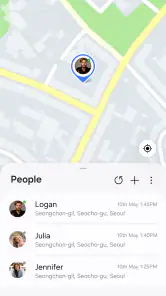
One of the app's standout features is location sharing. Imagine being able to share your whereabouts with just a few taps. Whether you're catching up with friends in a crowded place or ensuring your loved ones know you're safe during a late-night commute, this feature is incredibly reassuring. Plus, you have control over who sees your location and for how long.
That time limit is worth using deliberately. For a one-off meetup, temporary sharing is usually a better fit than leaving access open indefinitely; for regular family coordination, it makes sense to agree on who needs access and why. I’d also check the audience before sharing, especially when a phone is used by more than one person. Location tools are most helpful when everyone understands the arrangement, not when sharing happens by default.
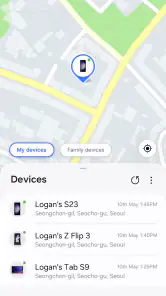
Another feature I found particularly useful was the ability to locate my Samsung devices. Gone are the days of panicking because I misplaced my phone in the house. With this app, you can easily track your device, making life a bit less stressful.
This device-finding side changes how I’d use it compared with a basic map app. A map helps me navigate to a destination; Samsung Find is more relevant when I want to check where a Samsung device is or coordinate with someone who has shared their location. A practical habit is to get familiar with the device view while everything is working normally. That way, if a phone goes missing, I’m not learning the layout in the middle of a stressful search.
User Experience and Interface
The user experience on this app is top-notch. The design is sleek and modern, with each function labeled clearly, so even the least tech-savvy individuals can navigate it without a hitch. The app runs smoothly without any noticeable lags, which is crucial when you’re trying to access your location quickly.
Still, it is not a universal replacement for every location service. Its most natural fit is for people already using Samsung devices and services; if your household relies on a different phone ecosystem, a platform-neutral location-sharing option may be easier for everyone to use. Before relying on it for a group, I’d check that each person can access the features they need on their own device.
Moreover, the battery consumption is surprisingly minimal. I've had apps in the past drain my battery faster than I could charge it, but this one seems to have optimized performance without compromising on functionality.
Privacy and Security
In today's digital age, privacy is paramount, and Samsung seems to get that. The app provides privacy settings, allowing you to choose who can access your location data. It’s comforting to know that your data isn’t being shared without your consent.
I would still treat location access as something to review rather than set and forget. If you shared your location for a particular outing, check whether that access is still needed afterward. And if someone asks you to share, it is reasonable to clarify the purpose and duration first. These small checks make the convenience feel more like a choice you control.
Everyday value and the trade-offs
Picture meeting friends in a busy area after work: instead of sending several messages describing where you are, sharing your location can help them find you. On another day, you might use the device-finding function when you cannot remember where you left a Samsung phone at home. Those are useful, distinct jobs, and the app’s appeal comes from bringing both into one place.
The trade-off is that the app’s usefulness depends on your devices and the people you want to coordinate with. It is not the best choice if you mainly need turn-by-turn directions, or if your friends and family use a mix of platforms and prefer one shared service everyone already knows. Nor would I install it expecting a replacement for good privacy habits: deciding who gets access remains part of using it responsibly.
Who should use it, and who can skip it
I’d recommend giving it a try if you use Samsung devices, occasionally need to find one, or want a straightforward way to share your whereabouts with people you trust. Its free access makes trying it a low-commitment choice, and its Everyone age rating makes it broadly accessible. The app has 129 reviews as well as its larger rating pool, another reminder that people’s experiences can vary.
I’d skip it if you do not use Samsung devices, rarely share locations, or need a service designed around a mixed-device group. Before depending on it for a commute or meetup, set it up in a calm moment, confirm that the right people can see your location, and decide how long sharing should last. That simple rehearsal is more useful than discovering the controls when you are already in a hurry.
Final Thoughts
In conclusion, if you’re a Samsung user, the app is a handy tool. It’s not just about finding your way; it’s about peace of mind, knowing that you can stay connected with your loved ones effortlessly. The app combines functionality with simplicity, making it a strong choice for anyone looking to make location sharing and finding Samsung devices part of everyday life. Give it a try, and you might just find it becoming one of your go-to apps!
A simple decision based on your routine
I would base the install decision on how often the two main tasks come up for me. If I regularly misplace a Samsung phone or coordinate arrivals with a small group of trusted people, a free tool that keeps both jobs close at hand offers clear everyday value. If I rarely need either function, installing another app may add little beyond one more icon and another setting to manage.
The most useful habit is to make a small test part of setup: check the device view, try location sharing with someone who understands the plan, and confirm that you can adjust who has access and for how long. Then decide whether the workflow feels natural enough to keep. I would not wait for a stressful moment to find out whether the app suits my household.
My verdict on the value
For me, the strongest reason to choose Samsung Find: Location Sharing is its focused combination of Samsung device finding and deliberate location sharing, without a purchase price. That does not make it the right choice for everyone: people who need directions should keep using a navigation app, and mixed-device groups may prefer the location service they already share. But for a Samsung user who wants these particular tools in one place, it is an easy, sensible app to try.
Samsung Find: Location Sharing Frequently Asked Questions
Do I need a Samsung device or account to use Samsung Find: Location Sharing?
Samsung Find is designed to work within Samsung’s ecosystem, so it is best suited to people using Samsung devices. The app is listed for Android devices running version 10 or later. If you plan to share your location with someone who does not use a Samsung device, they may still be able to view it through a web-based link, though the experience may be less integrated.
What is Samsung Find: Location Sharing?
Samsung Find: Location Sharing is a feature within Samsung's ecosystem that allows users to share their real-time location with friends and family. It's particularly useful for coordinating meetups or ensuring loved ones' safety. The app integrates seamlessly with Samsung devices, providing a user-friendly interface to manage location sharing preferences and settings.
Is Samsung Find: Location Sharing free to use?
Yes, Samsung Find: Location Sharing is free to use. It is part of Samsung’s device ecosystem, and there is no subscription fee to access the app. However, users should be aware that data charges may apply when using mobile data for location sharing, depending on their mobile plan. The app is developed by Samsung Electronics Co., Ltd.
How do I enable location sharing on Samsung Find?
To enable location sharing on Samsung Find, navigate to the app or settings related to location sharing on your Samsung device. Ensure that the location services are turned on. Then, select the contacts you wish to share your location with and configure the duration of the sharing session. The app provides options to share your location for a set period or indefinitely.
Can I stop sharing my location whenever I want?
Yes. Samsung Find gives you control over your location-sharing preferences, so you can stop sharing your location when you no longer want others to see it. You can also choose who receives your location and manage sharing settings from your Samsung device. Reviewing those choices before sharing is a sensible way to make sure your location is only visible to the people you intend.
Pros
- User-friendly interface for all ages.
- Real-time location updates.
- Low battery consumption.
- Customizable location alerts.
- Supports group location sharing.
Cons
- Requires constant internet connection.
- Limited features in free version.
- May drain battery with heavy use.
- Privacy concerns with data sharing.
- Occasional inaccuracies in location.

- Category
- Lifestyle
- Version
- 1.8.00.20